Einführung
The Ring Outdoor Cam Pro, Plug-In, is a high-definition security camera designed for outdoor use at homes and businesses. It provides advanced surveillance features to help monitor your property effectively.
- Retinal 4K Video: Capture clear video footage with 4K resolution.
- 10x Enhanced Zoom: Magnify details in your video feed.
- Low-Light Sight: Experience true color video in low ambient light and crisp black-and-white in total darkness.
- 3D Motion Detection: Receive precise alerts based on radar-powered motion detection.
- Gegenseitiges Gespräch: Kommunizieren Sie mit Besuchern oder schrecken Sie Eindringlinge mit dem eingebauten Lautsprecher und Mikrofon ab.
- Wetterbeständig: Designed for outdoor installation in various weather conditions.
Lieferumfang
Vergewissern Sie sich vor Beginn der Installation, dass alle Komponenten vorhanden sind:
- Ring Outdoor Cam Pro, Plug-In (2nd Gen)
- Outdoor/Indoor Power Adapter (USB-C, 17.8-ft.)
- Installationshardware
- Installationshandbuch
- Garantie- und Sicherheitsdokument
- Sicherheitsaufkleber
Setup und Installation
The estimated installation time for the Ring Outdoor Cam Pro is approximately 10 minutes. This camera requires a standard power outlet and can be mounted on a vertical or horizontal surface.
Strombedarf
The camera is powered by the included USB-C 17.8-ft. (5.45-m.) 20W Outdoor/Indoor Power Adapter. This is a plug-in only model and does not support battery operation.
Konnektivität
The camera connects via Wifi 6 (802.11ax) with dual-band support for 2.4GHz and 5.0GHz networks. A recommended minimum upload speed of 15 Mbps is advised for optimal performance. Video resolution may vary based on internet bandwidth.
Montageoptionen
The Ring Outdoor Cam Pro offers flexible mounting options for various outdoor locations. Ensure the camera is positioned to cover the desired area.
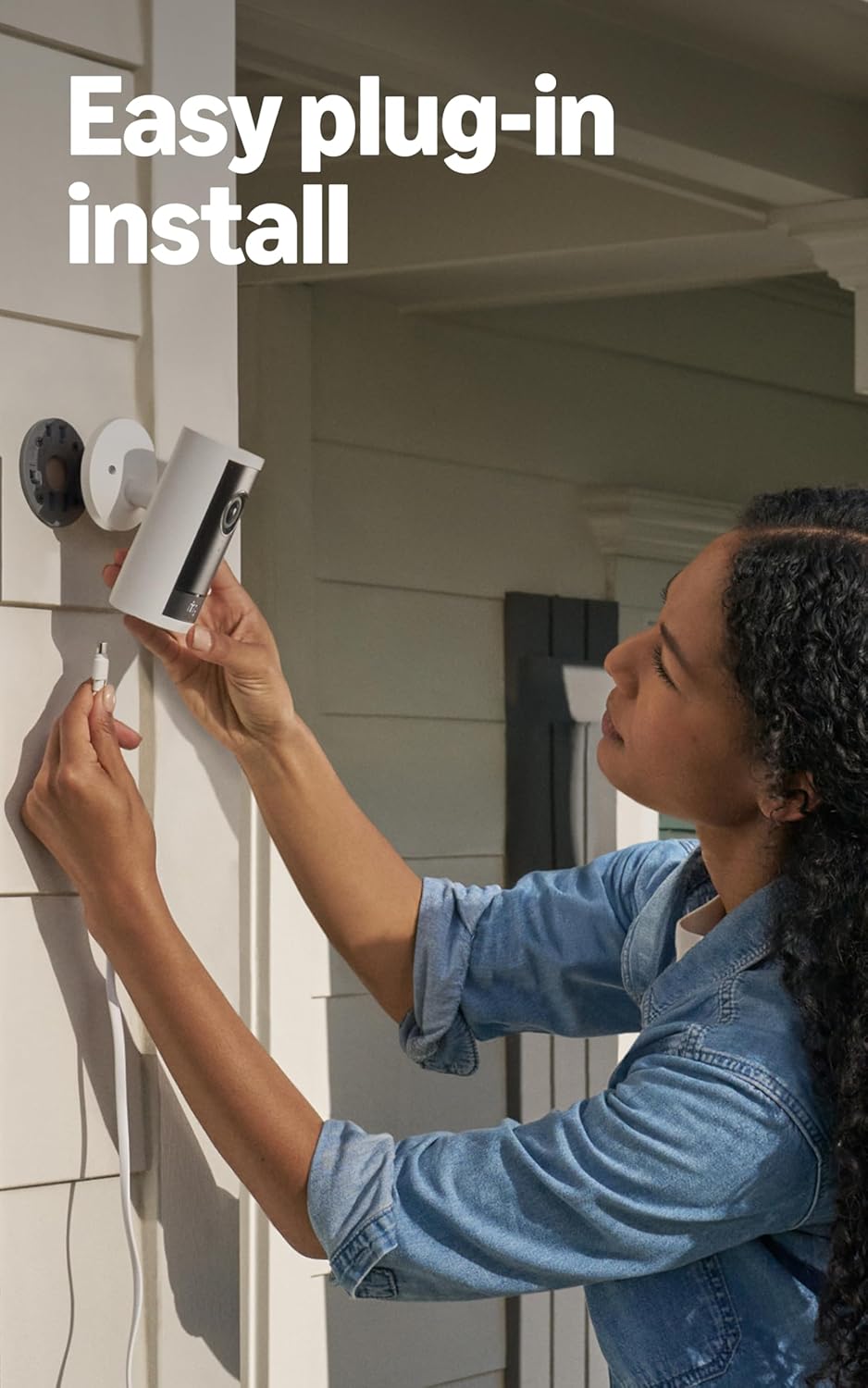
Image: Easy plug-in installation of the Ring Outdoor Cam Pro. The camera is being connected to its power adapter on an exterior wall.
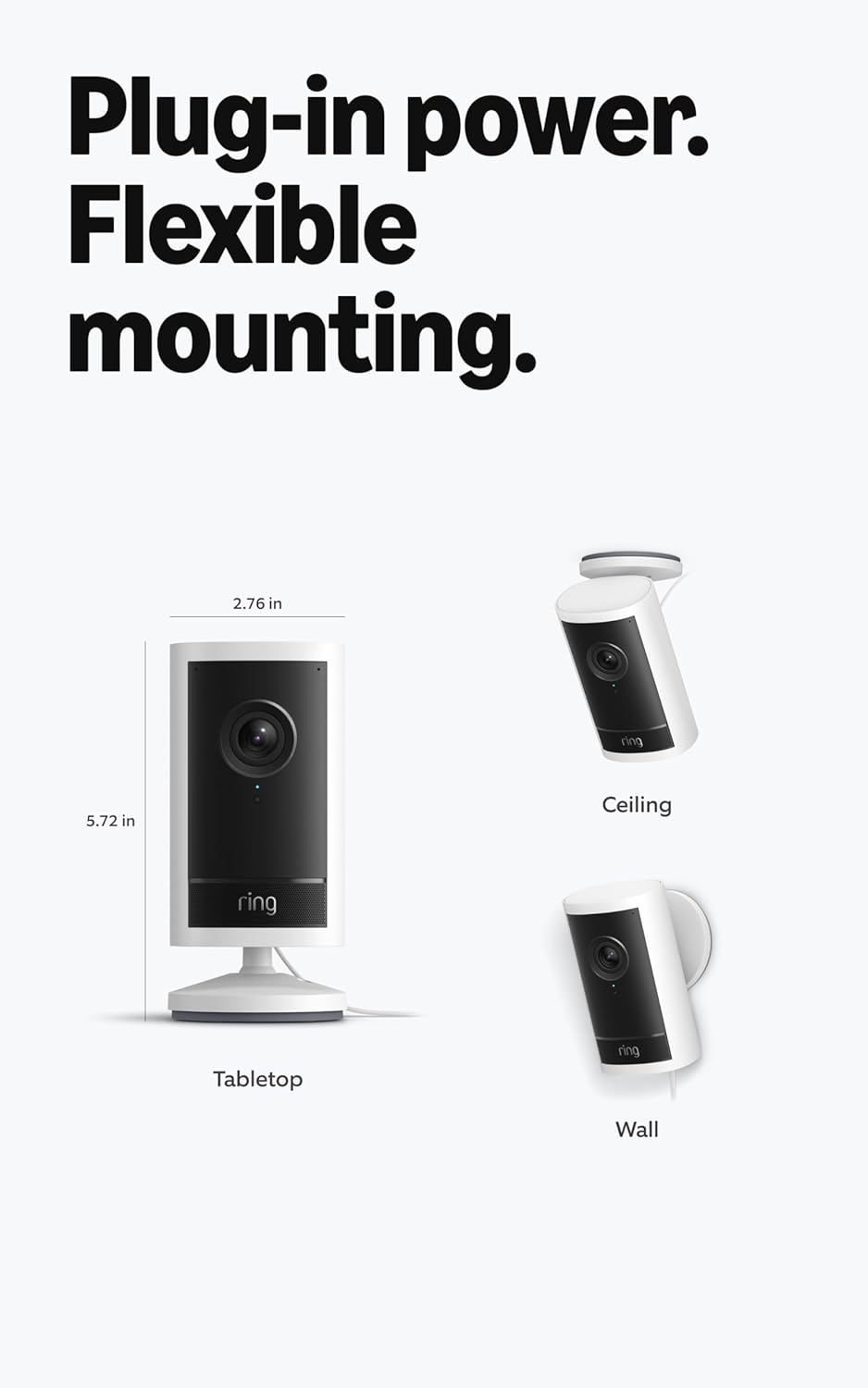
Image: Flexible mounting options for the Ring Outdoor Cam Pro, including tabletop, wall, and ceiling installations, along with its dimensions (2.76 in width, 5.72 in height).
Bedienungsanleitung
Once installed and connected to the Ring app, your Outdoor Cam Pro provides comprehensive security monitoring.
Videoüberwachung
The camera records in 4K video resolution, offering a 140° horizontal and 85° vertical field of view. Utilize the 10x Enhanced Zoom to focus on specific areas within the video feed.

Image: The Ring Outdoor Cam Pro mounted on an exterior wall, highlighting its design and 4K video capability.

Image: A demonstration of the 10x Enhanced Zoom feature, showing a zoomed-in view of a person's face from a wider outdoor camera perspective.
Nachtsicht
Dank der Funktion „Low-Light Sight“ liefert die Kamera auch bei schwachem Licht farbtreue Videos. Bei völliger Dunkelheit schaltet sie automatisch auf gestochen scharfe Schwarzweiß-Nachtsicht um, um alle Details klar darzustellen.

Image: A split image demonstrating Adaptive Night Vision, showing a dark scene on the left and the same scene with a person clearly visible in black-and-white night vision on the right.
Bewegungserkennung und Alarme
The camera features radar-powered 3D Motion Detection, allowing for customizable motion zones. This helps in receiving precise alerts to your phone, reducing false alarms.

Image: A smartphone displaying the Ring app interface, showing how to set up 3D Motion Detection zones on a map of the monitored area.
Two-Way Talk and Siren
Engage in real-time conversations using the Two-Way Talk feature with Audio+ and advanced noise cancellation. A remote-activated security siren is also available for deterring unwanted activity.
Wartung
To ensure optimal performance and longevity of your Ring Outdoor Cam Pro, follow these maintenance guidelines:
- Linsenreinigung: Reinigen Sie das Kameraobjektiv regelmäßig mit einem weichen Tuch.amp cloth to remove dust, dirt, or smudges that may affect video clarity.
- Stromanschluss: Regularly check the power adapter and cable for any signs of damage or loose connections. Ensure the plug is securely seated in the outlet.
- Wi-Fi-Signal: Monitor your Wi-Fi signal strength through the Ring app to ensure a stable connection. Poor signal can lead to interrupted video feeds or missed alerts.
- Umgebungsbedingungen: The camera is weather-resistant and designed to operate between -5°F to 120°F (-20.5°C to 48.5°C). In extreme heat and direct sunlight, the camera may temporarily turn off to prevent overheating. Ensure proper ventilation around the camera if possible.
- Software-Updates: Keep the Ring app and camera firmware updated to benefit from the latest features and security enhancements.
Fehlerbehebung
If you encounter issues with your Ring Outdoor Cam Pro, refer to the following common troubleshooting steps:
- Kamera offline:
- Überprüfen Sie den Stromanschluss, um sicherzustellen, dass die Kamera mit Strom versorgt wird.
- Verify your Wi-Fi network is operational and the signal strength is adequate.
- Try power cycling the camera by unplugging it for a few seconds and then plugging it back in.
- Ensure your router is within range and not obstructed.
- Schlechte Videoqualität:
- Confirm your internet upload speed meets the recommended minimum of 15 Mbps.
- Reinigen Sie die Kameralinse von Verunreinigungen oder Flecken.
- Video quality can be affected by internet bandwidth and device temperature.
- Probleme bei der Bewegungserkennung:
- Review your 3D Motion Detection zone settings in the Ring app to ensure they cover the desired areas.
- Adjust motion sensitivity settings if you are receiving too many or too few alerts.
- Audioprobleme:
- Ensure the microphone and speaker settings are enabled in the Ring app.
- Check for any physical obstructions around the microphone or speaker.
- Environmental factors like strong winds can affect audio clarity.
- Camera Not Mounting Correctly:
- Ensure you are using the provided installation hardware.
- The camera is designed for vertical or horizontal surface mounting.
Technische Daten
| Maße | 2.8 in x 5.7 in x 2.8 in (7 cm x 14.5 cm x 7 cm) including stand base and universal mounting plate |
| Verfügbare Farben | Schwarz, Weiß |
| Video | 4K video resolution, Low-Light Sight, up to 10x Enhanced Zoom |
| Bewegungserkennung | 3D-Bewegungserkennung mit anpassbaren Bewegungszonen |
| Fachgebiet View | 140 ° Horizontal, 85 ° Vertikal |
| Audio | Zwei-Wege-Kommunikation mit Audio+ und fortschrittlicher Geräuschunterdrückung |
| Sirene | Fernaktivierbare Sicherheitssirene |
| Leistung | USB-C 17.8-ft. (5.45-m.) 20W Outdoor/Indoor Power Adapter |
| Internetanforderungen | Für optimale Leistung wird eine Upload-Mindestgeschwindigkeit von 15 Mbit/s empfohlen. Die Videoauflösung kann je nach Internetbandbreite variieren. |
| Konnektivität | Wifi 6 (802.11ax), Dual-band wifi connection @ 2.4GHz, 5.0GHz |
| Geschätzte Installationszeit | 10 Мinuten |
| Betriebsbedingungen | -20.5 °C bis 48.5 °C, wetterfest. Die Kamera kann sich bei direkter Sonneneinstrahlung und extremer Hitze vorübergehend abschalten. |
| Einrichtungsanforderung | Vertical or horizontal surface for mounting, Standard power outlet |
Garantieinformationen
The Ring Outdoor Cam Pro, Plug-In, comes with a 1 Jahre eingeschränkte Garantie.
Dieses Gerät erhält garantierte Software-Sicherheitsupdates bis mindestens vier Jahre, nachdem das Gerät das letzte Mal als Neugerät bei uns zum Kauf angeboten wurde websites. For specific information regarding your device's software security updates, visit the Software Security Updates section in the Ring Control Center.
Unterstützung
For further assistance, detailed guides, or to contact customer support, please visit the official Ring support website. You can also access additional resources through the Ring app.
For more information on Ring products and services, visit: Ring Store bei Amazon


