1. Einleitung
This manual provides essential information for the safe and efficient installation, operation, and maintenance of your TCP Economy LED UFO High Bay Luminaire. Please read this manual thoroughly before installation and retain it for future reference.
The TCP Economy LED UFO High Bay Luminaire is designed for commercial and industrial applications, offering high efficacy and a long operational lifespan. It features a robust design suitable for various environments, including warehouses, retail spaces, and gymnasiums.

Abbildung 1: Vorderseite view of the TCP Economy LED UFO High Bay Luminaire, showing the LED array and clear lens.
2. Sicherheitshinweise
- Elektrische Sicherheit: Installation must be performed by a qualified electrician in accordance with all national and local electrical codes. Always disconnect power at the circuit breaker before installing, servicing, or cleaning the fixture.
- Erdung: Stellen Sie sicher, dass die Leuchte ordnungsgemäß geerdet ist, um einen Stromschlag zu verhindern.
- Handhabung: Do not handle the fixture with wet hands. Avoid touching the LED array directly.
- Betriebsumgebung: This luminaire is rated IP65 for outdoor use and protection against dust and water jets. Do not submerge the fixture in water. Ensure the operating temperature is within the specified range.
- Montage: The mounting structure must be capable of supporting the weight of the fixture.
- Änderungen: Do not attempt to modify or disassemble the fixture. This will void the warranty and may create safety hazards.
3. Packungsinhalt
Prüfen Sie nach dem Auspacken, ob alle Komponenten vorhanden und unbeschädigt sind. Die Verpackung sollte Folgendes enthalten:
- 1 x TCP Economy LED UFO High Bay Luminaire
- 1 x Eyebolt for suspended mounting
Note: Additional mounting hardware (e.g., chains, hooks) may be required and is sold separately.
4. Spezifikationen
| Besonderheit | Spezifikation |
|---|---|
| Modellnummer | 762148336747 |
| Marke | TCP |
| Wastage Optionen | 115 W / 160 W / 200 W |
| Wirksamkeit | Bis zu 145 LPW |
| Farbtemperatur (CCT) | 4000K / 5000K |
| Dimmen | 0-10V Dimmen |
| IP-Schutzart | IP65 (staubdicht, geschützt gegen Strahlwasser) |
| Lebensdauer | 50,000 Stunden |
| Eingangslautstärketage | 120-277V AC (Typical, verify product label) |
| Lichtquellentyp | LED |
| Installationstyp | Suspended (Eyebolt included) |
| Spielplan | Decke |
| Verwendung im Innen- und Außenbereich | Im Freien |
| Schirmmaterial | Acryl |
| Artikelgewicht | 6.44 Pfund |
| Verpackungsabmessungen | 12.48 x 12.44 x 5.87 Zoll |
| Fixture Dimensions (approx.) | 11" Diameter x 5.9" Height (with eyebolt) |
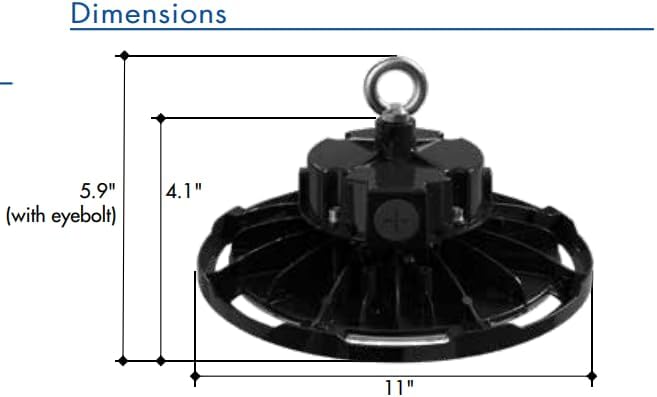
Figure 2: Approximate dimensions of the luminaire, including height with eyebolt and diameter.
5. Installationsanleitung (Einrichtung)
This luminaire is designed for suspended mounting. Follow these steps for proper installation:
- Sicherheit geht vor: Ensure power to the installation area is turned OFF at the circuit breaker before beginning any work.
- Vorrichtung prüfen: Carefully remove the luminaire from its packaging and inspect for any damage. Do not install if damaged.
- Prepare Mounting Point: Identify a suitable structural mounting point capable of safely supporting the luminaire's weight (6.44 lbs). Install appropriate mounting hardware (e.g., chain, hook) if not already present.
- Attach Eyebolt: Securely thread the provided eyebolt into the top of the luminaire housing.
- Aufhängungselement: Carefully lift the luminaire and attach the eyebolt to your chosen mounting hardware. Ensure the fixture is stable and level.
- Verdrahtung:
- Open the wiring compartment on the top of the fixture.
- Connect the AC input wires (Line, Neutral, Ground) from your power supply to the corresponding wires on the luminaire. Refer to local electrical codes for proper wiring practices.
- For 0-10V dimming functionality, connect the purple (DIM+) and gray (DIM-) wires from your 0-10V dimmer to the corresponding dimming wires on the luminaire. If dimming is not desired, cap these wires individually.
- Stellen Sie sicher, dass alle Verbindungen sicher und isoliert sind.
- Fach schließen: Schließen Sie die Abdeckung des Verdrahtungsfachs sicher.
- Strom wiederherstellen: Sobald die Installation abgeschlossen und alle Verbindungen überprüft sind, stellen Sie die Stromversorgung am Leistungsschalter wieder her.
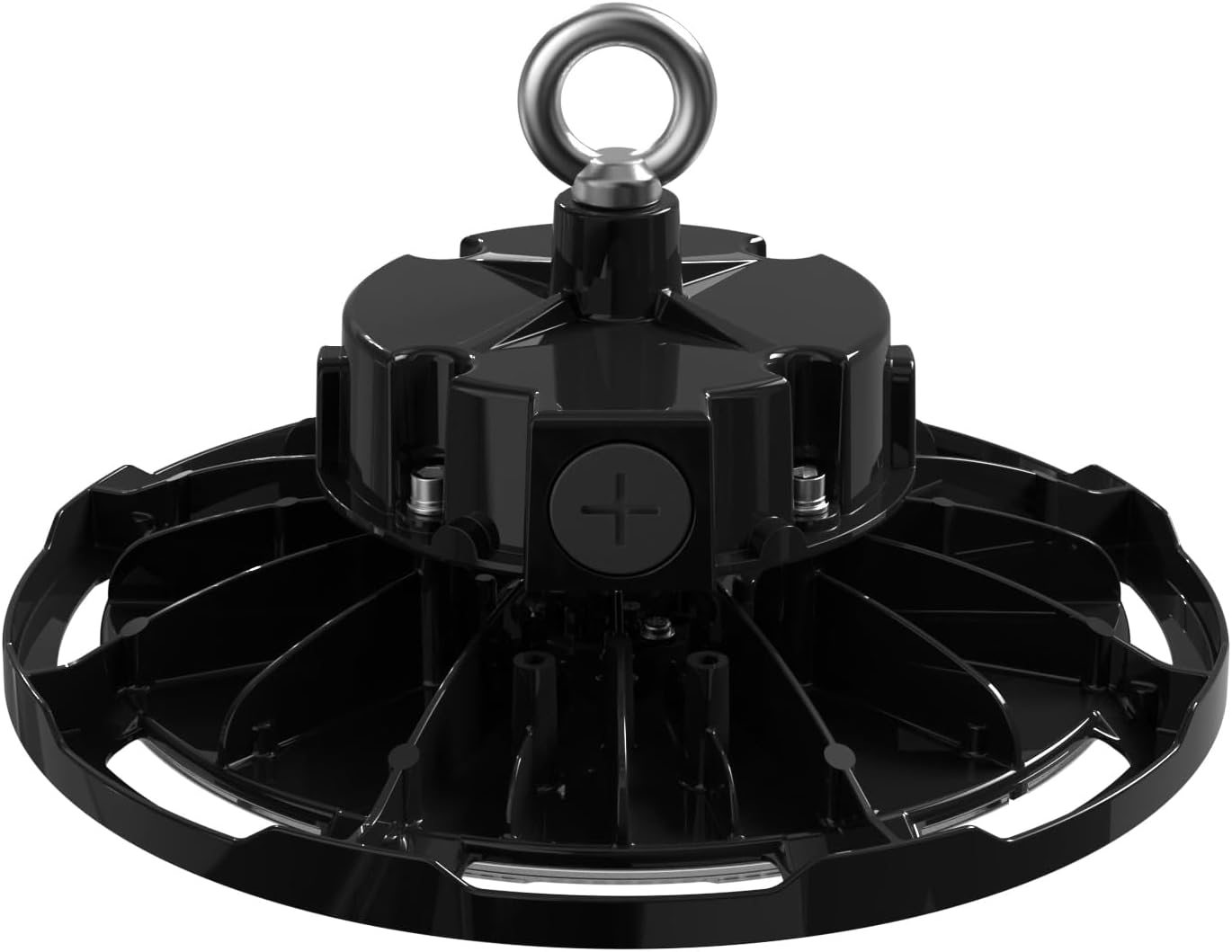
Abbildung 3: Oben view of the luminaire, illustrating the eyebolt for suspension and the location of the wiring compartment.
6. Bedienung
The TCP Economy LED UFO High Bay Luminaire operates immediately upon receiving power.
- Ein-/Ausschalten: Control the luminaire's power supply via the connected wall switch or circuit breaker.
- Dimmen: If connected to a compatible 0-10V dimmer, adjust the light output by manipulating the dimmer control. The luminaire will respond to the 0-10V signal to vary its brightness.
7. Wartung
The TCP Economy LED UFO High Bay Luminaire requires minimal maintenance.
- Reinigung: Ensure power is disconnected before cleaning. Use a soft, damp cloth to wipe the exterior of the fixture. Do not use abrasive cleaners or solvents, as these may damage the finish or optical components.
- Inspektion: Periodically inspect the fixture and its mounting hardware for any signs of damage, loose connections, or wear. Address any issues promptly.
- Keine vom Benutzer zu wartenden Teile: There are no user-serviceable parts inside the luminaire. Do not attempt to open or repair the unit.
8. Fehlerbehebung
If the luminaire is not functioning as expected, perform the following basic checks:
- Kein Licht:
- Verify that the power supply to the fixture is active at the circuit breaker and wall switch.
- Check all wiring connections for proper contact and insulation.
- Dimmfunktion funktioniert nicht:
- Ensure the 0-10V dimmer is compatible and correctly wired to the luminaire's dimming leads (purple and gray).
- Verify the dimmer is functioning correctly.
- Flackern:
- Überprüfen Sie, ob die Kabelverbindungen lose sind.
- Stellen Sie sicher, dass die Eingangslautstärketage ist stabil und liegt innerhalb des vorgegebenen Bereichs.
If these steps do not resolve the issue, contact customer support for assistance. Do not attempt further repairs yourself.
9. Garantie und Support
This TCP Economy LED UFO High Bay Luminaire is covered by a Beschränkte 5-Jahres-Garantie against defects in manufacturing. Please retain your proof of purchase for warranty claims.

Figure 4: Warranty statement and product listings (UL and cUL listed, IP65 Rated).
For technical support, warranty inquiries, or replacement parts, please contact TCP customer service:
- WebWebsite: www.tcpi.com
- Telefon: Refer to TCP's official webWebseite für aktuelle Kontaktnummern.


