Einführung
Thank you for choosing the joliker X58 MP3 Player. This device is designed to provide a versatile and high-quality audio experience, featuring Bluetooth 5.3 for seamless connectivity, a generous 128GB of internal storage expandable via SD card, a built-in HD speaker, and a user-friendly 2.4-inch touchscreen. It supports various functions including music playback, FM radio, voice recording, e-books, and video playback. Please read this manual carefully to ensure proper use and maintenance of your device.

The joliker X58 MP3 Player, showcasing its intuitive touchscreen interface and compact design.
Aufstellen
Lieferumfang
- 1x joliker X58 MP3 Player
- 1x Typ-C Ladekabel
- 1x Kabelgebundenes Headset
- 1x Benutzerhandbuch
Aufladen des Geräts
Before first use, fully charge the MP3 player. Connect the provided Type-C charging cable to the device's Type-C port and the other end to a USB power adapter (not included) or a computer's USB port. The battery indicator on the screen will show charging status.

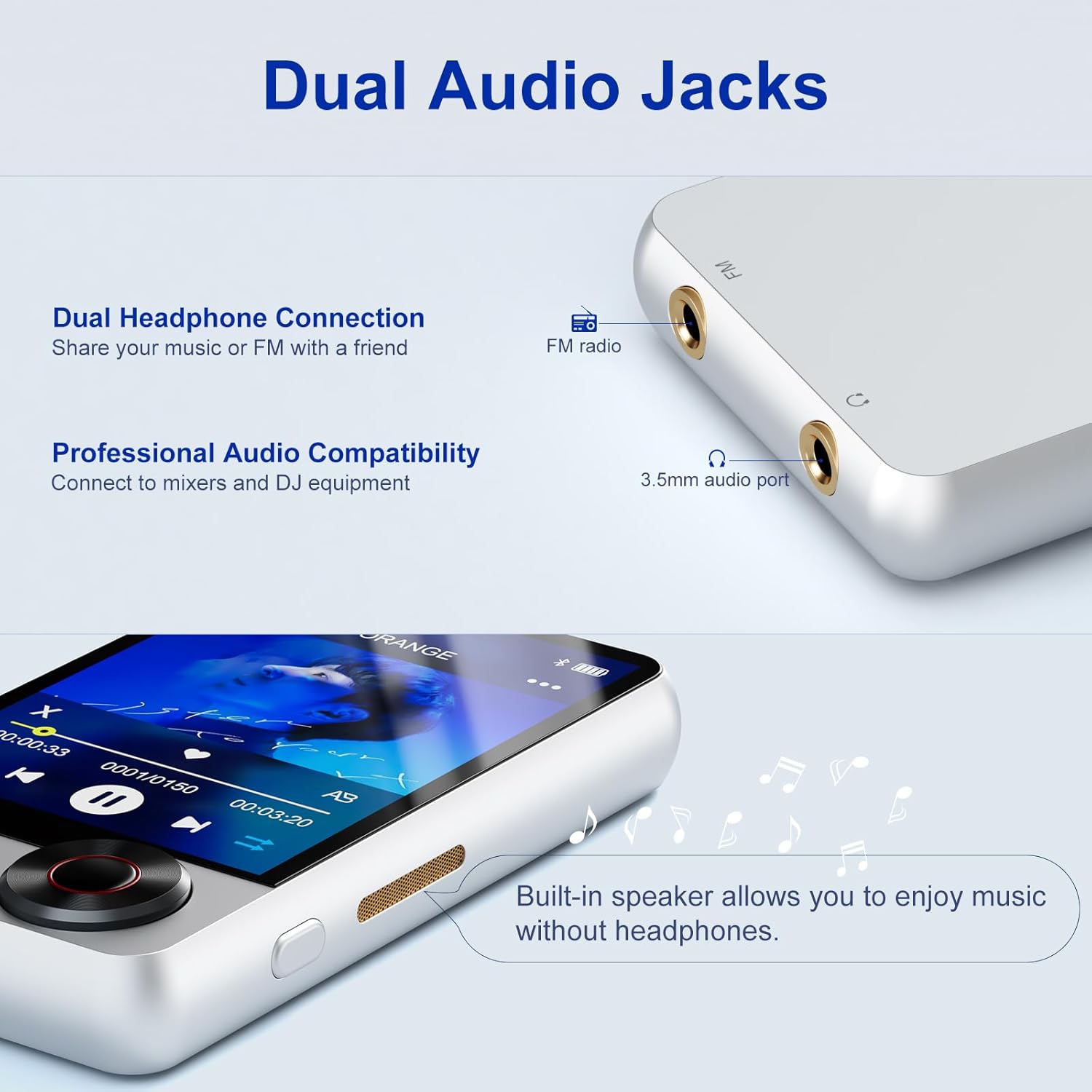
The Type-C port for charging and data transfer, alongside the dual audio jacks.
Ein-/Ausschalten
To power on, press and hold the power button located on the side of the device until the screen lights up. To power off, press and hold the power button until the power-off prompt appears, then confirm on the touchscreen.
Bedienungsanleitung
Grundlegende Navigation
The X58 MP3 player features a 2.4-inch touchscreen for easy navigation. Tap icons to open applications. Swipe left or right to browse through menus. Use the physical buttons below the screen for play/pause and track adjustment (previous/next, fast forward/rewind). The rotating knob on the side allows for volume control.
The 2.4-inch touchscreen and intuitive controls for easy operation.
Musikwiedergabe
Tap the 'Music' icon to access your audio library. You can browse by artist, album, genre, or all songs. The player supports various audio formats. Use the on-screen controls or physical buttons to play, pause, skip tracks, and adjust volume. The device features HIFI sound quality for a superior listening experience.
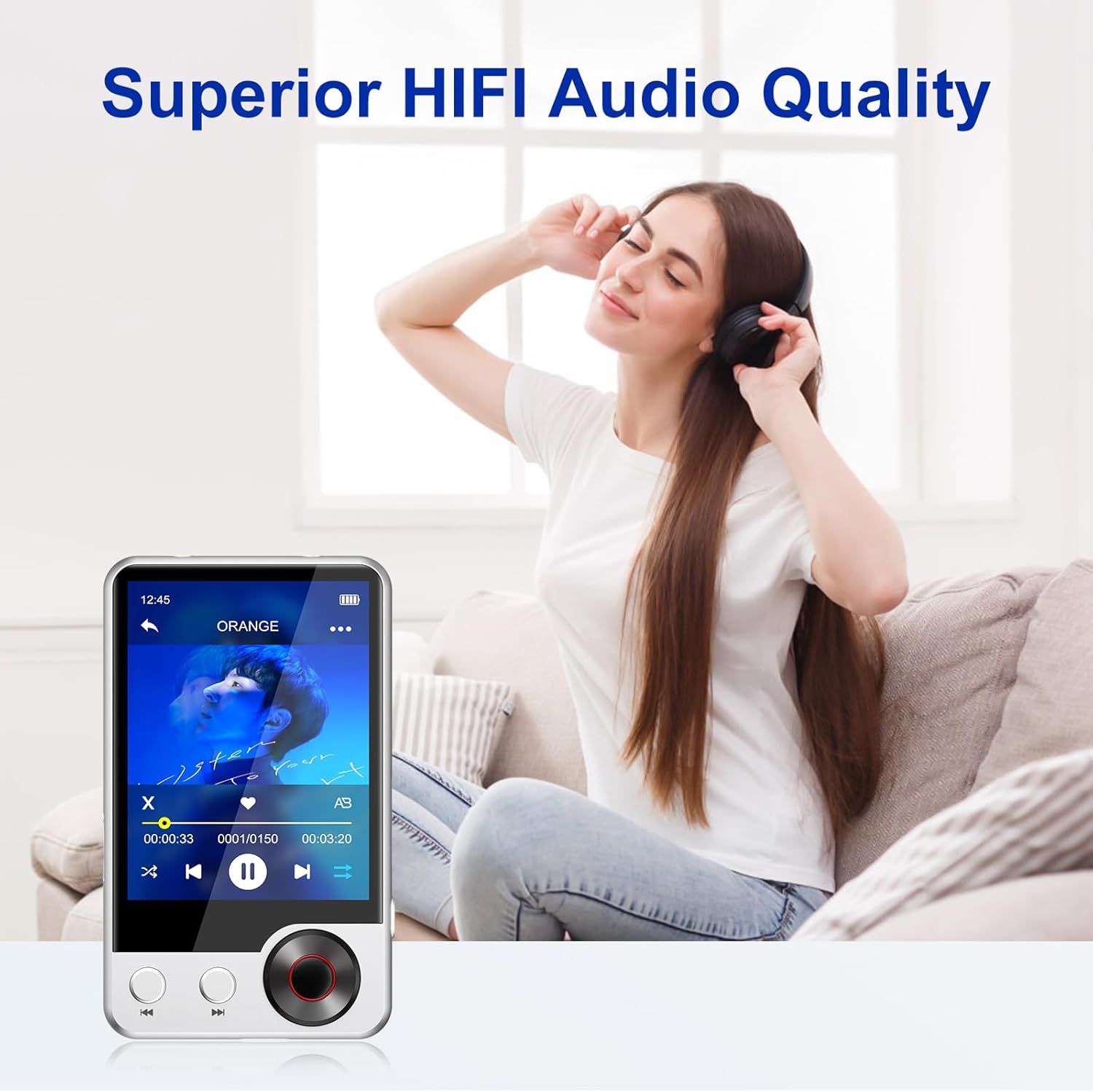
Experience superior HIFI audio quality with your joliker X58 MP3 Player.
Bluetooth-Verbindung
The X58 MP3 player is equipped with Bluetooth 5.3 for stable and efficient wireless audio. To connect to Bluetooth headphones or speakers:
- Gehen Sie zu „Einstellungen“ und wählen Sie „Bluetooth“.
- Schalten Sie Bluetooth ein.
- Stellen Sie sicher, dass sich Ihr Bluetooth-Gerät im Kopplungsmodus befindet.
- Wählen Sie Ihr Gerät aus der Liste der verfügbaren Geräte zum Koppeln aus.

Bluetooth 5.3 connectivity for seamless audio streaming to headphones or speakers.
UKW-Radio
To use the FM radio function, you must connect wired headphones, as they serve as the antenna. Tap the 'FM Radio' icon, then use the on-screen controls to scan for stations or manually tune to a frequency.

FM Radio function, requiring wired headphones to act as an antenna.
Sprachaufzeichnung
Tap the 'Recordings' icon to access the voice recorder. Press the record button to start and stop recording. Recordings are saved internally and can be managed through the 'Folder view' or 'Recordings' menu.

Voice Recorder feature for capturing audio moments.
E-Book Reader
The device supports e-book reading. Tap the 'EBook' icon to open your text files. Note that only plain text (.txt) files are supported for e-books. You can adjust font size and navigate pages using the touchscreen.

E-book reader for reading text fileIch bin unterwegs.
Video-Wiedergabe
Tap the 'Video' icon to play supported video files. Ensure your video files are in a compatible format for optimal playback. The device's 2.4-inch screen provides a compact viewErfahrung.

Video playback feature for enjoying multimedia content.
File Management
Use the 'Folder view' icon to browse and manage files stored on the device's internal 128GB memory or an inserted Micro SD card (up to 256GB). You can transfer files to and from the device by connecting it to a computer using the Type-C cable.

The MP3 player features 128GB of internal memory, expandable with a Micro SD card.
Eingebauter Lautsprecher
The X58 MP3 player includes a built-in HD speaker, allowing you to enjoy music without headphones. This is ideal for sharing audio or for situations where earphones are not preferred.

Enjoy music freely with the built-in HD speaker.
Offizielles Produktvideo
Dieses Video bietet ein Overview of the joliker X58 MP3 Player's features, including its design, Bluetooth 5.3 connectivity, touchscreen interface, dual audio jacks, 128GB memory, built-in speaker, HIFI sound, FM radio, and voice recorder functions.
Wartung
- Reinigung: Reinigen Sie das Gerät mit einem weichen, trockenen Tuch. Verwenden Sie keine flüssigen Reiniger oder Sprays.
- Lagerung: Bewahren Sie das Gerät an einem kühlen, trockenen Ort fern von direkter Sonneneinstrahlung und extremen Temperaturen auf.
- Batteriepflege: Um die Akkulaufzeit zu verlängern, vermeiden Sie häufiges vollständiges Entladen des Akkus. Laden Sie das Gerät regelmäßig auf, auch wenn es längere Zeit nicht benutzt wird.
- Auswirkungen vermeiden: Schützen Sie das Gerät vor Stürzen und Stößen, da diese interne Komponenten oder den Bildschirm beschädigen können.
Fehlerbehebung
| Problem | Lösung |
|---|---|
| Gerät lässt sich nicht einschalten. | Stellen Sie sicher, dass das Gerät vollständig aufgeladen ist. Wenn der Akku vollständig entladen ist, kann es einige Minuten dauern, bis sich das Gerät einschalten lässt. |
| Verbindung via Bluetooth nicht möglich. | Ensure Bluetooth is enabled on both the MP3 player and the target device. Make sure the target device is in pairing mode and within range. Try restarting both devices. |
| Volume knob is unresponsive or erratic. | This may indicate a hardware issue. Try adjusting volume via the touchscreen if available. If the problem persists, contact customer support. |
| Lag or slow response from touchscreen. | Close any background applications. Restart the device. Ensure the device's memory is not completely full. |
| Cannot play MP4 videos or certain image files. | The device supports specific file formats. For e-books, only plain text (.txt) files are supported. For videos, ensure they are converted to a compatible format. Refer to specifications for supported media types. |
| Music stops when opening another application. | This device is designed to focus on one primary function at a time. Some applications may pause music playback when opened. |
| Gerät wird vom Computer nicht erkannt. | Try a different USB port or cable. Ensure the device is powered on. On the device, select 'File Transfer' mode if prompted. Restart both the device and the computer. |
Technische Daten
| Besonderheit | Detail |
|---|---|
| Marke | joliker |
| Modellname | X58-silvery-US |
| Speicherkapazität | 128 GB (Expandable via Micro SD card up to 256GB) |
| Bildschirmgröße | 2.4 Zoll |
| Konnektivitätstechnologie | Bluetooth 5.3, USB (Type-C), Aux (3.5mm) |
| Besondere Merkmale | Built-In Speaker, Voice Recorder, Touch Screen, Equalizer, FM Radio, Dual Headphone Ports |
| Artikelgewicht | 2.97 Unzen |
| Batterien | 1 Lithium-Polymer-Akku (im Lieferumfang enthalten) |
| Verpackungsabmessungen | 5.83 x 5.79 x 0.87 Zoll |
Garantie und Support
The joliker X58 MP3 Player comes with a standard manufacturer's warranty. Please refer to the warranty card included in your package for specific terms and conditions. For technical support, troubleshooting assistance, or warranty claims, please contact joliker customer service through the retailer's platform or visit the official joliker webWebsite für Kontaktinformationen.
We are committed to providing high-quality products and excellent customer service. If you encounter any issues or have questions, do not hesitate to reach out to us.


