1. Einleitung
Vielen Dank für Ihren Einkauf.asing the joliker X58 MP3 Player. This device is designed to provide a versatile and high-quality audio experience with its advanced features, including Bluetooth 5.3, a 2.4-inch touchscreen, and extensive storage capabilities. This manual will guide you through the setup, operation, and maintenance of your new MP3 player.
2. Lieferumfang
- 1x joliker X58 MP3 Player
- 1x Typ-C Ladekabel
- 1x Kabelgebundenes Headset
- 1x Benutzerhandbuch (dieses Dokument)
3. Produktüberschreitungview und Funktionen
The joliker X58 MP3 Player is equipped with a range of features for an enhanced user experience.

Abbildung 3.1: Vorder- und Rückseite view of the joliker X58 MP3 Player, highlighting its compact design and dual headphone ports.
- Bluetooth 5.3: Offers stable and energy-efficient wireless connectivity for headphones and speakers.
- 128 GB interner Speicher: Bietet ampPlatz für Musik, Videos und andere files, expandable via SD card.
- 2.4-inch Touchscreen & Intuitive Controls: Easy navigation and volume adjustment with a responsive touchscreen and physical buttons.
- Zwei Audio-Buchsen: Features both an FM out port and an earphone out port for flexible listening options.
- Eingebauter HD-Lautsprecher: Allows for music playback without the need for headphones.
- Multifunktional: Supports music playback, FM radio, voice recording, e-books, picture viewing, video playback, and an alarm clock.

Figure 3.2: The MP3 player displaying a music interface, with two white wireless earbuds nearby, illustrating Bluetooth 5.3 connectivity.

Figure 3.3: The MP3 player screen showing various app icons, with a graphic indicating 128GB internal memory and support for up to 256GB TF card expansion.

Figure 3.4: A close-up of the MP3 player's touchscreen and physical controls, including the rotating volume knob and track adjustment buttons, with labels for easy navigation.
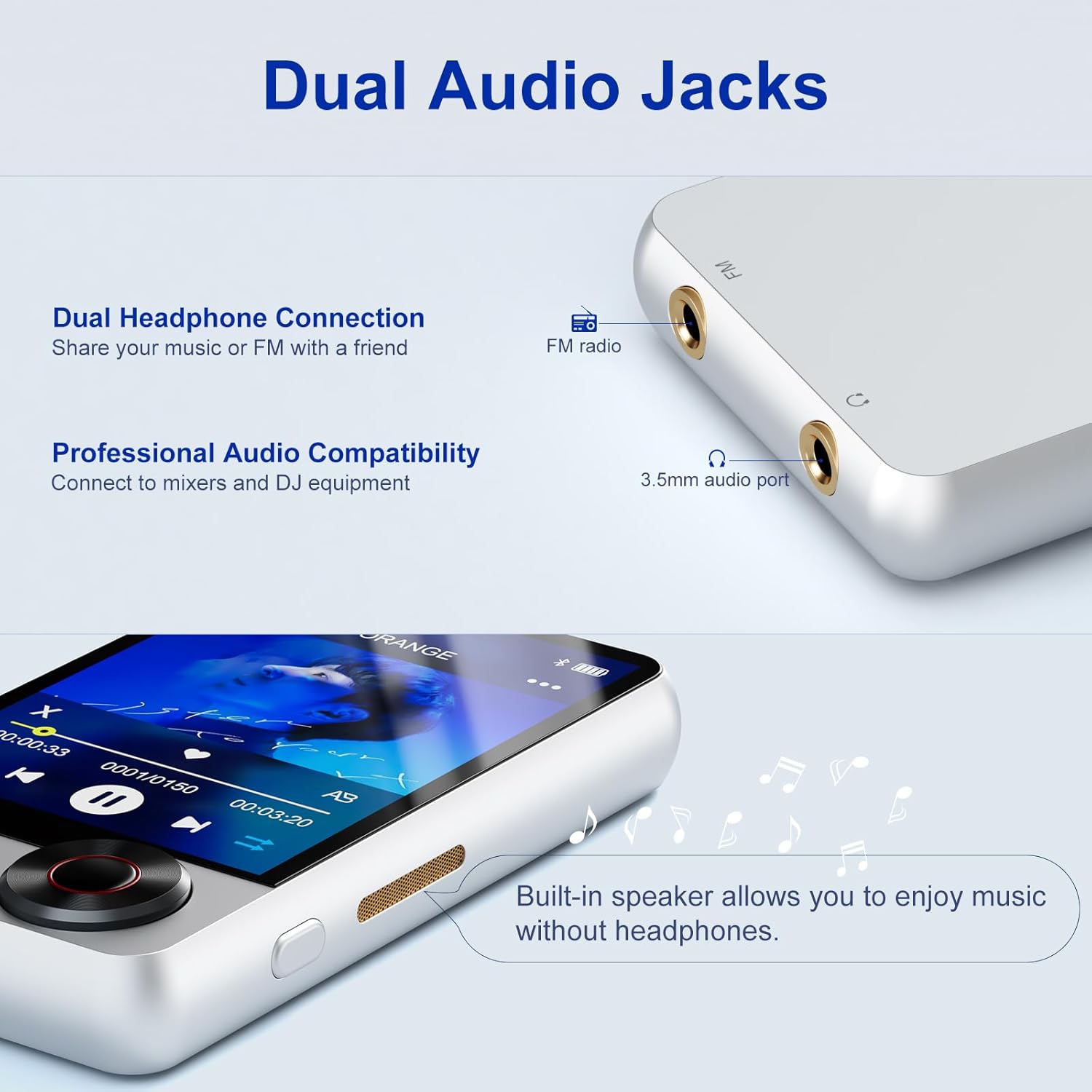
Abbildung 3.5: Eine detaillierte view of the top of the MP3 player, showing the FM radio output and 3.5mm audio port, indicating dual headphone connection capability.

Figure 3.6: A father and daughter dancing in a living room, with the MP3 player on the floor emitting sound, demonstrating the built-in speaker feature.
Video 3.1: Ein überview of the joliker X58 MP3 Player, showcasing its design, Bluetooth 5.3, touchscreen, dual audio jacks, 128GB memory, built-in speaker, HIFI sound, FM radio, voice recorder, and e-book functions.
4. Einrichtung
4.1 Aufladen des Geräts
Before first use, fully charge the MP3 player. Connect the provided Type-C charging cable to the device's charging port and the other end to a USB power adapter (not included) or a computer's USB port. The battery indicator on the screen will show charging status.
4.2 Ein-/Ausschalten
- So schalten Sie das Gerät ein: Halten Sie den Ein-/Ausschalter (an der Seite) gedrückt, bis der Bildschirm aufleuchtet.
- So schalten Sie das Gerät aus: Press and hold the Power button until the power-off options appear on the screen, then select "Power Off".
4.3 Ersteinrichtung
Upon first power-on, you may be prompted to select your preferred language. Follow the on-screen instructions to complete the initial setup.
5. Bedienungsanleitung
5.1 Musikwiedergabe
- Musik übertragen: Connect the MP3 player to your computer using the Type-C cable. The device will appear as a removable disk. Drag and drop your music files (e.g., MP3, WMA, WAV, FLAC, APE) into the "Music" folder on the device.
- Musik abspielen: From the main menu, tap the "Music" icon. You can browse by Artist, Album, Songs, Playlists, etc. Tap a song to begin playback.
- Steuerung:
- Abspielen/Pause: Tap the play/pause icon on the touchscreen.
- Nächster / Vorheriger Track: Use the physical buttons below the screen or swipe on the touchscreen.
- Lautstärkeregelung: Rotate the physical volume knob on the side of the device.
5.2 Bluetooth-Konnektivität
So verbinden Sie Bluetooth-Kopfhörer oder -Lautsprecher:
- Tippen Sie im Hauptmenü auf das Symbol „Bluetooth“.
- Stellen Sie sicher, dass sich Ihr Bluetooth-Gerät im Kopplungsmodus befindet.
- Der MP3-Player sucht nach verfügbaren Geräten. Wählen Sie Ihr Gerät aus der Liste aus, um es zu koppeln.
- Nach erfolgreicher Kopplung wird der Ton über das verbundene Bluetooth-Gerät ausgegeben.
5.3 UKW-Radio
To use the FM Radio function, you must connect wired headphones to the earphone port, as they serve as the antenna.
- Schließen Sie kabelgebundene Kopfhörer an.
- Tippen Sie im Hauptmenü auf das Symbol „FM-Radio“.
- Nutzen Sie die Bedienelemente auf dem Bildschirm, um nach Sendern zu suchen oder manuell eine Frequenz einzustellen.
5.4 Diktiergerät
So nehmen Sie Audio auf:
- From the main menu, tap the "Recordings" icon.
- Tippen Sie auf die Aufnahmetaste, um die Aufnahme zu starten.
- Tippen Sie auf die Stopp-Taste, um die Aufnahme zu beenden und zu speichern.
5.5 E-Book-Funktion
The device supports plain text (.TXT) files for e-books.
- Transfer .TXT files to the "Ebook" folder on the device.
- From the main menu, tap the "EBook" icon.
- Select the desired book to open.
- Swipe from the bottom of the screen to turn the page. Be aware that swiping from the right may close the book.
5.6 Videowiedergabe
The device supports certain video formats. Transfer video filein den Ordner „Video“.
- Tippen Sie im Hauptmenü auf das Symbol „Video“.
- Wählen Sie ein Video zum Abspielen aus.
6. Wartung
- Halten Sie das Gerät trocken. Vermeiden Sie den Kontakt mit Feuchtigkeit oder Flüssigkeiten.
- Reinigen Sie Bildschirm und Gehäuse mit einem weichen, trockenen Tuch. Verwenden Sie keine Scheuermittel.
- Vermeiden Sie extreme Temperaturen.
- Versuchen Sie nicht, das Gerät zu zerlegen, da dies zum Erlöschen der Garantie führt.
- Laden Sie das Gerät regelmäßig auf, auch wenn es nicht benutzt wird, um die Batterieleistung zu erhalten.
7. Fehlerbehebung
| Problem | Mögliche Ursache/Lösung |
|---|---|
| Gerät lässt sich nicht einschalten. | Battery may be depleted. Charge the device for at least 30 minutes. If unresponsive, try resetting by pressing the reset button (if available, usually a small pinhole) or holding the power button for an extended period. |
| Verbindung zum Bluetooth-Gerät nicht möglich. | Ensure Bluetooth is enabled on both devices. Make sure the other device is in pairing mode. Move closer to the MP3 player. Try unpairing and re-pairing. |
| Kein Ton aus Lautsprecher/Kopfhörern. | Check volume level. Ensure headphones are properly plugged in. If using Bluetooth, ensure it's connected. Test with different headphones. |
| Übertragung nicht möglich files zum Gerät. | Ensure the device is properly connected to the computer and recognized as a storage device. Try a different USB port or cable. Restart both the computer and the MP3 player. |
| FM-Radio funktioniert nicht. | Wired headphones must be connected to act as an antenna. Ensure they are fully inserted. |
| Volume knob is unresponsive or erratic. | This may indicate a hardware issue. Ensure no debris is obstructing the knob. If the problem persists, contact customer support. |
8. Spezifikationen
| Besonderheit | Detail |
|---|---|
| Marke | joliker |
| Modellname | X58-silvery-US |
| Speicherkapazität | 128 GB (Expandable via Micro SD) |
| Bildschirmgröße | 2.4 Zoll |
| Konnektivitätstechnologie | Bluetooth 5.3, USB, AUX |
| Besondere Merkmale | Built-In Speaker, Voice Recorder, Touch Screen, Equalizer, FM Radio |
| Kompatible Geräte | Kopfhörer, Lautsprecher |
| Medientyp | Micro SD |
| Artikelgewicht | 2.97 Unzen |
| Batterien | 1 Lithium-Polymer-Akku (im Lieferumfang enthalten) |
| Ursprungsland | China |
9. Garantie und Support
The joliker X58 MP3 Player comes with a standard manufacturer's warranty. Please refer to the warranty card included in your packaging for specific terms and conditions. For technical support, troubleshooting assistance, or warranty claims, please contact joliker customer service through the retailer's platform or the official joliker webWebsite.
Bewahren Sie Ihren Kaufbeleg als Kaufnachweis für Garantiezwecke auf.


