Einführung
This manual provides essential information for the safe and effective use of your YANMONGI Smart Watch Charger for LIVIKEY EW1. Please read this manual thoroughly before using the product to ensure optimal performance and longevity.

Image: The LIVIKEY EW1 Smartwatch shown alongside its dedicated magnetic charging cable, illustrating the product's primary components.
Aufstellen
The YANMONGI Smart Watch Charger is designed for simple plug-and-play operation. No complex setup is required.
- Auspacken: Nehmen Sie das Ladekabel vorsichtig aus der Verpackung.
- Überprüfen: Before first use, inspect the cable and connectors for any visible damage. Do not use if damaged.
- An Stromquelle anschließen: Insert the USB-A end of the charging cable into a compatible USB port. Recommended power sources include:
- Computer USB port (PC, Mac, laptop, notebook) for optimal voltagDie Stabilität.
- Powerbank.
- Wall charger (ensure it provides a current of 1A and a voltage von 5V).
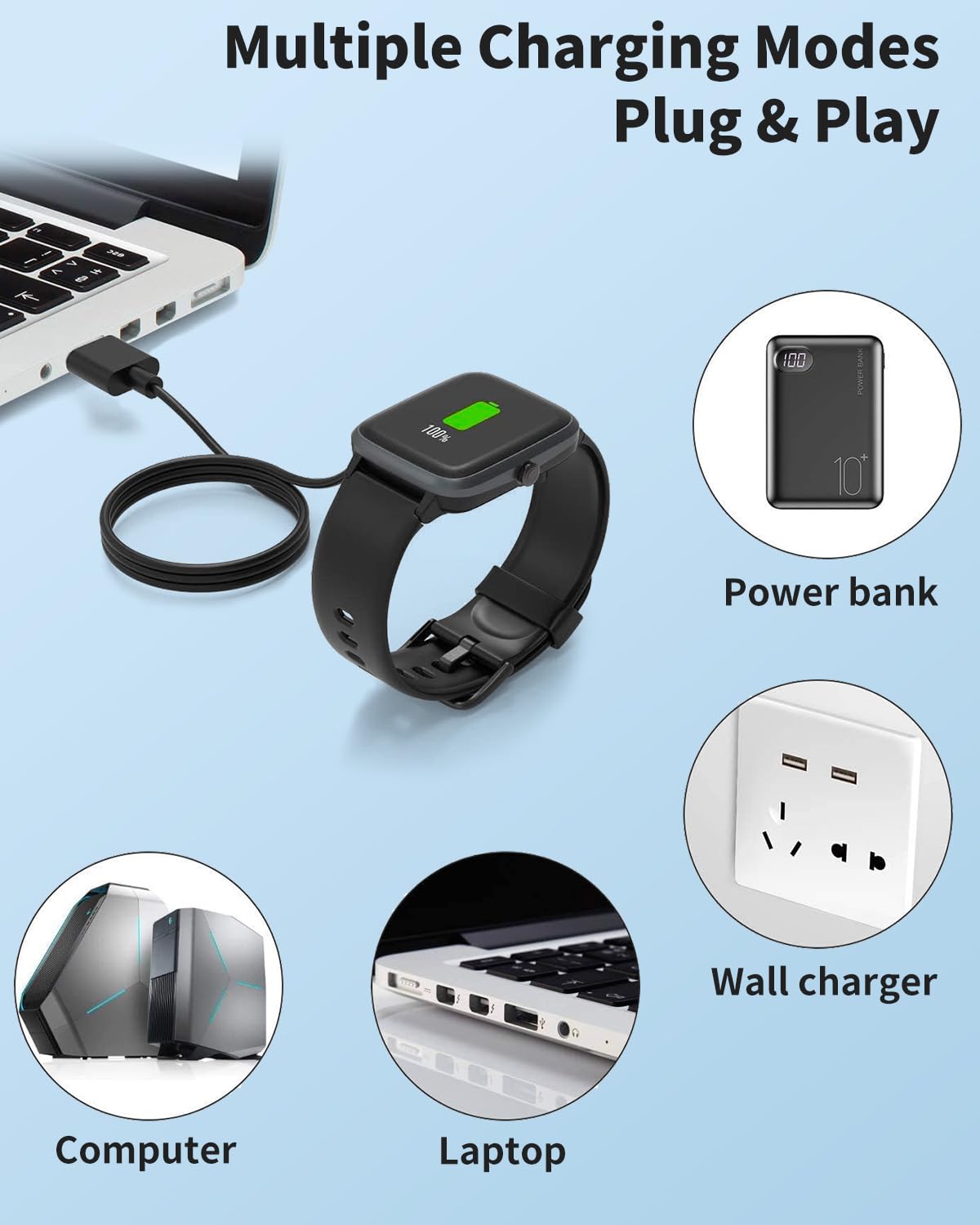
Image: An illustration demonstrating various compatible power sources for the charger, including laptops, desktop computers, power banks, and wall adapters.
Bedienungsanleitung
Follow these steps for efficient and safe charging of your LIVIKEY EW1 Smart Watch:
- Connect to Smartwatch: Align the magnetic charging pins of the cable with the charging contacts on the back of your LIVIKEY EW1 Smart Watch. The strong magnetic attraction will securely attach the charger to the watch.
- Ladevorgang einleiten: Once connected, the smartwatch should indicate that it is charging. The cable features an advanced automatic control system that prevents overcharging, over-discharging, and overheating.
- Ladezeit: Limit charging to a maximum of 80 minutes to avoid overcharging and to help extend the lifespan of your smartwatch battery.
- Batteriezustand: For optimal battery health, it is recommended to charge your smartwatch before the battery is completely drained.
- Power Source Recommendation: For the best voltage stability, always prioritize charging using the USB port on a computer (PC, Mac, laptop, notebook). Avoid using smartphone or fast-charging adapters unless they explicitly provide a current of 1A and a voltagvon 5V.

Bild: Eine Nahaufnahme view illustrating the strong magnetic attraction that securely connects the charging cable to the smartwatch's charging contacts.
Wartung
Proper care will ensure the longevity of your charging cable:
- Reinigung: Use a soft, dry cloth to gently wipe the cable and magnetic contacts. Do not use liquid cleaners or abrasive materials.
- Lagerung: Store the cable in a cool, dry place away from direct sunlight and extreme temperatures. Avoid tightly coiling the cable to prevent internal wire damage.
- Handhabung: Always grasp the plug when disconnecting the cable from the power source or smartwatch. Avoid pulling directly on the cable itself.
- Schutz: The cable is designed with high-quality TPE material and a reinforced design for durability. However, avoid excessive bending or sharp angles, especially near the connectors.

Image: A diagram illustrating the reinforced design of the charging cable, highlighting its durability against bending and the internal structure for long-lasting use.
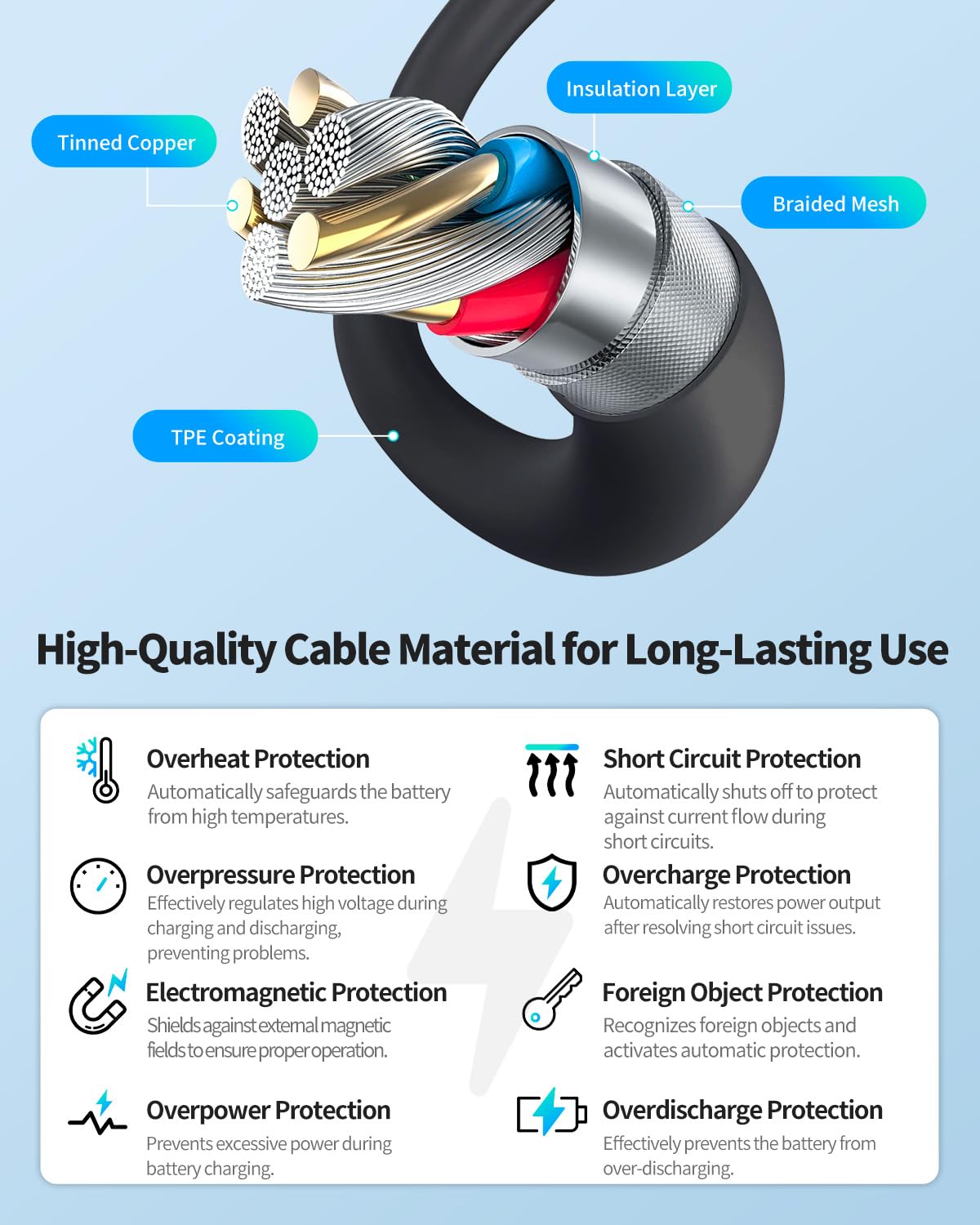
Image: A cross-section diagram detailing the high-quality materials used in the cable's construction, including tinned copper, insulation layer, braided mesh, and TPE coating, all contributing to its durability and safety features.
Fehlerbehebung
Sollten Sie Probleme mit Ihrem Ladegerät haben, beachten Sie bitte die folgenden häufig auftretenden Probleme und Lösungen:
| Problem | Mögliche Ursache | Lösung |
|---|---|---|
| Smartwatch lädt nicht. | Loose connection, incompatible power source, dirty contacts, damaged cable. | Ensure the magnetic connection is secure. Try a different USB port or power source (preferably a computer USB port). Clean the charging contacts on both the watch and cable with a dry cloth. Inspect the cable for damage; if damaged, discontinue use. |
| Langsamer Ladevorgang. | Low power output from USB port, using a non-recommended adapter. | Use a computer USB port. If using a wall adapter, ensure it provides 5V/1A. Avoid fast-charging adapters not designed for smartwatches. |
| Das Ladegerät fühlt sich warm an. | Normal operation, or potential overcurrent/overheating. | A slight warmth is normal during charging. If it becomes excessively hot, disconnect immediately and contact customer support. The cable has built-in overheat protection. |
| Unsure if charger is compatible. | Product compatibility question. | This charger is specifically compatible with LIVIKEY EW1 Smartwatch. If you are unsure, take a photo of your original charger or the charging part of your device and contact customer support for assistance. |
Technische Daten
| Besonderheit | Detail |
|---|---|
| Modellnummer | 4f1f9e7d-8d15-484e-9689-e3df34cbaf01 |
| Kabellänge | 3.3 Fuß / 100 cm |
| Steckertyp | USB Type A (Input), 2-Pin Magnetic (Output) |
| Kompatible Geräte | LIVIKEY EW1 Smart Watch (only) |
| Empfohlene Eingabe | 5V / 1A (from PC USB port, power bank, or compatible wall adapter) |
| Besondere Merkmale | Magnetic Design, Overcharge Protection, Over-discharge Protection, Overheat Protection, Integrated Chip for Longevity, Reinforced Design, Gold Plated POGO Pins, Well-built Protective Plug, High-grade TPE material. |
| Verpackungsabmessungen | 4 x 3.5 x 0.5 Zoll |
| Artikelgewicht | 1.59 Unzen |

Bild: Ein überview of the charger's durable and safe design features, including gold-plated POGO pins, a well-built protective plug, and the use of high-grade TPE material.
Garantie und Support
One-Year Quality Warranty
We stand by the quality of our product. If you encounter any defects or issues within one year of purchase, please contact us through the seller page for a free replacement or refund. We are committed to ensuring your satisfaction.
Kontaktieren Sie uns
For any questions or issues with the product, please reach out via your order history on Amazon. Our customer service team is here to assist you promptly.


