Einführung
This manual provides detailed instructions for the operation and maintenance of your CAMMHD V8PRO-512G 4K Body Camera. Please read this manual thoroughly before using the device to ensure proper functionality and to prevent damage.
Lieferumfang
Überprüfen Sie, ob alle Artikel im Paket vorhanden sind:
- 1*V8-512GB Body Camera
- 1*Charger and 1*Type-C Cable
- 1*Dock and 1*Battery
- 1*Long Clip and 1*Short Clip
- 1 * Benutzerhandbuch

Image: All components included in the CAMMHD V8PRO-512G package.
Produkt überview
Familiarize yourself with the main components and controls of your body camera.

Bild: Vorderseite view of the CAMMHD V8PRO-512G body camera.
Side Controls and Ports

Abbildung: Seite view of the camera with buttons for video marking, video recording, audio recording, and photo capture.
The side of the camera features dedicated buttons for quick access to functions:
- Important Video Marking Button: Mark important segments during recording.
- Videoaufnahmetaste: Starten und stoppen Sie die Videoaufzeichnung.
- Schaltfläche zur Audioaufnahme: Start and stop audio-only recording.
- Photo Capture Button: Machen Sie Standbilder.
- Ein-/Aus-Taste: Steuert die Gerätestromversorgung.
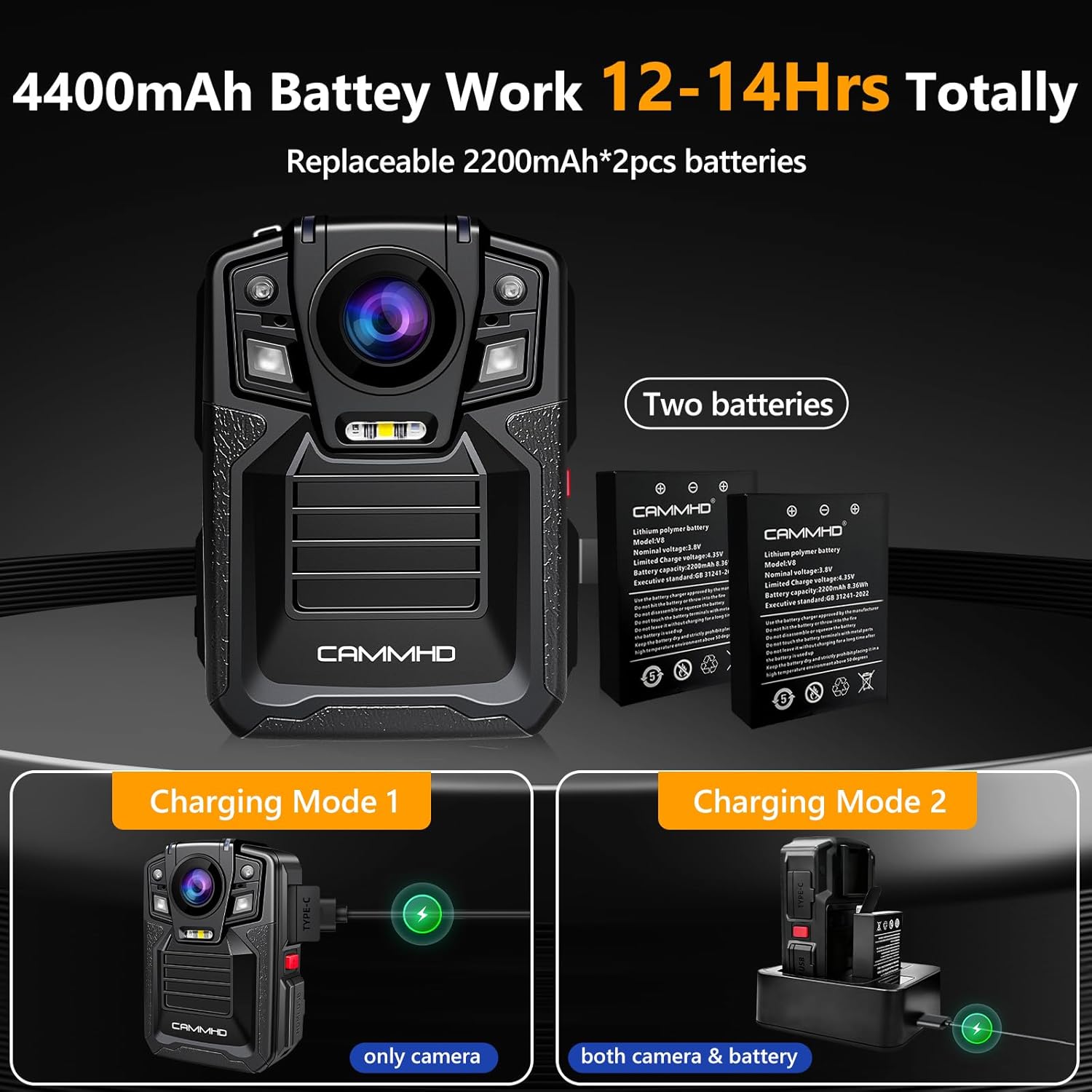
Abbildung: Seite view of the camera showing Type-C and Mini USB ports.
The device includes a Type-C charging port and a Mini USB charging port for versatile connectivity.
Video: Ein überview of the main features of the CAMMHD V8 body camera, demonstrating its design and key functionalities.
Aufstellen
Einsetzen und Aufladen der Batterie
The CAMMHD V8PRO-512G uses replaceable 2200mAh batteries (two included) for extended operation.
Video: Step-by-step guide on how to replace the V8 body camera battery.
So installieren oder ersetzen Sie die Batterie:
- Suchen Sie das Batteriefach auf der Rückseite der Kamera.
- Slide the lock mechanism to unlock the compartment.
- Setzen Sie die Batterie unter Berücksichtigung der richtigen Ausrichtung ein.
- Close the compartment and slide the lock mechanism to secure it.
Lademöglichkeiten:
- Direktes Laden: Connect the camera directly to the charger using the Type-C cable.
- Ladestation: Use the provided charging dock to simultaneously charge the camera and an extra battery.
Image: The body camera and an extra battery being charged simultaneously using the charging dock.
Bedienungsanleitung
Ein-/Ausschalten
Press and hold the red power button on the side of the device to turn it on or off.
Videoaufzeichnung
Press the dedicated video recording button to start or stop 4K/2160P video recording. The camera features a 170° ultra-clear wide-angle lens. The image can be zoomed in and out during recording, and snapshot is supported.
Image: Demonstrates the 4K/2160P video resolution capability of the camera.
Audioaufnahme
Press the dedicated audio recording button to start or stop audio-only recording.
Fotoaufnahme
Press the dedicated photo capture button to take still images.
Nachtsicht
The camera supports auto/manual IR night vision. Two powerful IR night vision LED lights can capture objects within 50 feet. In dark conditions, the camera can automatically switch to Night Vision Mode.
Image: The camera's auto/manual infrared night vision feature.
Loop-Aufnahme
The built-in 512GB SD card supports loop recording. When the storage limit is reached, the latest video automatically overwrites the oldest video.
Datum Stamp und Sicherheit
Enable the Date Stamp feature to ensure all recordings are time-stamped and cannot be modified or deleted, providing verifiable evidence. For enhanced security, enable Camera Password protection to restrict access to the device and its files.
Wiedergabe und File Überweisen
You can browse saved files directly on the camera's screen using the playback buttons. To transfer files to a computer, connect the camera via USB.
Video: Demonstrates on-device playback and connecting the CAMMHD V8 body camera to a computer for file Übertragung.
Wartung
Formatieren der SD-Karte
Regularly format the internal 512GB SD card to maintain optimal performance and free up storage space. This option is available in the device's setup menu.
Allgemeine Pflege
The camera is IP68 waterproof, offering protection against dust and water immersion. However, avoid prolonged exposure to extreme conditions and clean the lens and body with a soft, dry cloth.
Fehlerbehebung
If you encounter any issues, refer to the included User Manual and Troubleshooting Guide for detailed solutions. Common issues can often be resolved by checking battery levels, ensuring proper connections, or formatting the SD card.
Technische Daten
| Marke | CAMMHD |
| Modellnummer | V8PRO-512G |
| Videoauflösung | 4K/2160P |
| Fotosensor-Technologie | CMOS |
| Weitwinkel | 170° |
| Batteriekapazität | 2 x 2200 mAh (insgesamt 4400 mAh) |
| Videoaufnahmezeit | Up to 14 hours (at 720p) |
| Videokomprimierung | H.265 |
| Wasserdichtigkeit | IP68 |
| Nachtsichtbereich | Bis zu 50 Fuß |
| Lagerung | 512GB (Built-in SD card) |
| Konnektivität | USB Type-C, Mini USB |
| Maße | 2.32 x 3.27 x 1.22 Zoll |
| Gewicht | 5.7 Unzen |
Unterstützung
For any questions or further assistance, please contact us via email:
CAMMHD-Service@outlook.com


