1. Wichtige Sicherheitshinweise
Please read all instructions carefully before using the Bodytone FIT12 Inxide Foldable Treadmill. Retain this manual for future reference.
- Stellen Sie das Laufband immer auf eine ebene, stabile Fläche.
- Sorgen Sie für ausreichend Freiraum (mindestens 2 Meter hinter dem Laufband und 0.6 Meter auf jeder Seite) rund um das Laufband.
- Halten Sie Kinder und Haustiere während des Betriebs vom Laufband fern.
- Always attach the safety key clip to your clothing before starting your workout. The treadmill will stop if the safety key is dislodged.
- Betreiben Sie das Laufband nicht, wenn das Kabel oder der Stecker beschädigt ist oder wenn es nicht ordnungsgemäß funktioniert.
- Tragen Sie geeignete Sportschuhe und -kleidung.
- Das maximale Benutzergewicht von 90 kg (198 lbs) darf nicht überschritten werden.
- Konsultieren Sie einen Arzt, bevor Sie mit einem Trainingsprogramm beginnen.
2. Produktüberschreitungview
The Bodytone FIT12 Inxide is a foldable treadmill designed for home use, offering a blend of technology and convenience for your fitness routine.
Hauptmerkmale:
- Faltbares Design: Compact for easy storage in small spaces.
- Bluetooth-Konnektivität: Compatible with FitShow, Kinomap, and Zwift for interactive training.
- LED-Anzeige: Tracks speed, time, distance, calories burned, and heart rate.
- Voreingestellte Programme: 12 varied workout programs to optimize results.
- MP3 Speakers: Integrated speakers for audio playback during workouts.
- Lauffläche: 42 x 120 cm (16.5 x 47.2 inches) for comfortable use.
- Maximale Geschwindigkeit: Bis zu 12 km/h (7.5 mph).
- Motor: 0.8 HP brushless DC motor for efficient and quiet operation.
Komponenten:
Familiarize yourself with the main parts of your treadmill.

Abbildung 2.1: Vorderseite view of the Bodytone FIT12 Inxide Foldable Treadmill, showing the console, handlebars, and running deck.
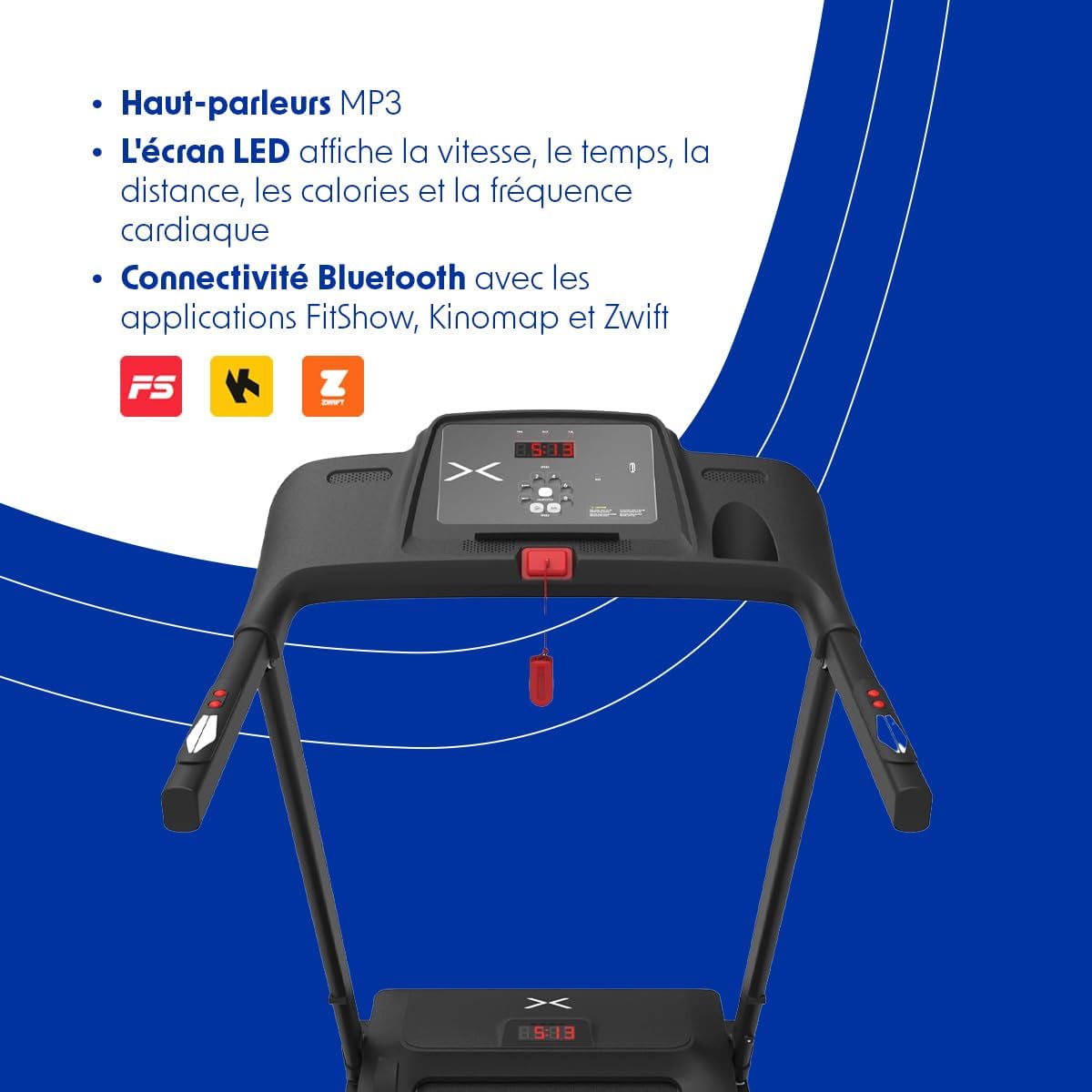
Figure 2.2: Close-up of the treadmill console, featuring the LED display, control buttons for speed and programs, and the safety key slot.

Figure 2.3: The Bodytone FIT12 Inxide Treadmill in its folded, compact position, illustrating its space-saving design.
3. Aufbau und Montage
The Bodytone FIT12 Inxide Treadmill comes largely pre-assembled. Follow these steps to prepare it for use.
Aufklappen des Laufbandes:
- Nehmen Sie das Laufband vorsichtig aus der Verpackung.
- Stellen Sie das Laufband auf eine freie, ebene Fläche.
- Locate the locking pin or knob that secures the running deck in the folded position.
- Release the locking mechanism and gently lower the running deck until it is flat on the floor. Ensure it clicks securely into place.
- Raise the console and handlebars to their upright position and secure them with any provided locking pins or screws.
Strom anschließen:
- Connect the provided power cord to the treadmill's power input port.
- Stecken Sie das Netzkabel in eine geerdete Steckdose.
- Ensure the power switch (usually located near the power cord input) is in the 'ON' position.

Figure 3.1: The treadmill in its folded state, emphasizing its compact and lightweight design for easy storage and portability.
4. Bedienungsanleitung
This section guides you through the basic operation of your Bodytone FIT12 Inxide Treadmill.
Ein Training starten:
- Stellen Sie sicher, dass das Laufband an das Stromnetz angeschlossen und der Netzschalter eingeschaltet ist.
- Befestigen Sie den Sicherheitsschlüsselclip an Ihrer Kleidung und stecken Sie den Sicherheitsschlüssel in den dafür vorgesehenen Schlitz an der Konsole. Das Display leuchtet auf.
- Steigen Sie auf das Laufband und stellen Sie Ihre Füße auf die seitlichen Griffe.
- Press the 'START' button. The treadmill will begin with a short countdown, then the belt will start moving at a low speed.
- Adjust the speed using the '+' and '-' buttons on the console or handlebars.
Konsolenfunktionen:
The LED display shows the following metrics:
- Geschwindigkeit: Aktuelle Laufgeschwindigkeit in km/h.
- Zeit: Dauer deines Trainings.
- Distanz: Zurückgelegte Gesamtstrecke.
- Kalorien: Geschätzter Kalorienverbrauch.
- Herzfrequenz: Your pulse, detected by hand sensors (if equipped and used).

Figure 4.1: The LED display on the console, illustrating how speed, calories, distance, time, and heart rate are tracked during a workout.
Voreingestellte Programme:
The treadmill includes 12 pre-set programs. To select a program:
- From standby mode, press the 'PROGRAM' button to cycle through the available programs (P1-P12).
- Once you've selected your desired program, press 'START' to begin. The treadmill will automatically adjust speed according to the program's profile.
Bluetooth-Konnektivität:
Connect your treadmill to compatible fitness apps for an enhanced training experience.
- Download a compatible app (e.g., FitShow, Kinomap, Zwift) on your smartphone or tablet.
- Aktivieren Sie Bluetooth auf Ihrem Gerät.
- Open the app and follow its instructions to search for and connect to your Bodytone FIT12 treadmill.
- Once connected, you can control the treadmill and track your progress through the app.
Using MP3 Speakers:
Connect your audio device to the treadmill's MP3 input port (if available) or via Bluetooth (if supported by the console) to play music through the integrated speakers.
Das Laufband anhalten:
- Drücken Sie die Taste „STOP“, um das Laufband allmählich zu verlangsamen und anzuhalten.
- Alternativ kann man im Notfall den Sicherheitsschlüssel aus seinem Schlitz ziehen, um das Laufband sofort anzuhalten.
5. Wartung
Regelmäßige Wartung gewährleistet die Langlebigkeit und optimale Leistung Ihres Laufbands.
Reinigung:
- Vor der Reinigung immer den Netzstecker des Laufbands ziehen.
- Wischen Sie die Konsole und andere Oberflächen mit einem Desinfektionsmittel ab.amp Tuch nach jedem Gebrauch, um Schweiß und Staub zu entfernen.
- Keine Scheuer- oder Lösungsmittel verwenden.
Riemenschmierung:
The running belt requires periodic lubrication to reduce friction and wear. Refer to the specific instructions provided with your treadmill's lubricant kit. Typically, lubrication is needed every 3-6 months depending on usage.
Riemeneinstellung:
If the running belt becomes off-center or slips, it may need adjustment. Consult the detailed instructions in the full product manual or contact customer support for guidance.
6. Fehlerbehebung
Hier finden Sie Lösungen für häufig auftretende Probleme:
| Problem | Mögliche Ursache | Lösung |
|---|---|---|
| Das Laufband startet nicht. | Power cord unplugged, power switch off, safety key not inserted. | Prüfen Sie den Stromanschluss, stellen Sie sicher, dass der Netzschalter eingeschaltet ist, und stecken Sie den Sicherheitsschlüssel vollständig ein. |
| Laufband rutscht. | Der Riemen ist zu locker, der Riemen muss geschmiert werden. | Adjust belt tension (refer to full manual), lubricate the belt. |
| Anzeige funktioniert nicht richtig. | Loose cable connection, console malfunction. | Check all cable connections, power cycle the treadmill. If issue persists, contact support. |
| Ungewöhnliche Geräusche während des Betriebs. | Lose Teile, Riemenreibung, Motorproblem. | Inspect for loose screws, lubricate belt, or contact customer support. |
7. Spezifikationen
Detailed technical specifications for the Bodytone FIT12 Inxide Treadmill:
| Besonderheit | Detail |
|---|---|
| Modell | FIT12 Inxide |
| Marke | Bodytone |
| Farbe | Schwarz |
| Motor | 0.8 HP Brushless DC |
| Geschwindigkeitsbereich | Bis zu 12 km/h (7.5 mph) |
| Lauffläche | 42 x 120 cm (16.5 x 47.2 Zoll) |
| Anzeigetyp | LED |
| Trainingsprogramme | 12 voreingestellte Programme |
| Konnektivität | Bluetooth (FitShow, Kinomap, Zwift compatible) |
| Besondere Merkmale | Built-In Speaker, Heart Rate Monitor, Lightweight, Wheeled for transport |
| Max. Benutzergewicht | 90 kg |
| Produktabmessungen (aufgeklappt) | 154 x 73 x 22 cm (60.6 x 28.7 x 8.7 Zoll) |
| Produktabmessungen (gefaltet) | 66.5 x 65 x 120 cm (26.2 x 25.6 x 47.2 Zoll) |
| Artikelgewicht | 31 kg |
| Im Lieferumfang enthaltene Komponenten | Netzkabel |
8. Garantie und Support
For warranty information, please refer to the documentation included with your purchase or visit the official Bodytone website. If you require technical assistance or have questions not covered in this manual, please contact Bodytone customer support.
Bodytone Customer Support: www.bodytone.eu/en/contact/


