1. Einleitung
Dieses Handbuch enthält wichtige Anweisungen für die Einrichtung, den Betrieb, die Wartung und die Fehlerbehebung Ihres Blackview BV4800 Rugged Phone. Please read this guide thoroughly to ensure proper use and to maximize the device's features and longevity. The Blackview BV4800 is designed for durability, featuring IP68/IP69K waterproof and MIL-STD-810H drop-proof certifications, a 6.56-inch HD+ display, a 5180mAh battery, and running on Android 13 with Doke OS 3.1.
2. Packungsinhalt
Prüfen Sie, ob alle Artikel in Ihrer Produktverpackung enthalten sind:
- Schwarzview BV4800 Robustes Telefon
- USB-Typ-C-Kabel
- Netzteil
- SIM-Auswerferwerkzeug
- Kurzanleitung
- Garantiekarte
3. Gerät überview
Machen Sie sich mit den physischen Bestandteilen Ihres schwarzenview BV4800 phone.
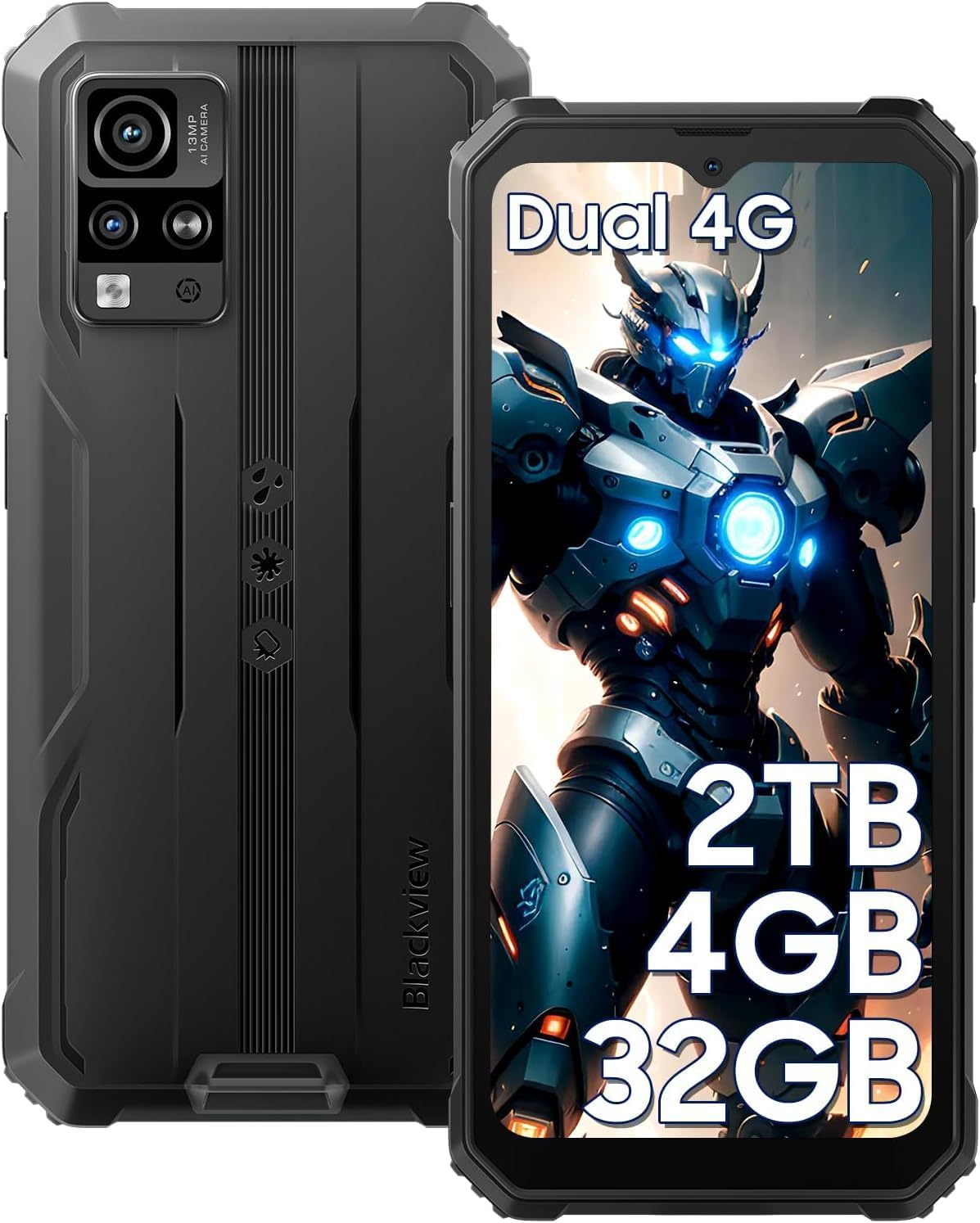
Abbildung 3.1: Vorne und hinten View des Schwarzenview BV4800. This image displays the phone's rugged exterior, including the rear camera module and the display.
- Frontkamera: Befindet sich oben in der Mitte des Displays.
- Anzeige: 6.56-Zoll-HD+-Touchscreen.
- Lautstärketasten: Seitlich befindet sich der Regler zur Einstellung der Audiopegel.
- Netzschalter: An der Seite befinden sich die Tasten zum Ein- und Ausschalten des Geräts sowie zum Sperren und Entsperren des Bildschirms.
- USB-Typ-C-Anschluss: At the bottom, protected by a flap, for charging and data transfer.
- Lautsprecher: Befindet sich ganz unten.
- Rückfahrkameras: Located on the back, including the 13MP main camera.
- Taschenlampe: Adjacent to the rear cameras.
- SIM-/MicroSD-Kartensteckplatz: On the side, accessible with the SIM ejector tool.
4. Einrichtung
4.1. Installation der SIM-Karte und der microSD-Karte
Das Schwarzeview BV4800 supports two Nano SIM cards and one MicroSD/TF card simultaneously. Ensure the phone is powered off before installation.
- Suchen Sie den SIM-Karten-Einschub an der Seite des Telefons.
- Führen Sie das SIM-Auswurfwerkzeug in die kleine Öffnung neben dem Fach ein und drücken Sie fest, bis das Fach herausspringt.
- Carefully place your Nano SIM cards and MicroSD card into the designated slots on the tray. Ensure they are correctly oriented as indicated on the tray.
- Drücken Sie die Ablage vorsichtig wieder in das Telefon hinein, bis sie bündig mit der Seite des Geräts abschließt.
- After inserting a storage card, restart the cellphone for proper recognition.
4.2. Erstes Einschalten
So schalten Sie Ihr Gerät zum ersten Mal ein:
- Halten Sie die seitlich am Telefon befindliche Ein-/Aus-Taste gedrückt, bis die schwarze LED leuchtet.view Das Logo erscheint auf dem Bildschirm.
- Folgen Sie den Anweisungen auf dem Bildschirm, um die Ersteinrichtung abzuschließen, einschließlich Sprachauswahl, WLAN-Verbindung und Einrichtung des Google-Kontos.
4.3. Aufladen des Geräts
Laden Sie Ihren Black vor der ersten Benutzung vollständig auf.view BV4800.

Abbildung 4.3.1: Laden des Schwarzenview BV4800. The image shows the phone connected to a charger via its USB-C port, highlighting its 5180mAh battery capacity.
- Open the protective flap covering the USB Type-C port at the bottom of the phone.
- Connect the USB Type-C cable to the phone's port and the other end to the power adapter.
- Stecken Sie das Netzteil in eine Wandsteckdose.
- Die Ladeanzeige erscheint auf dem Bildschirm. Eine vollständige Ladung kann mehrere Stunden dauern.
- In case of low battery, if the smartphone cannot power on, keep the charger connected for at least 30 minutes before attempting to power it on.
5. Betrieb Ihres Schwarzenview BV4800
5.1. Grundlegende Navigation
The BV4800 uses a touchscreen interface. Common gestures include:
- Klopfen: Wählen Sie ein Element aus oder öffnen Sie eine App.
- Wischen: Durch Bildschirme oder Listen scrollen.
- Prise: Bilder vergrößern oder verkleinern und web Seiten.
- Lange drücken: Kontextmenüs aufrufen oder Symbole verschieben.
5.2. Android 13 & Doke OS 3.1 Features
Your BV4800 runs on Android 13, enhanced with Blackview's Doke OS 3.1, offering improved privacy, personalization, and additional functionalities.

Abbildung 5.2.1: Android 13 and Doke OS 3.1 Interface. This image illustrates the user interface with features like notification permissions, privacy controls, and app customization.
- Datenschutzkontrollen: Manage app permissions, notification access, and clipboard history.
- Personalisierung: Customize themes, icons, and widgets to suit your preferences.
- Per-App Language: Set different languages for individual applications.
- Anrufaufzeichnung: Utilize the built-in call recording feature (check local regulations).
- Trainingsindex-Tracking: Monitor your physical activity directly from the device.
5.3. Konnektivität
The BV4800 supports 4G cellular networks and Wi-Fi connectivity.
- W-lan: Gehe zu Einstellungen > Netzwerk & Internet > WLAN um eine Verbindung zu verfügbaren WLAN-Netzwerken herzustellen.
- Mobile Daten (4G): Stellen Sie sicher, dass Ihre SIM-Karte aktiv ist und mobile Daten aktiviert sind. Einstellungen > Netzwerk & Internet > Mobilfunknetz.
- Bluetooth: Connect to wireless accessories via Einstellungen > Verbundene Geräte > Bluetooth.
5.4. Kamerafunktionen
Capture moments with the 13MP rear camera and 5MP front camera, featuring various modes.

Abbildung 5.4.1: Schwarzview BV4800 Camera Modes. This image displays the phone's camera capabilities, including Night Mode, Panorama Mode, Beauty Mode, and Underwater Mode.
- 13MP Hauptkamera: Für hochauflösende Fotos.
- 5MP Frontkamera: Für Selfies und Videoanrufe.
- Unterwassermodus: Allows photography in aquatic environments.
- Nachtmodus: Verbessert Fotos, die bei schwachen Lichtverhältnissen aufgenommen wurden.
- Panoramamodus: Captures wide-angle scenic views.
- Verbessertes HDR: Balances exposure in challenging lighting.
- 0.1s Ultra-fast PDAF: For quick and accurate focusing.
5.5. Besondere Merkmale
- Handschuhmodus: Enables sensitive screen operation even when wearing gloves. Activate this feature in Einstellungen > Intelligente Unterstützung > Handschuhmodus.
- Gesichtserkennung: Unlock your phone securely using facial recognition. Set up in Einstellungen > Sicherheit & Datenschutz > Gesichtserkennung.
- GPS Navigation: Supports GPS, Beidou, GLONASS, and Galileo for accurate positioning and navigation.
- OTG-Funktion: Use your BV4800 as a power bank to charge other devices or connect USB peripherals.
6. Wartung
Durch sachgemäße Wartung werden die Langlebigkeit und optimale Leistung Ihres Black gewährleistet.view BV4800.
6.1. Durability Features and Guidelines

Abbildung 6.1.1: Schwarzview BV4800 Durability. This image highlights the phone's IP68/IP69K waterproof and MIL-STD-810H drop-proof ratings, showing it resistant to dust, shocks, and water.
- IP68/IP69K Waterproof: The phone can withstand immersion in water up to 1.5 meters deep for 30 minutes. Ensure all port covers are securely closed before exposing the device to water.
- Fallschutz nach MIL-STD-810H: Certified to withstand drops from up to 1.5 meters. While rugged, avoid intentional drops or extreme impacts.
- Staubdicht: Das Gerät ist gegen das Eindringen von Staub geschützt.
Notiz: While the phone is rugged, extreme conditions or improper handling can still cause damage. Always ensure port covers are sealed when in wet or dusty environments.
6.2. Reinigung
To clean your phone, use a soft, lint-free cloth. For stubborn dirt, slightly dampBefeuchten Sie das Tuch mit Wasser. Vermeiden Sie die Verwendung von scharfen Chemikalien oder scheuernden Materialien.
6.3. Software-Updates
Prüfen Sie regelmäßig, ob Software-Updates verfügbar sind, und installieren Sie diese, um sicherzustellen, dass Ihr Gerät über die neuesten Funktionen, Sicherheitspatches und Leistungsverbesserungen verfügt. Gehen Sie zu Einstellungen > System > Systemupdate.
7. Fehlerbehebung
Dieser Abschnitt behandelt häufige Probleme, die bei Ihrem Black auftreten können.view BV4800.
| Problem | Mögliche Lösung |
|---|---|
| Das Telefon lässt sich nicht einschalten. | Stellen Sie sicher, dass der Akku geladen ist. Schließen Sie das Gerät mindestens 30 Minuten lang an ein Ladegerät an, bevor Sie es einschalten. |
| Cannot detect SIM card. | Ensure the SIM card is correctly inserted and the tray is fully closed. Restart the phone. Verify SIM card is active with your carrier. |
| Schlechtes Netzwerksignal. | Move to an area with better network coverage. Check if mobile data is enabled. Contact your carrier for network issues. |
| Touchscreen reagiert nicht. | Restart the phone. If the issue persists, perform a factory reset (backup data first). |
| Apps freezing or crashing. | App-Cache leeren (Einstellungen > Apps > [App-Name] > Speicher & Cache > Cache leeren). Update the app or the phone's software. |
| Der Akku entlädt sich schnell. | Reduce screen brightness, close background apps, disable unnecessary features (GPS, Bluetooth, Wi-Fi when not in use). Check battery usage in settings. |
If you encounter issues not listed here or if the suggested solutions do not resolve the problem, please contact Blackview Kundensupport.
8. Spezifikationen
Wichtigste technische Spezifikationen für das Blackview BV4800 Rugged Phone:
| Besonderheit | Detail |
|---|---|
| Modell | BV4800 |
| Betriebssystem | Android 13.0 with Doke OS 3.1 |
| Anzeige | 6.56-inch HD+ (720 x 1612 resolution) |
| RAM | 4 GB (2 GB physisch + 2 GB virtuell) |
| Interner Speicher | 32 GB |
| Erweiterbarer Speicher | Bis zu 2 TB Speicherkapazität über MicroSD-/TF-Karte |
| Rückfahrkamera | 13 Megapixel |
| Frontkamera | 5 Megapixel |
| Batteriekapazität | 5180 mAh |
| Konnektivität | 4G LTE, Wi-Fi, Bluetooth, GPS (GPS, Beidou, GLONASS, Galileo) |
| SIM-Steckplätze | Dual-Nano-SIM + 1 MicroSD/TF-Kartensteckplatz |
| Haltbarkeit | IP68/IP69K wasserdicht und staubdicht, MIL-STD-810H sturzsicher |
| Maße | 7.28 x 3.58 x 2.05 Zoll (Verpackung) |
| Artikelgewicht | 1.1 Pfund |
9. Garantie und Support
Schwarzview offers a 2-year guarantee service for all Blackview phones. For any issues or inquiries regarding your BV4800, please contact Blackview Kundensupport.
- Garantiezeit: 2 Jahre ab Kaufdatum.
- Support-Kontakt: Refer to the contact information provided in your Quick Start Guide or on the official Blackview webWebsite.
- Online-Ressourcen: Besuchen Sie die Schwarzview Bei Amazon kaufen für zusätzliche Produktinformationen und Support.
Bitte bewahren Sie Ihren Kaufbeleg für Garantieansprüche auf.


