Einführung
Thank you for choosing the BAOFENG UV-K61 Multi-Band Two-Way Radio. This device is designed for reliable and versatile communication, featuring 999 channels, multi-band reception (AM/FM), and convenient Type-C charging. This manual provides essential information for proper setup, operation, and maintenance to ensure optimal performance and longevity of your radio.

Image: BAOFENG UV-K61 Two-Way Radio. This image displays the BAOFENG UV-K61 radio from two angles, highlighting its compact design and antenna.
Lieferumfang
Bitte überprüfen Sie, ob alle unten aufgeführten Artikel in Ihrem Paket enthalten sind:
- 1x BAOFENG UV-K61 Funkgerät
- 1x 2600mAh Hochleistungsakku
- 1x Hochleistungsantenne
- 1x USB-C-Ladekabel
- 1x Ladestation
- 1x Gürtelclip
- 1x Handschlaufe
- 1x Benutzerhandbuch
- 1x 48 cm / 18.89 Zoll faltbare taktische Antenne
- 1x Programmierkabel
- 1x 12V USB-C Car Charger Cable

Image: Package Contents. This image illustrates all components included with the BAOFENG UV-K61 radio, such as the radio unit, battery, antennas, and various charging accessories.
Produkt überview
Familiarize yourself with the main components and functions of your BAOFENG UV-K61 radio.

Image: Product Parts Diagram. This diagram labels key parts of the BAOFENG UV-K61 radio, including the antenna, volume/power knob, PTT key, flashlight, LCD screen, keypad, and various function buttons.
Hauptmerkmale
- 999 Kanäle: Umfangreiche Kanalkapazität für vielfältige Kommunikationsbedürfnisse.
- Multi-Band (AM/FM): Supports various frequency bands for broader reception.
- Wireless Frequency Copying: Simplifies programming by copying frequencies from other radios.
- NOAA-Wetterkanäle: Provides real-time weather alerts and reports.
- VOX-Funktion: Sprachaktivierte Übertragung für freihändige Bedienung.
- Taschenlampe: Integrated LED flashlight for convenience in low-light conditions.
- USB-C-Aufladung: Modern and versatile charging options.
- Hochleistungsakku mit 2600 mAh: Verlängerte Betriebszeit.
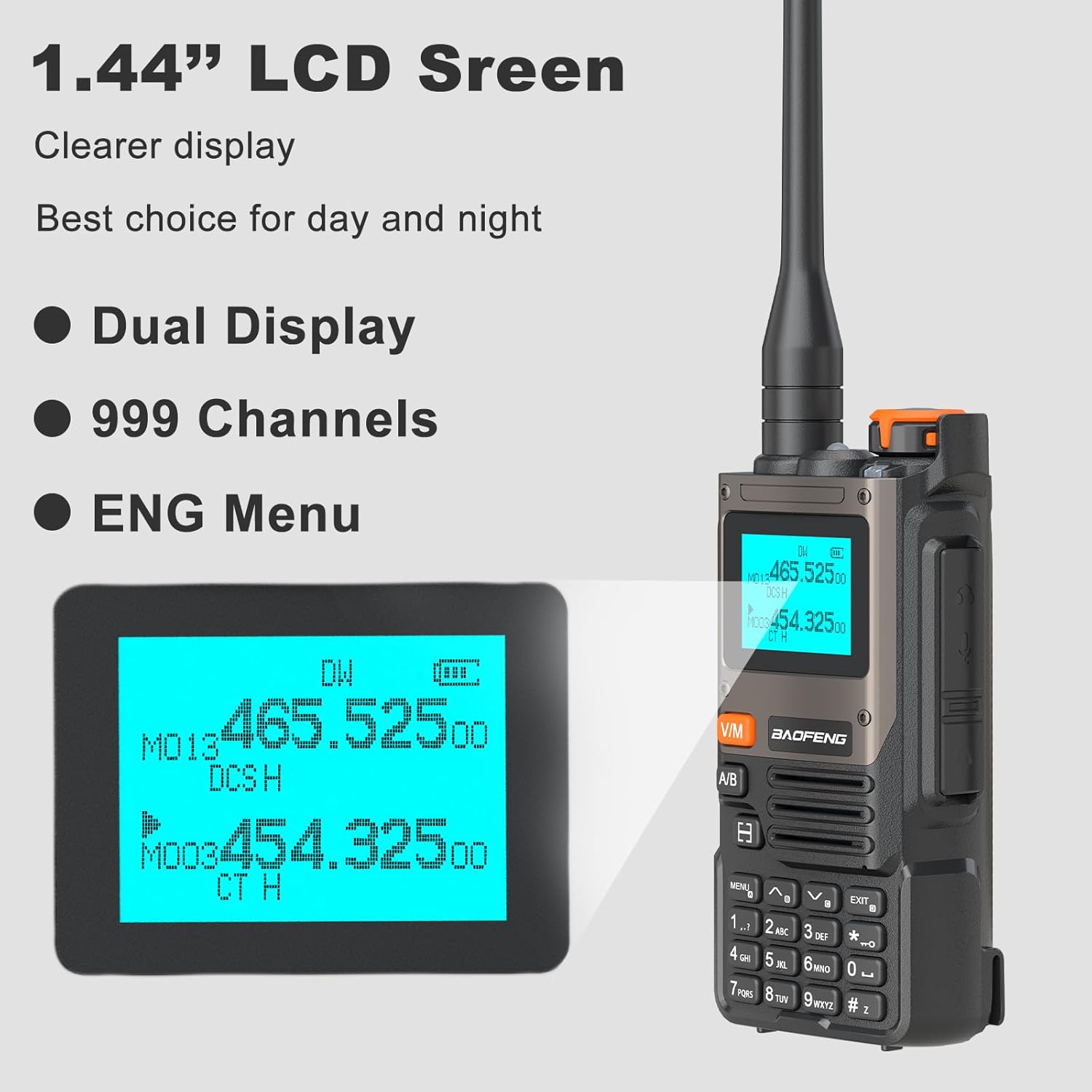
Image: Main Functions. This graphic highlights the primary features of the UV-K61 radio, including 999 channels, frequency copy, VOX function, 2600mAh battery, flashlight, 10 NOAA channels, FM radio, and AM reception.
Aufstellen
1. Einlegen der Batterie
- Richten Sie den Akku an den Rillen auf der Rückseite des Radios aus.
- Schieben Sie die Batterie nach oben, bis sie einrastet.
- Zum Entnehmen drücken Sie den Batterieentriegelungshebel (falls vorhanden) und schieben die Batterie nach unten.
2. Antennenbefestigung
- Schrauben Sie die Antenne im Uhrzeigersinn in den Anschluss oben am Radio, bis sie handfest sitzt. Nicht zu fest anziehen.
3. Laden des Akkus
The UV-K61 offers multiple charging methods:
- Verwendung der Ladestation: Place the radio with the battery installed into the charging dock. Ensure the charging contacts align. The LED indicator on the dock will show charging status.
- Direktes Laden über USB-C: Connect the provided USB-C cable directly to the USB-C port on the side of the radio and to a USB power source (e.g., power bank, laptop, car charger).
The LED indicator on the radio or battery will typically show red during charging and turn green when fully charged.

Image: High Capacity Battery and Charging Indicator. This image shows the 2600mAh battery and the LED indicators for charging status (red for charging, green for charged).

Image: Multiple Charging Options. This image illustrates various ways to charge the UV-K61 radio, including via laptop, USB power adapter, car charger, power bank, and the charging dock.
Bedienungsanleitung
1. Ein-/Ausschalten und Lautstärkeregelung
- Einschalten: Rotate the Volume/Power knob clockwise until you hear a click.
- Ausschalten: Rotate the Volume/Power knob counter-clockwise until you hear a click.
- Lautstärkeregelung: Rotate the Volume/Power knob to increase or decrease the audio level.
2. Channel Selection and Display
The UV-K61 features a 1.44-inch LCD screen with dual display capability and supports 999 channels.
- Use the Up/Down arrow keys or the keypad to navigate and select channels.
- Drücken Sie die V/M Taste zum Umschalten zwischen Frequenzmodus (VFO) und Kanalmodus (MR).
- Der A/B button switches between the upper and lower display lines for active frequency/channel.

Image: LCD Screen Display. This image shows the 1.44-inch LCD screen of the UV-K61, highlighting its clear dual display and channel information.
3. Wireless Frequency Copying (One Key Match Frequency)
Mit dieser Funktion können Sie Frequenzen schnell von einem anderen Funkgerät kopieren.
- Schritt 1: Turn on the radio. Press and hold the SPEISEKARTE button to enter search mode. The screen will display "SEARCH".
- Schritt 2: Press and hold the transmit (PTT) button on the other radio. The UV-K61 will search for and display the frequency and decode information. Press SPEISEKARTE zur Bestätigung.
- Schritt 3: Switch to channel mode (V/M button) to select the desired channel. The screen will show the frequency of the counterpart, allowing for immediate communication.

Image: One Key Match Frequency. This graphic illustrates the three steps for wirelessly copying frequencies from another radio to the UV-K61.
4. NOAA-Wetterkanäle
The UV-K61 includes a built-in NOAA receiver with 10 channels to provide real-time weather alerts.
- Access the NOAA weather channels through the radio's menu or a dedicated function key (refer to the full manual for specific key assignments).
- The radio will scan and deliver weather reports, helping you stay informed about changing weather conditions.

Image: NOAA Weather Alert. This image depicts the UV-K61 radio with a graphic indicating its 10 NOAA weather alert channels, set against a stormy background.
5. VOX-Funktion
The Voice Operated Exchange (VOX) function allows for hands-free transmission. When VOX is enabled, the radio will automatically transmit when it detects your voice.
- Activate VOX through the radio's menu. You can typically adjust the VOX sensitivity level to prevent accidental transmissions.
6. Taschenlampe
The radio includes a built-in LED flashlight for illumination.
- Press the dedicated flashlight button or access it via the menu (refer to the full manual for specific operation).
7. AM/FM-Radio
The UV-K61 can also function as an AM/FM broadcast radio receiver.
- Switch to FM radio mode via the menu or a dedicated button.
- Suchen Sie nach verfügbaren Sendern oder stellen Sie die Frequenz manuell ein.
Wartung
1. Reinigung
- Wischen Sie die Oberfläche des Radios mit einem weichen, fusselfreien Tuch ab.amp Tuch. Verwenden Sie keine scharfen Chemikalien oder Scheuermittel.
- Stellen Sie sicher, dass das Radio vor Gebrauch oder Aufladen trocken ist.
2. Batteriepflege
- Um die Lebensdauer der Batterie zu verlängern, sollte eine häufige vollständige Entladung vermieden werden.
- Bewahren Sie die Batterie an einem kühlen, trockenen Ort auf, wenn sie längere Zeit nicht benutzt wird.
- Setzen Sie den Akku keinen extremen Temperaturen oder direkter Sonneneinstrahlung aus.
3. Speicherung
- Store the radio in a dry environment, away from dust and moisture.
- Remove the battery if storing the radio for a long duration to prevent leakage.
Fehlerbehebung
| Problem | Mögliche Ursache | Lösung |
|---|---|---|
| Das Radio lässt sich nicht einschalten | Die Batterie ist schwach oder nicht richtig eingesetzt. | Laden Sie den Akku auf oder setzen Sie ihn wieder sicher ein. |
| Senden und Empfangen nicht möglich | Falsche Frequenz/falscher Kanal, Antenne nicht angeschlossen oder außerhalb der Reichweite. | Überprüfen Sie die Frequenz-/Kanaleinstellungen. Stellen Sie sicher, dass die Antenne fest angebracht ist. Gehen Sie näher an das andere Funkgerät heran. |
| Schlechte Audioqualität | Niedriger Batteriestand, schwaches Signal oder falsche Rauschsperreneinstellung. | Charge battery. Adjust squelch level. Ensure clear line of sight. |
| Akku wird nicht geladen | Charger cable/dock faulty, or battery not seated correctly. | Check connections. Try a different USB-C cable or power source. Re-seat the battery in the dock. |
Technische Daten
| Besonderheit | Detail |
|---|---|
| Modellnummer | UV-K61 |
| Anzahl der Kanäle | 999 |
| Batteriekapazität | 2600 mAh Lithium-Ionen-Akku (im Lieferumfang enthalten) |
| Ladeart | USB-C, Ladestation |
| Besondere Merkmale | 10 NOAA Weather Alarm, Multi-Band (AM/FM), One Key Match Frequency, VOX Function, Flashlight |
| Maximale Sprechreichweite | 5 Kilometer (ca. 3.1 Meilen) |
| Bandtage | 7.4 Volt (DC) |
| Technische Daten | 1.37"T x 2.16"B x 4.72"H (3.48 x 5.49 x 11.99 cm) |
| Artikelgewicht | 1.59 Pfund (ca. 0.72 kg) |
| Wasserbeständigkeit | Nicht wasserfest |

Image: Product Dimensions. This image provides a visual representation of the BAOFENG UV-K61 radio's dimensions in inches.
Garantieinformationen
The BAOFENG UV-K61 radio comes with a 1 Jahr Garantie Ausschließlich erhältlich über „Shiqun Electronics Co., Ltd“. Bitte bewahren Sie Ihren Kaufbeleg für Garantieansprüche auf.
Bei Fragen oder Problemen mit der Garantie wenden Sie sich bitte direkt an den Verkäufer.
Unterstützung
If you encounter any issues or have questions regarding your BAOFENG UV-K61 radio that are not covered in this manual, please refer to the following:
- Online-Ressourcen: Besuchen Sie die offizielle BAOFENG-Website. website for additional support, FAQs, and firmware updates.
- Verkäufersupport: Contact the seller or retailer from whom you purchased the product for direct assistance.


