Einführung
This manual provides detailed instructions for the setup, operation, and maintenance of your TECWARE Spectre 75% RGB Mechanical Gaming Keyboard. Designed for performance and customization, the Spectre 75 features a compact layout, customizable LCD screen, multi-function knob, gasket mount design, and hot-swappable switches. Please read this manual thoroughly to ensure proper use and to maximize your keyboard's potential.

Image: The TECWARE Spectre 75 mechanical gaming keyboard, showcasing sein kompaktes 75%-Layout und seine lebendige RGB-Hintergrundbeleuchtung.
Aufstellen
Packungsinhalt
- TECWARE Spectre 75 Mechanical Gaming Keyboard
- USB-C-auf-USB-A-Kabel
- 2.4-GHz-Wireless-Dongle
- Werkzeug zum Abziehen von Tastenkappen/Schaltern
- Benutzerhandbuch (dieses Dokument)
Konnektivitätsoptionen
The TECWARE Spectre 75 keyboard offers three modes of connectivity:
- 2.4 GHz Wireless: Für eine stabile drahtlose Verbindung mit geringer Latenz.
- Bluetooth 5.0: For wireless connection to multiple devices.
- USB-C-Kabelanschluss: Für eine direkte, zuverlässige Verbindung und zum Laden.

Image: The keyboard's connectivity options, including the 2.4GHz wireless dongle, USB-C port, and Bluetooth indicator.
Erstverbindung
- Kabelverbindung: Connect the provided USB-C cable to the keyboard's USB-C port and the other end to an available USB port on your computer. The keyboard will be recognized automatically.
- Drahtlose 2.4-GHz-Verbindung:
- Locate the 2.4GHz wireless dongle.
- Stecken Sie den Dongle in einen freien USB-Anschluss Ihres Computers.
- Ensure the keyboard's mode switch (usually on the back or side) is set to 2.4G.
- Die Tastatur sollte sich automatisch verbinden.
- Bluetooth Verbindung:
- Ensure the keyboard's mode switch is set to BT.
- Öffnen Sie auf Ihrem Computer oder Gerät die Bluetooth-Einstellungen.
- Suchen nach new devices and select "TECWARE Spectre 75" (or similar) from the list.
- Befolgen Sie die Anweisungen auf dem Bildschirm, um die Kopplung abzuschließen.
The keyboard is equipped with a 4000mAh battery, providing up to 400 hours of continuous usage on a single charge. Charge the keyboard using the USB-C cable.
Betrieb
Anpassbarer LCD-Bildschirm
The 1.14" TFT-LCD smart screen can display various information and custom content.
- Informationsanzeige: View time, date, battery level, connection mode, and system information (e.g., CPU/GPU usage).
- Benutzerdefinierte Inhalte: Upload your own GIFs or static images for a personalized display. This feature is managed via the TECWARE software.

Bild: Examples of content displayed on the customizable LCD screen, including animated GIFs, time and date, and system performance metrics.
Multifunktionsknopf
The dedicated knob provides dual functionality for media control and LCD screen navigation.
- Umschalten der Modi: Halten Sie die FN key and rotate the knob for 3 seconds to switch between LCD Mode and Volume Mode.
- LCD-Modus:
- Rotate Left/Right: Navigate through the LCD menu.
- Press Down: Confirm selection.
- Lautstärkemodus:
- Turn: Adjust system volume.
- Press: Mute/Unmute audio.

Image: A user's hand adjusting the multi-function knob, which controls volume and LCD screen navigation.
RGB-Beleuchtung
The keyboard features 16.8 million color RGB illumination with per-key customization and an RGB LED side underglow.
- Preset Lighting Modes: Access 18 preset lighting modes directly from the keyboard or customize further using the TECWARE software.
- RGB-Beleuchtung mit 3 Zonen: Lighting can be customized for keys, underglow, and the volume wheel.

Image: The TECWARE Spectre 75 keyboard displaying its extensive RGB lighting capabilities, including per-key customization and underglow effects.
Softwareunterstützung
Download the official TECWARE software from the TECWARE website to unlock advanced customization options:
- Makroaufzeichnung: Komplexe Makros erstellen und Tasten zuweisen.
- Macro Assignment: Easily assign recorded macros to any key.
- Benutzerdefinierter Benutzer Profiles: Save and switch between different key layouts and lighting configurations.
- LCD Screen Customization: Upload GIFs and images to the LCD screen.
- Erweiterte RGB-Steuerung: Fine-tune lighting effects and colors.

Image: The TECWARE Spectre 75 keyboard, highlighting its compatibility with software for advanced customization features like macros and user profiles.
Wartung
Reinigung der Tastatur
- Mit einem weichen, fusselfreien Tuch leichtampAnschließend mit Wasser oder einer milden Reinigungslösung abwischen, um die Tastenkappen und das Gehäuse zu reinigen.
- Für Staub und Schmutz zwischen den Tastenkappen verwenden Sie Druckluft.
- Vermeiden Sie es, Flüssigkeiten direkt auf die Tastatur zu sprühen.
- Verwenden Sie keine aggressiven Chemikalien oder scheuernden Materialien.
Hot-Swap-fähige Schalter
The TECWARE Spectre 75 features 5-pin universal hot-swappable sockets, allowing for easy replacement of switches without soldering.
- Schalter entfernen: Use the provided switch puller tool. Gently grip the switch from the top and bottom, then pull upwards with even pressure until the switch detaches from the PCB.
- Installation von Schaltern: Align the pins of the new switch with the holes on the PCB. Press down firmly until the switch clicks into place. Ensure the pins are not bent before insertion.
- Kompatibilität: South-facing LEDs ensure compatibility with most aftermarket switches.
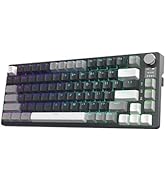
Image: The TECWARE Spectre 75 keyboard with keycaps and switches removed, showing the hot-swappable sockets and the tools required for switch replacement.
Fehlerbehebung
Tastatur reagiert nicht
- Verdrahtet: Stellen Sie sicher, dass das USB-C-Kabel fest mit der Tastatur und dem Computer verbunden ist. Versuchen Sie es mit einem anderen USB-Anschluss oder Kabel.
- 2.4 GHz Wireless:
- Verify the dongle is properly inserted into a USB port.
- Check that the keyboard's mode switch is set to 2.4G.
- Stellen Sie sicher, dass der Akku der Tastatur geladen ist.
- Bluetooth:
- Confirm the keyboard's mode switch is set to BT.
- Check your device's Bluetooth settings to ensure the keyboard is paired and connected.
- Try unpairing and re-pairing the keyboard.
- Stellen Sie sicher, dass der Akku der Tastatur geladen ist.
Probleme mit der RGB-Beleuchtung
- If RGB lighting is not working or displaying incorrectly, check the TECWARE software for lighting settings.
- Stellen Sie sicher, dass die Firmware der Tastatur auf dem neuesten Stand ist.
LCD-Bildschirm wird nicht angezeigt
- Stellen Sie sicher, dass die Tastatur eingeschaltet und angeschlossen ist.
- Check LCD settings within the TECWARE software.
- Try resetting the keyboard (refer to software or manufacturer web(siehe Website für genaue Anweisungen).
Tasten werden nicht registriert oder es werden doppelte Eingaben gemacht
- Dies könnte auf einen defekten Schalter hindeuten. Nutzen Sie die Hot-Swap-Funktion, um den problematischen Schalter auszutauschen.
- Stellen Sie sicher, dass der Schalter vollständig in seiner Fassung eingerastet ist.
Technische Daten
| Besonderheit | Detail |
|---|---|
| Technische Daten | 13.04 x 5.74 x 1.51 Zoll |
| Artikelgewicht | 2.03 Pfund |
| Hersteller | Tecware |
| Batterien | 1 9V-Batterie (im Lieferumfang enthalten) |
| Marke | TECWARE |
| Kompatible Geräte | PC, Mac |
| Konnektivitätstechnologie | Bluetooth (BT 5.0), USB-C, 2.4 GHz Wireless |
| Tastaturbeschreibung | Mechanische RGB-Gaming-Tastatur |
| Empfohlene Verwendung | Spiele |
| Besonderheit | Hintergrundbeleuchtetes, anpassbares LCD-Display, Multifunktionsknopf, Dichtungsmontage, im laufenden Betrieb austauschbare Buchsen |
| Farbe | Black, Candy Red Switch (Linear) |
| Stil | Spectre 75 |
| Thema | Regenbogen |
| Stromquelle | Batteriebetrieben |
Switch Specifications (Candy Red Linear)
| Merkmal | Wert |
|---|---|
| Betätigungskraft | 45 ± 5 gf |
| Bottom Out Force | 48 ± 5 gf |
| Gesamtreisedistanz | 3.5 ± 0.3mm |
| Typ | Linear |
Hinweis: Spezifikationen können ohne vorherige Ankündigung geändert werden.
Garantieinformationen
TECWARE products typically come with a limited manufacturer's warranty. For specific warranty terms, duration, and conditions applicable to your region and product, please refer to the warranty card included with your product or visit the official TECWARE webWebsite.
Bewahren Sie Ihren Kaufbeleg für Garantieansprüche auf.
Unterstützung
For technical assistance, driver downloads, firmware updates, or further inquiries, please visit the official TECWARE support page:
You may also contact TECWARE customer service through the contact information provided on their webWebsite.


