1. Einleitung
Thank you for choosing the MOVECRAB 3/8" Digital Torque Wrench. This precision tool is designed to provide accurate torque measurements for various applications, ensuring proper fastening and preventing damage from overtightening or undertightening. This manual provides essential information for the safe and effective use of your digital torque wrench.

Figure 1: MOVECRAB 3/8" Digital Torque Wrench with its protective case.
2. Sicherheitshinweise
To ensure safe operation and prolong the life of your tool, please observe the following safety guidelines:
- Do not overload the wrench: Exceeding 120% of the maximum torque value (60 N.m or 44 Ft.lb) may damage the wrench or cause it to lose accuracy.
- Do not use as a striking tool: This wrench is not designed for impact applications.
- Umweltbedingungen: Avoid placing the wrench near magnetic objects or in areas with high temperature, high humidity, direct sunlight, excessive dust, or sand.
- Moisture exposure: If the wrench accidentally gets wet, wipe it immediately with a dry towel. Saltwater can cause significant damage.
- Reinigung: Do not use organic solvents such as alcohol or paint thinner to clean the wrench. Use a soft, dry cloth.
3. Produktüberschreitungview
3.1 Komponenten
The MOVECRAB Digital Torque Wrench features an ergonomic design with an LED display and intuitive controls.

Figure 2: LED Display and Function Keys
- LED-Anzeige: Shows real-time torque values, selected mode, and units.
- Funktionstasten: Buttons for power, unit switching, mode selection, and value adjustment.
- Buzzer & Indicator Lights: Provide audible and visual alerts when approaching or reaching the target torque.
- Two-way Ratchet Head: Allows for both clockwise and counter-clockwise operation.
- Ergonomic Soft Grip Handle: Designed for comfort and secure handling.
- USB-C-Anschluss: For data transfer only (not for charging).
3.2 Dimensions and Torque Range

Figure 3: Product Dimensions and Torque Range
- Laufwerksgröße: 3/8"
- Drehmomentbereich: 3-60 N.m (2-44 Ft.lb)
- Länge: Ungefähr 11.61 Zoll (295 mm)
4. Einrichtung
4.1 Einlegen der Batterie
The wrench requires two AAA batteries (not included).
- Open the back case: Use the included small screwdriver to remove the two screws on the back cover of the wrench.
- Batterien einlegen: Place two AAA batteries into the compartment, ensuring correct polarity.
- Den Fall schließen: Bringen Sie die Rückabdeckung wieder an und befestigen Sie sie mit den Schrauben.

Figure 4: Opening the back case

Abbildung 5: Einlegen der AAA-Batterien
4.2 Einschalten
- Press the 'C' button: Press the 'C' button on the control panel to power on the wrench. The LED display will illuminate.

Figure 6: Powering on the wrench
5. Bedienung
5.1 Einheitenumschaltung
The wrench supports four units of measure: N.m, ft.lb, in.lb, and kgf.cm.
- Press 'U' button: Briefly press the 'U' button to cycle through the available units on the LED display.
Video 1: Demonstrating how to switch between different torque measurement units (N.m, ft.lb, in.lb, kgf.cm) on the MOVECRAB Digital Torque Wrench.
5.2 Mode Selection (Track and Peak Modes)
The wrench offers two operational modes: Track and Peak.
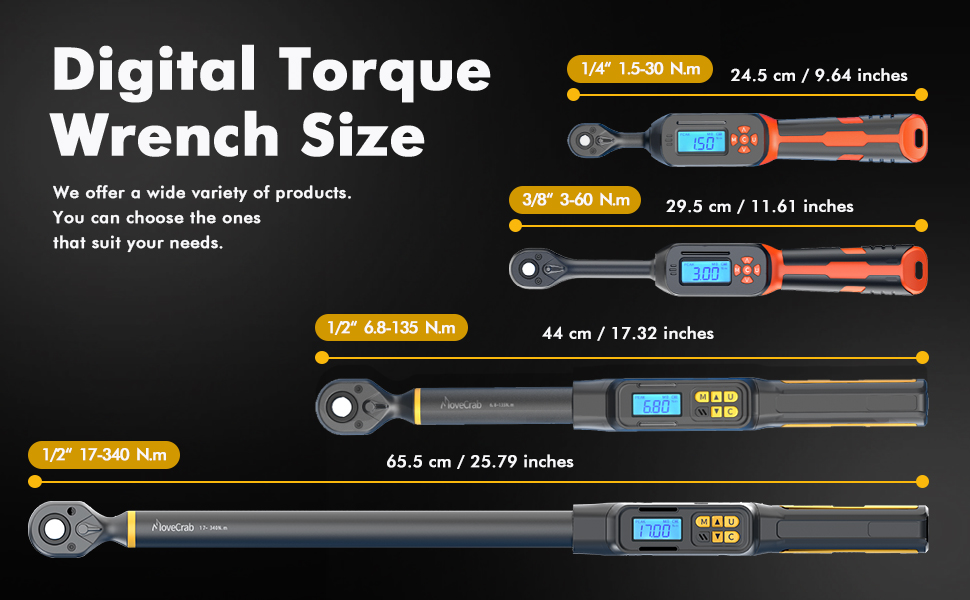
Figure 7: Multi-functional introduction (units, accuracy)
- Track-Modus: In this mode, the screen displays the real-time torque value as it is being applied.
- Spitzenmodus: After applying torque, the screen will display the maximum torque value achieved during the force application process. This mode can store up to 500 sets of data for later review.
So wechseln Sie zwischen den Modi:
- From the shutdown state, press 'C' to power on.
- Long press 'U' to enter the mode switching interface.
- Short press the 'Up' or 'Down' arrow buttons to select between TRACK or PEAK mode.
- Press 'U' to confirm your selection.
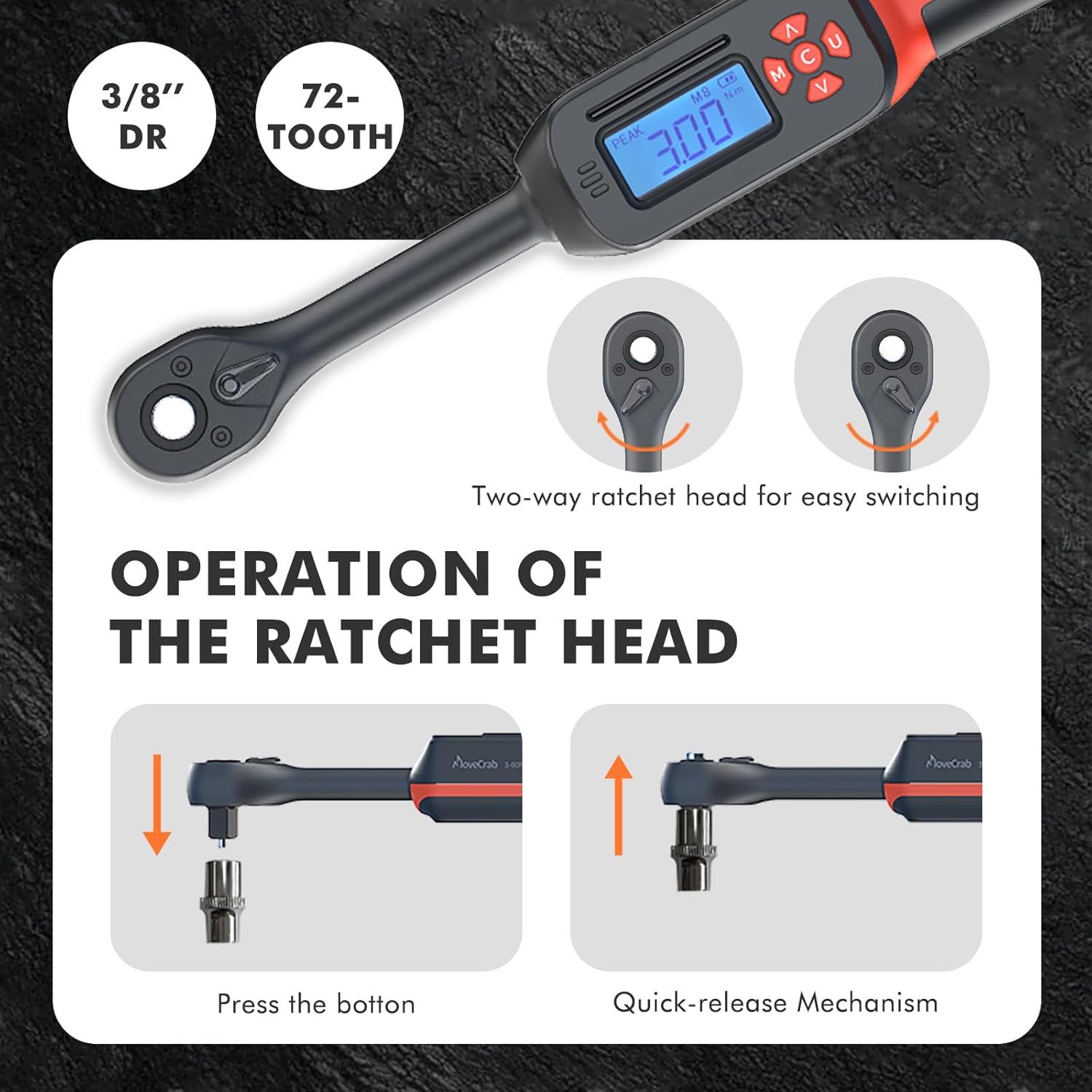
Figure 8: Setting Peak Mode
5.3 Setting Target Torque and Applying Force
- Adjust Torque Value: Use the 'Up' and 'Down' arrow buttons to set your desired target torque value.
- Drehmoment anwenden: Begin applying force to the fastener. The LED display will show the current torque.
- Erinnerungsfunktion: As you approach the preset torque value, the wrench will emit beeps and the LED indicator lights will flash. This double reminder helps prevent overtightening. The clockwise accuracy is ±2%.
5.4 Preset Values
The digital torque wrench allows you to store up to 10 sets of preset torque values. This feature is useful for tasks requiring repeated application of specific torque settings, allowing for quick switching between commonly used values.
Video 2: Illustrating the process of selecting and utilizing preset torque values on the MOVECRAB Digital Torque Wrench.
5.5 Ratchet Head Operation
The wrench features a two-way ratchet head for versatility.

Figure 9: Ratchet Head Operation
- Richtungsanpassung: The ratchet head can be adjusted for clockwise or counter-clockwise rotation using the reversing paddle.
- Quick-release Mechanism: Press the button on the ratchet head to easily attach or detach sockets.
6. Wartung
6.1 Reinigung
Keep the wrench clean and dry. Wipe off any moisture or debris immediately with a soft, dry cloth. Do not use harsh chemicals or organic solvents for cleaning.
6.2 Speicherung
Store the digital torque wrench in its provided protective case when not in use. This helps to prevent damage and maintain its accuracy. Ensure the storage area is dry and free from extreme temperatures or magnetic fields.

Figure 10: Wrench in use (bicycle)
7. Fehlerbehebung
- Wrench lässt sich nicht einschalten: Prüfen Sie, ob die AAA-Batterien richtig eingelegt sind und ausreichend geladen sind. Tauschen Sie sie gegebenenfalls aus.
- Ungenaue Messwerte: Ensure the wrench is not overloaded beyond its specified torque range. Avoid using it as a striking tool. Keep it away from strong magnetic fields.
- Anzeigeprobleme: Wenn das Display dunkel ist oder flackert, tauschen Sie die Batterien aus.
- USB-C-Anschluss: Remember the USB-C port is for data transfer only. It does not charge the device.
8. Spezifikationen
| Besonderheit | Spezifikation |
|---|---|
| Marke | MOVECRAB |
| Modellnummer | 3/8" 3-60N.m/2-44lb.ft |
| Laufwerksgröße | 3/8" |
| Drehmomentbereich | 3-60 N.m (2-44 Ft.lb) |
| Drehmomentgenauigkeit | ±2% (im Uhrzeigersinn) |
| Maßeinheiten | N.m, ft.lb, in.lb, kgf.cm |
| Modi | Track, Peak, Preset (10 sets) |
| Datenspeicherung | 500 sets (Peak Mode) |
| Material | Legierter Stahl |
| Artikellänge | 11.61 Zoll |
| Artikelgewicht | 0.95 Kilogramm (2.09 Pfund) |
| Stromquelle | 2 x AAA-Batterien (nicht enthalten) |
| USB-Anschluss | USB-C (Data Transfer Only) |
9. Garantie und Support
For warranty information, technical support, or service inquiries, please refer to the product packaging or contact MOVECRAB customer service directly. Keep your purchase receipt for warranty claims.


