Einführung
Thank you for choosing the Yaheetech Kitchen Island with Storage. This manual provides detailed instructions for the assembly, operation, and maintenance of your new kitchen island. Please read this manual thoroughly before assembly and use to ensure proper function and safety. Keep this manual for future reference.
This versatile kitchen island features a spacious countertop, two storage shelves, integrated power outlets, and convenient holders for mugs, wine glasses, and S-shaped hooks. It is designed to enhance your kitchen's functionality and organization.
Sicherheitshinweise
- Befolgen Sie die Montageanleitung stets sorgfältig.
- Do not overload the shelves or countertop beyond the specified weight capacities.
- Stellen Sie vor der Verwendung sicher, dass alle Verbindungen sicher sind.
- Halten Sie Kinder und Haustiere während der Montage fern.
- Use the power outlets only for small kitchen appliances within their rated capacity. Always turn off the OCP switch after use.
- If using the wheels, ensure the lockable casters are engaged when the island needs to remain stationary.
Ersatzteilliste
Prüfen Sie vor Beginn der Montage, ob alle unten aufgeführten Teile vorhanden und unbeschädigt sind. Sollten Teile fehlen oder beschädigt sein, wenden Sie sich bitte an den Yaheetech-Kundendienst.
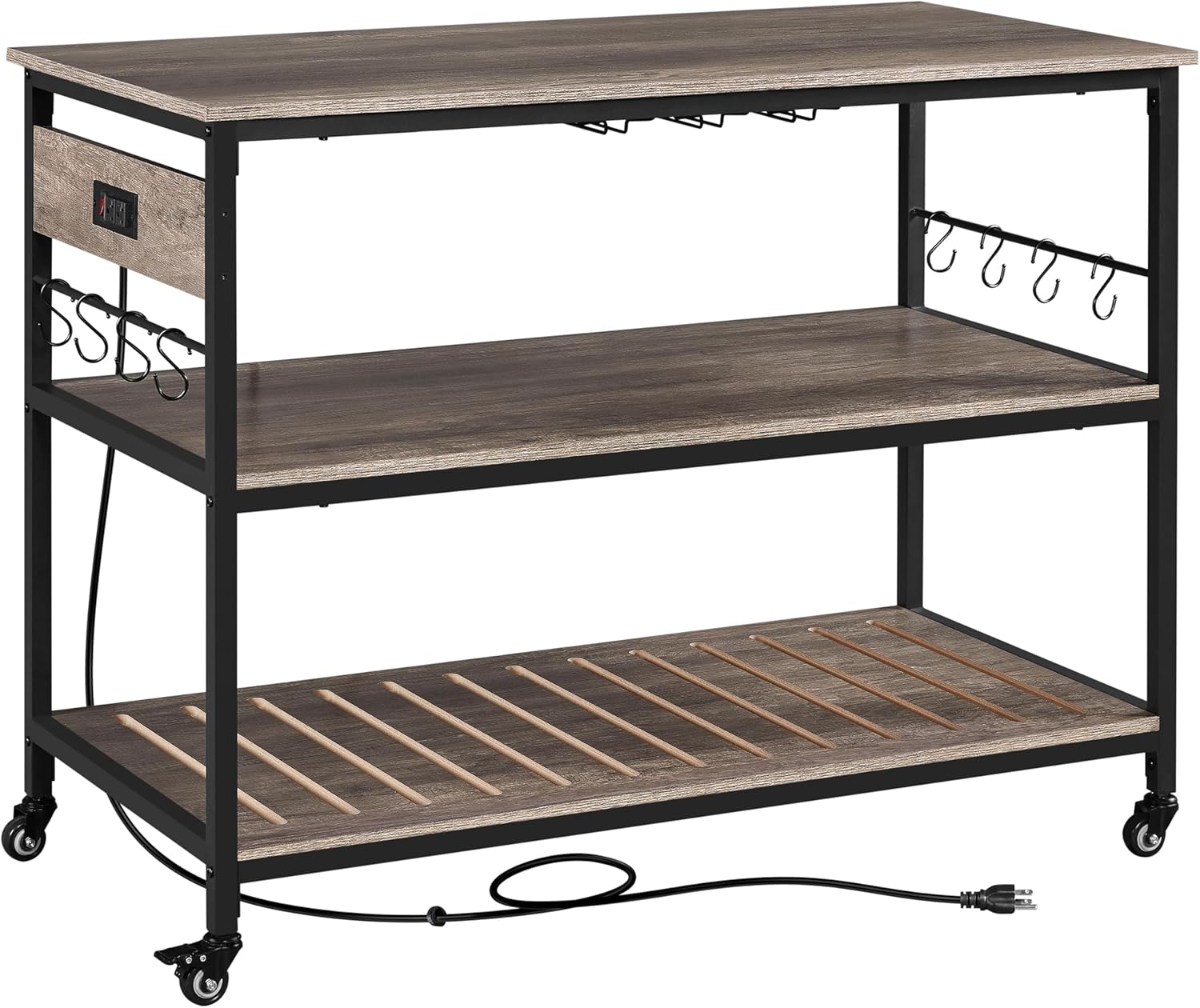
Abbildung 1: Überview of the Yaheetech Kitchen Island with its main components, including the countertop, shelves, frame, and power cord.
Komponenten:
- Countertop (1)
- Mittleres Regal (1)
- Unteres Regal (1)
- Seitenrahmen (2)
- Crossbars (various sizes)
- Power Outlet Unit with OCP Switch (1)
- Wine Glass Holders (3)
- Mug Holders (3)
- S-förmige Haken (8)
- Casters (4, 2 with locks) OR Adjustable Footpads (4)
- Montagezubehör (Schrauben, Bolzen, Inbusschlüssel)
Einrichtung und Montage
Follow these steps carefully to assemble your kitchen island. It is recommended to assemble the unit on a soft, clean surface to prevent scratches.
- Teile auspacken und identifizieren: Carefully remove all components from the packaging. Lay them out and compare them with the Parts List to ensure everything is present.
- Attach Casters or Footpads: Decide whether you want a mobile island (casters) or a stationary one (footpads).
- For Mobility: Screw the four casters into the designated holes at the bottom of the side frames. Ensure the two lockable casters are on the same side for easier locking.
- For Stability: Screw the four adjustable footpads into the designated holes at the bottom of the side frames.

Figure 2: Detail of the 360-degree rotating caster wheel and its locking mechanism. Two of the four casters are lockable for stability.
- Montieren Sie den Rahmen: Connect the side frames using the crossbars. Secure all connections with the provided hardware, but do not fully tighten screws until the entire frame is assembled.
- Regale installieren: Slide the middle and bottom shelves into their respective positions within the frame. Ensure they are properly aligned and secured.
- Attach Power Outlet Unit: Mount the power outlet unit to the designated area on the side frame, typically near the top. Ensure it is firmly attached.
- Platzieren Sie die Arbeitsplatte: Carefully place the countertop onto the top of the assembled frame. Secure it using the provided hardware.
- Install Holders and Hooks: Attach the wine glass holders, mug holders, and S-shaped hooks to their designated locations on the island.
- Abschließendes Anziehen: Once all components are in place, go back and fully tighten all screws and bolts to ensure the island is stable and secure.

Figure 3: Dimensional diagram of the kitchen island, illustrating its overall length, width, height, and shelf clearances.
Bedienungsanleitung
Verwenden der Steckdosen:
The kitchen island is equipped with two power outlets and an Over Current Protection (OCP) switch for your convenience and safety.
- Plug the island's power cord into a standard wall outlet.
- To activate the outlets, ensure the OCP switch is in the "ON" position.
- Plug your small kitchen appliances (e.g., microwave, coffee maker, toaster) into the integrated outlets.
- After using the appliances, always switch the OCP to the "OFF" position to ensure safety and conserve energy.

Abbildung 4: Ausführlich view of the two power outlets and the red Over Current Protection (OCP) switch, designed for safe appliance use.
Nutzung der Speicherfunktionen:
- Arbeitsplatte: Use the spacious 47.5" L x 24" W countertop for food preparation, serving, or placing larger appliances.
- Regale: Die beiden unteren Regalböden bieten ample space for kitchen essentials, cookware, or decorative items.
- Weinglashalter: Hang your wine glasses upside down on the integrated holders for easy access and dust protection.
- Mug Holders: Utilize the mug holders to keep your coffee mugs organized and within reach.
- S-shaped Hooks: Attach the S-shaped hooks to the side bars to hang utensils, towels, or other small items.

Figure 5: The kitchen island fully utilized, demonstrating its large storage capacity for appliances, bottles, and hanging items.
Mobilität und Stabilität:
- If equipped with casters, the island can be easily moved around your kitchen or living space.
- To secure the island in place, push down the levers on the two lockable casters until they click into the "ON" position.
- To move the island, release the locks by pushing the levers to the "OFF" position.
- If using footpads, adjust them as needed to ensure the island is level and stable on uneven floors.
Wartung
Proper care and maintenance will extend the life of your Yaheetech Kitchen Island.
- Reinigung: Oberflächen mit Werbung abwischenamp Bei hartnäckigen Flecken eine milde Seifenlauge verwenden und sofort trocknen. Scharfe Chemikalien oder Scheuermittel vermeiden.
- Verschüttungen: Clean up spills immediately to prevent damage to the wood finish.
- Hardware: Überprüfen Sie regelmäßig alle Schrauben und Bolzen, um sicherzustellen, dass sie fest sitzen. Ziehen Sie sie gegebenenfalls nach.
- Netzkabel: Überprüfen Sie das Netzkabel regelmäßig auf Beschädigungen. Bei Beschädigung die Verwendung einstellen und den Kundendienst kontaktieren.
Fehlerbehebung
Sollten Sie Probleme mit Ihrer Kücheninsel haben, beachten Sie bitte die folgenden häufigen Probleme und Lösungen:
| Problem | Mögliche Ursache | Lösung |
|---|---|---|
| Die Insel ist wackelig/instabil. | Loose hardware; uneven floor; casters not locked. | Ensure all screws and bolts are tightened. If using footpads, adjust them to level the island. If using casters, ensure both lockable casters are engaged. |
| Die Steckdosen funktionieren nicht. | OCP switch is off; island not plugged in; power outage. | Ensure the OCP switch is in the "ON" position. Verify the island's power cord is securely plugged into a working wall outlet. Check your home's circuit breaker. |
| Difficulty moving the island. | Die Rollen sind blockiert; Schmutz befindet sich in den Rädern. | Ensure both lockable casters are in the "OFF" position. Check wheels for any obstructions and clear them. |
If the problem persists after trying these solutions, please contact Yaheetech customer support for further assistance.
Technische Daten
| Besonderheit | Detail |
|---|---|
| Modell | B0DHXD13FH |
| Farbe | Taupe Wood Countertop |
| Materialien | MDF, Metall |
| Assembled Dimensions (on wheels) | 47.5 Zoll L × 24 Zoll B × 36.5 Zoll H |
| Abmessungen der Arbeitsplatte | 47.5 Zoll L × 24 Zoll B |
| Maximum Weight Capacity (Countertop) | 88 kg |
| Maximale Tragfähigkeit (pro Regalboden) | 88 kg |
| Maximum Weight Capacity (Each Hook) | 11 kg |
| Steckdosen | 2 AC Outlets with OCP Switch |
| Länge des Netzkabels | 6.5 Fuß |
| Montage erforderlich | Ja |
Garantie und Support
Yaheetech products are designed for quality and durability. For information regarding warranty coverage, please refer to the warranty card included with your purchase or visit the official Yaheetech webWebsite.
For technical support, missing parts, or any questions regarding your Yaheetech Kitchen Island, please contact our customer service team:
- WebWebsite: www.yaheetech.com
- E-Mail: Siehe webWebsite für Kontakt-E-Mail.
- Telefon: Siehe webWebsite für Kontakttelefonnummer.
Please have your model number (B0DHXD13FH) and purchase date ready when contacting support.


