Einführung
Vielen Dank, dass Sie sich für O entschieden haben.urlife Mini Drone. This drone is equipped with dual 4K cameras, offering high-quality photo and video capture, and can be controlled via a smartphone app for real-time viewing. Designed for ease of use, it features one-button takeoff/landing, altitude hold, headless mode, and gesture control, making it suitable for beginners and enthusiasts alike. Its compact, foldable design ensures portability for all your adventures. Please read this manual carefully before operation to ensure safe and optimal performance.
Sicherheitshinweise
Sicherheit hat beim Betrieb Ihrer Drohne stets oberste Priorität. Die Nichtbeachtung dieser Richtlinien kann zu Verletzungen, Sachschäden oder rechtlichen Problemen führen.
- Lesen Sie das Handbuch: Fully understand all instructions and warnings before first flight.
- Offener Raum: Always fly in open, unobstructed areas, away from people, animals, buildings, and power lines. Avoid flying in strong winds.
- Sichtlinie: Halten Sie jederzeit Sichtkontakt zur Drohne.
- Batteriesicherheit: Use only original batteries and charging cables. Do not overcharge or short-circuit batteries. Discontinue use if batteries are damaged or swollen.
- Propellersicherheit: Halten Sie Finger, Haare und lose Kleidung von den rotierenden Propellern fern. Schalten Sie die Drohne immer aus, bevor Sie die Propeller berühren.
- Altersbeschränkung: Dieses Produkt wird für Benutzer ab 14 Jahren empfohlen.
- Einhaltung gesetzlicher Vorschriften: Be aware of and comply with local laws and regulations regarding drone operation.
Packungsinhalt
Überprüfen Sie, ob alle Artikel in Ihrem Paket vorhanden sind:

Image: Contents of the Ourlife Mini Drone package, showing the drone, remote control, two rechargeable batteries, a screwdriver, four protective frames, four main propellers, a USB charging cable, and an instruction manual.
- Ourlife Mini Drone x 1
- Fernbedienung x 1
- Rechargeable Drone Battery x 2
- Schraubendreher x 1
- Schutzrahmen x 4
- Main Propeller x 4 (spare)
- USB-Ladekabel x 1
- Bedienungsanleitung x 1
Note: The remote control requires 3 AAA batteries, which are not included.
Produkt überview
Familiarize yourself with the drone and remote control components.

Bild: Das Ourlife Mini Drone in its unfolded state, alongside its remote control, two drone batteries, and the drone in its folded, compact form.
Drohnenkomponenten
- Klappbare Arme: Für kompakte Aufbewahrung und einfachen Transport.
- Propeller: Vier Hauptpropeller für den Flug.
- Doppelkameras: Front 4K camera (120° adjustable) and bottom optical flow lens for stable flight and diverse shooting angles.
- Batteriefach: Befindet sich am Heck der Drohne.
- LED-Leuchten: Drohnenstatus und -ausrichtung anzeigen.

Bild: Nahaufnahme view des Ourlife Mini Drone's dual camera system, highlighting the adjustable front camera and the lower lens for stable flight. The front camera can be adjusted by 120 degrees.
Layout der Fernbedienung
- Linker Joystick: Steuert die Höhe (aufwärts/abwärts) und die Drehung (links/rechts).
- Rechter Joystick: Steuert Vorwärts-/Rückwärts- und Links-/Rechtsbewegungen.
- Ein-Tasten-Start-/Landeknopf: Leitet den automatischen Start oder die automatische Landung ein.
- Schaltfläche für den Headless-Modus: Aktiviert/deaktiviert den Headless-Modus.
- Geschwindigkeitsschaltertaste: Toggles between different flight speeds (low, medium, high).
- 360°-Klappknopf: Führt einen 360-Grad-Spiegel aus.
- Telefonhalter: Zum Befestigen Ihres Smartphones an view FPV-Feed.
Aufstellen
1. Aufladen des Drohnenakkus
- Schließen Sie das USB-Ladekabel an den Drohnenakku an.
- Stecken Sie das USB-Ende in einen 5V/1A USB-Adapter (nicht im Lieferumfang enthalten) oder in einen USB-Anschluss Ihres Computers.
- The indicator light on the cable will show charging status. It will turn off or change color when fully charged.
2. Einbau des Drohnenakkus
- Stellen Sie sicher, dass die Drohne ausgeschaltet ist.
- Insert the charged battery into the battery compartment at the rear of the drone until it clicks into place.
3. Einlegen der Batterien in die Fernbedienung
- Öffnen Sie das Batteriefach auf der Rückseite der Fernbedienung.
- Legen Sie 3 AAA-Batterien (nicht im Lieferumfang enthalten) entsprechend den Polaritätsmarkierungen ein.
- Schließen Sie den Batteriefachdeckel fest.
4. Anbringen der Propellerschutzvorrichtungen
- Carefully attach the four protective frames to each motor arm of the drone.
- Ensure they are securely fastened to prevent detachment during flight.
5. App Installation (KY UFO)
- Scan the QR code provided in the manual or search for "KY UFO" in your smartphone's app store (App Store for iOS, Google Play for Android).
- Laden Sie die Anwendung herunter und installieren Sie sie.
- Turn on the drone, then go to your phone's Wi-Fi settings and connect to the drone's Wi-Fi network (usually named "KY-UFO-XXXXXX").
- Open the KY UFO app to access the real-time FPV feed and advanced controls.
Bedienungsanleitung
1. Koppeln der Drohne und der Fernbedienung
- Stellen Sie die Drohne auf eine ebene Fläche.
- Schalten Sie den Netzschalter der Drohne ein. Die Kontrollleuchten der Drohne blinken.
- Schalten Sie die Fernbedienung ein.
- Push the left joystick all the way up, then pull it all the way down. The drone's lights will stop flashing and remain solid, indicating successful pairing.
2. Grundlegende Flugsteuerung
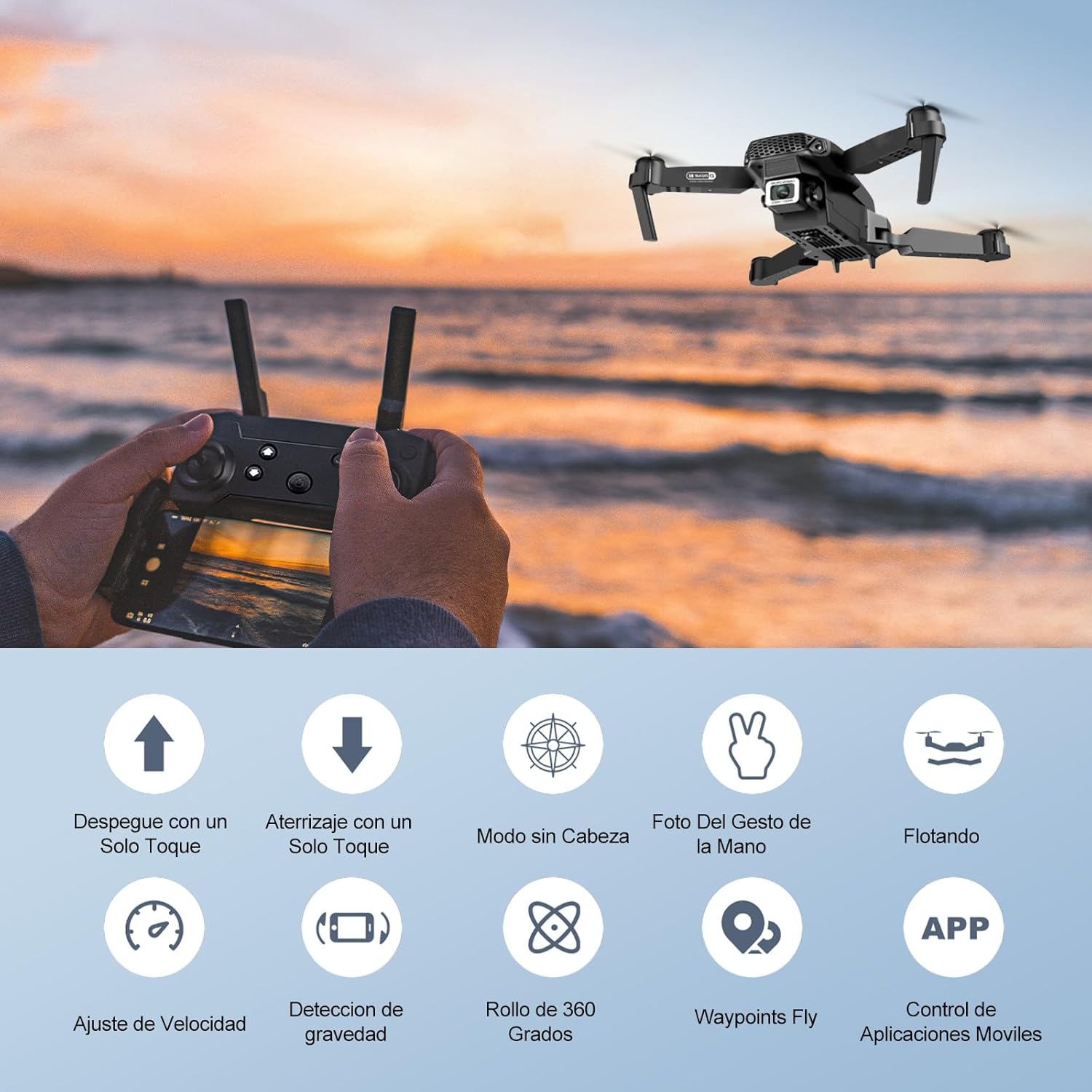
Image: Icons representing various flight features: One-touch takeoff, One-touch landing, Headless Mode, Hand Gesture Photo, Floating (Altitude Hold), Speed Adjustment, Gravity Detection, 360 Degree Roll, Waypoints Fly, and APP Control.
- Ein-Tasten-Start: Drücken Sie die Ein-Tasten-Start/Landung button. The drone will automatically ascend and hover at a certain altitude.
- Landung mit nur einer Taste: Drücken Sie die Ein-Tasten-Start/Landung button again. The drone will automatically descend and land.
- Höhenhaltung: Die Drohne hält ihre aktuelle Flughöhe automatisch bei und ermöglicht so ein stabiles Schweben.
- Linker Joystick (Gas/Gierachse):
- Drücken nach oben/unten: Höhe erhöhen/verringern.
- Push left/right: Rotate drone left/right.
- Right Joystick (Forward/Backward/Sideways):
- Push up/down: Fly forward/backward.
- Push left/right: Fly left/right (strafe).

Bild: Das Ourlife Mini Drone taking off or landing with a single button press, illustrating the ease of use for beginners.
3. Erweiterte Flugfunktionen
- Headless-Modus: Drücken Sie die Headless-Modus button. In this mode, the drone's orientation is relative to the pilot, regardless of the drone's actual front. This simplifies control, especially for beginners.
- 360°-Flip: Fly the drone to a height of at least 2 meters. Press the 360 ° Flip button, then push the right joystick in any direction to perform a flip in that direction.
- Gesture Control (Photos/Videos): With the KY UFO app open, make specific hand gestures in front of the drone's camera to trigger photo or video recording.
- "V" Gesture: Triggers photo capture.
- Handflächengeste: Triggers video recording.
- Wegpunktflug: In the KY UFO app, draw a desired flight path on your smartphone screen. The drone will automatically follow this path.
- Geschwindigkeitsanpassung: Drücken Sie die Geschwindigkeitsschalter button to cycle through low, medium, and high-speed modes. Adjust according to your skill level and environmental conditions.
- FPV-Echtzeitübertragung: Connect your smartphone to the drone's Wi-Fi. Open the KY UFO app to view Live-Videoübertragung von der Drohnenkamera auf Ihren Handybildschirm.
- Schwerkraftinduktion: In the KY UFO app, activate gravity induction mode. You can then control the drone's movement by tilting your smartphone.

Bild: Das Ourlife Mini Drone performing a 360-degree flip in the air and demonstrating the Waypoints Fly feature, where the drone follows a pre-drawn path.

Image: Demonstrates 1080P FPV Real-Time Transmission, showing a live view from the drone. Also illustrates gesture control for taking photos (V-sign) and recording videos (palm gesture), and the 120-degree adjustable camera angle.
Wartung
- Reinigung: Reinigen Sie Drohne und Fernbedienung mit einem weichen, trockenen Tuch. Verwenden Sie keine scharfen Chemikalien oder Lösungsmittel.
- Propelleraustausch: If propellers are damaged, replace them with spare ones provided. Ensure correct propeller (A or B) is installed on the corresponding motor.
- Batteriepflege: Bewahren Sie Batterien an einem kühlen, trockenen Ort auf. Lagern Sie weder vollständig geladene noch vollständig entladene Batterien über längere Zeit. Laden Sie sie für die Langzeitlagerung auf etwa 50 % auf.
- Lagerung: Bewahren Sie die Drohne und ihr Zubehör bei Nichtgebrauch an einem sicheren, trockenen Ort, fern von direkter Sonneneinstrahlung und extremen Temperaturen auf.
Fehlerbehebung
| Problem | Mögliche Ursache | Lösung |
|---|---|---|
| Die Drohne reagiert nicht auf die Fernbedienung. | Not paired; low battery (drone/remote); interference. | Re-pair drone and remote. Charge batteries. Move to an area with less interference. |
| Die Drohne driftet während des Fluges ab. | Nicht kalibriert; unebene Oberfläche beim Start; Wind. | Calibrate the gyroscope (refer to app instructions). Take off from a flat surface. Avoid flying in windy conditions. |
| Camera feed is not showing in app. | Keine Verbindung zum Drohnen-WLAN; Problem mit der App. | Ensure phone is connected to the drone's Wi-Fi network. Restart the app and drone. |
| Kurze Flugzeit. | Batterie nicht vollständig geladen; alte Batterie. | Stellen Sie sicher, dass der Akku vor dem Flug vollständig geladen ist. Erwägen Sie, alte Akkus auszutauschen. |
| Drohnen stürzen leicht ab. | Lack of experience; strong wind; damaged propellers. | Practice in open areas. Avoid strong winds. Replace damaged propellers. |
Technische Daten

Image: Diagram showing the dimensions of the Ourlife Mini Drone (unfolded and folded) and its remote control in inches.
| Besonderheit | Detail |
|---|---|
| Marke | Ourlwenn |
| Modellnummer | AF-E88-BK |
| Produktgewicht | 430 g (ca. 0.95 Pfund) |
| Produktabmessungen (erweitert) | 28 x 22 x 5 cm (ca. 11 x 8.7 x 2 Zoll) |
| Produktabmessungen (gefaltet) | 12.5 x 8.1 x 5.3 cm (ca. 4.9 x 3.2 x 2.1 Zoll) |
| Akku-Typ | Lithium-Ionen-Akku (2 enthalten) |
| Auflösung der Videoaufnahme | 4K (Dual Cameras) |
| Konnektivitätstechnologie | W-lan |
| Kontrollmethode | Fernbedienung, Smartphone-App |
| Farbe | Schwarz |
Garantie und Support
Ourlife provides post-sale warranty support for this product. If you encounter any issues with the drone, remote control, or the KY UFO application during flight or operation, please do not hesitate to contact the seller directly for assistance.
For optimal performance and to minimize potential issues, it is recommended to conduct initial flight tests in an open space, especially when using the propeller protectors. Please note that wind interference may occur when operating outdoors.


