Einführung
This manual provides essential information for the safe and efficient installation, operation, and maintenance of your GIGABYTE AORUS Elite P1000W Ice Power Supply. Please read this manual thoroughly before using the product and retain it for future reference.

Abbildung 1: Schräg view of the GIGABYTE AORUS Elite P1000W Ice Power Supply, highlighting the 1000W rating.
Sicherheitshinweise
Beachten Sie stets die folgenden Sicherheitsvorkehrungen, um Verletzungen und Schäden an Ihrer Ausrüstung zu vermeiden:
- Vor der Installation oder Handhabung muss sichergestellt werden, dass die Stromversorgung von der Steckdose getrennt ist.
- Öffnen Sie das Netzteil nicht. Hohe SpannungtagEs befinden sich im Inneren Teile, und es gibt keine vom Benutzer wartbaren Teile.
- Installieren Sie das Netzteil in einem gut belüfteten Bereich, fern von Wärmequellen und direkter Sonneneinstrahlung.
- Verwenden Sie ausschließlich die mit diesem Netzteil gelieferten modularen Kabel. Die Verwendung inkompatibler Kabel kann zu Schäden führen.
- Das Netzteil darf keiner Feuchtigkeit oder extremen Temperaturen ausgesetzt werden.
Packungsinhalt
Überprüfen Sie, ob alle Artikel im Paket vorhanden sind:
- GIGABYTE AORUS Elite P1000W Ice Power Supply Unit
- Modular Cable Set (including ATX 24-pin, EPS/CPU 8-pin, PCIe 6+2-pin, 12VHPWR, SATA, Peripheral)
- AC Power Cord (EU Plug)
- Befestigungsschrauben
- Benutzerhandbuch (dieses Dokument)
Produkteigenschaften
- ATX 3.0 and PCIe Gen 5.0 ready (ATX 3.1 compatible)
- Certified 80 PLUS Platinum efficiency
- 100% Japanese Capacitors for enhanced reliability
- 120mm Dynamic Fluid Ball Bearing (FDB) Fan for quiet and efficient cooling
- Compact design for easier installation
- Fully modular design for improved cable management
- Powerful single rail +12V output
- Comprehensive protection features: OVP (Over Voltage Protection), OPP (Over Power Protection), SCP (Short Circuit Protection), UVP (Under Voltage Protection), OCP (Over Current Protection), OTP (Over Temperature Protection)
Setup und Installation
Befolgen Sie diese Schritte, um Ihr Netzteil zu installieren:
- Bereiten Sie Ihr System vor: Ensure your computer case is open and all existing power supply cables are disconnected.
- Netzteil montieren: Carefully place the GIGABYTE AORUS Elite P1000W into the power supply bay of your computer case. Secure it with the provided mounting screws.

Abbildung 2: Insgesamt view of the GIGABYTE AORUS Elite P1000W Ice Power Supply. This image shows the main unit with its fan grill and modular cable ports.
- Modulare Kabel anschließen: Identify the necessary cables for your motherboard and components (CPU, GPU, storage drives). Connect the appropriate modular cables to the power supply's output ports.

Abbildung 3: Ausführlich view of the modular cable connectors on the GIGABYTE AORUS Elite P1000W Ice Power Supply. This image illustrates the clearly labeled ports for M/B, CPU/PCI-E, Peripheral, and 12VHPWR connections.
- 24-poliges ATX-Kabel: Schließen Sie die Verbindung an den Hauptstromanschluss des Motherboards an.
- 8-pin EPS/CPU Cable: Connect to the motherboard's CPU power connector.
- PCIe 6+2-Pin-Kabel: Connect to your graphics card(s) if they require additional power.
- 12VHPWR Cable: Connect to PCIe Gen 5.0 graphics cards that utilize this connector.
- SATA-Kabel: Anschlussmöglichkeiten für SSDs, HDDs und optische Laufwerke.
- Peripheriekabel (Molex): Connect to other components requiring Molex power.
- Komponenten verbinden: Route the connected modular cables neatly to their respective components and plug them in securely.
- Wechselstrom anschließen: Ensure the power supply's main switch is in the OFF (0) position. Connect the AC power cord to the power supply and then to a wall outlet.
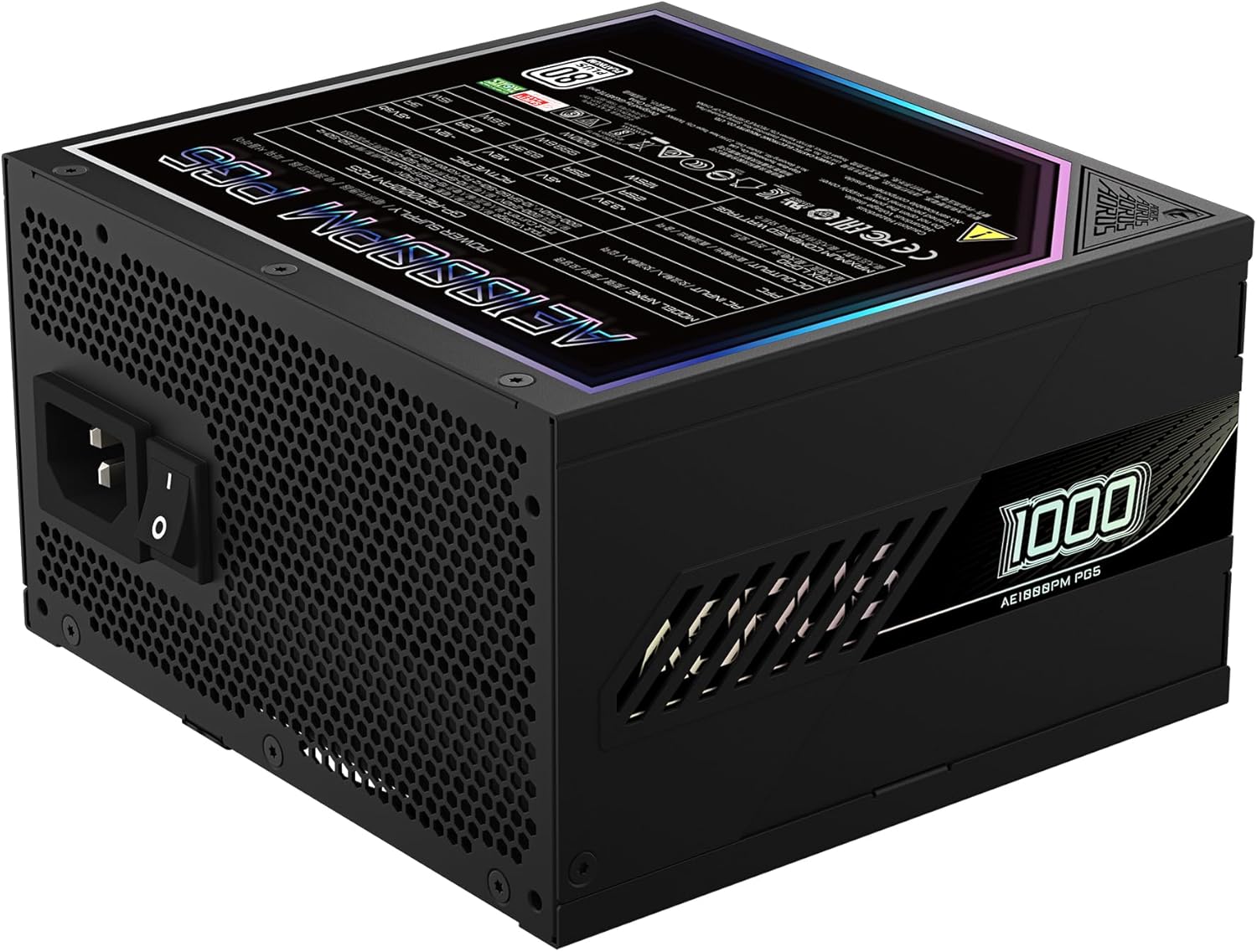
Figure 4: Rear panel of the GIGABYTE AORUS Elite P1000W Ice Power Supply, showing the AC power input and power switch. Ensure the switch is set to '0' before connecting the AC cord.
Bedienungsanleitung
After installation, follow these steps to power on your system:
- Einschalten: Flip the main power switch on the rear of the power supply to the ON (I) position.
- Systemstart: Drücken Sie den Netzschalter an Ihrem Computergehäuse, um das System zu starten.
- Ausschalten: To shut down your system, perform a proper shutdown through your operating system. Once the system is off, you may flip the power supply's main switch to the OFF (0) position for complete power disconnection.

Abbildung 5: Draufsicht view of the 120mm fan with the AORUS logo on the GIGABYTE AORUS Elite P1000W Ice Power Supply. The fan provides active cooling during operation.
Wartung
Regelmäßige Wartung trägt dazu bei, die Langlebigkeit und optimale Leistung Ihres Netzteils zu gewährleisten:
- Staubreinigung: Periodically clean dust from the power supply's fan grill and vents using compressed air. Ensure the power supply is turned off and unplugged before cleaning.
- Kabelmanagement: Ensure cables are neatly routed and do not obstruct airflow within the computer case.
- Umgebungsbedingungen: Maintain a cool, dry, and well-ventilated environment for your computer system.
Fehlerbehebung
Sollten Probleme auftreten, beachten Sie bitte die folgenden gängigen Schritte zur Fehlerbehebung:
- Kein Strom:
- Prüfen Sie, ob das Netzkabel fest mit dem Netzteil und der Steckdose verbunden ist.
- Ensure the power supply's main switch is in the ON (I) position.
- Verify that all modular cables are correctly seated in both the power supply and the components.
- Prüfen Sie die Wandsteckdose mit einem anderen Gerät, um sicherzustellen, dass sie Strom liefert.
- System Shuts Down Unexpectedly:
- This could indicate an overload or overheating. Ensure your system's power requirements do not exceed the PSU's 1000W capacity.
- Check for proper ventilation and clear any dust buildup.
- Verify that all power connections are secure.
- Ungewöhnliche Geräusche:
- A clicking sound might indicate a protective mechanism engaging. Disconnect power and recheck all connections.
- If the fan is making excessive noise, ensure it is free from obstructions.
If issues persist after following these steps, contact GIGABYTE customer support.
Technische Daten

Figure 6: Product label on the GIGABYTE AORUS Elite P1000W Ice Power Supply, displaying electrical specifications and certifications. Refer to this label for detailed electrical ratings.
| Besonderheit | Detail |
|---|---|
| Modellname | AORUS ELITE P1000W |
| Artikelmodellnummer | GP-AE1000PM PG5 EU |
| Ausgang Wattage | 1000 Watt |
| 80 PLUS Zertifizierung | Platin |
| Formfaktor | ATX |
| ATX Version Compatibility | ATX 3.0 (ATX 3.1 compatible) |
| PCIe Version Compatibility | PCIe Gen 5.0 |
| Lüftergröße | 120 mm |
| Lüftertyp | Dynamic Fluid Ball Bearing (FDB) |
| Kondensatoren | 100 % japanische Kondensatoren |
| Modulares Design | Voll Modular |
| Schutz | OVP, OPP, SCP, UVP, OCP, OTP |
| Produktabmessungen (L x B x H) | 5.51 x 5.91 x 3.39 Zoll |
| Artikelgewicht | 6.79 Pfund (3080 Gramm) |
Garantieinformationen
The GIGABYTE AORUS Elite P1000W Ice Power Supply comes with a 10 Jahr Garantie from the date of purchase. This warranty covers defects in materials and workmanship under normal use. Please retain your proof of purchase for warranty claims. For full warranty terms and conditions, refer to the official GIGABYTE webWebsite oder wenden Sie sich an den Kundendienst.
Unterstützung
For technical assistance, troubleshooting beyond this manual, or warranty inquiries, please visit the official GIGABYTE support website or contact their customer service department. You can typically find contact information on the GIGABYTE webauf der Website oder auf der Produktverpackung.
Offizieller GIGABYTE-Artikel WebWebsite: www.gigabyte.com


