Einführung
This manual provides comprehensive instructions for the safe and efficient use of your Hello Kitty Wireless Bluetooth Light-Up Headphones. Please read this manual thoroughly before operating the device and retain it for future reference.

Bild: Vorderseite view of the Hello Kitty Wireless Bluetooth Light-Up Headphones in white, featuring the iconic Hello Kitty face on the earcups and light-up cat ears on the headband.
Lieferumfang
Prüfen Sie beim Auspacken, ob alle Artikel vorhanden sind:
- Hello Kitty Wireless Bluetooth Light-Up Headphones
- USB-Ladekabel
- Benutzerhandbuch (dieses Dokument)
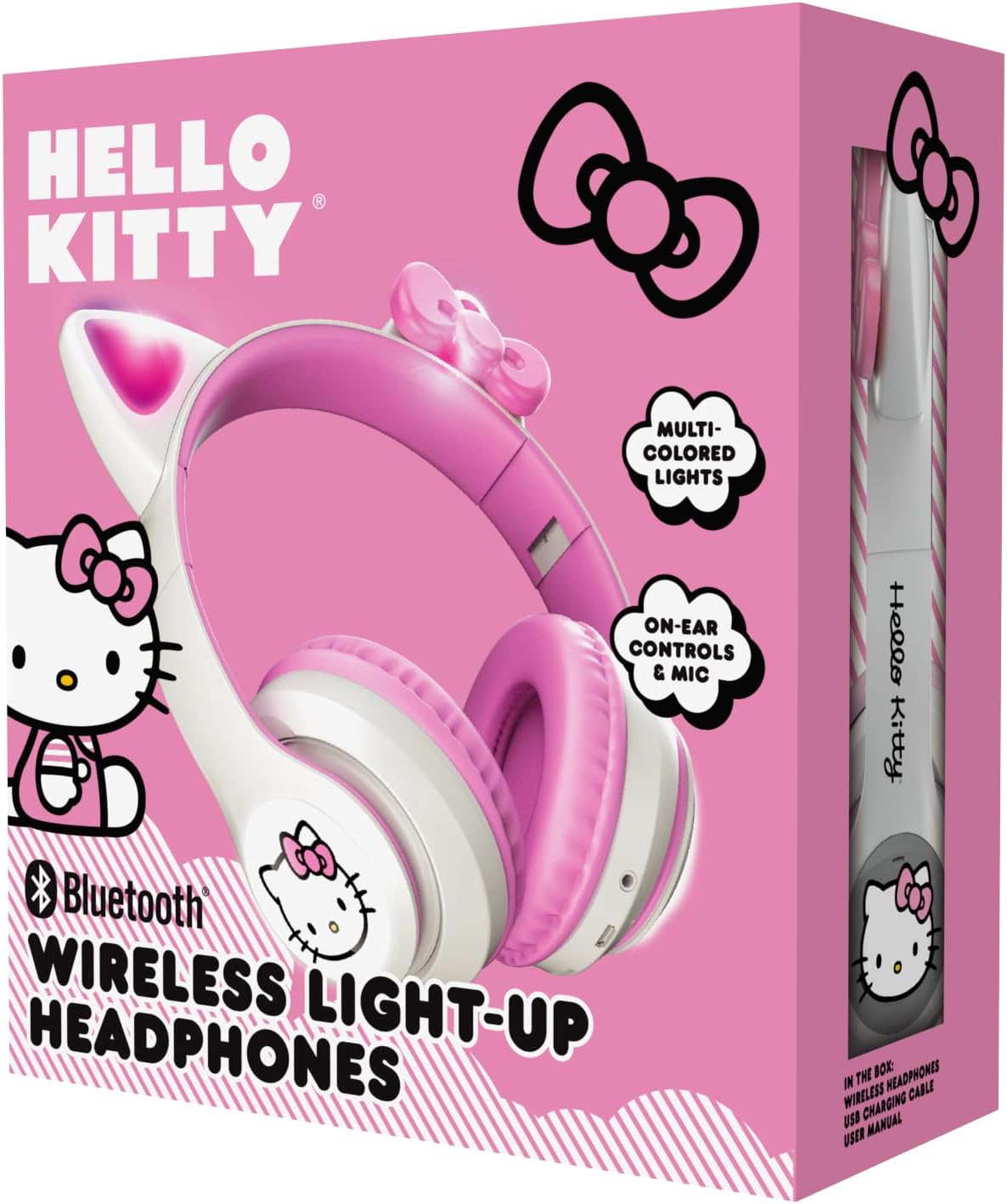
Image: The retail packaging for the Hello Kitty Wireless Bluetooth Light-Up Headphones, illustrating the headphones and the USB charging cable.
Produkteigenschaften
- Bluetooth-Konnektivität: Nahtlose drahtlose Kopplung mit kompatiblen Geräten.
- Light-Up LED Earcups & Cat Ears: Features Hello Kitty graphics on earcups and colorful LED lights in the ears. Lights can change with music or be turned on/off as desired.
- Faltbares und tragbares Design: Easy to store and carry, ideal for travel.
- Eingebautes Mikrofon: Enables hands-free calls, voice chats, and gaming communication.
- Verstellbares Kopfband: Provides a custom and comfortable fit for various head sizes.
Aufstellen
1. Aufladen der Kopfhörer
Before first use, fully charge the headphones. Connect the included USB charging cable to the charging port on the headphones and to a USB power source (e.g., computer, wall adapter). The LED indicator will show charging status and turn off or change color when fully charged.
2. Bluetooth-Kopplung
- Stellen Sie sicher, dass die Kopfhörer ausgeschaltet sind.
- Halten Sie die Ein-/Aus-Taste gedrückt, bis die LED-Anzeige blau und rot blinkt. Dies signalisiert den Kopplungsmodus.
- Aktivieren Sie auf Ihrem Gerät (Smartphone, Tablet, Laptop) Bluetooth und suchen Sie nach verfügbaren Geräten.
- Select "Hello Kitty Headphones" from the list of devices.
- Nach erfolgreicher Kopplung leuchtet die LED-Anzeige normalerweise durchgehend blau oder blinkt langsam.
Note: If prompted for a password, enter "0000".
Bedienungsanleitung
Ein-/Ausschalten
- So schalten Sie das Gerät ein: Den Ein-/Ausschalter etwa 3 Sekunden lang gedrückt halten.
- So schalten Sie das Gerät aus: Den Ein-/Ausschalter etwa 5 Sekunden lang gedrückt halten.
Lautstärkeregelung
- Lautstärke erhöhen: Drücken Sie die Taste „+“.
- Lautstärke runter: Drücken Sie die Taste „-“.
Musikwiedergabe
- Abspielen/Pause: Press the Multi-function button (often the Power button when not powering on/off).
- Nächster Titel: Die Taste „+“ gedrückt halten.
- Vorheriges Lied: Die Taste „-“ gedrückt halten.
Anruf-Management
- Anruf annehmen/beenden: Drücken Sie die Multifunktionstaste.
- Anruf ablehnen: Halten Sie die Multifunktionstaste gedrückt.
- Wahlwiederholung letzte Nummer: Drücken Sie die Multifunktionstaste zweimal.
LED-Lichtsteuerung
The LED lights on the earcups and cat ears can be controlled independently. Locate the dedicated light button (refer to the diagram in the included quick start guide if available). Press the button to cycle through light modes (e.g., blinking, solid, off).
Adjusting and Folding
- Kopfband anpassen: Gently slide the earcups up or down along the headband to achieve a comfortable fit.
- Zur Aufbewahrung zusammenfalten: The earcups can be folded inwards towards the headband for compact storage and portability.

Image: The Hello Kitty Wireless Bluetooth Light-Up Headphones shown in their folded position, demonstrating their portability.
Wartung
- Reinigung: Reinigen Sie die Kopfhörer mit einem weichen, trockenen Tuch. Verwenden Sie keine Scheuermittel und tauchen Sie sie nicht in Wasser.
- Lagerung: Bewahren Sie die Kopfhörer an einem kühlen, trockenen Ort fern von direkter Sonneneinstrahlung und extremen Temperaturen auf. Nutzen Sie das faltbare Design für eine platzsparende und sichere Aufbewahrung.
- Batteriepflege: To prolong battery life, charge the headphones regularly, even if not in frequent use. Avoid fully discharging the battery for extended periods.
Fehlerbehebung
| Problem | Mögliche Lösung |
|---|---|
| Die Kopfhörer lassen sich nicht einschalten. | Stellen Sie sicher, dass die Kopfhörer vollständig aufgeladen sind. Schließen Sie sie an eine Stromquelle an und versuchen Sie es erneut. |
| Kopplung mit dem Gerät nicht möglich. |
|
| Kein Ton oder geringe Lautstärke. |
|
| Die LED-Leuchten funktionieren nicht. | Press the dedicated light control button to cycle through modes or turn them on. Ensure headphones have sufficient battery. |
Technische Daten
- Modellname: Hello Kitty Wireless Bluetooth Light-Up Headphones with Built-in Microphone, Foldable Design, Adjustable Headband, 8 Hours Playtime, LED Kitty Earcups, for Kids & Adults (White)
- Modellnummer: HKLEDBTHP2-WH-MFN
- Konnektivitätstechnologie: Kabellos (Bluetooth)
- Bluetooth-Version: 5.0
- Hörerform: Am Ohr
- Material: Plastik
- Artikelgewicht: 0.27 Kilogramm (9.6 Unzen)
- Batterie: 1 nicht standardmäßige Batterie (im Lieferumfang enthalten)
- Besondere Merkmale: Adjustable Headband, Foldable, Lightweight, Light-Up LED Earcups & Cat Ears, Built-in Microphone
- Kompatible Geräte: Smartphones, Tablets, Laptops
- Hersteller: Südliche Telekommunikation
- UPC: 680079035358
Garantie und Support
For warranty information and technical support, please refer to the contact details provided on the product packaging or visit the official Hello Kitty or Southern Telecom webBewahren Sie Ihren Kaufbeleg für Garantieansprüche auf.


