1. Einleitung
Willkommen zur Bedienungsanleitung für Ihr Blackview BV4800 Pro 4G Rugged Smartphone. This guide provides essential information to help you set up, operate, maintain, and troubleshoot your device. Please read this manual carefully to ensure optimal performance and longevity of your smartphone.

Das Schwarzeview BV4800 Pro Smartphone, Showcasing its robust design and key features on the display.
2. Produktüberschreitungview
Das Schwarzeview BV4800 Pro is a rugged smartphone designed for durability and performance. It features a powerful processor, ample memory, a high-capacity battery, and advanced camera capabilities, all within a robust, protective casing.
Hauptmerkmale:
- Leistung: Experience enhanced speed and performance with the T606 chipset. The Blackview BV4800 Pro Android phone features 4GB fixed RAM and 128GB ROM. Through RAM expansion technology, an additional 8GB of virtual RAM can be accessed via settings, totaling up to 12GB of RAM.
- Haltbarkeit: The BV4800 Pro outdoor smartphone offers 360° total protection and IP68 waterproofing, inspired by a sophisticated space capsule structure. Its 27 integrated construction upgrades enhance resistance to water immersion, drops, and shocks. This military-grade mobile phone withstands extreme temperatures from -22°F (-30°C) to 122°F (50°C).
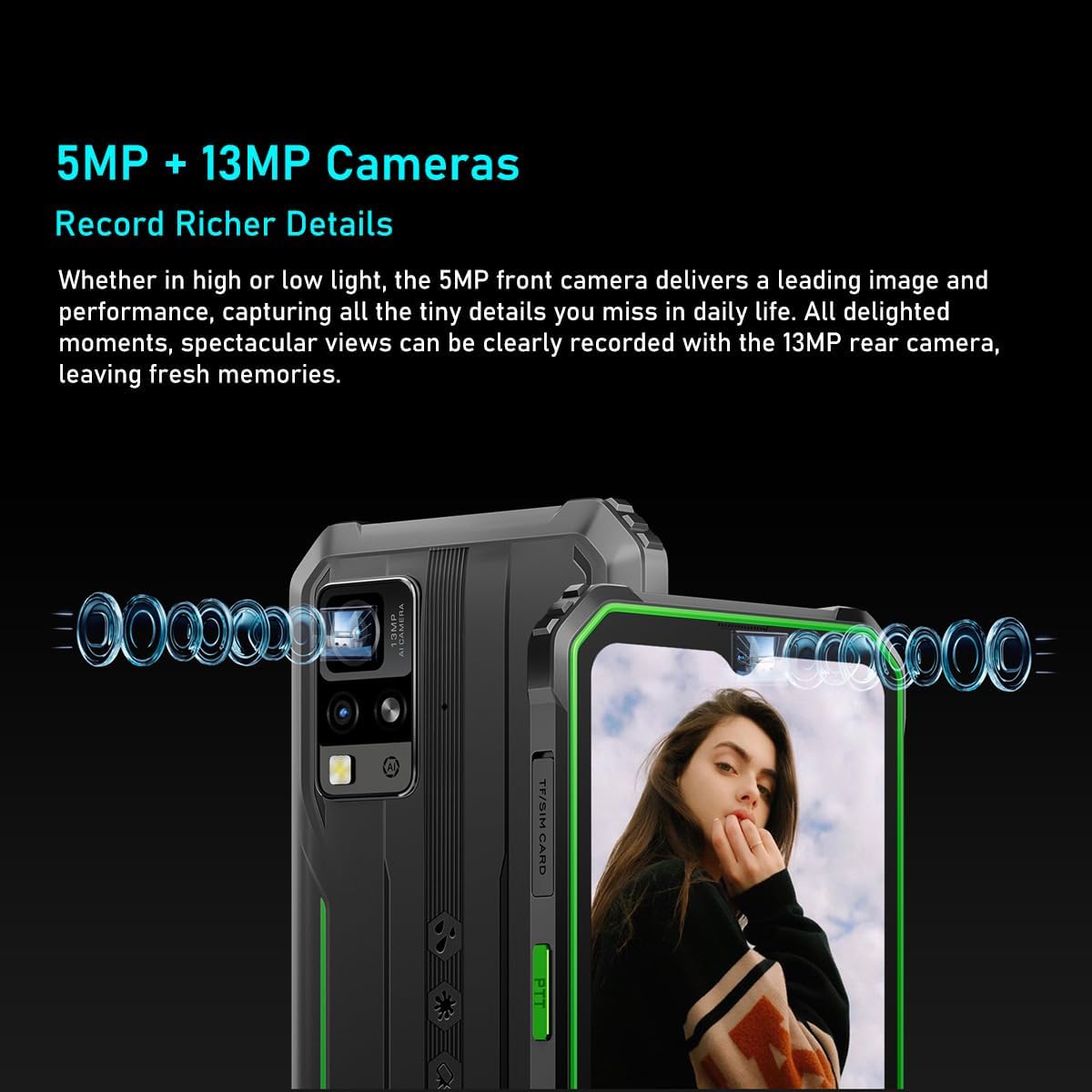
- Kamerasystem: Das Schwarzeview BV4800 Pro features a 16MP rear camera for capturing moments and an 8MP front camera for quick face unlock and selfies. Utilize the latest facial recognition features for faster and more secure phone unlocking.
- Akkulaufzeit: The BV4800 Pro rugged outdoor mobile phone boasts a 5180mAh long-lasting battery, providing extended usage for work or study without frequent recharging.
- Konnektivität: Das Schwarzeview BV4800 Pro unlocked mobile phone supports dual 4G global networks and is compatible with most GSM, WCDMA, and LTE carriers. It includes GPS, NFC, and comes with a 24-month warranty.

The BV4800 Pro features 4GB of physical RAM, expandable with an additional 8GB of virtual RAM, providing a total of 12GB for smooth multitasking and faster application performance.

Equipped with a 16MP rear camera and an 8MP front camera, the BV4800 Pro allows for clear photo capture and video calls.
3. Einrichtung
3.1. Installation der SIM-Karte und der TF-Karte
- Locate the SIM/TF card slot on the side of your Blackview BV4800 Pro.
- Öffnen Sie vorsichtig die Schutzabdeckung des SIM-Kartenfachs.
- Insert your Nano-SIM card(s) and/or TF (microSD) card into the designated slots on the tray. Ensure the cards are correctly oriented.
- Gently push the tray back into the slot until it is fully seated and close the protective cover securely to maintain water and dust resistance.

Das Heck view of the BV4800 Pro, indicating the location of the SIM/TF card slot for installation.
3.2. Erstes Einschalten
- Press and hold the Power button (usually on the right side of the device) until the Blackview Das Logo erscheint.
- Folgen Sie den Anweisungen auf dem Bildschirm, um die Ersteinrichtung abzuschließen, einschließlich Sprachauswahl, WLAN-Verbindung und Einrichtung des Google-Kontos.
4. Bedienungsanleitung
4.1. Grundlegende Navigation
Dein Schwarzview BV4800 Pro runs on Android 14. Navigate using gestures or the traditional three-button navigation bar (configurable in Settings).
- Startbildschirm: Durch Wischen nach links oder rechts gelangen Sie zu verschiedenen Startbildschirmen.
- App-Schublade: Wischen Sie vom unteren Bildschirmrand nach oben, um view alle installierten Anwendungen.
- Benachrichtigungen & Schnelleinstellungen: Durch Wischen vom oberen Bildschirmrand nach unten gelangen Sie zu Benachrichtigungen und Schnellzugriffseinstellungen.
4.2. Kameranutzung
To open the camera, tap the Camera icon on your home screen or app drawer. The BV4800 Pro features a 16MP rear camera and an 8MP front camera.
- Kameras wechseln: Tippen Sie auf das Kamerasymbol, um zwischen der Vorder- und der Rückkamera umzuschalten.
- Foto aufnehmen: Tap the Shutter button to take a picture.
- Video aufnehmen: Switch to video mode and tap the Record button to start/stop recording.
- Gesichtsentsperrung: Configure face unlock in Security settings for quick and secure access.
4.3. Anzeigefunktionen
The 6.56-inch HD+ IPS display offers clear visuals.
- Helligkeit: Adjust screen brightness in Quick Settings or Display settings.
- Aktualisierungsrate: Das Display arbeitet mit einer Bildwiederholfrequenz von 60 Hz für flüssige Bilddarstellung.
- Berühren Sie S.ampling-Rate: Ein 120-Hz-Touchscreenampling rate ensures responsive touch input.

The device features a 6.56-inch HD+ IPS display protected by Corning Gorilla Glass 5, offering a 60Hz refresh rate and a responsive 120Hz touch sampling rate for clear visuals and smooth interaction.
4.4. Batteriemanagement
Der 5180-mAh-Akku ermöglicht eine längere Nutzungsdauer. So optimieren Sie die Akkulaufzeit:
- Reduzieren Sie die Bildschirmhelligkeit.
- Schließen Sie nicht verwendete Apps, die im Hintergrund ausgeführt werden.
- Aktivieren Sie bei Bedarf den Batteriesparmodus.
- Vermeiden Sie extreme Temperaturen.

The BV4800 Pro's 5180mAh battery provides extended usage, offering up to 7.5 hours of gaming, 8 hours of video playback, 11 hours of web browsing, 28.5 hours of calls, 30 hours of music, and 924 hours of standby time.
4.5. Besondere Merkmale
- NFC: Use Near Field Communication for contactless payments and quick data transfer. Enable NFC in Settings > Connected devices.
- Geographisches Positionierungs System: Das integrierte GPS bietet präzise Standortdienste für Navigations- und standortbasierte Apps.
- OTG: USB On-The-Go allows you to connect USB devices like flash drives or keyboards directly to your phone.
- FM Radio: Enjoy FM radio broadcasts using wired headphones as an antenna.
- Smart-K BOX Lautsprecher: Experience enhanced audio quality from the device's speaker.
The Smart-K BOX speaker system on the BV4800 Pro delivers powerful audio, enhancing your listening experience.
5. Wartung
5.1. Langlebigkeit und Schutz
Das Schwarzeview BV4800 Pro is built to be rugged, featuring IP68 water and dust resistance and MIL-STD-810H military standard compliance for shock protection.
- Wasserbeständigkeit: Ensure all port covers (USB-C, SIM tray) are securely closed to maintain water resistance. Avoid prolonged submersion or exposure to high-pressure water.
- Temperaturbeständigkeit: The device is designed to operate in extreme temperatures from -22°F (-30°C) to 122°F (50°C).
- Fallschutz: While rugged, avoid unnecessary drops. The device is tested to survive drops from up to 1.5 meters.

The BV4800 Pro is designed to withstand harsh conditions, including water immersion, dirt exposure, and impacts, as illustrated by these durability tests.

Built to MIL-STD-810H military standards, the BV4800 Pro is engineered for extreme environments, capable of surviving drops from up to 1.5 meters.
5.2. Reinigung
Verwenden Sie zum Reinigen Ihres Geräts ein weiches, feuchtes Tuch.amp Vermeiden Sie aggressive Chemikalien oder scheuernde Materialien, die den Bildschirm oder die Oberfläche beschädigen könnten.asing.
6. Fehlerbehebung
Sollten Sie Probleme mit Ihrem Schwarzen habenview BV4800 Pro, try the following steps:
- Gerät reagiert nicht: Um einen Neustart zu erzwingen, halten Sie den Netzschalter etwa 10-15 Sekunden lang gedrückt.
- Batterie entlädt sich schnell: Check for background apps, reduce screen brightness, and ensure Wi-Fi/Bluetooth are off when not in use.
- Netzwerkprobleme: Ensure your SIM card is correctly inserted. Try restarting the device or toggling Airplane Mode on/off.
- Apps stürzen ab: Löschen Sie den Cache der problematischen App (Einstellungen > Apps > [App-Name] > Speicher > Cache leeren). Sollte das Problem weiterhin bestehen, installieren Sie die App neu.
- Langsame Leistung: Schließen Sie unnötige Hintergrund-Apps, leeren Sie den Cache oder erwägen Sie als letzten Ausweg einen Werksreset (sichern Sie vorher Ihre Daten).
Bei komplexeren Fragen wenden Sie sich bitte an Black.view Kundensupport.
7. Spezifikationen
| Besonderheit | Spezifikation |
|---|---|
| Marke | Schwarzview |
| Modellname | Schwarzview BV4800 PRO |
| Farbe | Schwarz |
| Produkttyp | Bar Telefon |
| Betriebssystem | Android 14 |
| Bildschirmgröße | 6.56 Zoll |
| Bildschirmauflösung | 1080 x 2340 |
| Bildwiederholrate | 60 Hz |
| Prozessor | T606 Chipset |
| Installierte RAM-Größe | 12 GB (4 GB physisch + 8 GB virtuell) |
| Speicherkapazität | 128 GB (erweiterbar auf bis zu 1 TB per TF-Karte) |
| Auflösung der Rückkamera | 16 Megapixel |
| Auflösung der Frontkamera | 8 Megapixel |
| Batteriekapazität | 5180 mAh |
| Batteriezusammensetzung | Lithium-Ionen |
| Anschlüsse | Bluetooth |
| Ladeanschluss | USB Typ C |
| Besondere Merkmale | Rugged Body, Dual SIM, Expandable Memory, Water Resistant, USB OTG Support, NFC, GPS, FM |
| Mobilfunkanbieter | Freigeschaltet |
| Datum der ersten Verfügbarkeit | 23. Oktober 2024 |
8. Garantie und Support
8.1. Herstellergarantie
Das Schwarzeview Der BV4800 Pro wird mit einem 2 Jahr HerstellergarantieBitte bewahren Sie Ihren Kaufbeleg für Garantieansprüche auf.
8.2. Kundendienst
For technical assistance, warranty inquiries, or any other questions regarding your Blackview BV4800 Pro, please visit the official Blackview webBesuchen Sie die Website oder kontaktieren Sie direkt deren Kundendienst.
Spare parts availability and guaranteed software updates information are currently unavailable.


