Einführung
This manual provides instructions for the Xtrike Me GK-989A Wired Mechanical Gaming Keyboard. Designed for enhanced gaming and productivity, this keyboard features robust anti-ghosting technology, dynamic rainbow backlighting, and durable mechanical keys.
Hauptmerkmale:
- Advanced multi-key anti-ghosting with 25-key rollover support provides enhanced command readings in the heat of battle.
- Rainbow backlight with 12 lighting systems allows you to play and work even in complete darkness.
- Keys: 87, Key life: 50 million presses.
- Provides a comfortable and accurate typing experience, in addition to long-lasting durability.
- Robust structure and high-quality materials.
Packungsinhalt
- Xtrike Me GK-989A Wired Mechanical Gaming Keyboard
- Bedienungsanleitung
Installationsanweisungen
- Schließen Sie die Tastatur an: Plug the USB Type-A connector of the keyboard into an available USB port on your computer.
- Treiberinstallation: Die Tastatur ist Plug-and-Play-fähig und benötigt in der Regel keine zusätzlichen Treiber. Ihr Betriebssystem sollte die erforderlichen Treiber automatisch erkennen und installieren.
- Bereit zum Benutzen: Once detected, the keyboard is ready for immediate use.
Bedienungsanleitung
Grundfunktionen
The GK-989A keyboard features standard QWERTY layout keys. Pressing keys will input characters or execute commands as expected by your operating system.
Multimedia Keys (Fn Combinations)
The keyboard includes multimedia functions accessible via the Fn Schlüssel kombiniert mit dem F1-F12 Tasten.
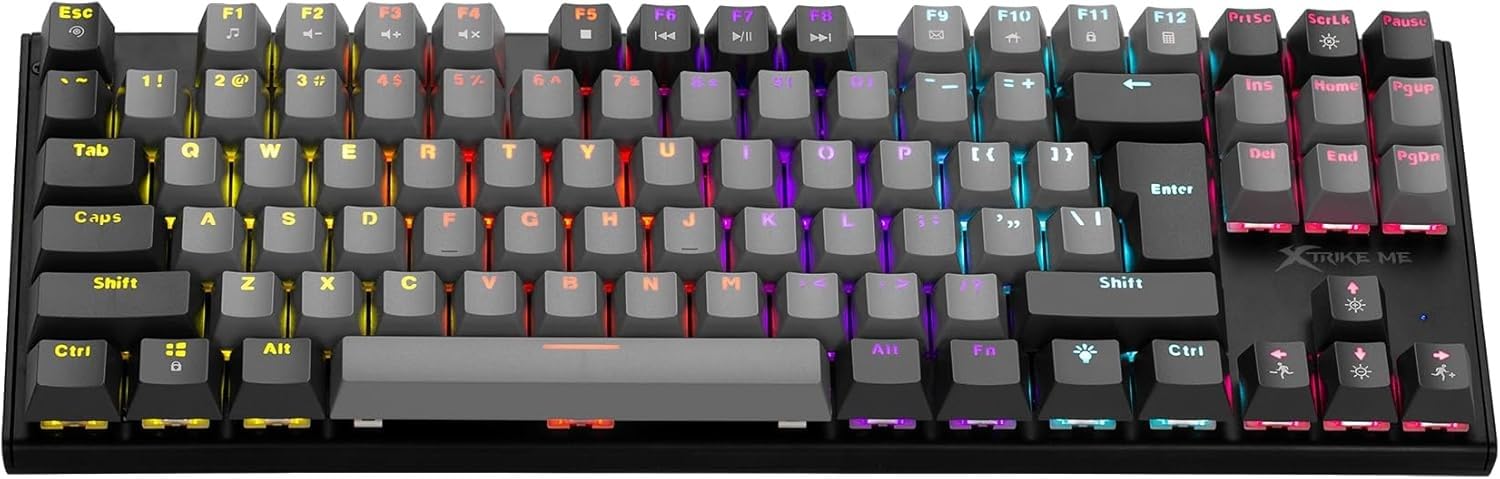
Bild: Überview of the Xtrike Me GK-989A keyboard, showing the layout and multimedia key locations.
- Fn+F1: Media Player
- Fn+F2: Lautstärke verringern
- Fn+F3: Lautstärke erhöhen
- Fn+F4: Stumm
- Fn+F5: Stoppen
- Fn+F6: Vorheriger Titel
- Fn+F7: Abspielen/Pause
- Fn+F8: Nächster Titel
- Fn+F9: E-Mail
- Fn+F10: Web Browser-Startseite
- Fn+F11: Mein Computer
- Fn+F12: Kalkulator
Steuerung der Hintergrundbeleuchtung
The GK-989A features dynamic rainbow backlighting with 12 different lighting modes.

Image: Close-up of the keyboard showing the backlight control keys.
- Fn + Light Bulb Key (next to Alt Gr): Durchschalten Sie 12 verschiedene Hintergrundbeleuchtungsmodi.
- Fn + Pfeiltasten nach oben/unten: Passen Sie die Helligkeit der Hintergrundbeleuchtung an.
- Fn + Pfeiltasten links/rechts: Hintergrundbeleuchtungsgeschwindigkeit anpassen (für dynamische Modi).
- ScrLk Key: Hintergrundbeleuchtung ein-/ausschalten.
Anti-Ghosting
The keyboard supports 25-key rollover, ensuring that multiple key presses are registered accurately, which is crucial for fast-paced gaming.
Wartung
- Reinigung: Use a soft, dry cloth to wipe the keyboard surface. For deeper cleaning, use compressed air to remove dust and debris from between the keys.
- Vermeiden Sie Flüssigkeiten: Die Tastatur darf nicht mit Flüssigkeiten in Berührung kommen. Sollte Flüssigkeit verschüttet werden, trennen Sie die Tastatur sofort vom Stromnetz und lassen Sie sie vollständig trocknen, bevor Sie sie wieder anschließen.
- Lagerung: Bewahren Sie die Tastatur an einem kühlen, trockenen Ort fern von direkter Sonneneinstrahlung und extremen Temperaturen auf.
Fehlerbehebung
Tastatur reagiert nicht
- Stellen Sie sicher, dass das USB-Kabel sowohl mit der Tastatur als auch mit dem Computer fest verbunden ist.
- Versuchen Sie, die Tastatur an einen anderen USB-Anschluss Ihres Computers anzuschließen.
- Starten Sie Ihren Computer neu.
- Testen Sie die Tastatur an einem anderen Computer, um festzustellen, ob das Problem an der Tastatur oder am USB-Anschluss/den Treibern des Computers liegt.
Hintergrundbeleuchtung funktioniert nicht
- Drücken Sie die ScrLk key to ensure the backlight is not turned off.
- Versuchen Sie, die verschiedenen Hintergrundbeleuchtungsmodi durchzuschalten. Fn + Glühbirnentaste.
- Passen Sie die Helligkeit an mit Fn + Pfeiltasten nach oben/unten.
Schlüssel werden nicht korrekt registriert
- Clean the affected keys with compressed air to remove any obstructions.
- Ensure no software conflicts are interfering with key inputs.
Technische Daten
| Besonderheit | Detail |
|---|---|
| Marke | Xtrike Me |
| Modellnummer | XT-GK-989A |
| Konnektivitätstechnologie | Kabelgebunden (USB Typ-A) |
| Anzahl der Schlüssel | 87 |
| Schlüssellebensdauer | 50 Millionen Mal gedrückt |
| Hintergrundbeleuchtung | Rainbow, 12 Modes |
| Anti-Ghosting | 25-Tasten-Rollover |
| Material | Plastik |
| Farbe | Schwarz |
| Produktgewicht | 700 g |
| Kompatible Geräte | Gaming Console (PC compatibility implied) |
Garantie und Support
This product comes with a standard manufacturer's warranty. Please refer to the warranty card included in your package or contact Xtrike Me customer support for detailed warranty information and assistance.
For technical support or inquiries, please visit the official Xtrike Me webWebsite oder wenden Sie sich an den Kundendienst.


