1. Einleitung
This manual provides detailed instructions for setting up, operating, and maintaining your Mercusys MR27BE BE3600 Dual-Band Wi-Fi 7 Router. The MR27BE is designed to deliver high-speed wireless connectivity with Wi-Fi 7 technology, featuring dual-band operation and multiple high-speed Ethernet ports for a robust home or small office network.
2. Packungsinhalt
Überprüfen Sie, ob Ihr Paket die folgenden Artikel enthält:
- Mercusys MR27BE Wi-Fi 7 Router
- Netzteil
- Ethernet-Kabel
- Kurzanleitung zur Installation

This image displays the retail packaging for the Mercusys MR27BE BE3600 Dual Band Wi-Fi 7 Router, highlighting key features and branding.
3. Körperliche Übergriffeview
3.1 Rückseite
The rear panel of the MR27BE router features various ports and buttons for connectivity and control.
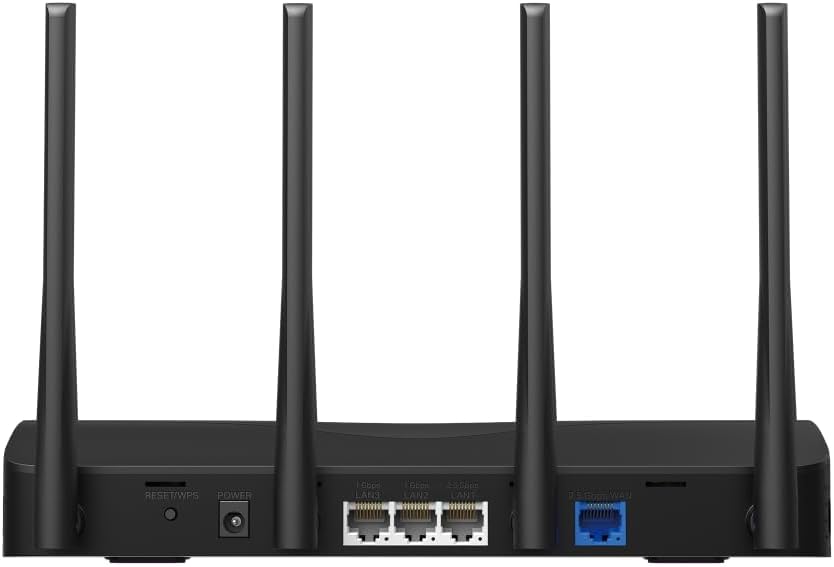
This image displays the rear panel of the MR27BE router, highlighting the 2.5 Gbps WAN port (blue), 2.5 Gbps LAN port, two 1 Gbps LAN ports, the Reset/WPS button, and the power input.
- Stromanschluss: Schließen Sie hier das mitgelieferte Netzteil an.
- Reset/WPS-Taste: Press and hold for 1 second to activate WPS. Press and hold for more than 5 seconds to factory reset the router.
- LAN Ports (1 Gbps): Two Gigabit Ethernet ports for connecting wired devices.
- LAN Port (2.5 Gbps): One 2.5 Gigabit Ethernet port for high-speed wired connections.
- WAN-Anschluss (2.5 Gbit/s): One 2.5 Gigabit Ethernet port for connecting to your modem or internet service provider's (ISP) network.
3.2 Hauptmerkmale
The MR27BE router incorporates advanced features for enhanced network performance.

This graphic illustrates key features of the MR27BE, including its Wi-Fi 7 capabilities, the presence of 2x 2.5 Gbps ports and 2x Gigabit ports, four omni-directional high-gain antennas, EasyMesh compatibility, and easy app control.

This image demonstrates the speed performance of the MR27BE router, indicating up to 2880 Mbps on the 5 GHz band and 688 Mbps on the 2.4 GHz band, showcasing its Wi-Fi 7 capabilities.
4. Einrichtung
4.1 Hardware-Anschluss
- Ausschalten: Trennen Sie gegebenenfalls Ihr Modem vom Stromnetz.
- WAN-Port anschließen: Connect one end of the Ethernet cable to your modem's Ethernet port and the other end to the blue 2.5 Gbps WAN port on your MR27BE router.
- Strom anschließen: Schließen Sie das Netzteil an den Stromanschluss des Routers an und stecken Sie es in eine Steckdose.
- Einschalten: Wait for the router to power on completely. The LED indicator should turn solid green.
- Geräte anschließen (optional): For wired devices, connect an Ethernet cable from your computer or other device to one of the yellow LAN ports on the router.

This image shows the 2.5 Gbps ports of the MR27BE router in use, illustrating connections for 2.5 Gbps wired devices and multi-gig internet access, emphasizing high-performance networking.
4.2 Erstkonfiguration
You can configure your router using the MERCUSYS app or a web Browser.
Verwendung der MERCUSYS-App:
- Download the MERCUSYS app from the App Store or Google Play.
- Verbinden Sie Ihr Smartphone mit dem Standard-WLAN-Netzwerk des Routers (SSID und Passwort befinden sich auf dem Aufkleber an der Unterseite des Routers).
- Open the MERCUSYS app and follow the on-screen instructions to complete the setup.
Mit einem Web Browser:
- Connect your computer to the router via an Ethernet cable or the default Wi-Fi network.
- Öffnen Sie ein web Browser und Typ
mwlogin.netor192.168.1.1in die Adressleiste. - Erstellen Sie bei Aufforderung ein Anmeldepasswort.
- Follow the Quick Setup wizard to configure your internet connection and Wi-Fi settings.
5. Bedienung des Routers
5.1 Geräte anschließen
- Kabellose Geräte: Suchen nach your Wi-Fi network name (SSID) on your device and enter the Wi-Fi password you set during setup.
- Kabelgebundene Geräte: Connect an Ethernet cable from your device to any available LAN port on the router.
5.2 EasyMesh-Kompatibilität
The MR27BE router supports EasyMesh, allowing you to create a seamless whole-home Wi-Fi network by adding compatible EasyMesh range extenders or other routers.

This diagram visually explains how the EasyMesh system, compatible with the MR27BE router, can expand Wi-Fi coverage throughout an entire home, ensuring seamless connections.
To set up an EasyMesh network, refer to the instructions provided with your EasyMesh compatible devices or the MERCUSYS app.
5.3 Advanced Settings (via Web Schnittstelle)
Zugriff auf die web Schnittstelle (mwlogin.net) um erweiterte Einstellungen wie die folgenden zu konfigurieren:
- Gast-Netzwerk: Richten Sie ein separates WLAN-Netzwerk für Gäste ein.
- Kindersicherung: Internetzugang für bestimmte Geräte verwalten.
- Netzwerksicherheit: Configure firewall rules and access control.
- Betriebsmodus: Switch between Router, Access Point, or Range Extender modes.
6. Wartung
6.1 Firmware-Aktualisierung
Regularly updating the router's firmware ensures optimal performance and security. You can check for updates via the MERCUSYS app or the web interface under System Tools > Firmware Upgrade.
6.2 Neustart des Routers
If you experience network issues, a simple restart can often resolve them. You can restart the router via the MERCUSYS app, the web interface, or by unplugging and replugging the power adapter.
6.3 Werksreset
A factory reset will restore the router to its default settings. This can be done by pressing and holding the Reset/WPS button on the rear panel for more than 5 seconds until the LED blinks rapidly, or via the web interface under System Tools > Factory Defaults.
7. Fehlerbehebung
7.1 Kein Internetzugang
- Check all cable connections, especially the WAN port connection to your modem.
- Vergewissern Sie sich, dass Ihr Modem ordnungsgemäß funktioniert.
- Starten Sie sowohl Ihr Modem als auch Ihren Router neu.
- Überprüfen Sie Ihre Interneteinstellungen im Router. web Schnittstelle.
7.2 Probleme mit dem WLAN-Signal
- Stellen Sie sicher, dass der Router an einem zentralen Ort und fernab von Hindernissen und Störquellen (z. B. Mikrowellen, schnurlose Telefone) aufgestellt wird.
- Stellen Sie die Antennen des Routers für eine optimale Abdeckung ein.
- Consider using EasyMesh compatible devices to extend coverage in larger homes.
7.3 Forgotten Wi-Fi Password or Login Password
- Das Standard-WLAN-Passwort befindet sich auf dem Aufkleber an der Unterseite des Routers.
- If you changed it and forgot, you will need to perform a factory reset to restore default settings, then reconfigure the router.
8. Spezifikationen
| Modellname | MR27BE |
| Wireless-Standard | 802.11be (Wi-Fi 7) |
| Frequenzbandklasse | Dualband |
| WAN-Anschluss | 1x 2.5 Gbit/s WAN-Anschluss |
| LAN-Anschlüsse | 1x 2.5 Gbps LAN Port, 2x 1 Gbps LAN Ports |
| Besonderheit | EasyMesh-kompatibel |
| Technische Daten | 7.87 x 5.91 x 3.94 Zoll |
| Artikelgewicht | 2.23 Pfund |
| Im Lieferumfang enthaltene Komponenten | MR27BE, Power Adapter, instruction manual |
9. Unterstützung
For technical support, warranty information, or further assistance, please visit the official Mercusys website or contact Mercusys customer support.
- Mercusys Offiziell WebWebsite: www.mercusys.com
- Refer to the Quick Installation Guide for initial setup and contact details.


