Einführung
Thank you for choosing the Vortex Blast Portable Bluetooth Speaker. This manual provides essential information for setting up, operating, and maintaining your speaker. Designed for home, outdoors, and parties, the Vortex Blast delivers powerful 30W sound with deep bass, features an IPX6 waterproof rating, Bluetooth 5.2 connectivity, TWS functionality for stereo sound, and dynamic LED light effects.
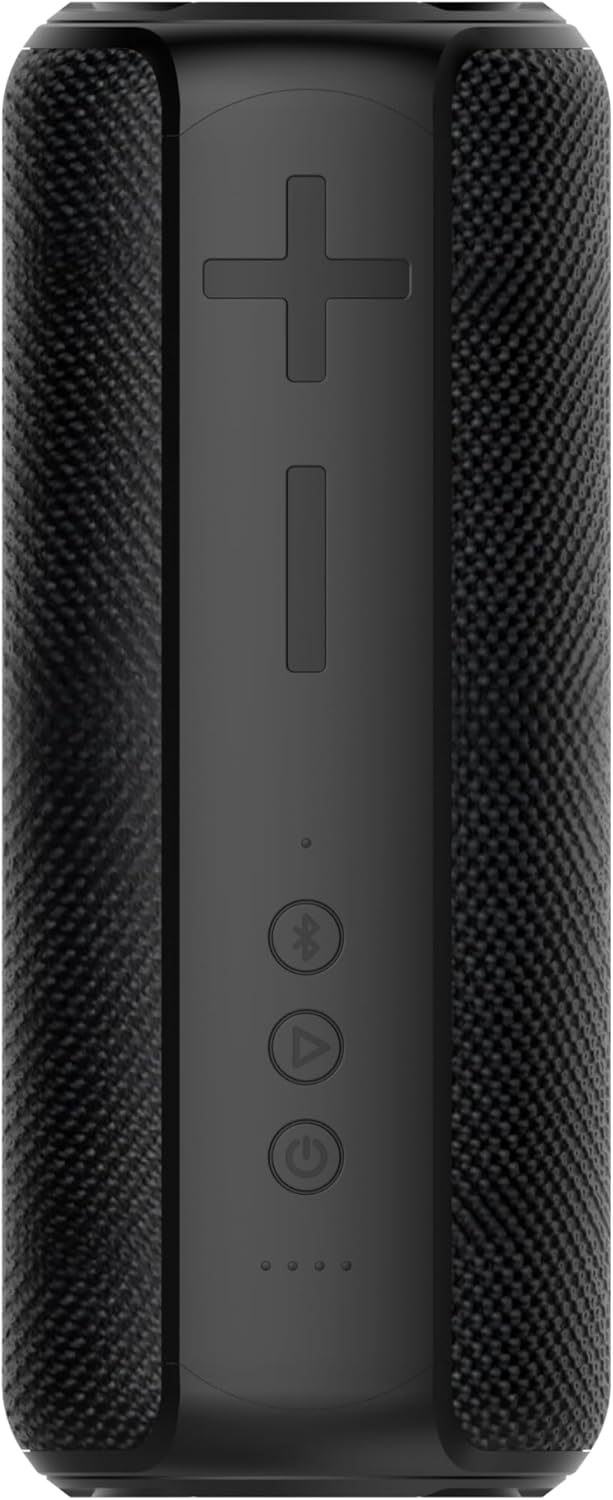
Image: The Vortex Blast Portable Bluetooth Speaker, showcasing its sleek black design and cylindrical shape.
Packungsinhalt
Bitte kreuzen Sie das Kästchen für die folgenden Elemente an:
- 1 x Vortex Blast Portable Bluetooth Speaker
- 1 x USB-C Ladekabel
- 1 x AUX Audiokabel
- 1 x Netzteil
- 1 x Benutzerhandbuch (dieses Dokument)
Produkt überview
Familiarize yourself with the controls and ports of your Vortex Blast speaker:

Bild: Draufsicht view of the Vortex Blast speaker, highlighting the control panel with power, play/pause, Bluetooth, and volume buttons.
Bedienfeld:
- Ein-/Ausschalter (⑂): Zum Ein-/Ausschalten gedrückt halten. Kurz drücken, um die Musikwiedergabe zu starten/pausieren.
- Lauter (+): Kurz drücken für höhere Lautstärke. Lang drücken für nächsten Titel.
- Lautstärke runter (-): Kurz drücken zum Verringern der Lautstärke. Lang drücken zum vorherigen Titel.
- Bluetooth Button (⑃): Short press to enter pairing mode. Double tap to toggle LED lights on/off.
- LED-Anzeigen: Four small lights indicating battery level and charging status.

Bild: Nahaufnahme view of the back of the Vortex Blast speaker, showing the charging port and auxiliary input port, protected by a rubber flap.
Ports (located under a protective flap):
- USB-C-Ladeanschluss: Zum Aufladen des Lautsprechers.
- AUX-Eingang: Zum Anschließen von Geräten über ein 3.5-mm-Audiokabel.
Aufstellen
1. Laden Sie den Lautsprecher auf
Before first use, fully charge your Vortex Blast speaker. Connect the provided USB-C charging cable to the speaker's charging port and the power adapter to a wall outlet. The LED indicators will show charging progress and turn off when fully charged. A full charge provides approximately 10 hours of playtime.
2. Ein-/Ausschalten
- Zum Einschalten: Halten Sie die Ein-/Aus-Taste (⑂) 2-3 Sekunden lang gedrückt, bis Sie einen akustischen Hinweis hören und die LED-Leuchten aufleuchten.
- To power off: Press and hold the Power button (⑂) for 2-3 seconds until you hear an audible prompt and the LED lights turn off.
3. Bluetooth-Kopplung
- Ensure the speaker is powered on and the Bluetooth indicator light is blinking, indicating it's in pairing mode.
- Aktivieren Sie auf Ihrem Gerät (Smartphone, Tablet, Laptop) Bluetooth und suchen Sie nach verfügbaren Geräten.
- Select "Vortex Blast" from the list.
- Sobald die Verbindung hergestellt ist, hören Sie einen Bestätigungston und die Bluetooth-Anzeigeleuchte leuchtet dauerhaft.
Hinweis: Der Lautsprecher versucht beim Einschalten automatisch, die Verbindung zum zuletzt gekoppelten Gerät wiederherzustellen.
4. True Wireless Stereo (TWS)-Kopplung
To achieve a true stereo sound experience, you can pair two Vortex Blast speakers together:
- Ensure both Vortex Blast speakers are powered on and not connected to any other Bluetooth devices.
- On one speaker, short press the Bluetooth button (⑃). It will enter TWS pairing mode.
- Die beiden Lautsprecher suchen und verbinden sich automatisch. Nach erfolgreicher Kopplung hören Sie einen Bestätigungston.
- Once TWS paired, connect your device to one of the speakers via Bluetooth as described in step 3. Both speakers will now play audio in stereo.
Bedienungsanleitung
Musikwiedergabe:
- Abspielen/Pause: Drücken Sie kurz die Ein-/Aus-Taste (⑂).
- Lautstärkeregelung: Drücken Sie kurz die Lautstärketaste + (+) oder die Lautstärketaste - (-).
- Nächster Titel: Die Lauter-Taste (+) lange drücken.
- Vorheriges Lied: Die Leiser-Taste (-) lange gedrückt halten.
LED-Lichtanzeige:
The Vortex Blast speaker features dynamic LED light effects that enhance your music experience.

Image: The Vortex Blast speaker with its vibrant LED light ring illuminated, showcasing the dynamic light effects.
- To toggle the LED lights on or off: Double tap the Bluetooth button (⑃).
- The lights will cycle through various modes automatically.
AUX-Modus:
Connect an external audio device using the provided 3.5mm AUX audio cable. The speaker will automatically switch to AUX mode. In this mode, volume control can be managed via the speaker or the connected device, but track control must be done on the connected device.
Wartung
- Reinigung: Reinigen Sie den Lautsprecher mit einem weichen, trockenen Tuch. Verwenden Sie keine scharfen Chemikalien oder Scheuermittel.
- Wassereinwirkung: While IPX6 waterproof, avoid prolonged submersion. Ensure the protective flap over the ports is securely closed before exposure to water.
- Lagerung: Bewahren Sie den Lautsprecher an einem kühlen, trockenen Ort fern von extremen Temperaturen und direkter Sonneneinstrahlung auf.
- Batteriepflege: To prolong battery life, charge the speaker regularly, even if not in frequent use. Avoid completely draining the battery.
Fehlerbehebung
| Problem | Lösung |
|---|---|
| Der Lautsprecher lässt sich nicht einschalten. | Ensure the battery is charged. Connect the speaker to a power source using the provided cable and adapter. |
| Kopplung mit Bluetooth-Gerät nicht möglich. |
|
| Kein Ton oder geringe Lautstärke. |
|
| Die LED-Leuchten funktionieren nicht. | Double tap the Bluetooth button (⑃) to toggle the LED lights on/off. |
| TWS-Kopplung fehlgeschlagen. |
|
Technische Daten
| Besonderheit | Detail |
|---|---|
| Modellname | Explosion |
| Marke | Wirbel |
| Lautsprechertyp | Tragbarer Lautsprecher |
| Konnektivitätstechnologie | Bluetooth 5.2 |
| Maximale Lautsprecherausgangsleistung | 30 Watt |
| Audioausgabemodus | Stereo (mit TWS) |
| Wasserbeständigkeit | IPX6 Wasserdicht |
| Akkulaufzeit | Bis zu 10 Stunden |
| Stromquelle | Batteriebetrieben |
| Technische Daten | 3.34"T x 3.34"B x 8.46"H |
| Artikelgewicht | 2.64 Pfund |
| Kontrollmethode | Berühren |
Garantie und Support
The Vortex Blast Portable Bluetooth Speaker comes with a Eingeschränkte GarantieDie genauen Garantiebedingungen entnehmen Sie bitte der in Ihrer Verpackung enthaltenen Garantiekarte.
For technical support, troubleshooting assistance, or warranty claims, please contact Vortex customer service through the retailer's platform or visit the official Vortex webWebsite.