1. Einleitung
This manual provides detailed instructions for the setup, operation, maintenance, and troubleshooting of your Chilkey ND75 LP Low Profile Aluminum Mechanical Keyboard. Please read this manual thoroughly before using the product to ensure proper functionality and longevity.

Figure 1.1: Chilkey ND75 LP Low Profile Aluminum Mechanical Keyboard (Purple variant).
2. Hauptmerkmale
- Niedriger Profile Metal Design: Constructed with a full CNC aluminum alloy case, providing durability and a sleek aesthetic.
- 75% Layout with Functional LCD Screen: A compact 75% layout keyboard featuring an integrated LCD screen for displaying custom GIFs, connection modes, battery status, backlight settings, RGB modes, volume, and language.

Figure 2.1: Functional LCD screen displaying keyboard status and customization options.
- Magnetic Quick Release System: Facilitates easy assembly and disassembly for maintenance and customization.

Figure 2.2: Magnetic quick release structure and mounting options.
- Optimized Ergonomic Design: Niedrigprofile keystroke design reduces hand fatigue for extended use.
- Three Unique Typing Styles: Adaptable with a multi-functional wrist rest that can be installed under the keyboard, at the front, or used separately.
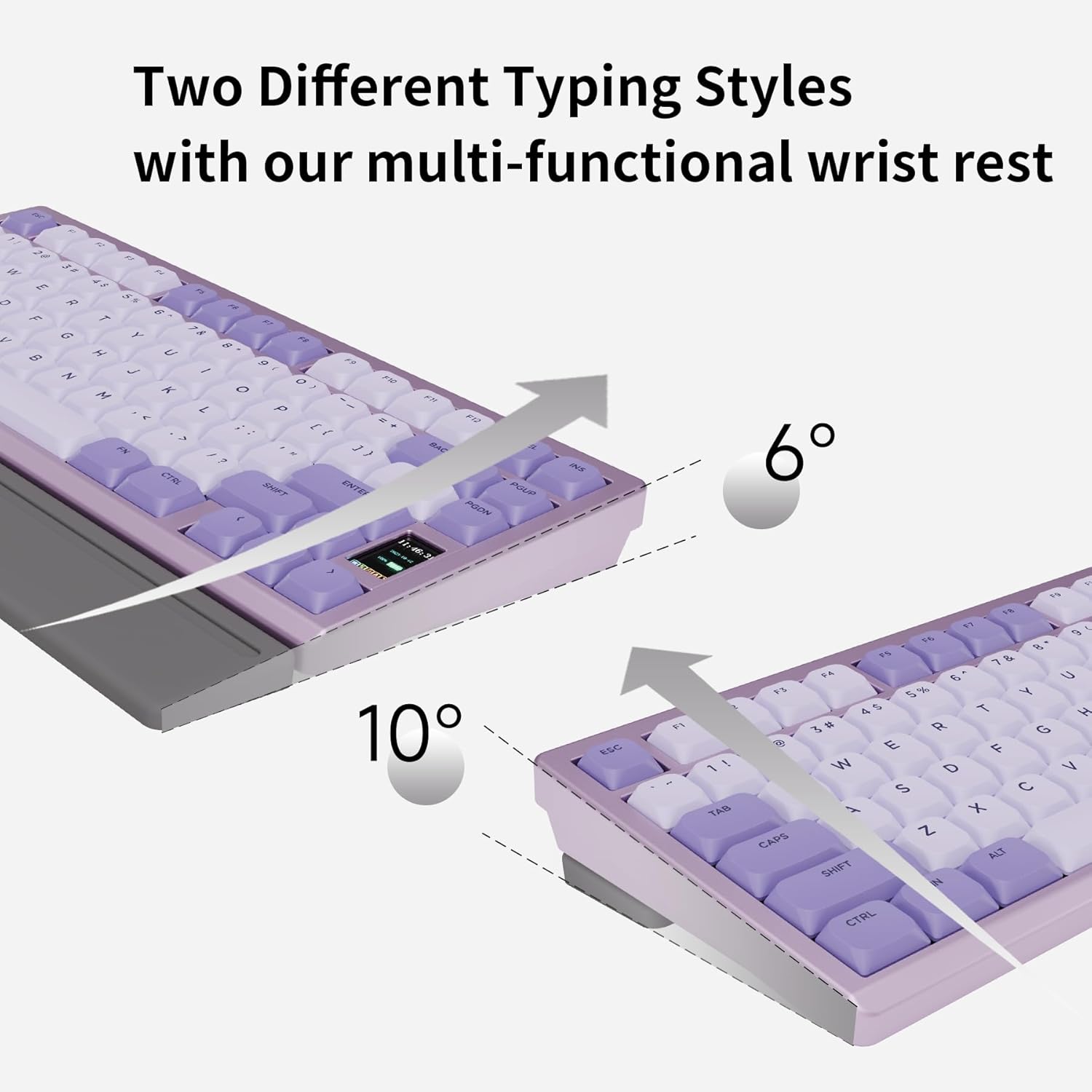
Figure 2.3: Adjustable typing angles with the wrist rest.
- Full POM Switches and Double Shot PBT Keycaps: Features self-developed full POM switches for a smooth typing experience, paired with durable double shot PBT keycaps.

Figure 2.4: Components of the full POM linear switch and keycap.
- Dreimodus-Konnektivität: Supports USB-C wired, 2.4GHz wireless, and Bluetooth 5.3 connections.

Abbildung 2.5: Tri-Mode-Konnektivitätsoptionen.
- Per-key RGB Backlighting: Customizable RGB lighting with 20 lighting effects.

Figure 2.6: Per-key RGB backlighting and control functions.
- Hot-Swap-fähige Leiterplatte: Features a 1.2mm non-flex-cut PCB, allowing for switch replacement. Note: Only compatible with specific low-profile Schalter.

Figure 2.7: Hot-swappable PCB for switch customization.
3. Installationsanleitung
3.1. Packungsinhalt
Bevor Sie fortfahren, vergewissern Sie sich, dass alle Artikel im Paket vorhanden sind:
- Chilkey ND75 LP Mechanical Keyboard
- USB-Kabel (USB-C)
- Tastenkappenabzieher
- (Optional) Multi-functional Wrist Rest
- (Optional) 2.4GHz Wireless Dongle
3.2. Erste Verbindung
The ND75 LP keyboard supports three connection modes: wired (USB-C), 2.4GHz wireless, and Bluetooth 5.3.
- Kabelgebundener Modus:
Connect the provided USB-C cable to the keyboard's USB-C port and the other end to your computer's USB port. The keyboard will automatically switch to wired mode and begin charging.
- 2.4-GHz-Wireless-Modus:
Insert the 2.4GHz wireless dongle into an available USB port on your computer. On the keyboard, switch to 2.4GHz mode (refer to the keyboard's function keys or LCD screen for mode selection). The keyboard should connect automatically.
- Bluetooth-Modus:
Ensure your device's Bluetooth is enabled. On the keyboard, switch to Bluetooth mode (typically by pressing FN + Q/W/E for 3 seconds to pair with up to three devices). The keyboard's LCD screen will indicate pairing status. Select "Chilkey ND75 LP" from your device's Bluetooth settings to connect.
4. Bedienungsanleitung
4.1. Grundlegende Tastaturfunktionen
The ND75 LP functions as a standard 75% mechanical keyboard. All standard key inputs will work as expected.
4.2. LCD Screen Functions
The integrated LCD screen provides real-time information and customization options. Navigate through the screen's menus using the designated function keys or knob (if present on your model).
- Verbindungsmodus: Displays current connection (Wired, 2.4G, BT1, BT2, BT3).
- Batteriestatus: Zeigt die verbleibende Batterieladung in Prozent antage.
- Hintergrundbeleuchtungseinstellungen: Adjust brightness, effect mode, and speed of the RGB lighting.
- RGB-Modi: Cycle through various pre-set RGB lighting effects.
- Lautstärkeregelung: Passen Sie die Systemlautstärke an.
- Sprache: Select display language for the screen.
- Benutzerdefinierte GIFs: Upload and display custom animated GIFs (requires software, see Section 4.4).
4.3. RGB-Hintergrundbeleuchtungssteuerung
Control the per-key RGB backlighting using the following key combinations:
| Funktionstastenkombination | Beschreibung |
|---|---|
| FN + PGDN | Cycle through 20 kinds of lighting effects. |
| FN + F10 | Hintergrundbeleuchtungsfarbe wechseln. |
| FN + | Erhöhen Sie die Helligkeit. |
| FN + | Helligkeit verringern. |
| FN + → | Increase effect speed. |
| FN + | Decrease effect speed. |
| FN+X | Turn On/Off the light. |
4.4. Software-Support
The Chilkey ND75 LP supports an independent driver for advanced customization, including custom RGB backlighting, shortcut key remapping, and macro creation. This software is required for uploading custom GIFs to the LCD screen.
- Please run the driver in wired mode for optimal performance.
- Note: Mac system drivers may not support key remapping, GIF upload, or synchronous time functions.

Abbildung 4.1: Bspample of the keyboard's customization software interface.
5. Wartung
5.1. Reinigung der Tastatur
- Vor der Reinigung die Tastatur von allen Stromquellen trennen.
- Mit einem weichen, fusselfreien Tuch leichtampened with water or a mild cleaning solution to wipe the aluminum case and keycaps.
- For dust and debris between keycaps, use compressed air or the provided keycap puller to remove keycaps and clean thoroughly.
- Avoid using harsh chemicals, abrasives, or solvents as they may damage the finish.
5.2. Batteriepflege
- The keyboard is equipped with a built-in 1800 mAh Lithium Polymer battery.
- Laden Sie die Tastatur mit dem mitgelieferten USB-C-Kabel an einer Standard-USB-Stromquelle auf.
- Um die Lebensdauer der Batterie zu verlängern, sollte eine häufige vollständige Entladung vermieden werden.
- Wenn Sie die Tastatur über einen längeren Zeitraum lagern, laden Sie sie vor der Lagerung auf etwa 50 % auf.
6. Fehlerbehebung
| Problem | Mögliche Ursache | Lösung |
|---|---|---|
| Tastatur reagiert nicht (Kabelgebunden) | Wackelkontakt, defekter USB-Anschluss, Treiberproblem. | Stellen Sie sicher, dass das USB-C-Kabel fest angeschlossen ist. Versuchen Sie es mit einem anderen USB-Anschluss oder Kabel. Starten Sie Ihren Computer neu. |
| Tastatur verbindet sich nicht (drahtlos/Bluetooth) | Falscher Modus ausgewählt, schwacher Akku, Störungen, Kopplungsproblem. | Ensure correct mode (2.4GHz/Bluetooth) is selected on the keyboard. Charge the keyboard. Re-pair the Bluetooth connection or re-insert the 2.4GHz dongle. Move closer to the receiver. |
| Tasten wiederholen sich oder werden nicht registriert | Software glitch, switch issue, low battery. | Restart the keyboard and computer. Ensure the keyboard is fully charged. If a specific key is problematic, consider hot-swapping the switch (refer to Section 2.9). Update keyboard firmware if available. |
| Der LCD-Bildschirm zeigt kein korrektes Bild an. | Software issue, firmware issue. | Ensure the keyboard is in wired mode when using the customization software. Check for firmware updates. |
| RGB-Beleuchtung funktioniert nicht | Beleuchtung ausgeschaltet, Helligkeit zu gering, Softwarekonflikt. | Press FN + X to toggle lighting. Increase brightness using FN + ↑. Check software settings. |
7. Produktspezifikationen
| Attribut | Detail |
|---|---|
| Modell | ND75 LP |
| Technische Daten | 12.67 x 5.51 x 1 Zoll (32.18 x 14.00 x 2.54 cm) |
| Artikelgewicht | 2.88 Pfund (1.31 kg) |
| Hersteller | OOCTPK |
| Batterien | 2 Lithium Polymer batteries (included), 1800 mAh capacity |
| Konnektivitätstechnologie | 2.4-GHz-Funk, Bluetooth 5.3, USB-C-Kabel |
| Tastaturbeschreibung | Mechanisch |
| Besondere Merkmale | Backlit (RGB), Hot-Swappable, Low-Profile Key, Rechargeable, Wrist Rest |
| Farbe (Variante) | Lila |
| Tastenkappenmaterial | Doppelschuss PBT |
| Schaltertyp | Full POM Linear Switches (Aster Low-Profile) |
8. Garantie und Support
8.1. Garantieinformationen
For specific warranty details, please refer to the warranty card included with your product or visit the official Chilkey webDie Garantiebedingungen decken in der Regel Herstellungsfehler bei normalem Gebrauch ab.
8.2. Kundendienst
If you encounter any issues not covered in this manual or require further assistance, please contact Chilkey customer support through their official website or the retailer where the product was purchased. Provide your product model (ND75 LP) and purchase details for faster service.
Besuchen Sie die Chilkey Store on Amazon für weitere Informationen und Supportressourcen.


