Einführung
Welcome to your RCA Wave-68 True Wireless Earbuds. This manual provides detailed instructions on how to set up, operate, maintain, and troubleshoot your earbuds to ensure optimal performance and a seamless audio experience. Please read this manual thoroughly before using your device.
Packungsinhalt
- RCA Wave-68 True Wireless Ohrhörer (links und rechts)
- Ladeetui
- USB-Ladekabel
- Bedienungsanleitung
Produkt überview
Familiarize yourself with the components of your RCA Wave-68 earbuds and charging case.

Bild: The RCA Wave-68 earbuds are shown inside their open charging case. The case features a digital display indicating the battery levels of both the case and individual earbuds.
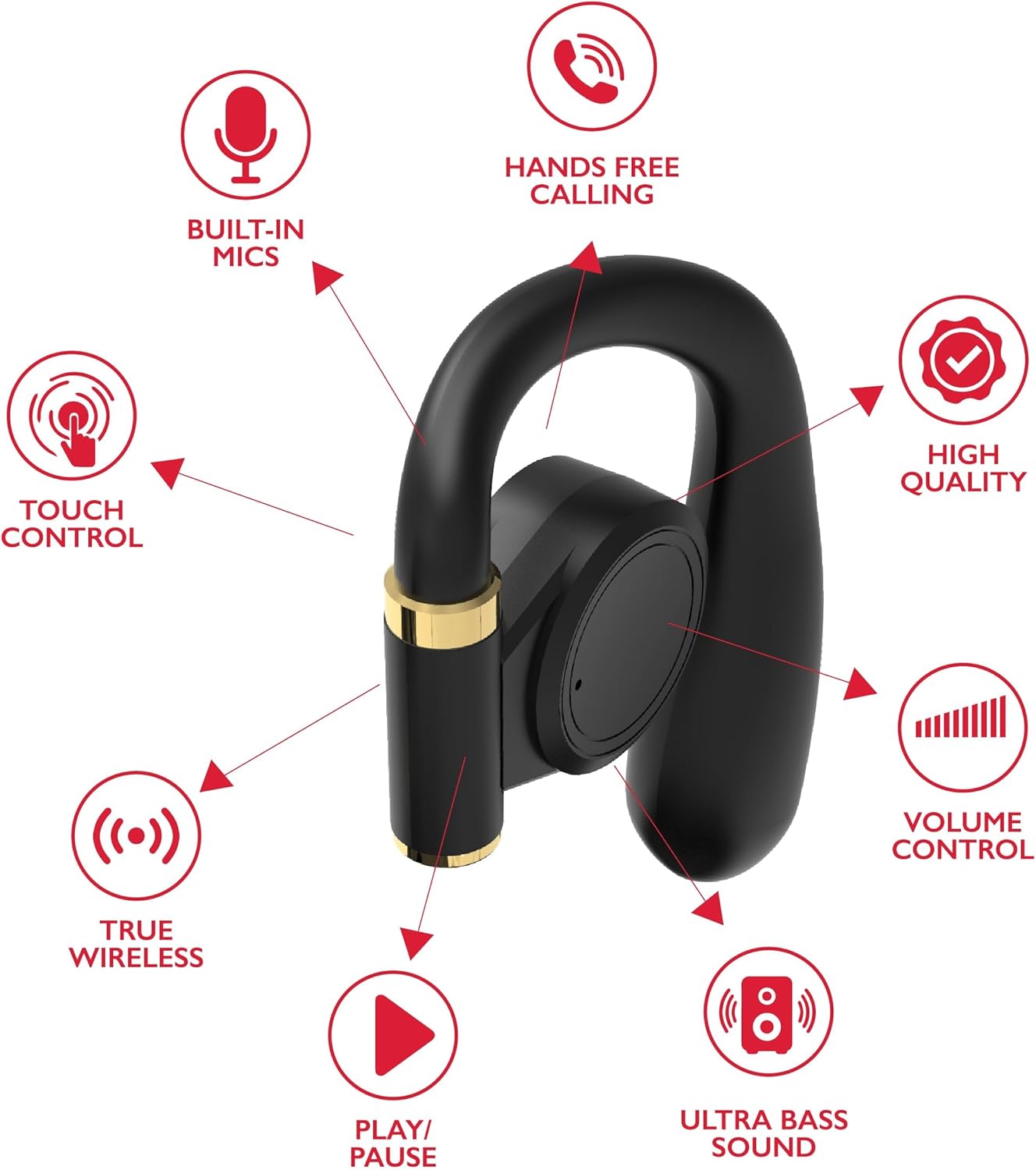
Bild: A diagram highlights key features of a single RCA Wave-68 earbud, including built-in mics, hands-free calling, touch control, true wireless connectivity, play/pause function, ultra bass sound, volume control, and high-quality audio.
Aufstellen
1. Aufladen der Ohrhörer und des Ladecase
Before first use, fully charge the earbuds and charging case. Place the earbuds into the charging case. Connect the USB charging cable to the charging port on the case and to a power source. The digital display on the case will show the charging status. A full charge provides approximately 20 hours of total playtime with the charging case.
2. Bluetooth-Kopplung
- Einschalten: Open the charging case. The earbuds will automatically power on and enter pairing mode. You may see a blinking light indicator on the earbuds.
- Bluetooth aktivieren: Aktivieren Sie Bluetooth auf Ihrem Gerät (Smartphone, Tablet usw.).
- Gerät auswählen: Suchen nach "RCA Wave-68" in the list of available Bluetooth devices and select it to connect.
- Bestätigung: Once connected, the earbuds will indicate successful pairing, and the light indicator may stop blinking or turn off.
If pairing fails, ensure the earbuds are charged and within range of your device. Turn off Bluetooth on other nearby devices to avoid interference.
Bedienungsanleitung
Ein-/Ausschalten
- Einschalten: Öffnen Sie das Ladecase, die Ohrhörer schalten sich automatisch ein. Alternativ können Sie die Touch-Bedienelemente an beiden Ohrhörern 3 Sekunden lang gedrückt halten.
- Ausschalten: Legen Sie die Ohrhörer zurück in das Ladecase und schließen Sie den Deckel. Sie schalten sich automatisch aus. Alternativ können Sie die Touch-Bedienelemente an beiden Ohrhörern 5 Sekunden lang gedrückt halten.
Touch-Bedienelemente
The RCA Wave-68 earbuds feature intuitive touch controls for managing audio playback, calls, and voice assistant functions.
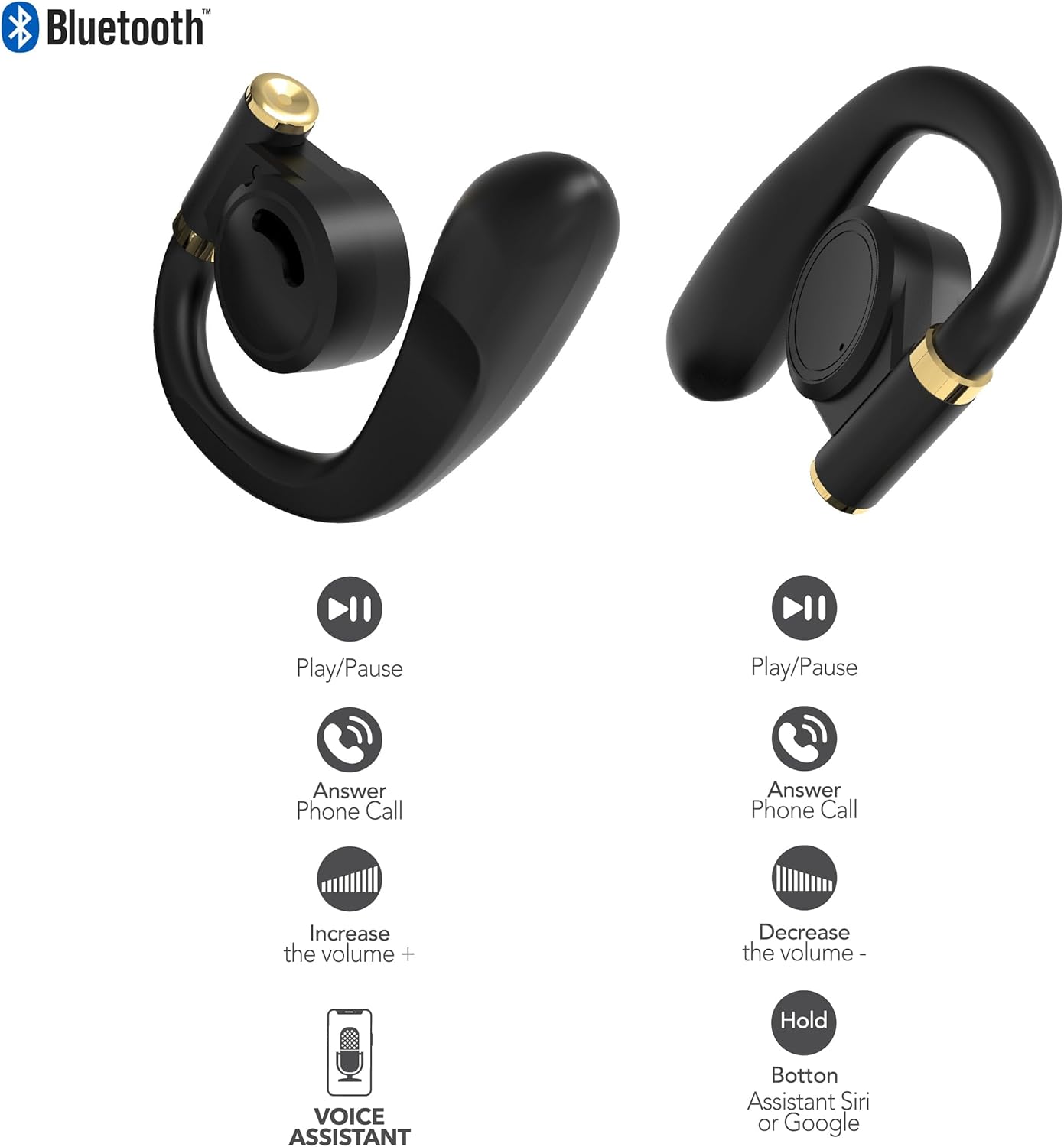
Bild: This diagram illustrates the touch control functions for both the left and right RCA Wave-68 earbuds, including play/pause, answer phone call, volume increase/decrease, and activating the voice assistant.
- Abspielen/Pause: Tippen Sie einmal auf einen der Ohrhörer.
- Nächster Titel: Tippen Sie zweimal auf den rechten Ohrhörer.
- Vorheriges Lied: Tippen Sie zweimal auf den linken Ohrhörer.
- Lautstärke erhöhen: Tippen Sie dreimal auf den rechten Ohrhörer.
- Lautstärke runter: Tippen Sie dreimal auf den linken Ohrhörer.
- Anruf annehmen/beenden: Einmaliges Tippen auf einen der Ohrhörer während eines eingehenden oder aktiven Anrufs.
- Anruf ablehnen: Drücken und halten Sie während eines eingehenden Anrufs einen der Ohrhörer 2 Sekunden lang.
- Sprachassistent aktivieren (Siri/Google Assistant): Halten Sie einen der Ohrhörer 3 Sekunden lang gedrückt.
Transparenzmodus
The Transparency Mode allows you to hear your surroundings while still enjoying your audio. This feature is useful for awareness in environments like busy streets or public transport.
- Activate/Deactivate Transparency Mode: Consult your device's Bluetooth settings or specific app if available, or refer to the product's quick start guide for a specific touch control gesture if not listed above.
Wartung
Reinigung
Regelmäßige Reinigung trägt zur Erhaltung der Klangqualität und Hygiene bei.
- Verwenden Sie ein weiches, trockenes, fusselfreies Tuch, um die Ohrhörer und das Ladecase abzuwischen.
- Verwenden Sie keine Scheuermittel, Alkohol oder chemische Lösungsmittel.
- Gently remove any earwax or debris from the earbud tips and speaker mesh using a small, clean brush or cotton swab.
Lagerung
Bewahren Sie die Ohrhörer bei Nichtgebrauch im Ladecase auf, um sie vor Staub und Beschädigungen zu schützen.
- An einem kühlen, trockenen Ort aufbewahren und vor extremen Temperaturen schützen.
- Vermeiden Sie längere Einwirkung von direkter Sonneneinstrahlung oder Feuchtigkeit.
Fehlerbehebung
Sollten Sie Probleme mit Ihren RCA Wave-68 Ohrhörern haben, beachten Sie bitte die folgenden gängigen Lösungsansätze:
- Earbuds not powering on automatically: Ensure the charging case is charged. Place earbuds back in the case, close the lid, then open it again. If issues persist, manually power on by pressing and holding the touch control area for 3 seconds.
- Ohrhörer lassen sich nicht koppeln: Make sure both earbuds are fully charged. Turn off Bluetooth on your device, then turn it back on. Forget "RCA Wave-68" from your device's Bluetooth list and attempt to pair again. Ensure no other devices are actively connected to the earbuds.
- Kein Ton aus einem Ohrhörer: Place both earbuds back into the charging case, close the lid, and then take them out again. This often re-syncs them. Check your device's audio balance settings.
- Charging case not displaying battery info/not charging: Ensure the USB cable is securely connected to both the case and the power source. Try a different USB cable or power adapter. Clean the charging port on the case for any debris.
- Geringe Lautstärke oder schlechte Tonqualität: Adjust the volume on both your device and the earbuds. Ensure the earbuds are properly seated in your ears for a good seal. Clean any debris from the earbud speaker mesh.
- Ohrhörer fallen heraus: Ensure you are using the correct ear tip size for a secure and comfortable fit.
Technische Daten
| Besonderheit | Detail |
|---|---|
| Modellname | Welle 68 |
| Marke | Cinch |
| Konnektivitätstechnologie | Kabellos (Bluetooth) |
| Bluetooth-Version | 5.3 |
| Akkulaufzeit | Bis zu 20 Stunden (mit Ladeetui) |
| Kontrollmethode | Berühren |
| Platzierung des Ohrs | Im Ohr |
| Formfaktor | Im Ohr |
| Material | Kunststoff, Silikon |
| Besondere Merkmale | Built-In Voice Assistant, Transparency Mode |
| UPC | 850068964468 |
Sicherheitshinweise
- Die Ohrhörer und das Ladecase dürfen nicht auseinandergenommen oder verändert werden.
- Vermeiden Sie es, das Gerät extremen Temperaturen, hoher Luftfeuchtigkeit oder Flüssigkeiten auszusetzen.
- Um Gehörschäden zu vermeiden, sollten die Ohrhörer nicht über längere Zeiträume mit hoher Lautstärke verwendet werden.
- Außerhalb der Reichweite von Kindern und Haustieren aufbewahren.
- Entsorgen Sie das Gerät ordnungsgemäß gemäß den örtlichen Vorschriften.
Garantie und Support
RCA products are designed for reliability and performance. For warranty information or technical support, please refer to the warranty card included in your package or visit the official RCA support webBitte bewahren Sie Ihren Kaufbeleg für Garantieansprüche auf.


