1. Einleitung
This manual provides essential information for the safe and efficient use of your Hama Travel 600 Multi-Device Bluetooth Keyboard. Please read these instructions carefully before using the device and keep them for future reference. This keyboard is designed for universal use with mobile devices such as tablets and smartphones, as well as PCs and laptops, offering a portable and versatile typing solution.
2. Sicherheitshinweise
- Do not open the device. Incorrect assembly or repair can lead to hazards.
- Protect the product from moisture, dirt, and extreme temperatures. Avoid direct sunlight.
- Verwenden Sie das Produkt nur bestimmungsgemäß.
- Betreiben Sie das Produkt nicht außerhalb der in den technischen Daten angegebenen Leistungsgrenzen.
- Bewahren Sie dieses Produkt wie alle elektrischen Produkte außerhalb der Reichweite von Kindern auf.
- Entsorgen Sie Verpackungsmaterial umgehend entsprechend den örtlich geltenden Vorschriften.
- Nehmen Sie keinerlei Änderungen am Produkt vor. Andernfalls erlischt die Garantie.
3. Packungsinhalt
Bitte prüfen Sie, ob alle Artikel vorhanden und in gutem Zustand sind:
- 1 Hama Travel 600 Bluetooth Mini Keyboard
- 1 USB Charging Cable (USB-A to USB-C)
- 1 USB-C to USB-A Adapter
- 1 Kabelmanager
- 1 Bedienungsanleitung (dieses Dokument)
4. Produktüberschreitungview
The Hama Travel 600 is a compact, foldable multi-device Bluetooth keyboard designed for portability and versatility. Its slim design allows it to fit easily into a backpack or tablet compartment. The integrated magnetic case also functions as a stand for your tablet or smartphone, enhancing typing comfort.
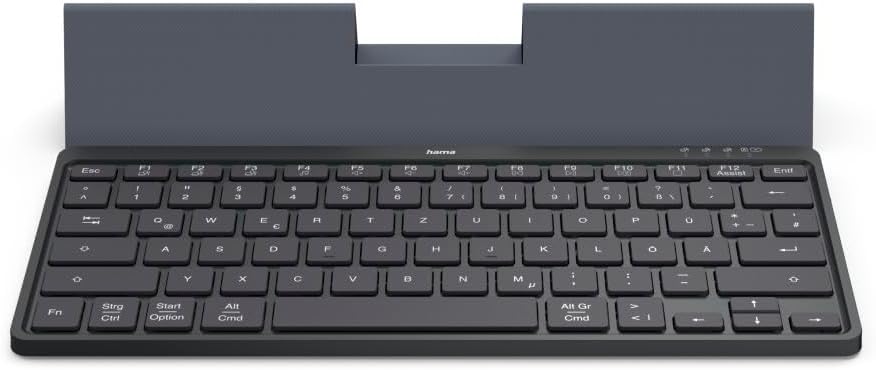
The Hama Travel 600 Multi-Device Bluetooth Keyboard in its open position, revealing the QWERTZ layout and the integrated stand for a tablet or smartphone. The keyboard features a compact design suitable for portability.
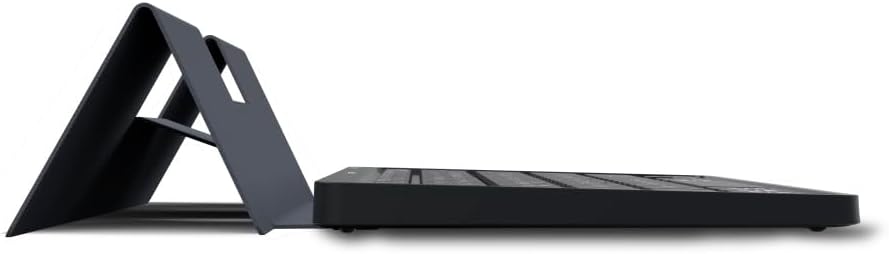
Seite view of the Hama Travel 600 keyboard, illustrating its slim profile and how the integrated case folds to form a stable stand for mobile devices.
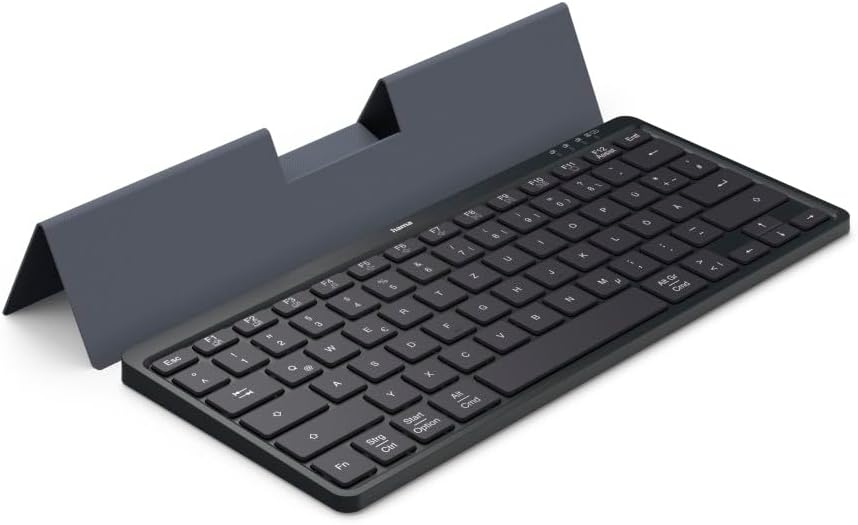
Ein abgewinkelter view of the Hama Travel 600 keyboard, showcasing its full QWERTZ layout and the magnetic case that doubles as a device stand, providing an ergonomic typing experience.

Unten view of the Hama Travel 600 keyboard with its case folded, highlighting the compact and flat design for easy storage and transport.

Close-up of the right side of the Hama Travel 600 keyboard, detailing the function keys (F7-F12), multimedia controls, and the QWERTZ key arrangement, including the 'Alt Gr' and 'Cmd' keys.

Ein weiterer Winkel view of the Hama Travel 600 keyboard, emphasizing its portability and the functional design of the magnetic case that securely holds a tablet or smartphone.
5. Einrichtung
5.1. Aufladen der Tastatur
The keyboard features an integrated lithium-polymer battery. Before initial use, ensure the keyboard is fully charged. Connect the supplied USB-C charging cable to the keyboard's charging port and the other end to a USB power source (e.g., computer, USB wall adapter). A charging indicator light will typically illuminate during charging and turn off or change color when fully charged. A full charge ensures maximum flexibility and usage time.
5.2. Bluetooth-Kopplung
To connect your Hama Travel 600 keyboard to a device via Bluetooth:
- Stellen Sie sicher, dass die Tastatur ausreichend geladen ist.
- Suchen Sie den Netzschalter auf der Tastatur und schieben Sie ihn in die Position „EIN“.
- Activate Bluetooth on your device (tablet, smartphone, PC).
- Press and hold the Bluetooth pairing button on the keyboard. This is often indicated by a Bluetooth symbol or a specific function key combination (e.g., Fn + C). The indicator light will flash, signifying it is in pairing mode.
- On your device, search for available Bluetooth devices. Select "Hama Travel 600" from the list.
- Geben Sie bei Aufforderung den angezeigten Kopplungscode über die Tastatur ein und drücken Sie die Taste. Eingeben.
- Once successfully paired, the indicator light on the keyboard will stop flashing, and your device will confirm the connection. The keyboard is now ready for use.
6. Bedienung der Tastatur
6.1. Umschaltung mehrerer Geräte
The Hama Travel 600 keyboard allows you to connect and switch between multiple devices. Use the dedicated multi-device switching keys (typically marked with Bluetooth icons or numbers) to select the desired paired device. Press the corresponding key to switch the keyboard's active connection.
6.2. Special Function Keys (Fn Keys)
The keyboard includes a row of function keys (F1-F12) that can perform special actions when pressed in combination with the Fn key. These keys provide quick access to multimedia controls and system functions.
| Tastenkombination | Funktion |
|---|---|
| Fn + F7 | Vorheriger Titel |
| Fn + F8 | Abspielen/Pause |
| Fn + F9 | Lautstärke verringern |
| Fn + F10 | Lautstärke erhöhen |
| Fn + F11 | Stumm |
| Fn + F12 | Assist (e.g., Voice Assistant activation) |
| Strg / Ctrl | Steuer Key |
| Start / Option | Windows Key / Option Key (Mac) |
| Alt / Cmd | Alt Key / Command Key (Mac) |
| Alt Gr / Cmd | Alt Graph Key / Command Key (Mac) |
Note: The exact functionality of some keys may vary depending on the operating system and device connected.
7. Wartung
- Reinigen Sie das Produkt nur mit einem leicht feuchtenamp, fusselfreies Tuch.
- Do not use aggressive cleaning agents, alcohol, or other chemical solutions, as these could damage the surface or functionality.
- Ensure no liquid enters the keyboard during cleaning.
- Bewahren Sie die Tastatur bei Nichtgebrauch in einer trockenen, staubfreien Umgebung auf.
- Vermeiden Sie es, die Tastatur fallen zu lassen oder starken Stößen auszusetzen.
8. Fehlerbehebung
If you encounter issues with your Hama Travel 600 keyboard, refer to the following table for common problems and solutions:
| Problem | Mögliche Ursache | Lösung |
|---|---|---|
| Die Tastatur verbindet sich nicht/koppelt nicht. | Low battery; Bluetooth off on device; keyboard not in pairing mode; interference. | Charge the keyboard. Ensure Bluetooth is enabled on your device. Put the keyboard into pairing mode. Move closer to the device and away from other wireless devices. Try unpairing and re-pairing. |
| Die Tasten reagieren nicht oder die Eingabe wird verzögert. | Low battery; weak Bluetooth signal; device issue. | Charge the keyboard. Ensure the keyboard is within effective Bluetooth range. Restart your connected device. |
| Incorrect characters are typed. | Incorrect keyboard layout selected on the device. | Check your device's settings to ensure the correct keyboard layout (e.g., QWERTZ DE) is selected. |
| Die Tastatur trennt häufig die Verbindung. | Niedriger Batteriestand; zu große Entfernung zum Gerät; Störungen. | Charge the keyboard. Keep the keyboard close to your device. Minimize other wireless interference. |
9. Spezifikationen
| Besonderheit | Detail |
|---|---|
| Marke | Hama |
| Modellnummer | 00125138 |
| Konnektivitätstechnologie | Bluetooth |
| Farbe | Schwarz |
| Material | Plastik |
| Akku-Typ | Integrated Lithium-Polymer |
| Besondere Merkmale | Lightweight, Portable, Shortcut keys, Multimedia keys, Rechargeable, Magnetic case |
| Kompatible Geräte | Laptop, PC, Tablet, Smartphone |
| Tastaturlayout | QWERTZ DE (German Layout) |
| Im Lieferumfang enthaltene Komponenten | USB-C charging cable, USB-C to USB-A adapter, Cable manager |
10. Garantie und Support
Hama products are covered by a standard manufacturer's warranty. For detailed warranty terms, technical support, or service inquiries, please refer to the official Hama webSeite? ˅ (www.hama.com) or contact their customer service directly. Please retain your proof of purchase for any warranty claims.


