1. Produktüberschreitungview
The Nitecore HC70 UHE is a high-performance, USB-C rechargeable headlamp designed for demanding outdoor and professional applications. It features a powerful 1600-lumen output, dual light sources (white and red), and is bundled with the Carbon 6K Battery Runtime Extender Kit for significantly extended operation.
Dieser Kopfamp is built with durable aero-grade aluminum alloy, offering IP68 waterproof rating and 2-meter impact resistance, making it suitable for various challenging environments including night maintenance, search and rescue, outdoor work, and trekking.


2. Packungsinhalt
Überprüfen Sie, ob alle Artikel im Paket vorhanden sind:
- Nitecore HC70 UHE Headlamp
- Nitecore Carbon Battery 6K
- 2 x Stirnbänder
- 2 x USB-C to USB-C Charging Cables
- Klammer
- Clips
- Aufbewahrungskoffer
3. Einrichtung
3.1 Attaching the Headlamp and Battery Pack
- Attach the HC70 UHE headlamp unit to the front headband using the integrated bracket.
- Secure the Carbon Battery 6K to the rear headband using its dedicated mount.
- Schließen Sie den Kopf anamp to the Carbon Battery 6K using one of the provided USB-C to USB-C charging cables. Ensure a secure connection.
3.2 Erstaufladung
Vor dem ersten Gebrauch den Ladekopf vollständig aufladen.amp and the Carbon Battery 6K.
- Connect the USB-C charging cable to the headlamp's USB-C port and to a 5V/2A USB power adapter.
- The intelligent charging circuit allows for use while charging and automatically stops charging once the battery is full. Full charge typically takes 3 hours and 20 minutes.

4. Bedienungsanleitung
4.1 Bedienelemente

- Netzschalter: Used for turning the headlamp On/Off and adjusting brightness levels.
- MODE-Taste: Used for switching between light sources (white/red) and accessing special modes.
4.2 Ein-/Ausschalten
- To turn On: Press and hold the Power Button for 1 second.
- To turn Off: Press and hold the Power Button for 1 second while the light is on.
4.3 Helligkeitsstufen und Modi
The HC70 UHE features both primary white light and auxiliary red light modes.

- Primary White Light: With the light on, short press the Power Button to cycle through brightness levels: ULTRALOW (8 Lumens) → LOW (150 Lumens) → MID (500 Lumens) → HIGH (1000 Lumens) → TURBO (1600 Lumens).
- Rotes Zusatzlicht: With the light on, short press the MODE Button to switch to red light. Short press again to cycle through red light modes: LOW (5 Lumens) → HIGH (15 Lumens) → SLOW FLASHING (15 Lumens).
- Special Modes (SOS/BEACON): With the white light on, long press the MODE Button to activate SOS mode. Long press again to activate BEACON mode. Short press the Power Button to exit special modes.
4.4 Red Safety Rear Light
The Carbon Battery 6K features a red safety rear light for added visibility.
- To turn On: Long press the Power Button on the Carbon Battery 6K for 1 second.
- To turn Off: Long press the Power Button on the Carbon Battery 6K for 1 second.

4.5 Leistungsanzeige
Der Kopfamp provides an intuitive power indication system to show remaining battery life.

- 4 Constant-on Blue Bars: 75% - 100% battery
- 3 Constant-on Blue Bars: 50% - 75% battery
- 2 Constant-on Blue Bars: 25% - 50% battery
- 1 Constant-on Blue Bar: 0% - 25% battery
4.6 Runtime Extension with Carbon Battery 6K
When connected to the Carbon Battery 6K, the headlamp's runtime is significantly extended. The Carbon Battery 6K prioritizes its power supply to the headlamp, preserving the headlampinterne Batterie.


5. Wartung
5.1 Reinigung
- Wischen Sie den Kopf abamp and battery pack with a clean, damp Tuch. Keine Scheuer- oder Lösungsmittel verwenden.
- Ensure the USB-C port protective cover is properly sealed to prevent dust and water ingress.
5.2 Speicherung
- Bewahren Sie den Kopf aufamp an einem kühlen, trockenen Ort, geschützt vor direkter Sonneneinstrahlung und extremen Temperaturen.
- Zur Langzeitlagerung sollte der Akku alle drei Monate auf etwa 50 % aufgeladen werden, um seine Funktionstüchtigkeit zu erhalten.
6. Fehlerbehebung
- Licht geht nicht an: Ensure the battery is charged. Check that the headlamp and Carbon Battery 6K are securely connected.
- Low brightness or short runtime: Recharge the battery. Ensure the USB-C cable is fully inserted during charging. Battery performance may decrease in extremely cold conditions.
- Red Safety Rear Light not working: Ensure the Carbon Battery 6K is charged and the power button on the battery pack is pressed for 1 second.
- If issues persist, refer to the warranty information or contact Nitecore customer support.
7. Spezifikationen
Detaillierte technische Spezifikationen für den Nitecore HC70 UHE-Kopfamp:
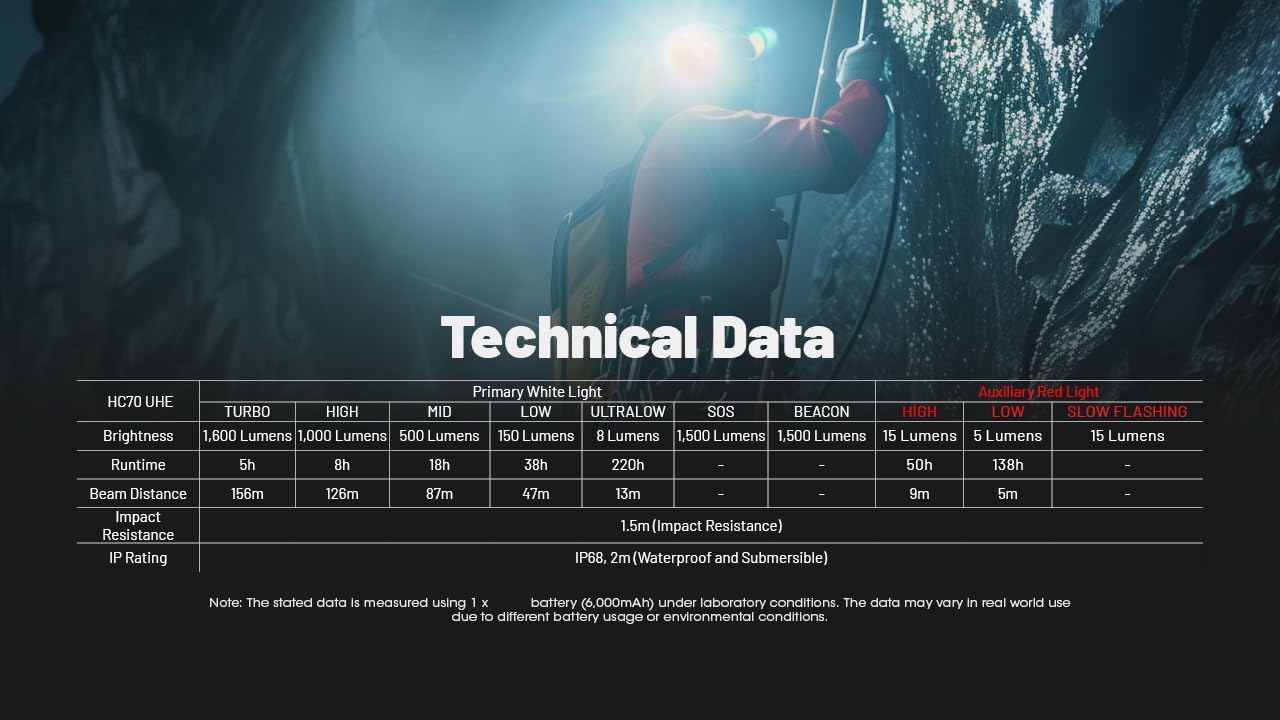
| Besonderheit | Spezifikation |
|---|---|
| Modell | HC70 UHE |
| Maximale Helligkeit | 1600 Lumen |
| Maximale Strahlreichweite | 156 Meter (170 Yards) |
| Stromquelle | Batteriebetrieben (Lithium-Ionen) |
| Ladeanschluss | USB-C (5 V) |
| Material | Aero-grade Aluminum Alloy |
| Wasserbeständigkeit | IP68 (wasserdicht und tauchfähig) |
| Schlagfestigkeit | 2 Meter |
| Besondere Merkmale | Rechargeable, Dual Light Sources (White/Red), Runtime Extender Kit |
8. Garantie und Support
8.1 Garantieinformationen
This Nitecore product comes with a limited warranty. Please refer to the warranty card included in your package for specific terms and conditions. Keep your purchase receipt as proof of purchase for warranty claims.
8.2 Kundendienst
For technical assistance, troubleshooting, or warranty service, please contact Nitecore customer support through their official website or authorized distributors. You can find more information and contact details by visiting the Nitecore Store auf Amazon oder deren globale webWebsite.


