1. Einleitung
The Audizio Avola is a comprehensive audio system designed to provide a wide range of listening options. It integrates Internet Radio, DAB+, FM radio, a CD player, and Bluetooth connectivity into a single, elegant unit. This manual will guide you through the setup, operation, and maintenance of your Avola system, ensuring you can fully utilize its features for an optimal audio experience.
2. Sicherheitshinweise
- Stromversorgung: Verwenden Sie ausschließlich das mitgelieferte Netzteil. Stellen Sie sicher, dass die Lautstärketage entspricht den Anforderungen Ihrer Region.
- Wasser und Feuchtigkeit: Das Gerät darf weder Regen noch Feuchtigkeit oder anderen Flüssigkeiten ausgesetzt werden. Stellen Sie keine mit Flüssigkeiten gefüllten Gegenstände, wie z. B. Vasen, auf das Gerät.
- Belüftung: Sorgen Sie für ausreichende Belüftung rund um das Gerät. Blockieren Sie keine Belüftungsöffnungen.
- Wärmequellen: Halten Sie das Gerät von Wärmequellen wie Heizkörpern, Heizlüftern, Öfen oder anderen Geräten fern, die Wärme erzeugen.
- Reinigung: Disconnect the unit from the power supply before cleaning. Use a soft, dry cloth. Do not use liquid cleaners or aerosol cleaners.
- Wartung: Führen Sie keine Reparaturen am Gerät selbst durch. Überlassen Sie alle Wartungsarbeiten qualifiziertem Fachpersonal.
- CD-Spieler: Do not insert foreign objects into the CD tray. Handle CDs by their edges to avoid scratches.
3. Packungsinhalt
Prüfen Sie, ob alle Artikel in der Verpackung vorhanden sind:
- 1x Audizio Avola Internet Radio
- 1x Fernbedienung
- 1x Netzteil
- 1x Benutzerhandbuch (Schnellstartanleitung)

Image: Audizio Avola unit shown with its remote control and power adapter.
4. Produktüberschreitungview
4.1 Frontplatte

Bild: Vorderseite view of the Audizio Avola with the CD tray closed.
The front panel features the main display, control buttons, a CD tray, and input ports.
- Anzeige: Color display for navigation and information.
- Bedientasten: MENU, INFO, REC/DEL, PRESET/REPEAT, STANDBY, I/R, Play/Pause, Stop, Skip/Fast Forward/Rewind.
- CD-Fach: Zum Einlegen von Audio-CDs.
- TUNE/SELECT-Regler: Durch Drehen des Bildschirms navigieren Sie durch die Menüs, durch Drücken wählen Sie aus.
- Lautstärkeregler: Passt den Audioausgabepegel an.
- USB-Anschluss: Zum Anschließen von USB-Speichergeräten.
- SD-Kartensteckplatz: Zum Einlegen von SD-Speicherkarten.
- AUX-Eingang: 3.5-mm-Klinkenbuchse für externe Audioquellen.
- Kopfhöreranschluss: 3.5-mm-Klinkenanschluss für ungestörtes Hören.

Image: Close-up of the Audizio Avola front panel showing USB, SD, AUX, and headphone ports.
4.2 Rückseite
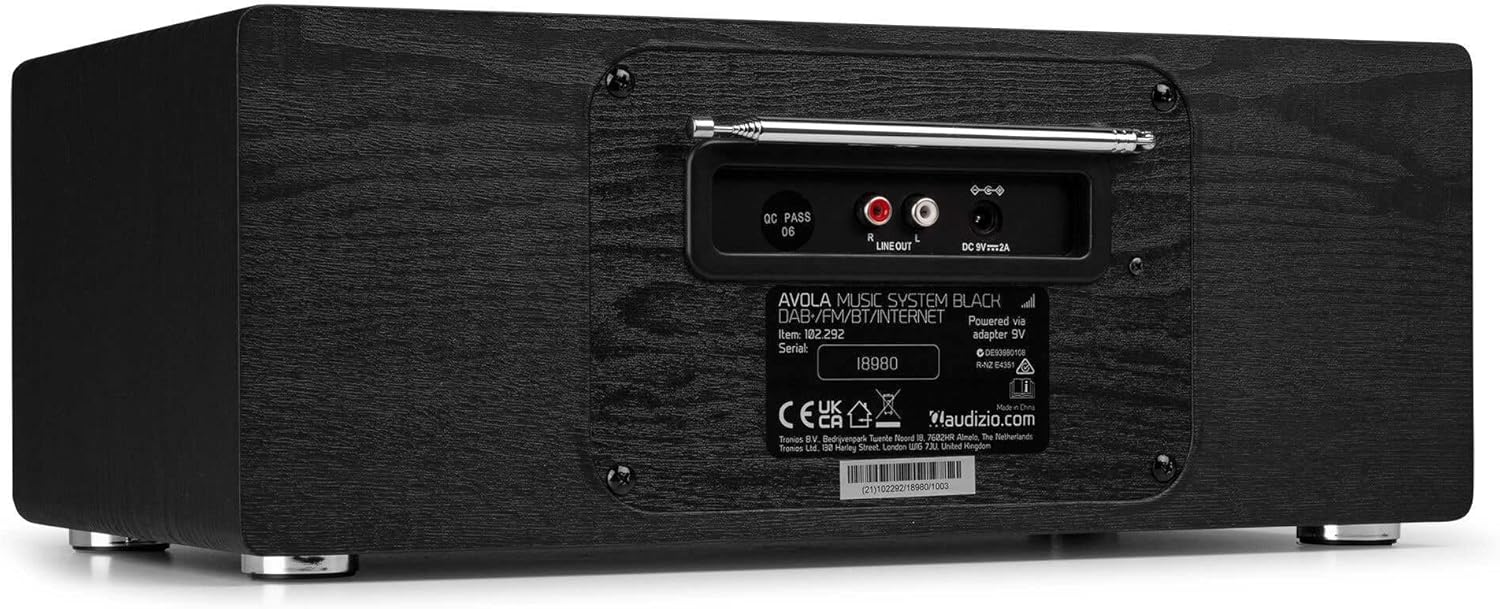
Bild: Rückseite view of the Audizio Avola, highlighting the antenna and connection ports.
The rear panel houses essential connections:
- Teleskopantenne: For DAB+ and FM radio reception. Extend fully for best signal.
- LINE OUT (RCA): Zum Anschluss an externe Geräte ampVerstärker oder Lautsprecher.
- Gleichstromeingang 9 V 2 A: Zum Anschluss des Netzteils.
5. Einrichtung
5.1 Stromanschluss
- Connect the power adapter to the DC 9V 2A input on the rear of the Avola unit.
- Stecken Sie das Netzteil in eine geeignete Steckdose.
- The unit will enter standby mode. Press the STANDBY button on the unit or remote control to power on.
5.2 Antenneneinrichtung
For optimal DAB+ and FM radio reception, fully extend the telescopic antenna located on the rear panel. Adjust its position for the best signal quality.
5.3 Initial Setup (WLAN Connection)
To access Internet Radio features, the Avola must be connected to a Wi-Fi network.
- Upon first power-on, the unit may prompt you to set up the network connection. If not, press MENU, navigate to 'System Settings' and then 'Network'.
- Select 'Wi-Fi Network' and choose 'Scan' to find available networks.
- Wählen Sie Ihr Wi-Fi-Netzwerk aus der Liste aus.
- Enter your Wi-Fi password using the TUNE/SELECT knob to navigate characters and press to confirm each character.
- Once connected, the display will show a Wi-Fi icon.
6. Betriebsarten
6.1 Internetradio
Access thousands of radio stations worldwide via your Wi-Fi connection.
- Press the MENU button and select 'Internet Radio'.
- Sie können die Sender nach Standort oder Genre durchsuchen oder gezielt nach bestimmten Sendern suchen.
- Use the TUNE/SELECT knob to navigate and select.
- To save a station as a preset, press and hold the PRESET/REPEAT button until the preset menu appears, then select a preset number.

Image: The Audizio Avola display showing the Internet Radio interface.
6.2 DAB+ Radio
Digital Audio Broadcasting Plus offers high-quality digital radio.
- Press the MENU button and select 'DAB Radio'.
- Das Gerät sucht automatisch nach verfügbaren DAB+-Sendern.
- Use the TUNE/SELECT knob to browse and select stations.
- Speichern Sie Voreinstellungen wie für Internetradio beschrieben.
6.3 UKW-Radio
Listen to traditional analog FM radio broadcasts.
- Press the MENU button and select 'FM Radio'.
- Use the TUNE/SELECT knob to manually tune or press and hold to auto-scan for stations.
- Speichern Sie Voreinstellungen wie für Internetradio beschrieben.
6.4 CD-Player
Spielen Sie Ihre Lieblings-Audio-CDs ab.
- Press the MENU button and select 'CD Player'.
- Press the 'Open' button next to the CD tray to open it.
- Carefully place an audio CD onto the tray with the label side facing up.
- Press the 'Open' button again to close the tray. The unit will begin playing the CD automatically.
- Use the Play/Pause, Stop, and Skip buttons for playback control.
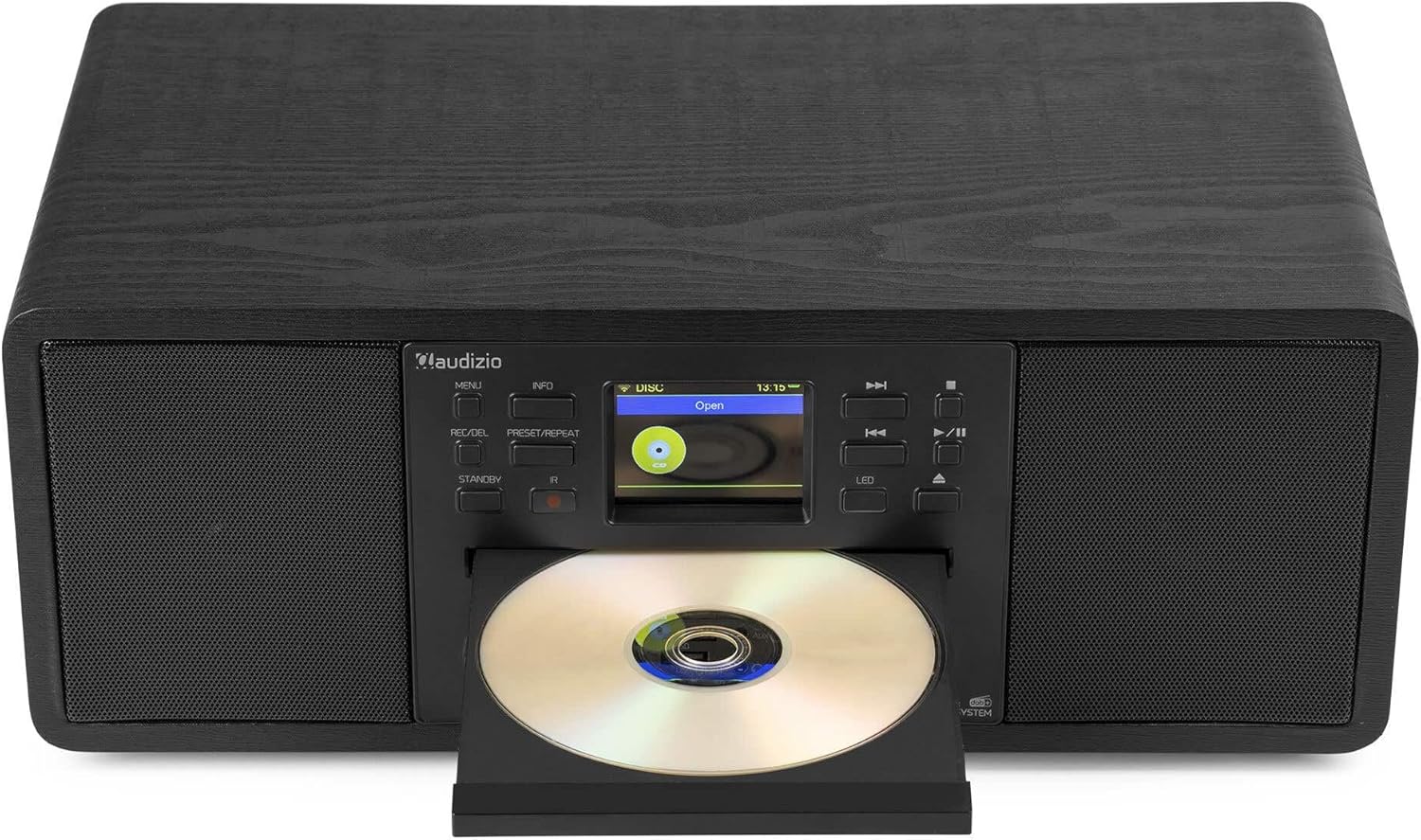
Image: The Audizio Avola with its CD tray open, ready for disc insertion.
6.5 Bluetooth-Konnektivität
Streamen Sie Audio kabellos von Ihrem Smartphone, Tablet oder anderen Bluetooth-fähigen Geräten.
- Press the MENU button and select 'Bluetooth'.
- The Avola will enter pairing mode and become discoverable.
- On your Bluetooth device, search for 'Audizio Avola' in the Bluetooth settings and select it to pair.
- Once connected, the display will show 'BT Connected'. You can now play audio from your device through the Avola.

Image: The Audizio Avola display indicating a successful Bluetooth connection.
6.6 USB/SD-Wiedergabe
Audio wiedergeben files von USB-Laufwerken oder SD-Karten.
- Insert a USB drive into the USB port or an SD card into the SD card slot on the front panel.
- Press the MENU button and select 'USB' or 'SD' (the unit may automatically switch to the correct mode).
- Navigieren Sie durch Ihren files and folders using the TUNE/SELECT knob.
- Press the TUNE/SELECT knob to play a selected track.
7. Wartung
- Reinigung des Geräts: Reinigen Sie die Außenseite des Geräts mit einem weichen, trockenen und fusselfreien Tuch. Verwenden Sie keine Scheuermittel, Wachse oder Lösungsmittel.
- CD-Linsenreinigung: Sollte die CD-Wiedergabe unregelmäßig werden, verwenden Sie eine handelsübliche CD-Linsenreinigungs-CD, um die Laserlinse zu reinigen.
- Lagerung: Wenn Sie das Gerät über einen längeren Zeitraum lagern, trennen Sie es vom Stromnetz und bewahren Sie es an einem kühlen, trockenen Ort auf.
8. Fehlerbehebung
| Problem | Mögliche Ursache | Lösung |
|---|---|---|
| Kein Strom | Netzteil nicht angeschlossen oder Steckdose defekt. | Überprüfen Sie die Stromanschlüsse. Versuchen Sie eine andere Steckdose. |
| Kein Ton | Volume too low, mute activated, or incorrect source selected. | Increase volume. Check if mute is active. Ensure correct input source is selected. |
| Internetradio verbindet sich nicht | Falsches WLAN-Passwort, schwaches Signal oder Netzwerkproblem. | Re-enter Wi-Fi password. Move unit closer to router. Check router status. |
| DAB+/FM reception poor | Antenne nicht ausgefahren oder schlechtes Signalgebiet. | Die Teleskopantenne vollständig ausziehen und einstellen. Versuchen Sie, das Gerät neu zu positionieren. |
| CD wird nicht abgespielt | CD inserted incorrectly, dirty/scratched CD, or unsupported format. | Ensure CD is inserted label-side up. Clean or replace CD. Verify CD format (supports CD-DA, MP3). |
| Bluetooth nicht gekoppelt | Device not in pairing mode, or Avola not discoverable. | Ensure both devices are in pairing mode. Check Bluetooth settings on your device. |
9. Spezifikationen
| Besonderheit | Spezifikation |
|---|---|
| Modellname | Avola |
| Artikelnummer | 102.292 |
| Abmessungen (LxBxH) | 45.8 x 25.8 x 19.7 cm |
| Gewicht | 4 kg |
| Leistungsaufnahme | 220 Volt (via power adapter) |
| Speaker Output Power (Max) | 60 Watt |
| Audioausgabemodus | Stereo |
| Unterstützte Audioformate | CD-DA, MP3 |
| Konnektivitätstechnologie | WLAN, Bluetooth, AUX, RCA |
| Kompatible Geräte | MP3 Player, PC, Smartphone, Tablet |
| Farbe | Schwarz |
10. Garantie und Support
Audizio products are designed and manufactured to the highest standards. In the unlikely event of a problem with your product, please contact your retailer for assistance. Keep your proof of purchase for warranty claims. For further support or inquiries, please refer to the official Audizio webWebsite oder wenden Sie sich an den Kundendienst.


