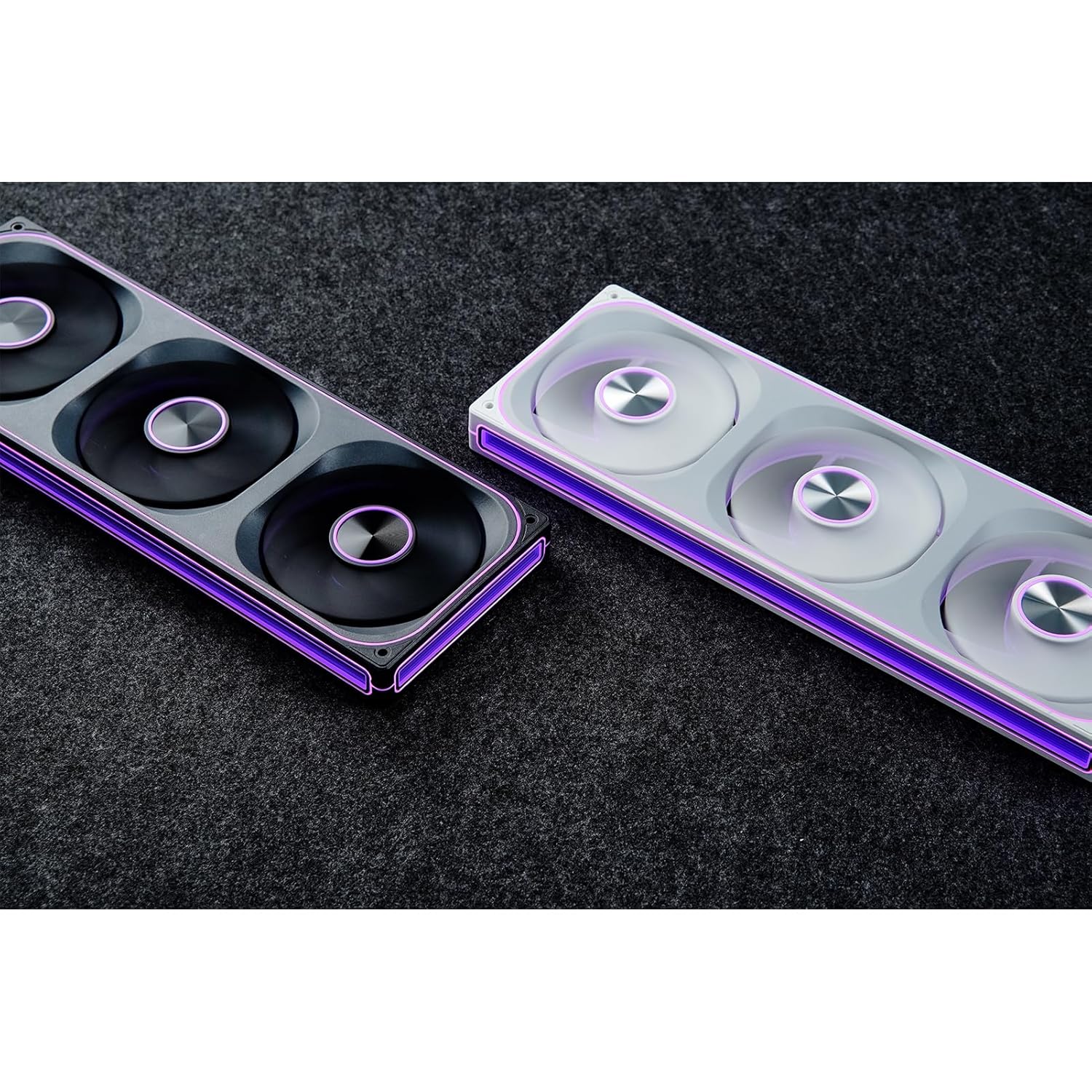
This manual provides detailed instructions for the installation, operation, and maintenance of your JONSBO ZA-240B PC Case Fan. Please read this manual thoroughly before installation and use to ensure proper function and longevity of the product. The JONSBO ZA-240B is an all-in-one unit featuring two 120mm ARGB fans, designed for efficient cooling and customizable lighting within a PC chassis.
2. Sicherheitshinweise
Stellen Sie sicher, dass Ihr Computersystem ausgeschaltet und vom Stromnetz getrennt ist, bevor Sie Installationen oder Wartungsarbeiten durchführen.
Vermeiden Sie es, die Lüfterflügel zu berühren, während der Lüfter in Betrieb ist.
Handle the fan unit carefully to prevent damage to components or wiring.
Setzen Sie das Produkt keiner Feuchtigkeit oder extremen Temperaturen aus.
Use only compatible power and ARGB connectors as specified. Incorrect connections may cause damage.
Außerhalb der Reichweite von Kindern aufbewahren.
3. Packungsinhalt
Überprüfen Sie, ob alle Artikel im Paket vorhanden sind:
JONSBO ZA-240B PC Case Fan Unit (with 2x120mm ARGB Fans)
Befestigungsschrauben
Dokumentation (dieses Handbuch)
Image: JONSBO ZA-240B fan unit with its integrated cables for power and ARGB connection.
4. Produktmerkmale
All-in-One-Design: Single frame unit integrating two 120mm ARGB fans, simplifying installation and cable management.
ARGB Infinity Mirror: Features 4-sides thousand-layer mirror illusion with 52 lamp beads around the circumference and 18 in the axis for dynamic lighting effects.
Addressable RGB Sync: Direct 3-pin ARGB connection to compatible motherboards for synchronized lighting control and over 16 million color effects.
PWM-Steuerung: Quiet and low-noise PWM fan operation with an integrated male/female head for speed regulation.
Namensschild aus Aluminium: Includes an aluminum CD pattern nameplate for enhanced aesthetics.
Simplified Cabling: One-line connection to the motherboard for both fan power and ARGB lighting.
Bild: Vorderseite view of the JONSBO ZA-240B PC Case Fan showcasing seine ARGB-Beleuchtung und den Unendlichkeitsspiegeleffekt.
5. Einrichtung und Installation
Follow these steps to install the JONSBO ZA-240B PC Case Fan into your computer chassis:
Bereiten Sie Ihr System vor: Power off your computer and unplug it from the power outlet. Open your PC case to access the interior.
Montageort bestimmen: Determine the desired mounting location for the fan unit (e.g., top, front, bottom, or side of the case). Ensure there is sufficient clearance.
Lüftereinheit sichern: Align the fan unit with the screw holes in your PC case. Use the provided mounting screws to firmly attach the fan unit to the chassis. Do not overtighten.
Image: JONSBO ZA-240B fan unit installed at the top of a PC case, demonstrating typical mounting.
PWM-Kabel anschließen: Locate an available 4-pin PWM fan header on your motherboard. Connect the 4-pin PWM connector from the fan unit to this header. This allows the motherboard to control fan speed.
ARGB-Kabel anschließen: Locate an available 3-pin 5V Addressable RGB header on your motherboard. Connect the 3-pin ARGB connector from the fan unit to this header. Ensure the arrow on the connector aligns with the +5V pin on the motherboard header to prevent damage. Nicht an einen 12V RGB-Anschluss anschließen.
Kabelmanagement: Route the cables neatly to avoid interference with other components and to improve airflow.
Gehäuse schließen und Gerät einschalten: Once all connections are secure, close your PC case, plug in the power cable, and power on your system.
6. Bedienung
Lüfterdrehzahlregelung (PWM)
The JONSBO ZA-240B fan unit utilizes Pulse Width Modulation (PWM) technology, allowing your motherboard to dynamically adjust fan speeds based on system temperature. This ensures optimal cooling performance while minimizing noise levels. You can configure fan curves through your motherboard's BIOS/UEFI settings or using compatible software provided by your motherboard manufacturer.
ARGB-Beleuchtungssteuerung
The Addressable RGB (ARGB) lighting of the ZA-240B can be controlled via your motherboard's ARGB software (e.g., ASUS Aura Sync, MSI Mystic Light Sync, GIGABYTE RGB Fusion, ASRock Polychrome Sync). Ensure your motherboard supports 3-pin 5V ARGB headers. This software allows you to customize lighting effects, colors, and synchronization with other ARGB components in your system.
Image: The JONSBO ZA-240B fan unit displaying its customizable ARGB lighting within a computer system.
7. Wartung
Regular maintenance helps ensure optimal performance and extends the lifespan of your fan unit.
Staubentfernung: Periodically clean dust from the fan blades and frame using compressed air or a soft brush. Ensure the system is powered off and unplugged before cleaning.
Inspektion: Occasionally inspect the fan and its cables for any signs of wear, damage, or loose connections.
8. Fehlerbehebung
Ausgabe
Mögliche Ursache
Lösung
Lüfter dreht sich nicht
Loose or incorrect PWM cable connection. Insufficient power.
Check the 4-pin PWM cable connection to the motherboard. Ensure the motherboard is supplying power to the fan header.
ARGB-Beleuchtung funktioniert nicht
Loose or incorrect ARGB cable connection. Connected to 12V RGB header. Motherboard ARGB software not configured.
Verify the 3-pin ARGB cable is securely connected to a 5V ARGB header. Ensure it is not connected to a 12V RGB header. Check motherboard ARGB software settings.
Der Lüfter ist zu laut
Fan speed set too high. Obstruction.
Adjust fan speed settings in your motherboard's BIOS/UEFI or software. Ensure no cables or objects are obstructing the fan blades.
Schlechte Kühlleistung
Insufficient airflow. Dust buildup. Incorrect fan orientation.
Ensure proper airflow within the case. Clean dust from fans. Verify fan is oriented to push or pull air in the desired direction.
9. Spezifikationen
Besonderheit
Detail
Modellnummer
ZA-240B
Lüftergröße
2 x 120mm (integrated unit)
Fan Thickness
28 mm
Drehzahl
700–2400 U/min (±10 %)
Geräuschpegel
21.3-37.3 dB(A)
Stromanschluss
4-Pin PWM
ARGB-Anschluss
3-Pin 5V ARGB
Bandtage
DC 12 Volts (Fan), 5 Volts (LED)
Wastage
5.16 Watt (Lüfter), 5.80 Watt (LED)
Kompatible Geräte
PC-Gehäuse
Abmessungen (Paket)
29.97 x 15.75 x 4.19 cm
Gewicht (Paket)
707.6 g
10. Garantie und Support
Informationen zur Garantie und zum technischen Support finden Sie auf der offiziellen JONSBO-Website. webBesuchen Sie unsere Website oder kontaktieren Sie Ihren Händler. Bewahren Sie Ihren Kaufbeleg für Garantieansprüche auf.
Zugehörige Dokumente - ZA-240B
Sicherheitshinweise und Warnhinweise für Jonsbo-Ventilatoren Dieses Dokument enthält wichtige Sicherheitshinweise und Warnungen für den Jonsbo-Ventilator und behandelt mechanische und elektrische Sicherheit, Belüftung und Wartung. Es dient der sicheren Handhabung und sachgemäßen Verwendung des Produkts.
Jonsbo D31 Computergehäuse – Installationsanleitung und Spezifikationen Ausführlicher Leitfaden für das Jonsbo D31 Computergehäuse mit Teileliste, Gehäusespezifikationen, Einbau von Netzteil und Grafikkarte, Kühloptionen und Kompatibilität. Enthält detaillierte Schritt-für-Schritt-Anleitungen zum PC-Zusammenbau.
JONSBO C6 PC-Gehäuse: Benutzerhandbuch und Installationsanleitung Ausführliches Benutzerhandbuch und Installationsleitfaden für das JONSBO C6 PC-Gehäuse. Dieses Dokument beschreibt den Lieferumfang, die Komponentenidentifizierung und die schrittweise Montageanleitung für Ihren PC.
JONSBO NV10 PC-Gehäuse Installationsanleitung Ausführliche Installationsanleitung für das JONSBO NV10 PC-Gehäuse mit detaillierter Beschreibung des Packungsinhalts, der Teile, der Anschlüsse und einer Schritt-für-Schritt-Montageanleitung für den Zusammenbau Ihres Computers.
JONSBO N5 NAS Gehäuse – Benutzerhandbuch Ausführliche Bedienungsanleitung für das JONSBO N5 NAS-Gehäuse mit detaillierten Produktspezifikationen, Teileliste und Schritt-für-Schritt-Installationsanweisungen für Komponenten wie Netzteil, Motherboard, Speicherlaufwerke und Kühlung.
JONSBO T9 Separates Schrankgehäuse – Benutzerhandbuch Ausführlicher Benutzerhandbuch für das JONSBO T9 Separated Cabinet Case mit detaillierten Produktspezifikationen, Teileliste und Schritt-für-Schritt-Installationsanweisungen für PC-Bastler.