1. Einleitung
This manual provides comprehensive instructions for the safe and efficient operation, installation, and maintenance of your THINKKEEN Socket Fan Light with Remote. This innovative product combines a ceiling fan and a dimmable LED light bulb, designed for easy installation into standard light sockets without the need for complex wiring or tools. It features adjustable light color temperatures (3000K-6500K), three wind speeds, and convenient remote control operation with timing functions.
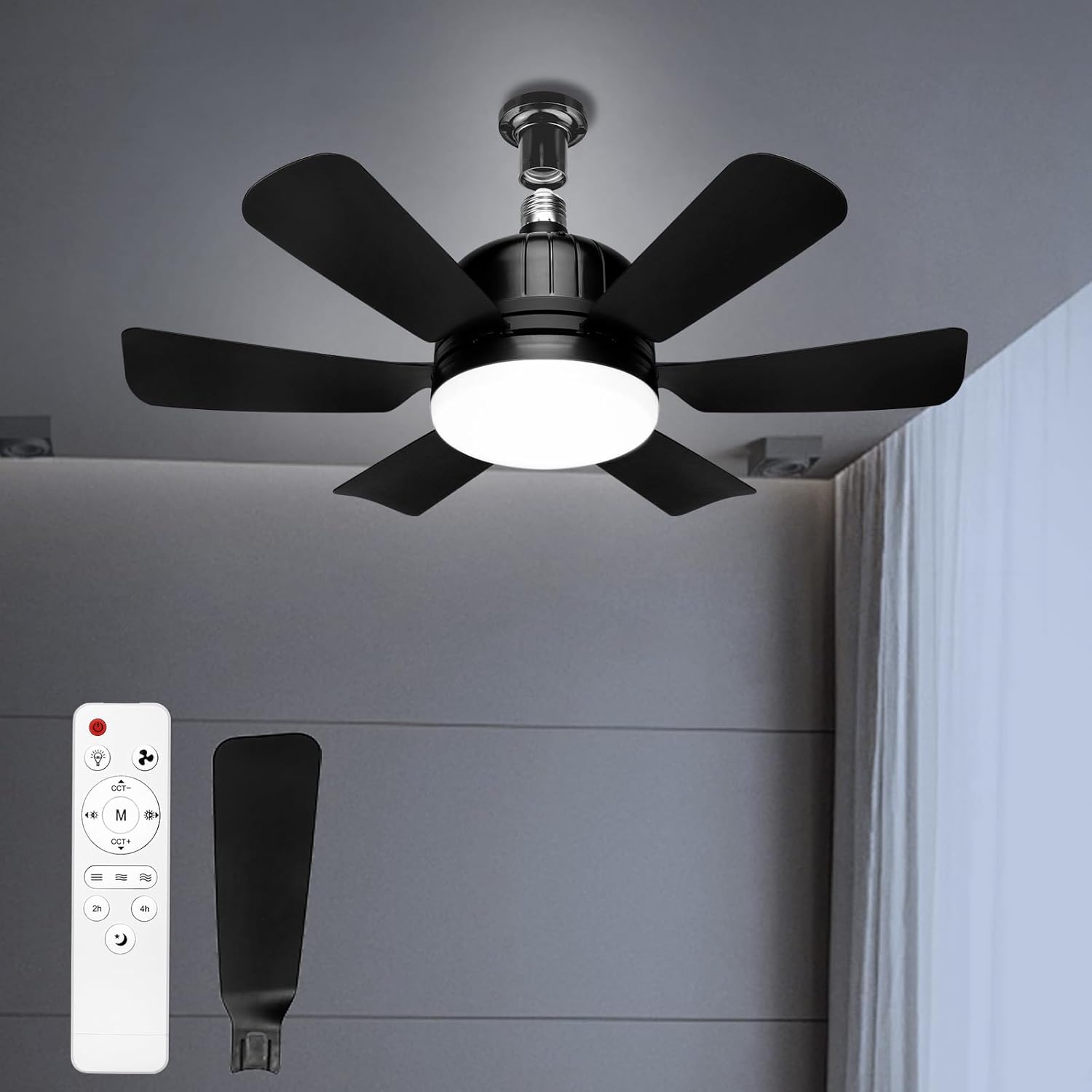
Figure 1.1: THINKKEEN Socket Fan Light with Remote.

Figure 1.2: Versatile application of the Socket Fan Light in different environments.
2. Sicherheitshinweise
Bitte lesen Sie vor der Installation oder Inbetriebnahme dieses Produkts alle Sicherheitshinweise und Anweisungen sorgfältig durch. Die Nichtbeachtung dieser Anweisungen kann zu Stromschlag, Brand oder schweren Verletzungen führen.
- Vor Installation oder Wartungsarbeiten muss die Stromzufuhr am Sicherungsautomaten abgeschaltet werden.
- Dieses Produkt ist nur für den Gebrauch in Innenräumen bestimmt. Vor Wasser und hoher Luftfeuchtigkeit schützen.
- Stecken Sie bei laufendem Ventilator weder Finger noch andere Gegenstände in die Ventilatorflügel.
- Ensure the light socket is rated for the product's power requirements.
- Do not attempt to disassemble or modify the product. Contact qualified personnel for repairs.
- Die Fernbedienung sollte von Wasser und extremen Temperaturen ferngehalten werden.
3. Packungsinhalt
Bitte prüfen Sie nach dem Öffnen der Verpackung, ob alle Komponenten vorhanden und unbeschädigt sind. Sollten Teile fehlen oder beschädigt sein, kontaktieren Sie bitte unseren Kundendienst.
- Socket Fan Light Unit (1)
- Remote Control (1)
- Benutzerhandbuch (1)
4. Einrichtung und Installation
The THINKKEEN Socket Fan Light is designed for simple, tool-free installation into any standard E26/E27 light socket. No complex wiring is required.
- Strom ausschalten: Vor der Installation muss sichergestellt werden, dass die Stromzufuhr zur Leuchte am Sicherungsautomaten vollständig abgeschaltet ist, um einen Stromschlag zu vermeiden.
- In die Fassung einschrauben: Carefully screw the Socket Fan Light unit into an existing E26/E27 light socket until it is securely fastened. Do not overtighten.
- Strom wiederherstellen: Once the unit is securely installed, restore power at the circuit breaker.
- Batterien in die Fernbedienung einlegen: Open the battery compartment of the remote control and insert the required batteries (not included, typically AAA).
- Testfunktionalität: Use the remote control to turn on the light and fan to ensure proper operation.

Figure 4.1: Easy Installation and Product Dimensions.
The fan measures approximately 18.11 inches in width and 6.29 inches in height from the socket base. The fan blades extend 7.5 inches from the center.
5. Bedienungsanleitung
Your Socket Fan Light is controlled via the included remote. Familiarize yourself with the remote's functions for optimal use.
5.1 Fernbedienungsfunktionen

Abbildung 5.1: Aufbau und Funktionen der Fernbedienung.
- Netzschalter: Schaltet die gesamte Einheit (Ventilator und Licht) ein oder aus.
- Licht Ein/Aus-Taste: Steuert das Licht unabhängig.
- Tasten für die Lüftergeschwindigkeit: Adjusts fan speed (Low, Medium, High). The fan offers 3 distinct wind speeds.
- Light Color Temperature (CCT) Buttons: Cycles through 3 color temperatures: 3000K (Warm Light), 4500K (Neutral Light), and 6500K (White Light).
- Dimmertasten: Adjusts the brightness of the light from 10% to 100%. The light is smoothly dimmable up to 1200 lumens.
- Nachtlicht-Taste: Aktiviert einen Nachtlichtmodus mit geringer Helligkeit.
- Timer Buttons (2h/4h): Sets the fan and/or light to automatically turn off after 2 or 4 hours.
5.2 Lichteinstellung
The integrated LED light offers versatile illumination options to suit various needs and moods.

Figure 5.2: Adjustable Light Features.
- Farbtemperatur: Use the CCT buttons on the remote to switch between 3000K (warm, cozy light), 4500K (neutral, balanced light), and 6500K (cool, bright white light).
- Helligkeitsdimmung: Use the dimming buttons to smoothly adjust the light intensity from 10% to 100%. The maximum brightness is 1200 lumens.
5.3 Lüfterbetrieb
The fan provides effective air circulation with quiet operation.

Figure 5.3: Quiet Operation and Timer Function.
- Geschwindigkeitskontrolle: Select from 3 fan speeds (Low, Medium, High) using the dedicated buttons on the remote.
- Leiser Motor: The fan is designed for quiet operation, ensuring minimal disturbance, even during sleep. Noise levels are typically very low, ranging from 10db to 50db depending on speed.
- Timer-Funktion: Utilize the 2-hour or 4-hour timer settings to automatically turn off the fan and/or light, conserving energy and providing convenience for sleep or departure.
6. Wartung
Regular maintenance ensures the longevity and optimal performance of your Socket Fan Light.
- Reinigung: Before cleaning, ensure the power is turned off at the circuit breaker. Use a soft, dry cloth to wipe down the fan blades and light housing. Do not use abrasive cleaners or solvents.
- Staubentfernung: Periodically remove dust accumulation from the fan blades and vents to maintain efficient airflow.
- Lampenwechsel: The LED light source is integrated and not user-replaceable. If the light fails, the entire unit may need replacement.
7. Fehlerbehebung
If you encounter issues with your Socket Fan Light, refer to the following common problems and solutions:
| Problem | Mögliche Ursache | Lösung |
|---|---|---|
| Ventilator oder Lampe schalten sich nicht ein. | No power to the socket; Remote batteries are dead or incorrectly inserted; Unit not screwed in properly. | Check circuit breaker; Replace remote batteries; Ensure unit is securely screwed into the socket. |
| Fernbedienung reagiert nicht. | Remote batteries are dead; Obstruction between remote and unit; Remote out of range. | Replace remote batteries; Remove obstructions; Ensure remote is within effective range. |
| Der Ventilator ist laut oder wackelt. | Unit not securely installed; Debris in fan blades. | Ensure unit is tightly screwed into the socket; Turn off power and carefully remove any debris from blades. |
| Das Licht flackert oder ist schwach. | Power fluctuation; Unit not receiving sufficient power. | Check power supply; Ensure socket is rated for the product. |
If the problem persists after attempting these solutions, please contact THINKKEEN customer support.
8. Spezifikationen
Detailed technical specifications for the THINKKEEN Socket Fan Light.
- Modellnummer: ZYJ-520FSD01
- Produktabmessungen: 18.11 x 4.72 x 6.29 Zoll
- Artikelgewicht: 1.41 Pfund
- Marke: DENKEN
- Design des elektrischen Ventilators: Deckenventilator
- Montageart: Ceiling Mount (Socket)
- Lichtfarbtemperatur: 3000K-6500K (einstellbar)
- Lichthelligkeit: Dimmable, up to 1200 Lumens
- Lüftergeschwindigkeiten: 3 (Niedrig, Mittel, Hoch)
- Timer-Einstellungen: 2 Stunden, 4 Stunden
9. Garantie und Support
THINKKEEN is committed to providing high-quality products and excellent customer service. For any questions, concerns, or technical support, please contact our customer service team.

Figure 9.1: THINKKEEN 24-Hour Customer Service.
Please refer to your purchase documentation or the official THINKKEEN website for specific warranty terms and contact information. Our team is available to assist you with product inquiries, troubleshooting, and any other support needs.