Einführung
This manual provides detailed instructions for the safe and efficient operation of your SIYEGK YJL-WB1020 Emergency Weather Radio. Designed for reliability in various situations, this multi-functional device offers AM/FM/SW/NOAA radio reception, multiple power sources, an SOS alarm, and a powerful flashlight. Please read this manual thoroughly before use and retain it for future reference.
Produkt überview
The SIYEGK YJL-WB1020 is a versatile emergency radio equipped with essential features for preparedness and outdoor activities. Key components include:
- AM/FM/SW/NOAA Weather Band Radio: For receiving local and international broadcasts, including critical weather alerts.
- Mehrere Ladeoptionen: Built-in rechargeable battery, USB input, hand crank, and solar panel. Also supports 3 AAA batteries (not included).
- 10000mAh/37000mWh Power Bank: To charge external devices via USB.
- SOS-Alarm: Loud siren with flashing lights for emergency signaling.
- Flashlight & Reading Lamp: Integrated LED lighting with multiple modes for illumination.
- Bluetooth Lautsprecher: For audio playback from compatible devices.
- Kopfhöreranschluss: Zum privaten Hören.
- IPX3 Wasserbeständigkeit: Bietet Schutz vor Spritzwasser.

Abbildung 1: Vorderseite view of the SIYEGK Emergency Weather Radio, showing the display, controls, and extended antenna.
Aufstellen
1. Erstes Aufladen
Before first use, fully charge the internal 10000mAh lithium battery using one of the following methods:
- USB-C-Aufladung: Connect the provided USB-C cable to the radio's USB-C input port and to a USB power adapter (not included) or computer.
- Handkurbel: Rotate the hand crank clockwise or counter-clockwise for 3-5 minutes to provide initial power.
- Solarmodul: Platzieren Sie das Radio so, dass das Solarpanel direktem Sonnenlicht ausgesetzt ist. Diese Methode dient hauptsächlich dazu, die Ladung zu erhalten oder langsam aufzuladen.
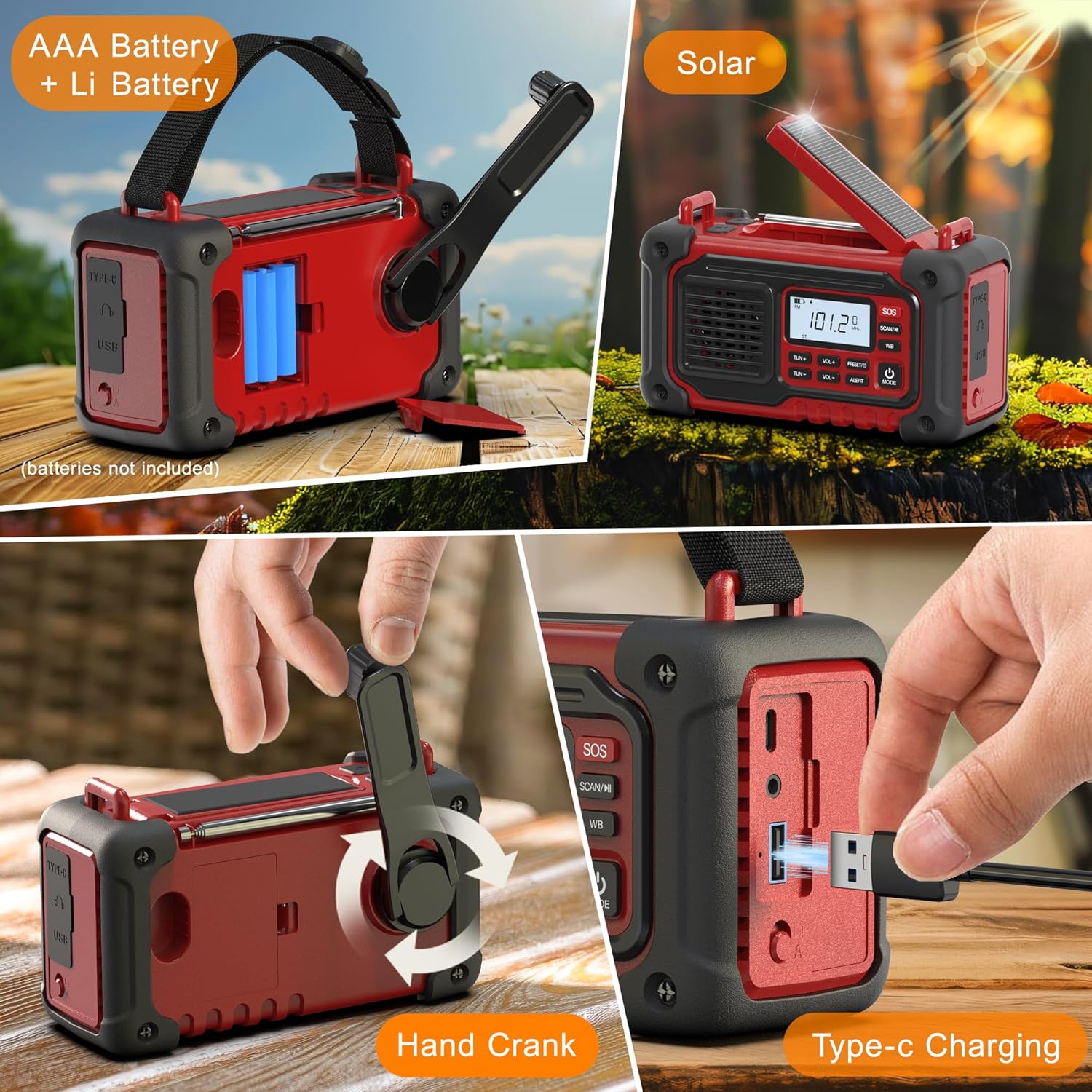
Figure 2: Various charging methods including AAA battery compartment, hand crank, solar panel, and USB-C port.
2. Installation der AAA-Batterie (optionale Notstromversorgung)
For an additional backup power source, you can install 3 AAA batteries (not included):
- Suchen Sie die Abdeckung des Batteriefachs auf der Rückseite des Radios.
- Öffnen Sie den Deckel und legen Sie 3 AAA-Batterien ein. Achten Sie dabei auf die richtige Polarität (+/-).
- Schließen Sie den Batteriefachdeckel fest.
- Use the battery selection switch (usually near the battery compartment) to select between the internal Li-Battery and AAA batteries. Ensure the switch is set to the desired battery mode before turning on the radio.
Bedienungsanleitung
1. Ein-/Ausschalten
- Halten Sie die POWER-MODUS button to turn the radio ON or OFF.
- The LCD display will show the current time and battery level.
2. Radio Functions (AM/FM/SW/NOAA)
- Drücken Sie die MODUS button repeatedly to cycle through AM, FM, SW (Shortwave), and WB (Weather Band) modes.
- Manuelle Abstimmung: Verwenden Sie die TUN+ Und TUN- Tasten zur manuellen Frequenzeinstellung.
- Automatischer Scan: Halten Sie die SCAN/M button to automatically scan for available stations. The radio will stop on the next strong signal.
- NOAA-Wetterwarnung: In WB mode, the radio can automatically scan for emergency alerts. When an alert is issued, the radio will sound an alarm and display the warning.
- Lautstärkeregelung: Verwenden Sie die Lautstärke+ Und vol- Tasten zum Einstellen der Lautstärke.
- Antenne: Extend the telescopic antenna for improved FM, SW, and WB reception.

Figure 3: The radio's LCD display showing the frequency and battery status.
3. Bluetooth-Lautsprecherfunktion
- Drücken Sie die MODUS Drücken Sie die Taste so lange, bis „BT“ auf dem Display erscheint.
- On your mobile device, search for Bluetooth devices and select "YJL-WB1020" to pair.
- Sobald die Geräte gekoppelt sind, können Sie Audio über den Lautsprecher des Radios abspielen.
4. SOS-Alarm
- Halten Sie die SOS button to activate the loud siren and flashing lights.
- Drücken Sie die SOS Zum Deaktivieren erneut drücken.

Figure 4: The SOS alarm feature with flashing lights.
5. Flashlight & Reading Lamp
- Drücken Sie die LICHT button (usually on the side or front) to cycle through flashlight modes: standard light, reading lamp, and SOS flashing.
- Die Lektüre lamp is located on the underside of the solar panel. Lift the solar panel to use it.

Figure 5: The 3W LED flashlight and reading lamp im Einsatz.
6. Charging External Devices (Power Bank)
- Connect your device's USB charging cable to the radio's USB-A output port.
- Der interne 10000-mAh-Akku des Radios beginnt nun mit dem Laden Ihres Geräts.

Figure 6: The radio functioning as a power bank to charge a smartphone.
Wartung
- Reinigen Sie das Radio regelmäßig mit einem weichen, trockenen Tuch. Verwenden Sie keine Scheuermittel oder Lösungsmittel.
- Vermeiden Sie es, das Radio extremen Temperaturen, direkter Sonneneinstrahlung über längere Zeiträume (außer zum Aufladen mit Solarenergie) oder hoher Luftfeuchtigkeit auszusetzen.
- If storing for an extended period, ensure the internal battery is partially charged (around 50%) and recharge it every 3-6 months to maintain battery health.
- Ensure all port covers are securely closed to maintain water resistance (IPX3).
Fehlerbehebung
| Problem | Mögliche Lösung |
|---|---|
| Das Radio lässt sich nicht einschalten. | Check battery level. Recharge the internal battery or install fresh AAA batteries. Ensure the battery selection switch is in the correct position. |
| Schlechter Radioempfang. | Extend the telescopic antenna fully. Try repositioning the radio. Perform an automatic scan to find stronger signals. |
| Externes Gerät kann nicht geladen werden. | Ensure the radio's internal battery has sufficient charge. Check the USB cable connection. Some devices may draw too much power or be incompatible. |
| SOS-Alarm funktioniert nicht. | Ensure the radio is powered on and the SOS button is pressed and held for a few seconds. |
Technische Daten
| Besonderheit | Detail |
|---|---|
| Modellnummer | YJL-WB1020 |
| Technische Daten | 6.3 x 2.6 x 3.1 Zoll (16.0 x 6.6 x 7.9 cm) |
| Artikelgewicht | 1.54 Pfund (0.7 kg) |
| Batteriekapazität | 10000mAh / 37000mWh (Built-in rechargeable) |
| Pufferbatterien | 3 AAA-Batterien (nicht im Lieferumfang enthalten) |
| Tuner-Technologie | AM, FM, NOAA, SW (7-Band Support) |
| Besondere Merkmale | Built-In AM Antenna, Built-In Flashlight, Rechargeable, SOS Alarm, Bluetooth, Reading Lamp |
| Konnektivitätstechnologie | Hilfsanschluss, Bluetooth |
| Stromquelle | Battery Powered, Solar Powered, Cranked Powered |
| Wasserbeständigkeit | IPX3 |
Lehrvideos
Best Prepared Gifts - Emergency Weather Radio
Video 1: Ein detaillierter Überblickview of the SIYEGK Emergency Weather Radio's features and benefits, including its various functions and power options.
Good Survival Gifts for Family - Crank Weather Radio
Video 2: Demonstrates the hand-crank charging mechanism and other survival-oriented features of the radio.
Crank Emergency Radios - ALL-IN-1 Wind Up Radio
Video 3: Highlights the all-in-one functionality of the wind-up radio, showcasing its various uses in emergency situations.
Garantie und Support
For warranty information or technical support, please refer to the contact details provided with your purchase or visit the official SIYEGK webBewahren Sie Ihren Kaufbeleg als Kaufnachweis für Garantieansprüche auf.
Included Components: Owner's Manual (this document).