1. Einleitung
This manual provides essential information for setting up, operating, and maintaining your JVC LT-55NQ7165C AI Vision Series QLED Google TV. Please read it thoroughly before use to ensure proper functionality and safety.

The JVC LT-55NQ7165C is a 55-inch 4K Ultra HD QLED Google TV, featuring a 60Hz refresh rate, AI Vision technology, and integrated smart functionalities. It offers a vibrant display with HDR and HLG support, powerful 60 Watts Dolby Atmos sound, and extensive connectivity options.
Überview of JVC AI Vision Series QLED Android TV features.
2. Lieferumfang
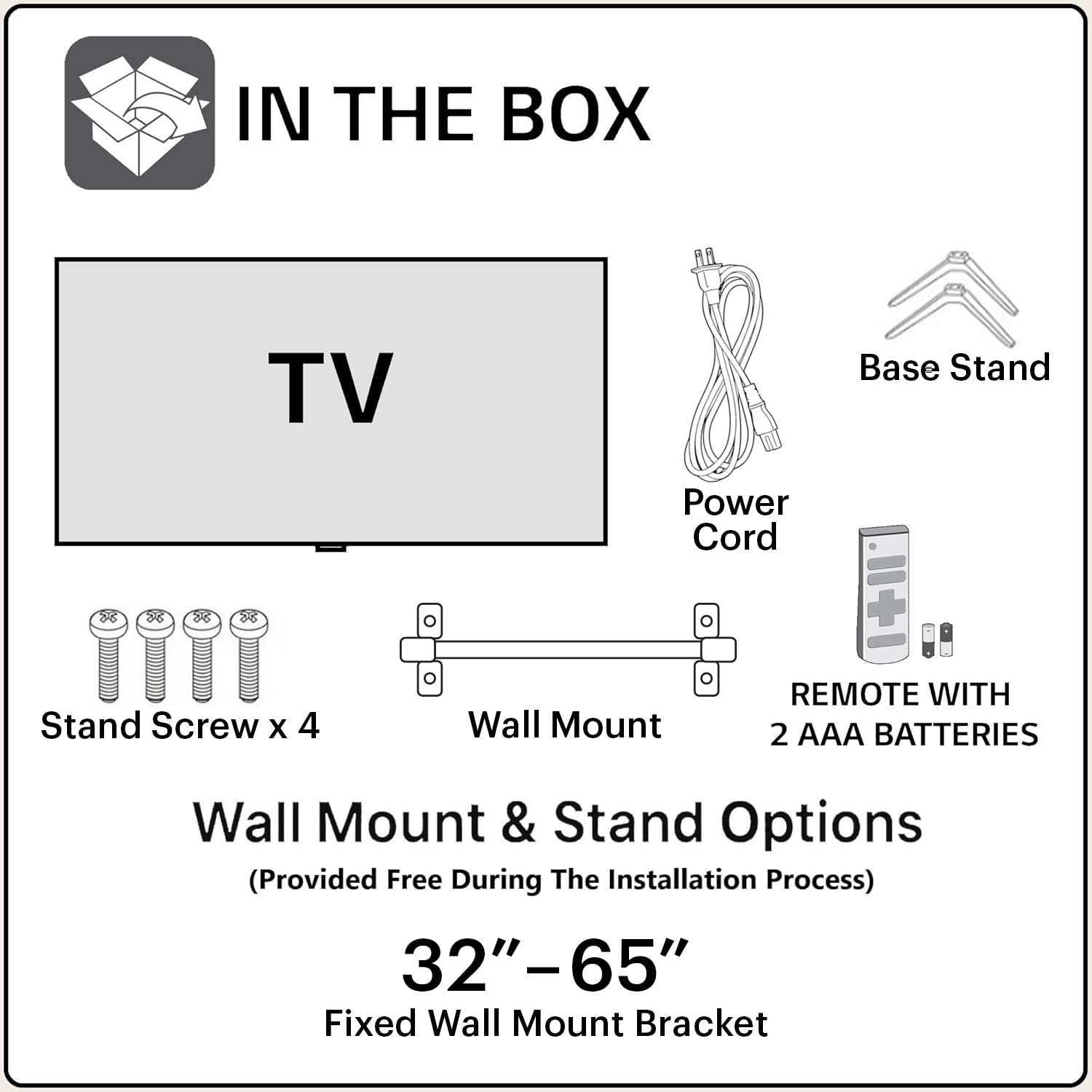
Prüfen Sie nach dem Öffnen der Verpackung, ob alle folgenden Komponenten enthalten sind:
- 1N JVC LT-55NQ7165C LED TV
- 1N Remote Control (with 2 AAA batteries included)
- 1N Wall Mount Bracket
- 1N Table Top Stand (Base Stand)
- 4x Ständerschrauben
- 1N Netzkabel
- Benutzerhandbuch (dieses Dokument)
3. Einrichtung und Installation
Your JVC TV offers both table-top and wall-mount installation options. Ensure the TV is placed on a stable surface or securely mounted to a wall.
3.1. Table-Top Installation
- Legen Sie den Fernseher vorsichtig mit dem Bildschirm nach unten auf eine weiche, saubere Oberfläche, um Kratzer zu vermeiden.
- Attach the two base stands to the bottom of the TV using the provided screws. Ensure they are firmly secured.
- Place the TV on a flat, stable surface, ensuring adequate ventilation around the unit.
3.2. Wandmontage
For wall-mount installation, it is recommended to seek professional assistance. The provided wall mount bracket is suitable for this model.
- Identify a suitable wall location, ensuring it can support the weight of the TV.
- Follow the instructions provided with the wall mount bracket to securely attach it to the wall.
- Carefully attach the TV to the wall mount bracket. Ensure all connections are secure before releasing den Fernseher.
Vorsicht: Improper wall mounting can result in serious injury or damage to your TV. Always follow safety guidelines.
3.3. Erstes Einschalten
- Schließen Sie das Netzkabel an den Fernseher und anschließend an eine Steckdose an.
- Legen Sie die mitgelieferten AAA-Batterien in die Fernbedienung ein.
- Drücken Sie die Ein-/Aus-Taste auf der Fernbedienung oder am Fernseher, um es einzuschalten.
- Follow the on-screen instructions for initial setup, including language selection, network connection, and Google account login.
4. Konnektivität
The JVC LT-55NQ7165C offers a variety of ports for connecting external devices and network access.

- HDMI-Anschlüsse (3): Connect gaming consoles, set-top boxes, Blu-ray players, and other HDMI-enabled devices. Supports ALLM (Auto Low Latency Mode) and eARC (Enhanced Audio Return Channel).
- USB-Anschlüsse (2): Connect hard drives, USB flash drives, and other USB devices for media playback.
- Dualband-WLAN: Connect to your home network wirelessly (2.4GHz / 5GHz).
- Ethernet (LAN)-Anschluss: Für eine kabelgebundene Internetverbindung.
- Bluetooth 5.0: Connect wireless headphones, speakers, or other Bluetooth accessories.
- Optischer Audioausgang: Connect to external sound systems or soundbars for high-quality audio.

5. Bedienung Ihres Fernsehgeräts
5.1. Fernbedienung
The included remote control allows you to navigate the TV's features. It includes dedicated buttons for popular streaming services and Google Assistant voice control.

- Netzschalter: Schaltet den Fernseher ein oder aus.
- Google Assistant-Schaltfläche: Aktiviert Sprachbefehle.
- Navigationspad: Zur Menünavigation.
- Lautstärke erhöhen/verringern: Regelt die Lautstärke.
- Kanal hoch/runter: Wechselt die Fernsehkanäle.
- Netflix-, Prime Video-, YouTube-Schaltflächen: Direkter Zugriff auf diese Streaming-Anwendungen.
5.2. Google TV-Funktionen
Your JVC TV runs on the Google TV operating system, providing access to a vast library of content and smart features.
- App-Zugriff: Download and install over 10,000 apps and games from the Google Play Store, including Netflix, Prime Video, YouTube, Zee5, Disney+ Hotstar, SonyLIV, MX Player, JioCinema, Apple TV, and Voot.
- Google Assistant: Use voice commands to search for content, control smart home devices, get answers, and more. Press the Google Assistant button on your remote and speak into the microphone.
- Screen Mirroring (Chromecast built-in): Übertragen Sie Inhalte von Ihrem kompatiblen Smartphone, Tablet oder Computer direkt auf Ihren Fernsehbildschirm.
- Personalisierte Empfehlungen: Google TV lernt Ihre Vorlieben kennen und schlägt Ihnen auf Sie zugeschnittene Inhalte vor.


5.3. Anzeigefunktionen
Experience stunning visuals with the TV's advanced display technologies.
- 4K-Ultra-HD-Auflösung: Enjoy incredibly sharp and detailed images with 3840 x 2160 pixels.
- QLED-Technologie: Quantum Dot LED display delivers vibrant colors and improved brightness.
- HDR (High Dynamic Range) & HLG: Provides enhanced contrast, brightness, and a wider color gamut for a more lifelike picture.
- AI Vision Series: AI-powered processing optimizes picture quality for various content types.
- 1.1 Billion Colours: Experience a rich and extensive color palette.
- 60Hz Bildwiederholfrequenz: Smooth motion for most content.


5.4. Audiofunktionen
Immerse yourself in rich and clear audio with the TV's integrated sound system.
- 60 Watt Ausgangsleistung: Powerful audio delivery for an engaging listening experience.
- Dolby Digital Plus & Dolby Atmos: Provides immersive, multi-dimensional sound that moves around you.
- DTS-TruSurround: Enhances surround sound effects for a cinematic audio experience.

5.5. Spielen
The TV is designed to enhance your gaming experience with features like ALLM (Auto Low Latency Mode) and a responsive display.

6. Fehlerbehebung
In diesem Abschnitt finden Sie häufig auftretende Probleme und deren Lösungen.
6.1. Kein Strom
- Stellen Sie sicher, dass das Netzkabel sowohl mit dem Fernseher als auch mit einer funktionierenden Steckdose fest verbunden ist.
- Prüfen Sie die Funktionsfähigkeit der Steckdose, indem Sie ein anderes Gerät anschließen.
- Vergewissern Sie sich, dass die Batterien der Fernbedienung richtig eingelegt und nicht leer sind.
6.2. Kein Bild / Schlechte Bildqualität
- Überprüfen Sie alle Kabelverbindungen (HDMI, Antenne usw.), um sicherzustellen, dass sie fest sitzen.
- Wählen Sie mit der Fernbedienung die richtige Eingangsquelle aus.
- Passen Sie die Bildeinstellungen (Helligkeit, Kontrast, Farbe) im TV-Menü an.
- Wenn Sie ein externes Gerät verwenden, überprüfen Sie dessen Ausgabeeinstellungen.
6.3. Kein Ton / Schlechte Tonqualität
- Stellen Sie sicher, dass die Lautstärke nicht stummgeschaltet oder zu niedrig eingestellt ist.
- Überprüfen Sie die Audiokabelverbindungen zu externen Soundsystemen.
- Passen Sie die Audioeinstellungen im TV-Menü an.
- If using external speakers, ensure they are powered on and functioning correctly.
6.4. Netzwerkverbindungsprobleme
- Stellen Sie sicher, dass Ihr WLAN-Router eingeschaltet und funktionsfähig ist.
- Starten Sie Ihren Router und Ihr Modem neu.
- Rufen Sie die Netzwerkeinstellungen Ihres Fernsehers auf und versuchen Sie, die Verbindung zu Ihrem WLAN-Netzwerk wiederherzustellen.
- Bei Verwendung einer kabelgebundenen Verbindung stellen Sie sicher, dass das Ethernet-Kabel fest angeschlossen ist.
7. Spezifikationen
| Besonderheit | Detail |
|---|---|
| Modellname | LT-55NQ7165C |
| Bildschirmgröße | 55 Zoll (140 cm) |
| Display-Technologie | QLED, IPS Display |
| Auflösung | 4K Ultra HD (3840 x 2160) |
| Bildwiederholrate | 60 Hz |
| Besondere Merkmale | Dolby Digital Plus, HDR, DTS-TruSurround, Google Assistant, Dolby Atmos, AI Vision Series |
| Betriebssystem | Google TV |
| RAM | 2 GB |
| Speicher (ROM) | 16 GB |
| Audioausgang | 60 Watt |
| Konnektivität | Dual Band Wi-Fi, 3 HDMI, 2 USB, Bluetooth 5.0, Optical, Ethernet |
| Produktabmessungen (L x B x H) | 124 x 12 x 71 cm |
| Artikelgewicht | 10.4 kg |
| Stromquelle | AC |
| Viewing-Winkel | 178 Grad |
| Bildkontrastverhältnis | 4000:1 |

8. Garantie und Support
Your JVC LT-55NQ7165C TV comes with a standard manufacturer's warranty.
- Produktgarantie: 1 Jahr ab Kaufdatum.
- Remote Accessories Warranty: 6 Monate ab Kaufdatum.
To avail warranty services, please retain your purchase invoice. The user manual can also be accessed from the brand's webWebsite unter dem Abschnitt „Produktdetails“.
Garantieausschlüsse: The warranty does not cover light bleeding and dot issues (Mura issues) occurring on a certain Grey scale, as per the Mura Inspection standard, this is considered acceptable. As per ND (Neutral Density) Filter 2% guideline, this is not considered a panel defect.
For further assistance or technical support, please refer to the contact information provided on the official JVC webWebsite oder Ihre Kaufdokumentation.


