1. Einleitung
This manual provides comprehensive instructions for the Mycket portable DAB/DAB+/FM radio, Model D009. It covers setup, operation, maintenance, and troubleshooting to ensure optimal performance and longevity of your device. Please read this manual carefully before using the product.
The Mycket D009 radio features advanced signal reception technology for clear audio, Bluetooth 5.0 for wireless streaming, USB playback, AUX-in connectivity, a dual alarm clock, and a sleep timer. Its integrated rechargeable battery offers portability for use in various environments.
2. Sicherheitshinweise
- Setzen Sie das Gerät weder Regen, Feuchtigkeit noch extremen Temperaturen aus.
- Lassen Sie das Gerät nicht fallen und setzen Sie es keinen starken Stößen aus.
- Das Gerät darf nicht selbst zerlegt oder repariert werden. Alle Wartungsarbeiten dürfen nur von qualifiziertem Fachpersonal durchgeführt werden.
- Halten Sie das Gerät von Wärmequellen wie Heizkörpern, Heizlüftern, Öfen oder anderen Geräten (einschließlich) fern. ampKonverter (Lüfter), die Wärme erzeugen.
- Use only the specified charging cable and power adapter (5V via USB) to charge the device.
- Ensure proper ventilation around the device during operation and charging.
- Batterien und elektronische Bauteile sind gemäß den örtlichen Vorschriften verantwortungsvoll zu entsorgen.
3. Produktüberschreitungview
3.1 Packungsinhalt
- 1 x Mycket Portable DAB Radio (Model D009)
- 1 x USB-Ladekabel
- 1 x Benutzerhandbuch
3.2 Geräteaufbau und Bedienelemente
Familiarize yourself with the main components and controls of your Mycket radio.

Bild 1: Front view of the Mycket D009 portable DAB radio, showing the speaker grille, LCD display, control buttons (MODE, OK, O/M, FAV, 1-4), and the telescopic antenna extended. The right side shows the DC 5V USB-C port, reset button, and headphone jack.
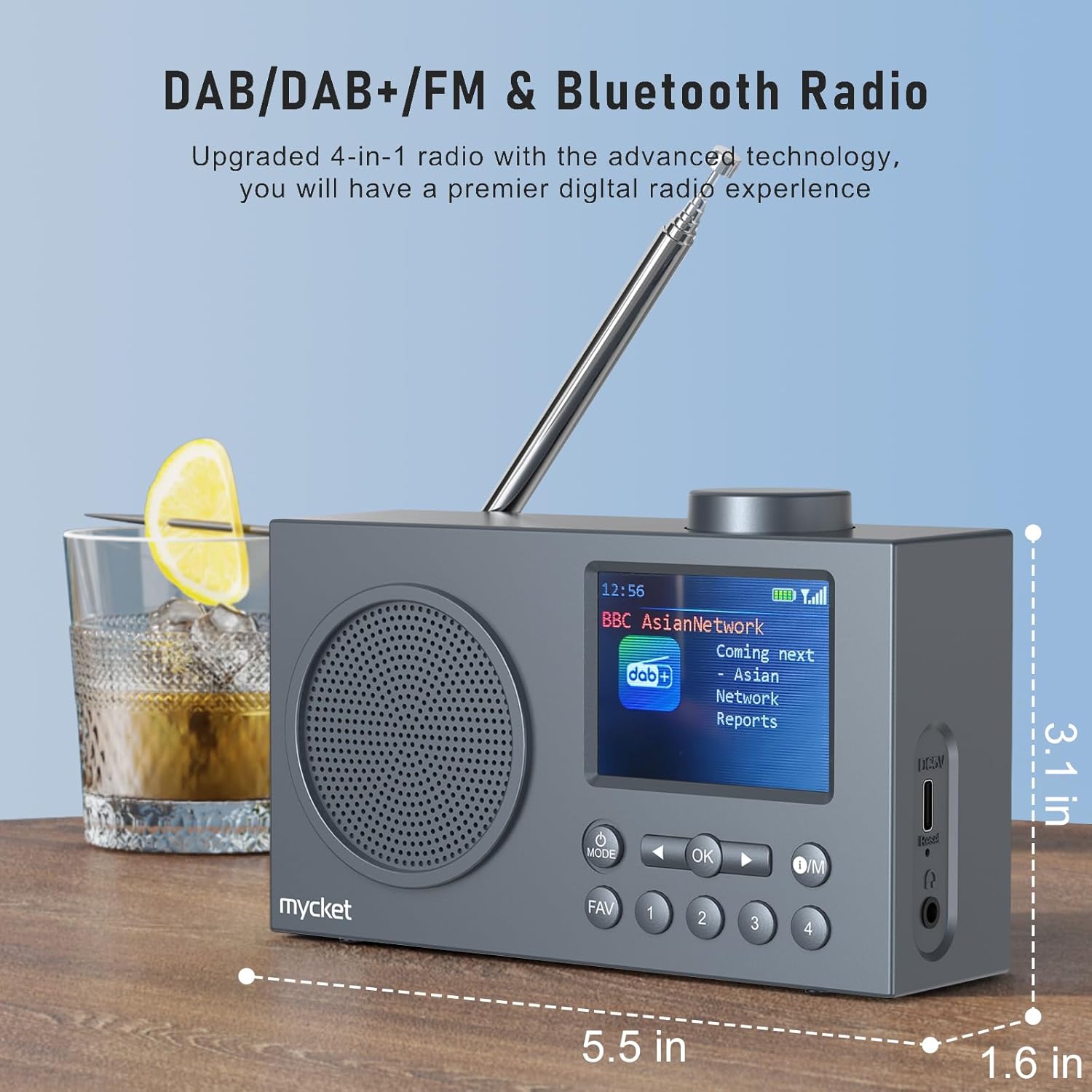
Bild 2: Seite view of the Mycket D009 radio illustrating its compact dimensions: approximately 5.5 inches (length), 1.6 inches (width), and 3.1 inches (height). The image also highlights its DAB/DAB+/FM and Bluetooth capabilities.
- Anzeige: 2.4-inch TFT color display for station information, time, and settings.
- Lautsprecher: Integrated Hi-Fi speaker for audio output.
- Teleskopantenne: Für optimalen Radioempfang.
- MODE-Taste: Schaltet zwischen DAB-, FM-, Bluetooth-, USB- und AUX-Modus um.
- OK-Taste: Bestätigt die Auswahl oder ruft Menüs auf.
- O/M-Taste: Power On/Off and Menu access.
- FAV-Taste: Accesses favorite presets.
- Zifferntasten (1-4): Direct access to stored presets.
- Navigation Buttons (Left/Right): Navigates menus or tunes stations.
- Lautstärkeregler: Regelt die Lautstärke.
- DC 5V USB-C Port: Zum Laden des internen Akkus.
- Reset-Taste: Resets the device (use a thin object to press).
- 3.5mm Kopfhörerbuchse: Zum privaten Hören.
4. Einrichtung
4.1 Laden des Akkus
The radio is equipped with a built-in 2200mAh lithium battery. Before first use, fully charge the device.
- Connect the provided USB charging cable to the DC 5V USB-C port on the side of the radio.
- Verbinden Sie das andere Ende des USB-Kabels mit einem kompatiblen USB-Netzteil (nicht im Lieferumfang enthalten) oder einem USB-Anschluss Ihres Computers.
- The charging indicator on the display will show the charging status. A full charge typically takes approximately 2.5 hours and provides up to 12 hours of playback time at 70% volume.

Bild 3: The Mycket D009 radio display showing a full battery indicator, emphasizing its long playback time on a single charge.
4.2 Antenneneinstellung
Für optimalen Radioempfang die Teleskopantenne vollständig ausziehen. Die Position für beste Signalqualität anpassen.
4.3 Erstes Einschalten
Halten Sie die O/M button to power on the radio. The display will light up, and the device will typically start in the last used mode or initiate a DAB scan if it's the first use.
5. Bedienungsanleitung
5.1 Schaltmodi
Drücken Sie die MODUS button repeatedly to cycle through available modes: DAB, FM, Bluetooth, USB, and AUX.
5.2 DAB/DAB+ Radiobetrieb
- Wechseln Sie mit dem/der/den MODUS Taste.
- The radio will automatically perform a full scan for available DAB/DAB+ stations upon first use or if no stations are found. To initiate a manual scan, press and hold the OK button, then select "Full Scan" from the menu.
- Once the scan is complete, use the navigation buttons (Left/Right) to browse through the list of available stations.
- Drücken OK einen Sender auswählen und anhören.

Bild 4: The Mycket D009 radio display showing a DAB station and highlighting the auto-scan and 40 preset features (20 DAB & 20 FM).
5.2.1 Storing DAB Presets
The radio supports up to 20 DAB presets.
- Stellen Sie den gewünschten DAB-Sender ein.
- Press and hold one of the number buttons (1-4) oder die FAV button to save the current station to a preset slot. Follow the on-screen prompts to select a slot if using the FAV button.
- To recall a preset, briefly press the corresponding number button or the FAV button and select from the list.
5.3 FM-Radiobetrieb
- Wechseln Sie mit dem MODUS Taste.
- Zum automatischen Sendersuchlauf nach FM-Sendern die Taste gedrückt halten OK button. The radio will scan and store available stations.
- To manually tune, use the navigation buttons (Left/Right) to adjust the frequency.
- Drücken OK to confirm the station.
5.3.1 Speichern von FM-Voreinstellungen
The radio supports up to 20 FM presets, similar to DAB presets.
- Stellen Sie den gewünschten UKW-Sender ein.
- Press and hold one of the number buttons (1-4) oder die FAV button to save the current station.
- To recall a preset, briefly press the corresponding number button or the FAV button and select from the list.
5.4 Bluetooth 5.0 Kopplung
Connect your smartphone or tablet to the radio via Bluetooth for wireless audio streaming.
- Wechseln Sie mithilfe der folgenden Option in den Bluetooth-Modus: MODUS button. The radio display will show "Bluetooth Pairing" or similar.
- Aktivieren Sie auf Ihrem Mobilgerät Bluetooth und suchen Sie nach verfügbaren Geräten.
- Select "Mycket D009" from the list of devices.
- Once paired, the radio will confirm the connection, and you can play audio from your device through the radio.

Bild 5: The Mycket D009 radio displaying "Playing" in Bluetooth mode, next to a smartphone showing "Mycket D009" as a connected Bluetooth device.
5.5 USB-Wiedergabe
MP3-Audio abspielen files direkt von einem USB-Laufwerk.
- Stecken Sie ein USB-Laufwerk mit MP3 files in den USB-Port.
- Wechseln Sie mithilfe des/der folgenden Befehls in den USB-Modus: MODUS Taste.
- Das Radio erkennt automatisch MP3-Dateien und beginnt mit der Wiedergabe. files. Use the navigation buttons to skip tracks.
5.6 AUX-Eingang
Externe Audiogeräte können über ein 3.5-mm-Audiokabel (nicht im Lieferumfang enthalten) angeschlossen werden.
- Connect one end of a 3.5mm audio cable to the AUX-in port on the radio.
- Verbinden Sie das andere Ende mit der Kopfhörerbuchse oder dem Audioausgang Ihres externen Geräts.
- Wechseln Sie mit dem MODUS Taste.
- Steuern Sie die Wiedergabe von Ihrem externen Gerät.
5.7 Weckerfunktion
Richten Sie bis zu zwei unabhängige Alarme ein.
- Halten Sie die O/M , um das Menü aufzurufen.
- Navigate to "Alarm Settings" using the navigation buttons and press OK.
- Wählen Sie Alarm 1 oder Alarm 2.
- Set the alarm time, source (DAB, FM, or Buzzer), and volume.
- Bestätigen Sie die Einstellungen durch Drücken von OK.
5.8 Sleep-Timer-Funktion
Stellen Sie das Radio so ein, dass es sich nach einer bestimmten Zeit automatisch ausschaltet.
- Halten Sie die O/M , um das Menü aufzurufen.
- Navigate to "Sleep Timer" and press OK.
- Wählen Sie die gewünschte Dauer (z. B. 15, 30, 60 Minuten).
- The radio will automatically power off after the set time.
5.9 Kopfhörernutzung
Connect 3.5mm headphones to the headphone jack for private listening. The internal speaker will be muted automatically.
6. Wartung
- Reinigung: Reinigen Sie das Gehäuse des Radios mit einem weichen, trockenen Tuch. Verwenden Sie keine Scheuermittel oder Lösungsmittel.
- Batteriepflege: Um die Akkulaufzeit zu verlängern, vermeiden Sie häufiges vollständiges Entladen des Akkus. Laden Sie das Gerät regelmäßig auf, auch wenn es längere Zeit nicht benutzt wird.
- Lagerung: Bewahren Sie das Radio an einem kühlen, trockenen Ort fern von direkter Sonneneinstrahlung und extremen Temperaturen auf.
7. Fehlerbehebung
| Problem | Mögliche Ursache | Lösung |
|---|---|---|
| Kein Strom / Radio lässt sich nicht einschalten. | Batterie ist leer. | Laden Sie das Radio mit dem mitgelieferten USB-Kabel auf. |
| Schlechter Radioempfang (DAB/FM). | Antenna not fully extended or positioned correctly. Weak signal area. | Fully extend and adjust the telescopic antenna. Try moving the radio to a different location. Perform a full scan for stations. |
| Die Bluetooth-Kopplung schlägt fehl. | Radio not in Bluetooth mode. Device too far. Bluetooth not enabled on external device. | Ensure the radio is in Bluetooth mode. Keep devices within range (approx. 10 meters). Enable Bluetooth on your external device and search for "Mycket D009". |
| Aus dem Lautsprecher kommt kein Ton. | Volume too low. Headphones connected. | Increase the volume. Disconnect headphones if not intended for private listening. |
| USB-Wiedergabe funktioniert nicht. | USB-Laufwerk nicht korrekt eingesteckt. Inkompatibel. file Format. | Stellen Sie sicher, dass der USB-Stick vollständig eingesteckt ist. Überprüfen Sie Folgendes: files sind im MP3-Format. |
| Gerät reagiert nicht. | Vorübergehender Softwarefehler. | Press the reset button on the side of the radio using a thin object (e.g., a paperclip). |
8. Spezifikationen
| Marke | Sehr |
| Modell | T009 - Die wunderbare Welt der Träume |
| Radio-Modi | DAB, DAB+, UKW |
| Bluetooth-Version | 5.0 |
| Wiedergabeoptionen | FM, DAB, DAB+, Bluetooth, USB MP3, AUX-in |
| Lautsprecherausgangsleistung | 5 Watt |
| Lautsprechereinheit | 4 Ω10 W 78 mm x 1 |
| Anzeige | 2.4-Zoll-TFT-Farb-LCD |
| Voreinstellungen | 40 (20 DAB, 20 FM) |
| Akku-Typ | Built-in Lithium-ion (18650) |
| Batteriekapazität | 2200 mAh (3.7V - 2.2 Ah) |
| Wiedergabezeit | Approx. 8-9 hours at 70% volume (up to 12 hours) |
| Ladezeit | Ca. 2.5 Stunden |
| Leistungsaufnahme | 5V über USB |
| Abmessungen (Produkt) | Ca. 14 cm (L) x 4 cm (B) x 7.8 cm (H) |
| Ausgangsanschlüsse | 3.5-mm-Kopfhörerbuchse |
9. Garantie und Support
Mycket products are designed for reliability and performance. This product comes with:
- 12-Monatsgarantie: Enjoy a hassle-free 12-month warranty from the date of purchase.
- Kundendienst: For any questions, issues, or support needs, please contact Mycket customer service.
Bitte bewahren Sie Ihren Kaufbeleg für Garantieansprüche auf.


