1. Einleitung
This manual provides detailed instructions for the setup, operation, maintenance, and troubleshooting of your MOREFINE M9 Pro Mini PC. Please read this manual thoroughly before using the device to ensure proper functionality and longevity.

Bild: Vorderseite view of the MOREFINE M9 Pro Mini PC, showcasing dank seines kompakten Designs und der Anschlüsse an der Vorderseite.
2. Packungsinhalt
Überprüfen Sie, ob alle Artikel im Paket vorhanden sind:
- 1 x MOREFINE M9 Pro Mini PC
- 1 x HDMI-Kabel
- 1 x Netzteil
- 1 x Benutzerhandbuch (dieses Dokument)
3. Einrichtungsanweisungen
3.1 Anschließen von Peripheriegeräten
- Display anschließen: Use the provided HDMI cable to connect the Mini PC to a monitor or TV. The device supports up to three displays simultaneously via two HDMI 2.0 ports and one Type-C port.
- USB-Geräte anschließen: Plug in your keyboard, mouse, and other USB peripherals into the available USB 3.2 and USB 2.0 ports.
- Netzwerk verbinden (optional): Für eine kabelgebundene Internetverbindung schließen Sie ein Ethernet-Kabel an den 2.5G-LAN-Anschluss an. Alternativ unterstützt das Gerät WiFi 6 für drahtlose Verbindungen.
- Strom anschließen: Plug the power adapter into the DC Power port on the Mini PC, then connect the adapter to a power outlet.

Abbildung: Rück- und Seitenansicht view of the MOREFINE M9 Pro Mini PC, illustrating the various ports including HDMI, USB, Type-C, LAN, and power input.
3.2 Erstes Einschalten
After connecting all necessary peripherals and power, press the power button located on the front of the Mini PC. The system will boot up. Follow any on-screen instructions for initial operating system setup.
4. Bedienungsanleitung
4.1 Energieverwaltung
- Einschalten: Drücken Sie die Einschalttaste.
- Abschalten: Nutzen Sie die Herunterfahrfunktion des Betriebssystems.
- Neustart: Nutzen Sie die Neustartfunktion des Betriebssystems.
- Schlafmodus: Nutzen Sie die Energiesparfunktion des Betriebssystems.
- Automatisches Einschalten: This feature can be enabled in the BIOS settings. Consult your operating system documentation for accessing BIOS.
- Wake on LAN (WoL): This feature can be enabled in the BIOS settings to power on the device remotely via the network.
4.2 Anzeigekonfiguration
The Mini PC supports triple display output at 4K resolution (3840x2160 pixels) via its two HDMI 2.0 ports and one Type-C port. To configure multiple displays, access your operating system's display settings. You can extend, duplicate, or use only one display.
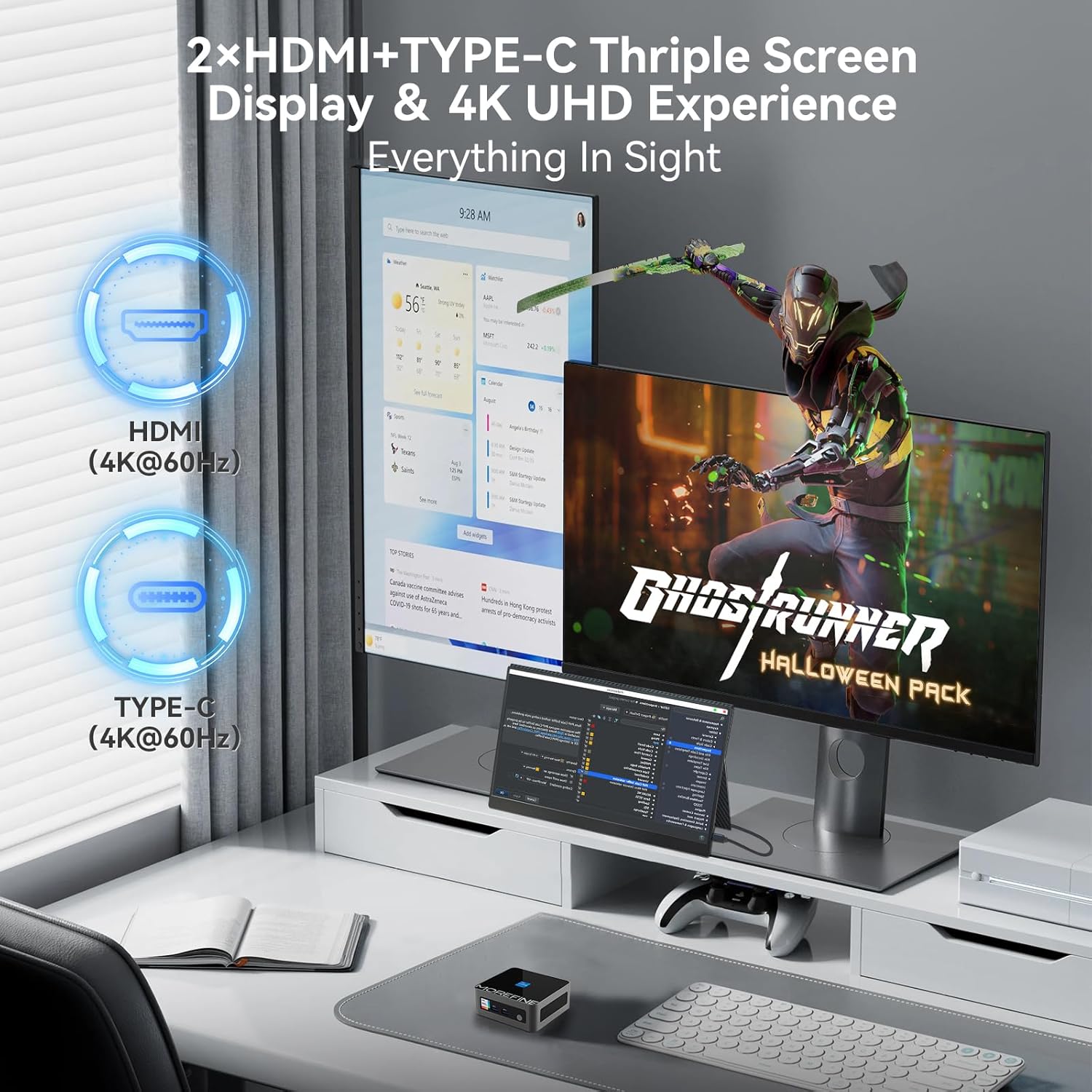
Image: A MOREFINE M9 Pro Mini PC connected to a triple monitor setup, demonstrating its multi-display capability.
4.3 Netzwerkverbindungen
- Kabelverbindung: Connect an Ethernet cable to the 2.5G LAN port for a stable wired network connection.
- Drahtlose Verbindung (WiFi 6): The device features an integrated WiFi 6 module. Access your operating system's network settings to connect to available wireless networks.
- Bluetooth 5.2: For connecting wireless peripherals such as keyboards, mice, or headphones, use the integrated Bluetooth 5.2. Pair devices through your operating system's Bluetooth settings.

Image: The MOREFINE M9 Pro Mini PC with visual indicators for WiFi 6 and Bluetooth 5.2 connectivity, emphasizing its wireless capabilities.
5. Wartung
5.1 Reinigung
- Stellen Sie vor der Reinigung sicher, dass das Gerät ausgeschaltet und vom Stromnetz getrennt ist.
- Verwenden Sie ein weiches, trockenes Tuch, um die Außenseite des Mini-PCs abzuwischen.
- Zur Beseitigung von Staubablagerungen in Lüftungsschächten Druckluft verwenden. Keine Gegenstände in die Lüftungsschächte einführen.
- Vermeiden Sie die Verwendung von flüssigen Reinigungsmitteln oder Scheuermitteln.
5.2 Storage and Upgrades
The Mini PC is equipped with dual-channel DDR4 SO-DIMM memory, supporting up to 64GB. It also includes one M.2 2242 slot and one M.2 2280 slot for storage expansion, supporting up to 4TB. The pre-installed storage is an M.2 NVME Gen3 X4 SSD. For memory or storage upgrades, consult a qualified technician or refer to detailed upgrade guides available from MOREFINE.

Abbildung: Ein interner view of the MOREFINE M9 Pro Mini PC, illustrating the DDR4 SO-DIMM memory slots and M.2 SSD slots for potential upgrades.
6. Fehlerbehebung
| Problem | Mögliche Ursache | Lösung |
|---|---|---|
| Kein Strom | Netzteil nicht angeschlossen; Problem mit der Steckdose | Ensure power adapter is securely connected to both the Mini PC and a working power outlet. Test the outlet with another device. |
| Keine Displayausgabe | Display cable loose; incorrect input selected on monitor | Check HDMI/Type-C cable connections. Ensure the monitor is set to the correct input source. Try a different display cable or port. |
| Keine Internetverbindung (kabelgebunden) | Ethernet cable loose; router/modem issue | Verify Ethernet cable is securely connected. Restart your router/modem. Check network settings in the operating system. |
| Keine Internetverbindung (drahtlos) | WiFi disabled; incorrect password; signal interference | Ensure WiFi is enabled in OS settings. Re-enter WiFi password. Move closer to the router or reduce interference. |
| System langsam oder reagiert nicht | Too many applications running; insufficient RAM/storage; overheating | Close unnecessary applications. Check system resources (Task Manager/Activity Monitor). Ensure proper ventilation. Consider RAM/SSD upgrade if issues persist. |
7. Spezifikationen
| Besonderheit | Detail |
|---|---|
| Modell | M9Pro-1340p |
| Prozessor | 13th Gen Intel Core i5-1340P (12 Cores, 16 Threads, up to 4.6GHz, 12MB Cache) |
| Grafik | Intel Iris Xe Grafik (integriert) |
| RAM | 16GB DDR4 SO-DIMM (Dual-channel, expandable up to 64GB) |
| Lagerung | 1TB PCIe3.0 NVME SSD (1x M.2 2280 slot, 1x M.2 2242 slot, max 4TB total) |
| Anzeigeausgabe | 2 x HDMI 2.0, 1 x Type-C (Supports 4K UHD Triple Display) |
| USB-Anschlüsse | 3 x USB 3.2, 1 x USB 2.0 |
| Netzwerk | 2.5G LAN, WiFi 6 (2.5G/5G/6G Tri-band) |
| Bluetooth | Bluetooth 5.2 |
| Audio | 1 x MIC (Audio Jack) |
| Betriebssystem | Betriebssystem (vorinstalliert, die genaue Version kann variieren) |
| Maße | Ungefähr 4.48 x 4.17 x 1.77 Zoll (11.2 x 10.5 x 4.3 cm) |
| Gewicht | Ungefähr 2.2 Pfund (1 kg) |
| Besondere Merkmale | Auto Power On, PXE Boot, Wake on LAN |
8. Garantie und Support
8.1 Garantieinformationen
The MOREFINE M9 Pro Mini PC comes with a standard manufacturer's warranty. Please refer to the warranty card included in your package or visit the official MOREFINE webDie detaillierten Garantiebedingungen finden Sie auf der Website. Bewahren Sie Ihren Kaufbeleg für Garantieansprüche auf.
8.2 Technischer Support
For technical assistance, troubleshooting beyond this manual, or service inquiries, please contact MOREFINE customer support. Contact information can typically be found on the official MOREFINE webauf der Website oder auf der Produktverpackung.
Online-Ressourcen: Visit the MOREFINE Store on Amazon


