1. Einleitung
This manual provides detailed instructions for the setup, operation, maintenance, and troubleshooting of your Transformers TF-Crystal 85 Keys Mechanical Keyboard. Please read this manual thoroughly before using the product to ensure proper functionality and longevity.
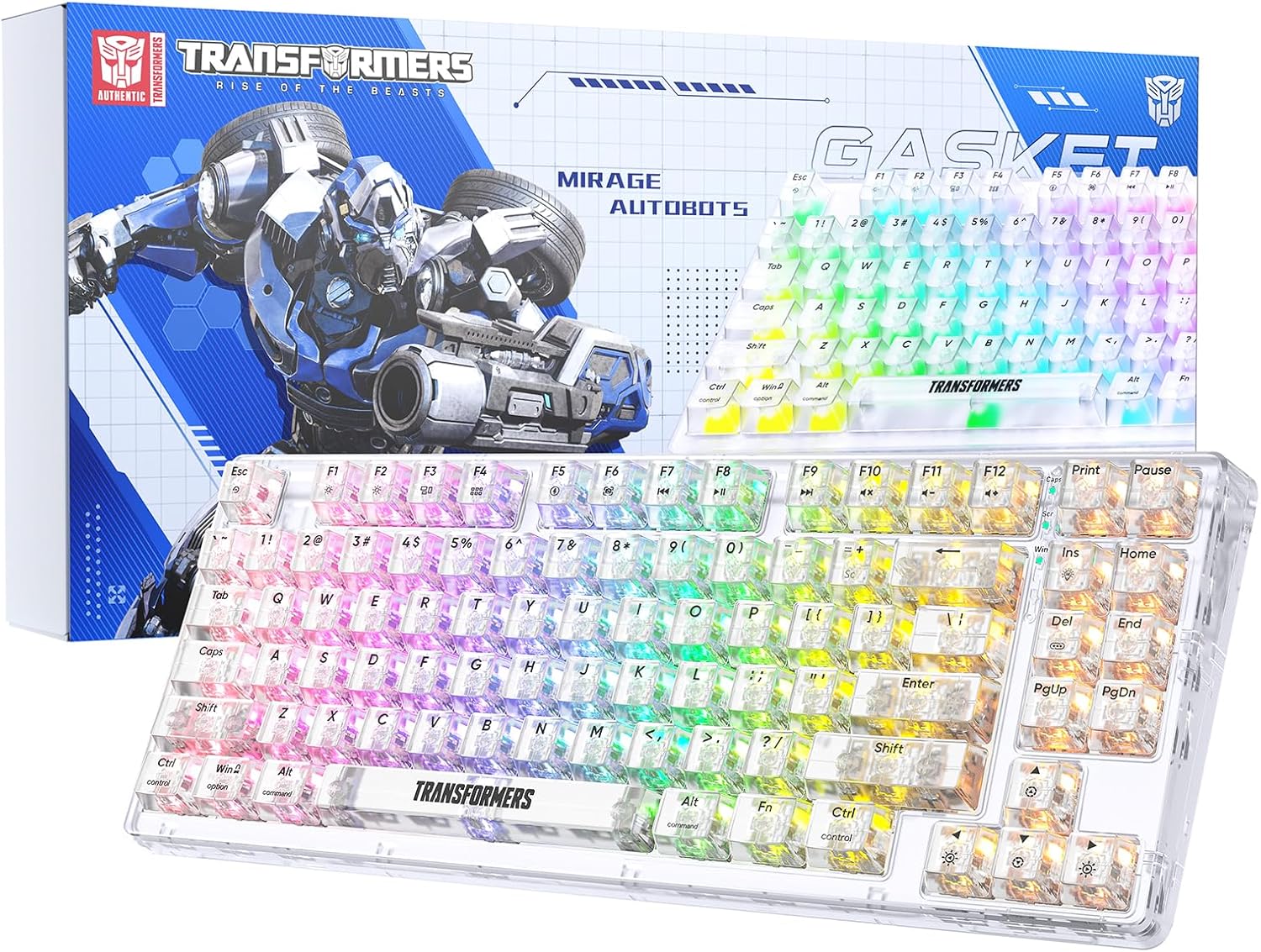
Image 1.1: Transformers TF-Crystal 85 Keys Mechanical Keyboard with its packaging, showcasing the transparent design and RGB lighting.
2. Produktüberschreitungview
2.1 Hauptmerkmale
- 85-Tasten-Layout: Compact 75% design retaining essential functions, arrow, and navigation keys.
- Dreimodus-Konnektivität: Unterstützt Bluetooth 5.0, 2.4-GHz-Funkverbindungen und kabelgebundene USB-C-Verbindungen.
- Hot-Swap-fähige Leiterplatte: Compatible with most 3-pin and 5-pin mechanical switches, allowing for easy customization and replacement.
- Linear Switches: Pre-lubricated switches with a 50 million keystroke lifespan for durability and smooth operation.
- Dichtungsstruktur: Incorporates high-quality gasket materials and a silicone pad to absorb vibrations and reduce typing noise.
- Anpassbare RGB-Hintergrundbeleuchtung: Features 20 built-in backlight modes, 16.8 million color options, and dynamic music rhythm effects.
- Programmable Driver: Enables macro customization, key function remapping, and advanced lighting control.
- Lange Akkulaufzeit: Equipped with a 4000mAh battery, providing up to 240 hours of continuous use in 2.4GHz mode without backlighting.
- Breite Kompatibilität: Supports Mac, Windows, iOS, Android, PC, Laptop, Smartphone, Tablet, Switch, Xbox, and PlayStation.
- Transparentes Design: Features transparent keycaps and base for enhanced aesthetic appeal.
3. Einrichtung
3.1 Aufladen der Tastatur
Before initial use, fully charge the keyboard. Connect the provided USB-C cable to the keyboard's USB-C port and the other end to a powered USB port (e.g., computer, wall adapter). The charging indicator will show the charging status.
3.2 Connecting via 2.4GHz Wireless Mode
- Locate the 2.4GHz USB receiver, typically stored in a compartment on the keyboard.
- Stecken Sie den USB-Empfänger in einen freien USB-Port Ihres Computers.
- Toggle the mode switch on the keyboard to the 2.4 G Position.
- Die Tastatur verbindet sich automatisch mit Ihrem Gerät.
3.3 Connecting via Bluetooth 5.0 Mode
- Toggle the mode switch on the keyboard to the BT Position.
- Drücken und halten Fn + 1 (oder Fn + 2, Fn + 3Halten Sie den Finger 3-5 Sekunden lang gedrückt, bis die Kontrollleuchte schnell blinkt und damit den Kopplungsmodus anzeigt.
- Aktivieren Sie auf Ihrem Gerät (Computer, Tablet, Smartphone) Bluetooth und suchen Sie nach neuen Geräten.
- Select "TF-Crystal 85" from the list of available devices to pair.
- Once paired, the indicator light will stop flashing and remain solid. You can pair up to three Bluetooth devices using Fn + 1, Fn + 2, Und Fn + 3.
3.4 Connecting via USB-C Wired Mode
- Verbinden Sie das mitgelieferte USB-C-Kabel mit dem USB-C-Anschluss der Tastatur.
- Verbinden Sie das andere Ende des USB-C-Kabels mit einem freien USB-Anschluss an Ihrem Computer.
- The keyboard will automatically switch to wired mode and function without battery power.

Image 3.1: Diagram illustrating the three connection modes: Bluetooth 5.0, 2.4GHz wireless, and USB-C wired, compatible with various devices.
4. Bedienungsanleitung
4.1 Umschalten zwischen den Betriebsmodi
Use the physical switch located on the keyboard to select between BT (Bluetooth), 2.4 G (2.4GHz wireless), and USB-C (wired) modes.
4.2 RGB-Hintergrundbeleuchtungssteuerung
The keyboard features customizable RGB backlighting. Use the following key combinations to adjust:
- Fn + Einfg: Cycle through 20 different backlight effects.
- Fn + Entf: Switch backlight colors within certain modes.
- Fn + ↑ / ↓: Helligkeit der Hintergrundbeleuchtung einstellen (5 Stufen).
- Fn + ← / →: Adjust backlight effect speed (5 levels).
- Fn + Esc (hold for 3s): Reset backlight settings to default.

Image 4.1: Visual guide for controlling RGB backlight effects, brightness, and speed using Fn key combinations.
4.3 Programmable Driver Usage
The keyboard includes a programmable driver for advanced customization. This driver allows you to:
- Makrobearbeitung: Record and edit complex key sequences.
- Key Redefinition: Customize the function of individual keys.
- RGB Effect Customization: Fine-tune lighting modes, colors, and speeds, including music rhythm lighting effects.
Refer to the software's dedicated user interface for detailed instructions on using these features.

Image 4.2: Screenshot of the programmable driver interface, showing options for macro editing, RGB effects, and key redefinition.
4.4 Hot-Swap-fähige Switches
The TF-Crystal 85 keyboard features a hot-swappable PCB, allowing you to change mechanical switches without soldering. This supports most 3-pin and 5-pin mechanical switches.
- Schalten Sie die Tastatur aus oder trennen Sie sie von Ihrem Gerät.
- Verwenden Sie den mitgelieferten Tastenkappenabzieher, um die gewünschte Tastenkappe vorsichtig zu entfernen.
- Use the provided switch puller to gently grip the switch from its top and bottom clips, then pull it straight up to remove it.
- Richten Sie die Pins des neuen Schalters an den Löchern auf der Leiterplatte aus. Achten Sie darauf, dass die Pins gerade sind.
- Drücken Sie den neuen Schalter vorsichtig ein, bis er hörbar einrastet. Wenden Sie dabei keine Gewalt an.
- Tauschen Sie die Tastenkappe aus.

Image 4.3: Illustration of the hot-swappable feature, showing how to remove and insert 3-pin/5-pin switches and the linear switch specifications.
5. Wartung
5.1 Reinigung der Tastatur
- Vor der Reinigung die Tastatur von allen Stromquellen trennen.
- Mit einem weichen, fusselfreien Tuch leichtampAnschließend mit Wasser oder einer milden Reinigungslösung abwischen, um die Tastenkappen und das Gehäuse zu reinigen.
- Für Staub und Schmutz zwischen den Tasten verwenden Sie Druckluft oder eine kleine Bürste.
- Avoid using harsh chemicals or abrasive materials that could damage the keyboard's surface.
5.2 Batteriepflege
- Vermeiden Sie häufiges vollständiges Entladen des Akkus.
- Bewahren Sie die Tastatur an einem kühlen, trockenen Ort auf, wenn Sie sie längere Zeit nicht verwenden.
- If the keyboard will not be used for a long time, charge it to about 50% before storage.
6. Fehlerbehebung
| Problem | Mögliche Ursache | Lösung |
|---|---|---|
| Tastatur reagiert im drahtlosen Modus nicht. | Low battery, incorrect mode selected, receiver not connected, Bluetooth not paired. | Charge the keyboard. Ensure the mode switch is set correctly (2.4G or BT). Re-insert the 2.4G receiver. Re-pair Bluetooth. |
| Tasten werden nicht registriert oder es werden doppelte Eingaben getätigt. | Defekter Schalter, Schmutz unter der Tastenkappe, Softwareproblem. | Clean under the keycap. Try hot-swapping the switch with a known working one. Restart your computer. |
| RGB backlight not working or incorrect. | Backlight turned off, incorrect settings, software conflict. | Passen Sie die Helligkeit an mit Fn + ↑. Zyklusmodi mit Fn + Einf. Reset backlight with Fn + Esc (3 Sekunden gedrückt halten). Check programmable driver settings. |
| Tastatur lädt nicht. | Faulty USB-C cable, power source issue, keyboard port damage. | Try a different USB-C cable. Use a different USB port or power adapter. Ensure the cable is fully inserted. |
7. Spezifikationen
| Besonderheit | Detail |
|---|---|
| Modellnummer | TF-Crystal 85 |
| Tastenbelegung | 85 Tasten (75 % Kompaktgröße) |
| Konnektivität | Bluetooth 5.0, 2.4-GHz-Funkverbindung, USB-C-Kabelverbindung |
| Schaltertyp | Pre-lubricated Linear Mechanical Switches |
| Lebensdauer wechseln | 50 Millionen Tastenanschläge |
| Hot-Swapable | Ja (3-Pin/5-Pin-kompatibel) |
| Hintergrundbeleuchtung | RGB (20 Modi, 16.8 Millionen Farben) |
| Batteriekapazität | 4000 mAh |
| Battery Life (2.4G, no light) | Bis zu 240 Stunden |
| Akkulaufzeit (Hintergrundbeleuchtung EIN) | Ungefähr 22 Stunden |
| Abmessungen (L x B x H) | 34.7 cm x 14 cm x 4.5 cm |
| Kompatibilität | Mac, Windows, iOS, Android, PC, Laptop, Smartphone, Tablet, Switch, Xbox, PlayStation |

Image 7.1: Visual representation of the keyboard's battery life: 240 hours with backlight off, 22 hours with backlight on, powered by a 4000mAh battery.
8. Garantie und Support
Transformers is committed to providing exceptional customer service. If you encounter any problems with your TF-Crystal 85 Keys Mechanical Keyboard, our after-sales support team is available to assist you. This includes technical support, exchanges, or installation guidance.
Please contact our customer service for assistance. We guarantee a hassle-free service experience.


