Einführung
Thank you for choosing the AIKELA Bluetooth Speaker with Video Scrolling Remote and Phone Stand. This multi-functional device is designed to enhance your media experience by providing amplified sound, a stable viewing platform, and convenient remote control. Whether you're watching videos, listening to podcasts, or making hands-free calls, this product offers a seamless and enjoyable experience.

The AIKELA Bluetooth Speaker with Phone Stand and its accompanying remote control.
Packungsinhalt
Bitte prüfen Sie das Paket auf folgende Artikel:
- Bluetooth Speaker with Phone Stand x 1
- Fernbedienung x 1
- Typ C-Kabel x 1
- Benutzerhandbuch x 1

Visuelle Darstellung aller im Produktpaket enthaltenen Artikel.
Produkteigenschaften
- Small But Powerful Sound: The upgraded wireless Bluetooth speaker delivers clear, loud sound for music, movies, videos, and podcasts. It includes a built-in microphone for crisp hands-free calls, which can also assist individuals with hearing loss.
- Video Scrolling Remote: A dedicated Bluetooth remote allows for easy scrolling, pausing, playing videos, and adjusting phone volume. This feature is ideal for platforms like YouTube, TikTok, or Netflix, freeing your hands during various activities.
- Verstellbarer Handyhalter: The stand features a weighted base with non-slip silicone to securely hold your phone. Its adjustable angle ensures optimal viewing, whether on a desk, kitchen counter, or bedside table.
- Portable & Long-Lasting: With a foldable, lightweight design, the speaker is easy to transport. Its rechargeable battery provides up to 10 hours of use on a single 1.5-hour charge, making it suitable for home, office, or travel.

The product combines a Bluetooth speaker, phone stand, built-in microphone, and remote control.

Genießen amplified sound for media and clear hands-free calls.

The phone stand is adjustable and foldable for convenience.

The speaker offers up to 10 hours of battery life on a 1.5-hour charge.
Installationshandbuch
1. Aufladen des Geräts
Before first use, fully charge the AIKELA Bluetooth Speaker using the provided Type-C cable. Connect the cable to the speaker's charging port and a compatible USB power source.
2. Ein-/Ausschalten
Locate the ON/OFF button on the speaker. Press and hold to power on or off the device.
3. Bluetooth Pairing (Speaker)
- Ensure the speaker is powered on and in pairing mode (indicated by a blinking blue LED light).
- On your smartphone or tablet, go to Bluetooth settings.
- Suchen nach available devices and select "YX01" (or similar name) to connect.
- Once connected, the LED light will become solid blue.
4. Bluetooth Pairing (Remote Control)
- Slide the ON/OFF button on the back of the remote control to the ON position.
- On your smartphone or tablet, go to Bluetooth settings.
- Suchen nach available devices and select "YK01 (Remote Control)" to connect.
- Once connected, the remote is ready for use.
5. iOS Specific Setup for Remote Control
For iOS devices, you must enable AssistiveTouch for the remote control to function correctly with video scrolling and other gestures. Follow these steps:
- Gehe zu Einstellungen.
- Wählen Zugänglichkeit.
- Klopfen Berühren.
- Einschalten AssistiveTouch.
- Sicherstellen Touch-Gesten ausführen ist eingeschaltet.
- Passen Sie die Tracking-Empfindlichkeit to 20%-30% for optimal performance.

Step-by-step guide for enabling AssistiveTouch on iOS devices to use the remote control.
6. Adjusting the Phone Stand
The phone stand is designed to be adjustable for various viewing angles. Gently adjust the hinges to achieve your desired height and tilt. Ensure your device is securely placed on the stand's non-slip surface. The stand is compatible with most 4"-13" smartphones, tablets, and e-readers.
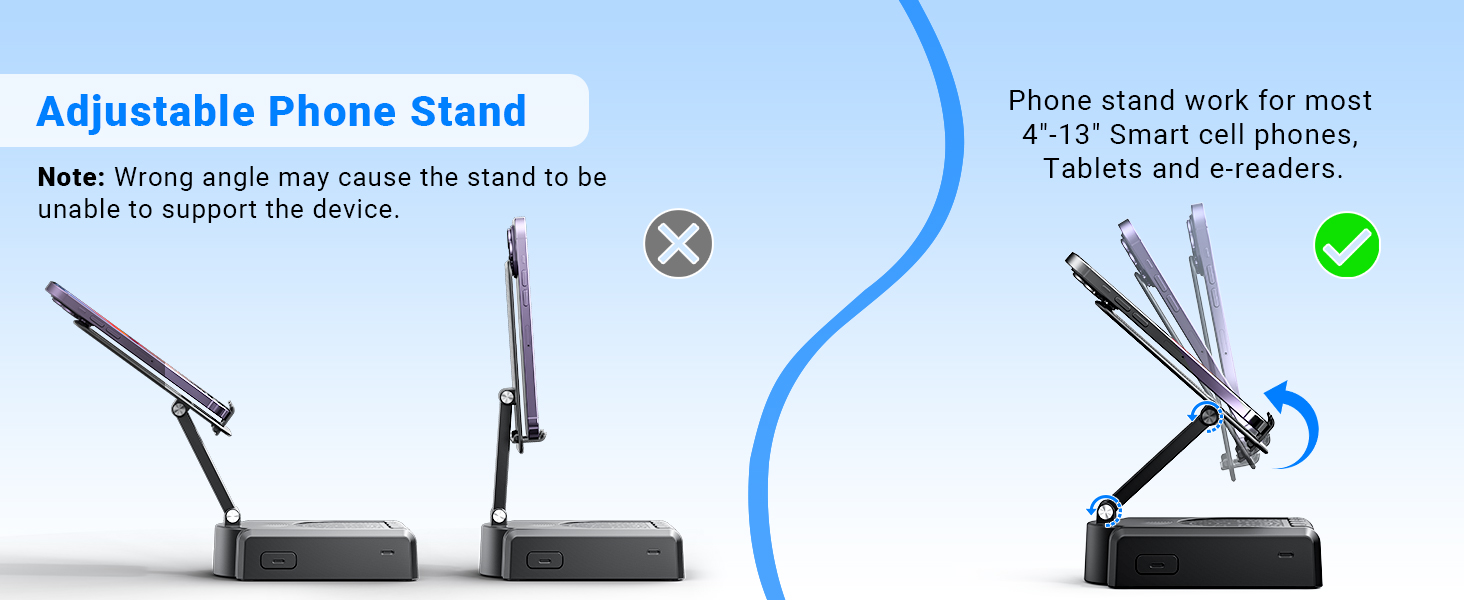
Demonstration of the adjustable angles of the phone stand.
Bedienungsanleitung
Lautsprechersteuerung
The speaker features intuitive buttons for basic functions:
- EIN/AUS: Schalten Sie das Gerät ein oder aus.
- Pause/Wiedergabe/Annehmen/Auflegen: Control media playback and phone calls.
- Zurück/Band-: Skip to the previous track or decrease volume.
- Weiter/Band+: Zum nächsten Titel springen oder die Lautstärke erhöhen.
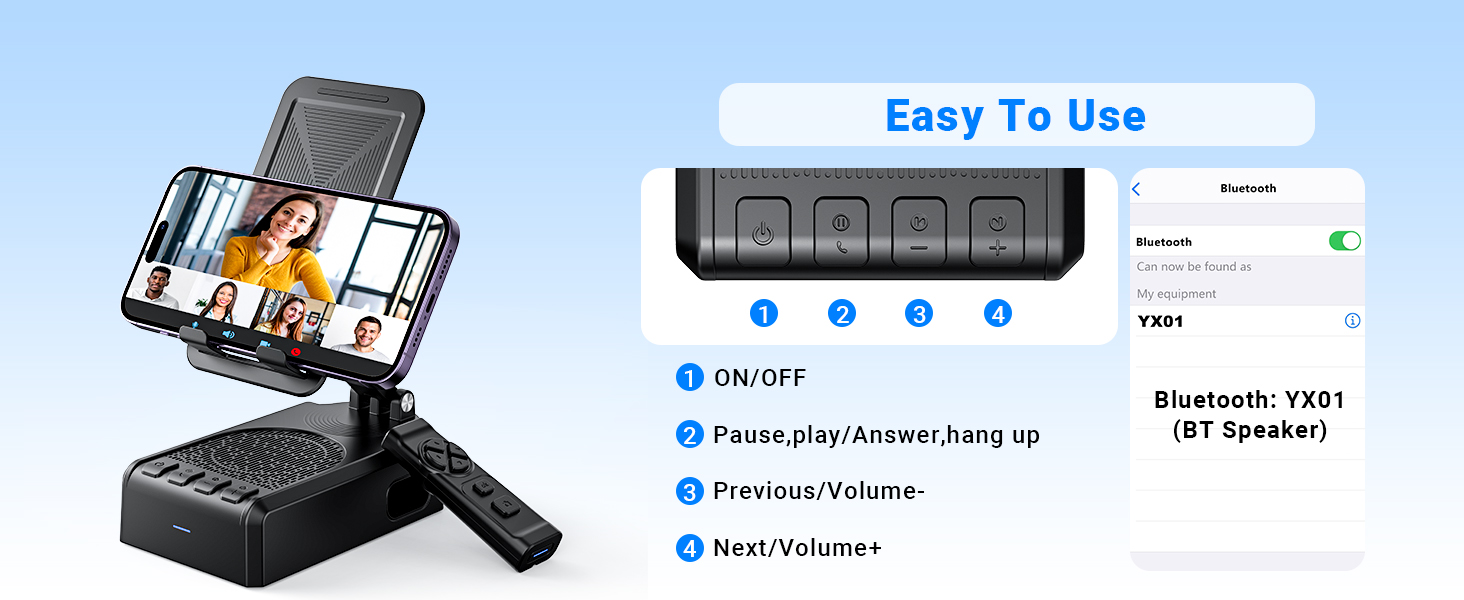
Überview von den Bedienknöpfen des Lautsprechers und deren Funktionen.
Fernbedienungsfunktionen
The Bluetooth remote control provides convenient hands-free operation for various applications:
- Single click (Up/Down arrows): Scroll up/down in apps like TikTok or YouTube.
- Single click (Left/Right arrows): Swipe left/right (e.g., for next/previous video).
- Long press (Left/Right arrows): Adjust volume (Volume- / Volume+).
- OK button (center): Medien abspielen/anhalten.
- Double click (OK button): Single 'like' in social media apps.
- Long press 3s (OK button): Continuous likes (in TikTok live state).
- Kamerataste: Exit continuous likes (in TikTok live state).
Note: The remote control is not compatible with music software or Kindle devices.
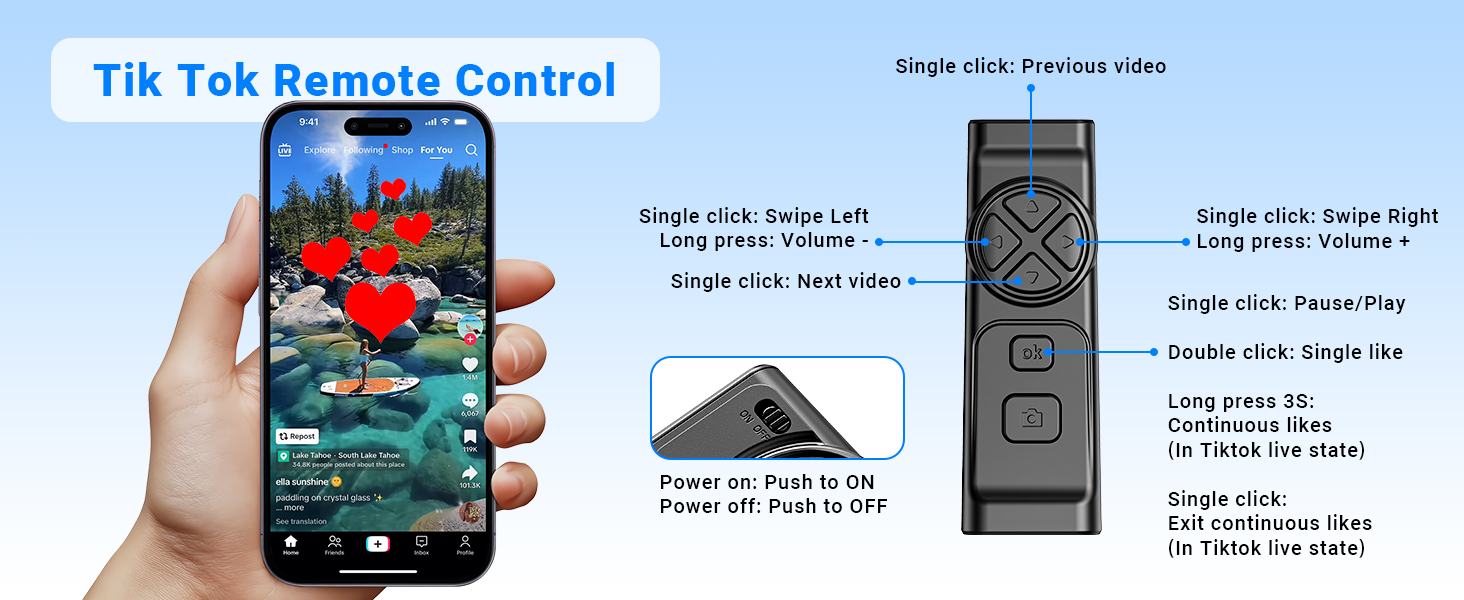
Detailed functions of the remote control for video scrolling and interaction.
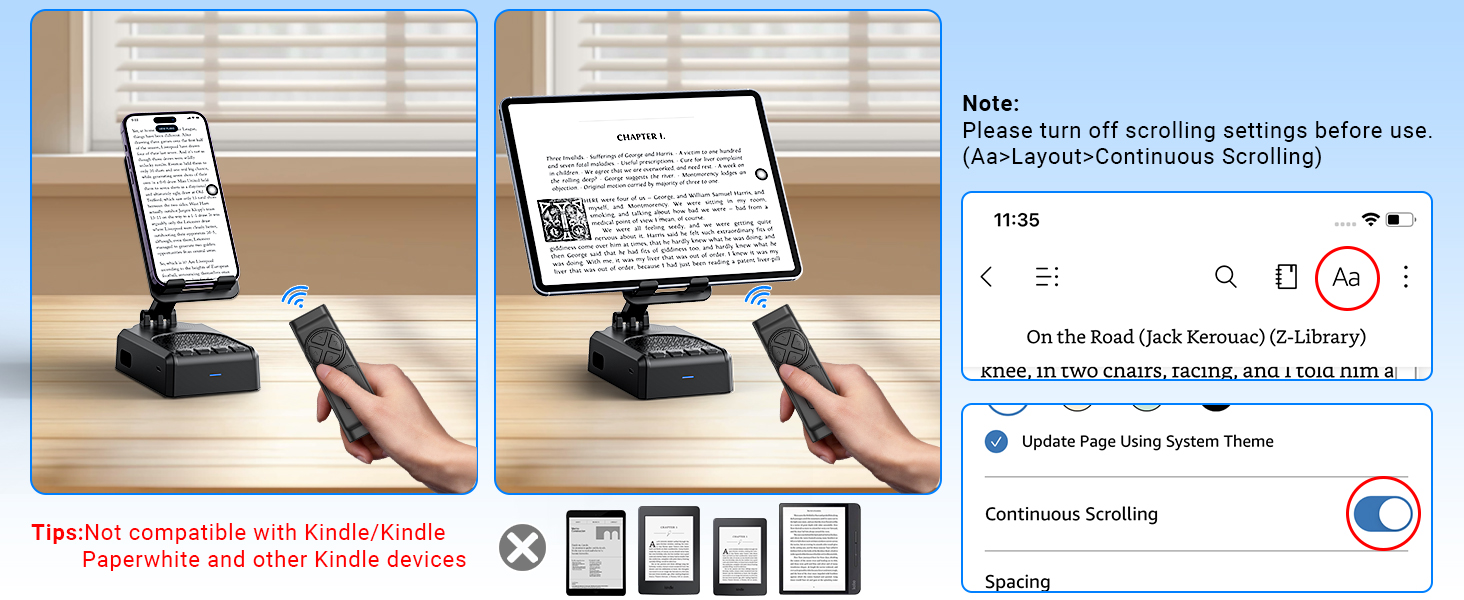
Important note regarding the remote control's compatibility with certain applications and devices.
Pflege und Wartung
- Halten Sie das Gerät trocken. Setzen Sie es weder Feuchtigkeit noch extremen Temperaturen aus.
- Reinigen Sie das Gerät mit einem weichen, trockenen Tuch. Vermeiden Sie die Verwendung von scharfen Chemikalien oder Scheuermitteln.
- Bewahren Sie das Gerät bei Nichtgebrauch an einem kühlen, trockenen Ort auf.
- Lassen Sie das Gerät nicht fallen und setzen Sie es keinen starken Stößen aus.
Fehlerbehebung
Remote Control Issues (iOS)
Problem: The remote control cannot scroll through videos on an iOS device.
Lösung: Ensure AssistiveTouch is properly configured. Go to Einstellungen > Eingabehilfen > Berühren > AssistiveTouch. Turn on AssistiveTouch, then turn on Touch-Gesten ausführen, and adjust the Tracking-Empfindlichkeit to 20%-30%.
Problem: Remote control still not working after enabling AssistiveTouch.
Lösung:
- Verify the remote control is powered on (slide the button on the back to ON).
- Confirm the remote is paired with your phone via Bluetooth. Check your phone's Bluetooth settings.
- If issues persist, try disabling and re-enabling the AssistiveTouch function.
Visual guide for troubleshooting remote control issues on iOS devices.
Low Volume on Android Devices
Problem: The speaker volume is too low on an Android device.
Lösung: After connecting the speaker via Bluetooth, go to your phone's Bluetooth settings, find the connected speaker (e.g., YX01), tap the gear icon or settings icon next to it, and ensure 'Sync volume with phone' or 'Media volume sync' is enabled.

Instructions for adjusting volume sync settings on Android devices.
Technische Spezifikationen
| Besonderheit | Spezifikation |
|---|---|
| Modellname | YX01, YK01 |
| Lautsprechertyp | Tragbarer Lautsprecher |
| Besondere Merkmale | Bass Boost, Built-In Microphone, Lightweight, Portable, Stereo Pairing |
| Kompatible Geräte | Android phone, Samsung, Tablet, iPad, iPhone |
| Einheitenanzahl | 1.0 Anzahl |
| Surround Sound-Kanalkonfiguration | 1.0 |
| Farbe | Schwarz |
| Akkulaufzeit | 10 Stunden |
| Technische Daten | 5.7"T x 2.08"B x 3.34"H |
| Artikelgewicht | 0.36 Kilogramm (12.6 Unzen) |
| Ist wasserdicht | FALSCH |
| Ladezeit | 1.5 Stunden |
| Garantietyp | Beschränkt |
| Maximale Reichweite (Bluetooth) | 393 Zoll (10 Meter) |
| Anzahl der Artikel | 1 |
| Kontrollmethode | Fernbedienung, berühren |
| Drahtlose Kommunikationstechnologie | Bluetooth |
| Stromquelle | Batteriebetrieben |
| Anzahl Batterien | 2 A Batterien erforderlich (im Lieferumfang enthalten) |
| Audiotreibertyp | Dynamischer Treiber |
| Anzahl der Mikrofone | 1 |
| Konnektivitätsprotokoll | Bluetooth |
| Stil | Modern |
| Hersteller | AIKELA |
| Maximale Lautsprecherausgangsleistung | 1 Watt |
| Audioausgabemodus | Stereo |
| Montagetyp | Tischhalterung |
Garantie und Support
AIKELA provides 12 months of support for your Speaker Stand. If you encounter any problems or have questions, please contact customer service. For quick assistance, use the 'Find Order - Contact Seller' option on your purchase platform.


