1. Einleitung
This manual provides comprehensive instructions for the safe and effective use of your Flashpoint Zoom Li-on X PRO R2 TTL On-Camera Round Flash Speedlight for Sony and the Glow PS-B24K ParaSnap Octagonal Softbox. Please read this manual thoroughly before operating the equipment and retain it for future reference. Proper understanding of these instructions will ensure optimal performance and longevity of your product.
2. Sicherheitshinweise
- Do not disassemble or modify the product. Unauthorized repairs can cause damage and void the warranty.
- Das Produkt trocken halten. Nicht mit nassen Händen anfassen oder in Wasser tauchen.
- Vermeiden Sie direkten Augenkontakt mit dem Blitzlicht.
- Außerhalb der Reichweite von Kindern aufbewahren.
- Verwenden Sie ausschließlich den angegebenen Akku und das angegebene Ladegerät.
- Sorgen Sie während des Betriebs für eine ausreichende Belüftung, um eine Überhitzung zu vermeiden.
3. Packungsinhalt
Überprüfen Sie, ob alle Artikel in Ihrem Paket vorhanden sind:
- Flashpoint Zoom Li-on X PRO R2 TTL On-Camera Round Flash Speedlight
- Lithium-Ionen-Akku
- Ladegerät
- USB-Ladekabel
- Mini-Ständer
- Schutzhülle
- Glow PS-B24K ParaSnap Octagonal Softbox (24")
- Flashpoint C-adapter for Round Head Flashes
- Softbox Carrying Bag
4. Produktüberschreitungview
The Flashpoint Zoom Li-on X PRO R2 TTL Flash is a versatile on-camera speedlight designed for Sony cameras, offering a round flash head for natural light distribution. It integrates with the R2 wireless system for advanced control. The Glow PS-B24K ParaSnap Octagonal Softbox is a portable light modifier that attaches to the flash via the C-adapter, providing soft, even illumination.
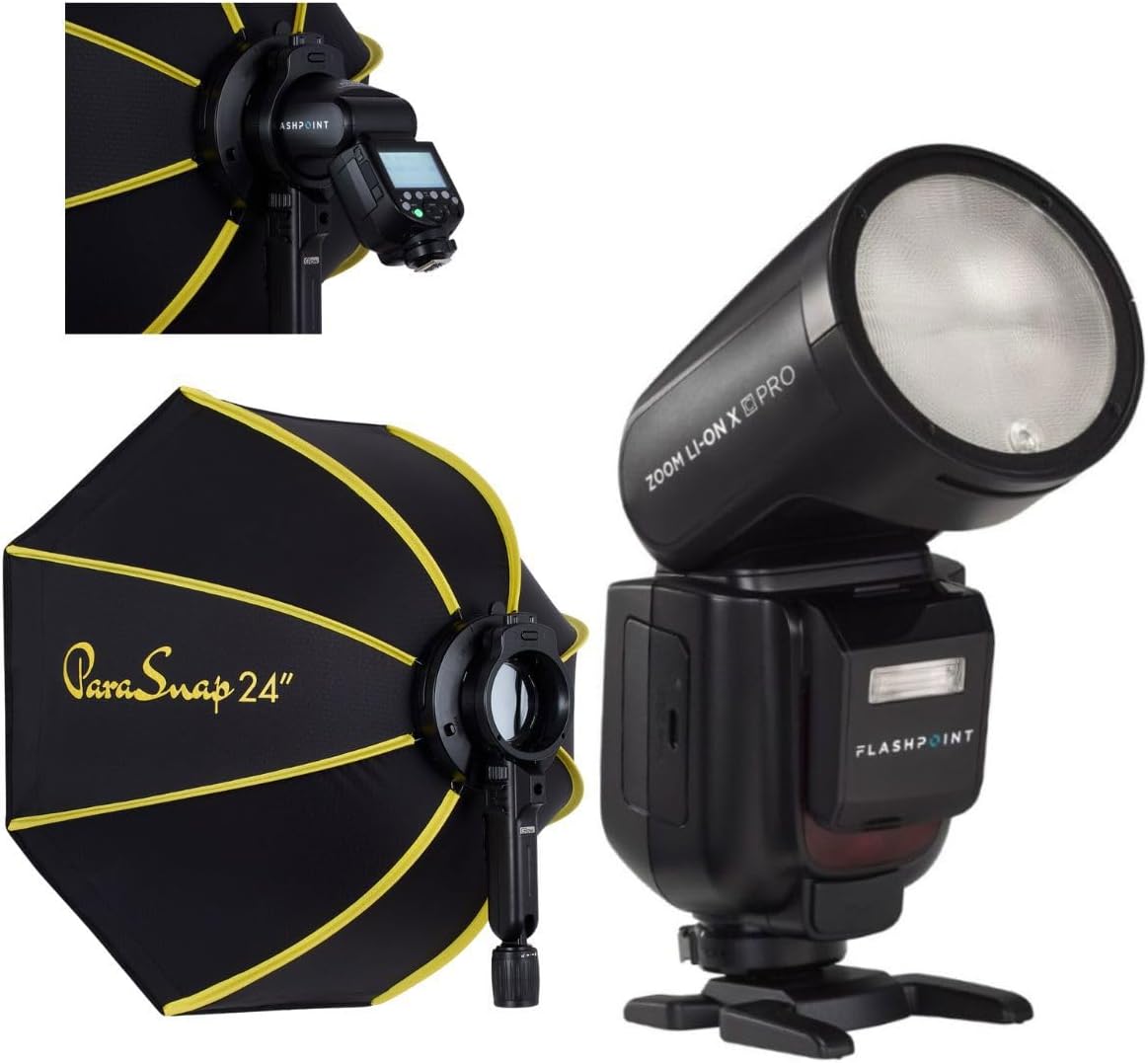
Image 1: The Flashpoint Zoom Li-on X PRO R2 TTL Flash shown alongside the Glow PS-B24K ParaSnap Octagonal Softbox, illustrating the complete kit.
4.1 Flash Unit (Zoom Li-on X PRO R2 TTL)
This unit features a round flash head, an LCD display for settings, control buttons, a hot shoe mount, and a battery compartment.

Bild 2: Eine Nahaufnahme view of the Flashpoint Zoom Li-on X PRO R2 TTL Flash unit, highlighting its round head and control panel.
4.2 Glow PS-B24K ParaSnap Octagonale Softbox
The softbox is designed for quick setup and breakdown, featuring an octagonal shape for pleasing catchlights and soft light. It includes a mounting bracket for the C-adapter.

Image 3: The Glow PS-B24K ParaSnap Octagonal Softbox in its open configuration, ready for use.
4.3 Flashpoint C-adapter
This adapter facilitates the connection of the round head flash to the softbox, ensuring a secure and stable mount.

Bild 4: A view of the Flashpoint C-adapter, which connects the round flash head to light modifiers.
5. Einrichtung
5.1 Einlegen und Laden der Batterie
- Open the battery compartment on the flash unit.
- Setzen Sie die Lithium-Ionen-Batterie ein und achten Sie dabei auf die richtige Polarität.
- Verschließen Sie das Batteriefach fest.
- To charge, connect the battery to the charger, then plug the charger into a power source. The indicator light will show charging status.
5.2 Attaching the Flash to Your Camera
- Schieben Sie den Blitzschuh des Blitzgeräts in den Blitzschuh Ihrer Kamera.
- Ziehen Sie den Verriegelungsring oder den Hebel am Blitzgerät fest, um es an der Kamera zu befestigen.
5.3 Assembling and Attaching the Softbox
- Unfold the Glow PS-B24K ParaSnap Octagonal Softbox. The internal rods will snap into place.
- Attach the Flashpoint C-adapter to the mounting bracket on the softbox.
- Insert the round head of the Flashpoint Zoom Li-on X PRO R2 TTL Flash into the C-adapter, ensuring it is securely seated.
- Optionally, attach the inner and outer diffusers to the softbox for softer light.

Image 5: The Flashpoint Zoom Li-on X PRO R2 TTL Flash integrated with the Glow PS-B24K ParaSnap Octagonal Softbox, demonstrating the assembled unit.

Abbildung 6: Ein überview of the Glow PS-B24K ParaSnap Octagonal Softbox components, including the softbox, C-adapter, and carrying bag.

Abbildung 7: Ein Seitenprofilfile of the Flashpoint C-adapter, showing its design for connecting the flash to the softbox.
6. Bedienungsanleitung
6.1 Ein-/Ausschalten
Press and hold the power button on the flash unit for approximately 2 seconds to turn it on or off.
6.2 Blitzmodi
- TTL-Modus: The flash automatically adjusts its output based on the camera's metering system for balanced exposure.
- Manueller Modus (M): Allows you to manually set the flash power from 1/1 (full power) down to 1/256 in precise steps.
- Multi- (Stroboskop-)Modus: Feuert während einer einzigen Belichtung eine Reihe schneller Blitze ab, um mehrere Bilder eines sich bewegenden Objekts aufzunehmen.
Use the mode button to cycle through available flash modes and the dial/buttons to adjust settings within each mode.
6.3 R2 Wireless System Operation
The Flashpoint Zoom Li-on X PRO R2 TTL Flash can operate as a master or slave unit within the Flashpoint R2 wireless system. Refer to the flash unit's display and controls to set the wireless mode, channel, and group. This allows for remote control of multiple R2-compatible flashes.
6.4 Using the Softbox
The Glow PS-B24K ParaSnap Octagonal Softbox diffuses the flash light, creating a softer, more even illumination with reduced harsh shadows. Position the softbox and flash unit to achieve the desired lighting effect on your subject.
7. Wartung
- Reinigen Sie den Blitzkopf und das Blitzgehäuse mit einem weichen, trockenen Tuch. Verwenden Sie keine Lösungsmittel oder Scheuermittel.
- Stellen Sie sicher, dass die Batteriekontakte sauber sind.
- When not in use for extended periods, remove the battery and store the flash and softbox in their protective cases in a cool, dry place.
8. Fehlerbehebung
| Problem | Mögliche Ursache | Lösung |
|---|---|---|
| Der Blitz löst nicht aus. | Low battery; incorrect camera/flash settings; flash not securely mounted. | Charge battery; check flash and camera settings (e.g., flash enabled, correct mode); re-mount flash securely. |
| Die Flash-Ausgabe ist inkonsistent. | Battery low; environmental factors; incorrect TTL compensation. | Ensure battery is fully charged; adjust flash exposure compensation; check for obstructions. |
| Softbox does not open/close smoothly. | Mechanism obstruction; bent rods. | Check for any fabric or debris obstructing the mechanism; gently straighten any bent rods if possible. |
9. Spezifikationen
| Besonderheit | Detail |
|---|---|
| Technische Daten | 24.5 x 8.2 x 2.78 Zoll |
| Artikelgewicht | 4.52 Pfund |
| ASIN | B0DT4TGDN7 |
| Datum der ersten Verfügbarkeit | 15. Januar 2025 |
| Hersteller | Flammpunkt |
| Marke | Flammpunkt |
| UPC | 192223270701 |
| Leistungsabgabe | 1/1 to 1/256 in 81 steps |
| Recyclingzeit | Ca. 1.5 Sekunden (volle Leistung) |
| BLITZDAUER | 1/300 bis 1/20000 Sekunden |
| Batterie | 7.2V/2980mAh Lithium-Ion |
| Wireless-System | Flashpoint R2 (2.4GHz) |
10. Garantie und Support
Flashpoint products are designed for reliability and performance. For warranty information, technical support, or service inquiries, please refer to the official Flashpoint webBesuchen Sie unsere Website oder wenden Sie sich an Ihren autorisierten Händler. Bewahren Sie Ihren Kaufbeleg als Kaufnachweis auf.
Besuchen Sie die Flashpoint Store für weitere Produkte und Supportressourcen.