1. Einleitung
Welcome to the NexFoto 21.5 Inch Touchscreen Digital Picture Frame. This manual provides detailed instructions for setting up, operating, and maintaining your new digital photo frame. Designed for ease of use, this frame allows you to effortlessly share and display your cherished memories in vibrant Full HD.

Figure 1: NexFoto 21.5 Inch Digital Picture Frame
2. Produktmerkmale
- 21.5-inch FHD Glossy Touch Screen: Features 1920 x 1080 resolution with a 16:9 aspect ratio and IPS display technology for wide viewing angles and sharp details.
- 64 GB interner Speicher: Stores up to 160,000 pictures, with support for Micro SD card extended storage (up to 64GB, not included).
- Wi-Fi-Konnektivität: Compatible with 2.4GHz and 5Ghz networks for easy photo and video sharing.
- Vielseitige Platzierung: Can be freestanding or wall-mounted in both landscape and portrait orientations with auto-rotation.
- Multifunctional Custom Settings: Includes options for captions, weather display, calendar, clock, alarm, and sleep mode.
- Cloudbasierter Speicher: Offers convenient, private, and secure cloud storage.
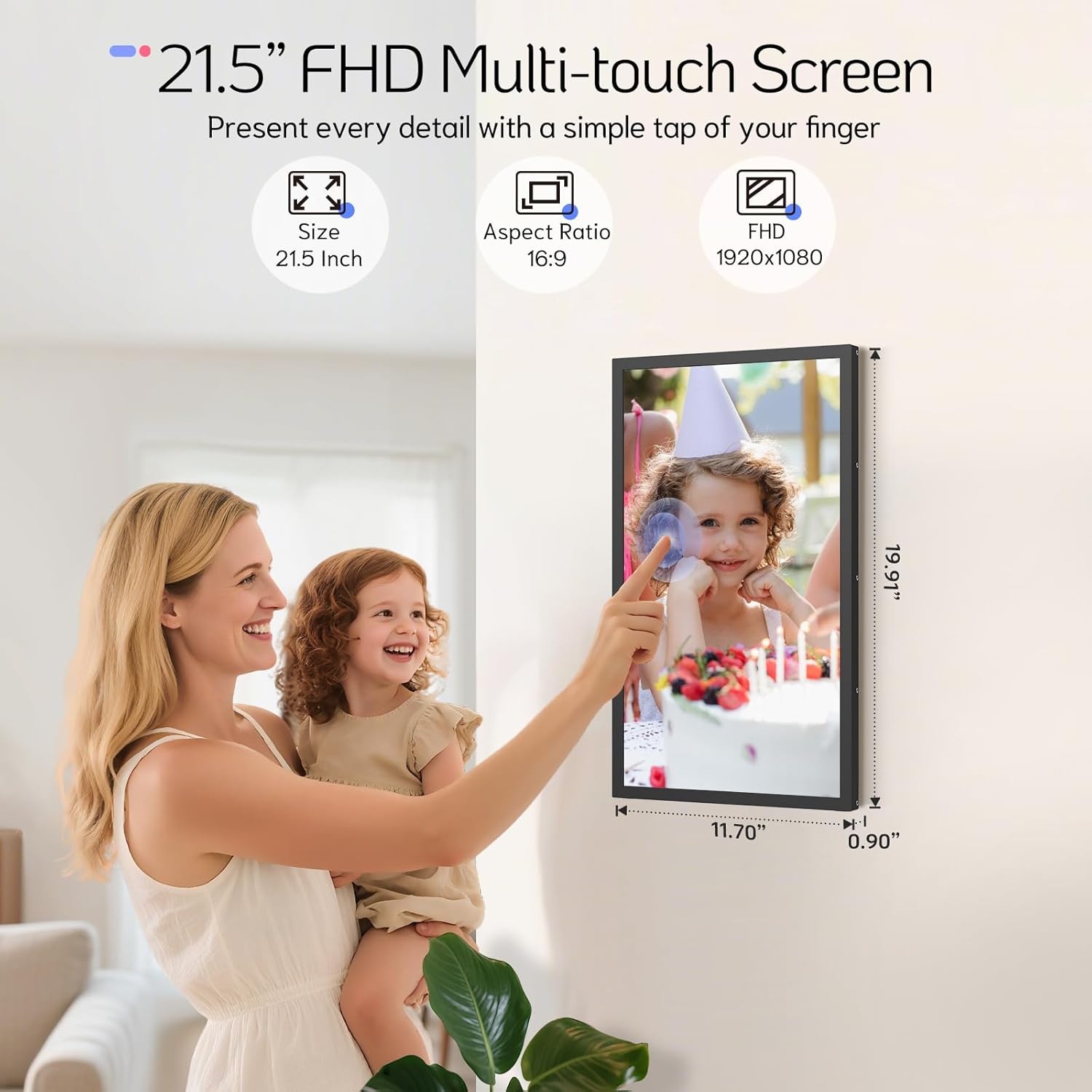
Figure 2: 21.5 Inch FHD Multi-touch Screen Details

Figure 3: Effortless Photo and Video Sharing

Figure 4: Built-In Bluetooth Speakers & Art Gallery
3. Packungsinhalt
Bitte kreuzen Sie das Kästchen für die folgenden Elemente an:
- NexFoto 21.5 Inch Digital Picture Frame
- Wall Adaptor with US plug
- 64GB USB drive
- Benutzerhandbuch & Kurzanleitung
- Schraubendreher
- Rotatable Wall Mount (100x100 VESA Compatible)
- Dübel & Schrauben
- Stand

Abbildung 5: Lieferumfang
4. Installationsanleitung
4.1 Ersteinrichtung
- Einschalten: Schließen Sie das Netzteil an den Rahmen an und stecken Sie es in eine Steckdose. Der Rahmen schaltet sich automatisch ein.
- Sprachauswahl: Folgen Sie den Anweisungen auf dem Bildschirm, um Ihre bevorzugte Sprache auszuwählen.
- Wi-Fi-Verbindung: Connect the frame to your Wi-Fi network (supports 2.4GHz and 5GHz). Ensure a stable connection for optimal performance.
- Download NexFoto App: Scan the QR code displayed on the screen or search for "NexFoto" in your mobile app store (iOS/Android) to download the companion app.
- Kombinieren Sie Ihren Rahmen: Open the NexFoto app, create an account, and follow the in-app instructions to pair your mobile device with the digital frame via Bluetooth and Wi-Fi.

Abbildung 6: Schnelle Einrichtungsschritte
Video 1: Dieses Video bietet einen kurzen Überblick überview of the NexFoto Digital Picture Frames, showcasing their features and ease of use for sharing memories.
5. Bedienungsanleitung
5.1 Fotos und Videos teilen
Once your frame is paired with the NexFoto app, you can easily upload photos and videos from your smartphone. The app allows you to select media from your gallery, add captions, and choose which album to send them to. You can also invite family and friends to join your private social circle to share their own memories directly to your frame.
The frame also supports direct upload via USB drive or Micro SD card (not included) for added convenience.

Figure 7: Interact and Connect with Shared Memories
5.2 Benutzerdefinierte Einstellungen
The NexFoto frame offers various customizable settings accessible through the touchscreen interface or the app:
- Bildunterschriften: Füge deinen Fotos personalisierte Bildunterschriften hinzu.
- Anzeigeinformationen: Enable or disable the display of weather, calendar, and clock.
- Alarm & Sleep Mode: Set alarms or schedule sleep mode to conserve energy and manage display times.
5.3 Bildschirmausrichtung
The frame can be used in both landscape and portrait orientations. Its auto-rotation feature adjusts the display content automatically. For wall mounting, use the included rotatable wall mount for easy adjustment.

Figure 8: Rotatable Wall Mount for Flexible Display
6. Wartung und Pflege
- Reinigen des Bildschirms: Verwenden Sie ein weiches, fusselfreies Tuch, um den Bildschirm vorsichtig abzuwischen. Bei hartnäckigen Flecken leicht andrücken.ampBefeuchten Sie das Tuch mit Wasser oder einem Bildschirmreiniger. Vermeiden Sie aggressive Chemikalien.
- Rahmen reinigen: Wischen Sie den Rahmen mit einem trockenen, weichen Tuch ab.
- Platzierung: Avoid placing the frame in direct sunlight or in areas with extreme temperatures or high humidity.
- Handhabung: Behandeln Sie den Rahmen vorsichtig, um Beschädigungen am Bildschirm oder an den internen Komponenten zu vermeiden.
7. Fehlerbehebung
| Problem | Lösung |
|---|---|
| Das Gehäuse lässt sich nicht einschalten. | Vergewissern Sie sich, dass das Netzteil fest mit dem Rahmen und einer funktionierenden Steckdose verbunden ist. Versuchen Sie es mit einer anderen Steckdose. |
| Es kann keine Verbindung zum WLAN hergestellt werden. | Check if your Wi-Fi network is 2.4GHz or 5GHz compatible. Ensure the Wi-Fi password is correct. Restart your router and the frame. |
| Fotos werden nicht im Rahmen angezeigt. | Verify that photos have been successfully uploaded via the NexFoto app or inserted USB/Micro SD card. Ensure the frame is connected to Wi-Fi if using the app. |
| Der Bildschirm reagiert nicht. | Starten Sie den Rahmen neu, indem Sie das Netzteil aus- und wieder einstecken. Stellen Sie sicher, dass der Bildschirm sauber und frei von Staub und Schmutz ist. |
| Frame is displaying incorrect time/weather. | Ensure the frame is connected to Wi-Fi and location services are enabled (if applicable) for accurate data synchronization. |
8. Technische Daten
| Besonderheit | Detail |
|---|---|
| Bildschirmgröße | 21.5 Zoll |
| Auflösung | 1920 * 1080 FHD |
| Seitenverhältnis | 16:9 |
| Interner Speicher | 64 GB |
| Kompatible Geräte | iOS, Android |
| Wi-Fi-Kompatibilität | 2.4 GHz, 5 GHz |
| Technische Daten | 19.91 x 11.7 x 0.99 Zoll |
| Artikelgewicht | 8.67 Pfund |
| Farbe | Schwarz |
| Modellnummer | NF-W215BN-T-BT-U-US |
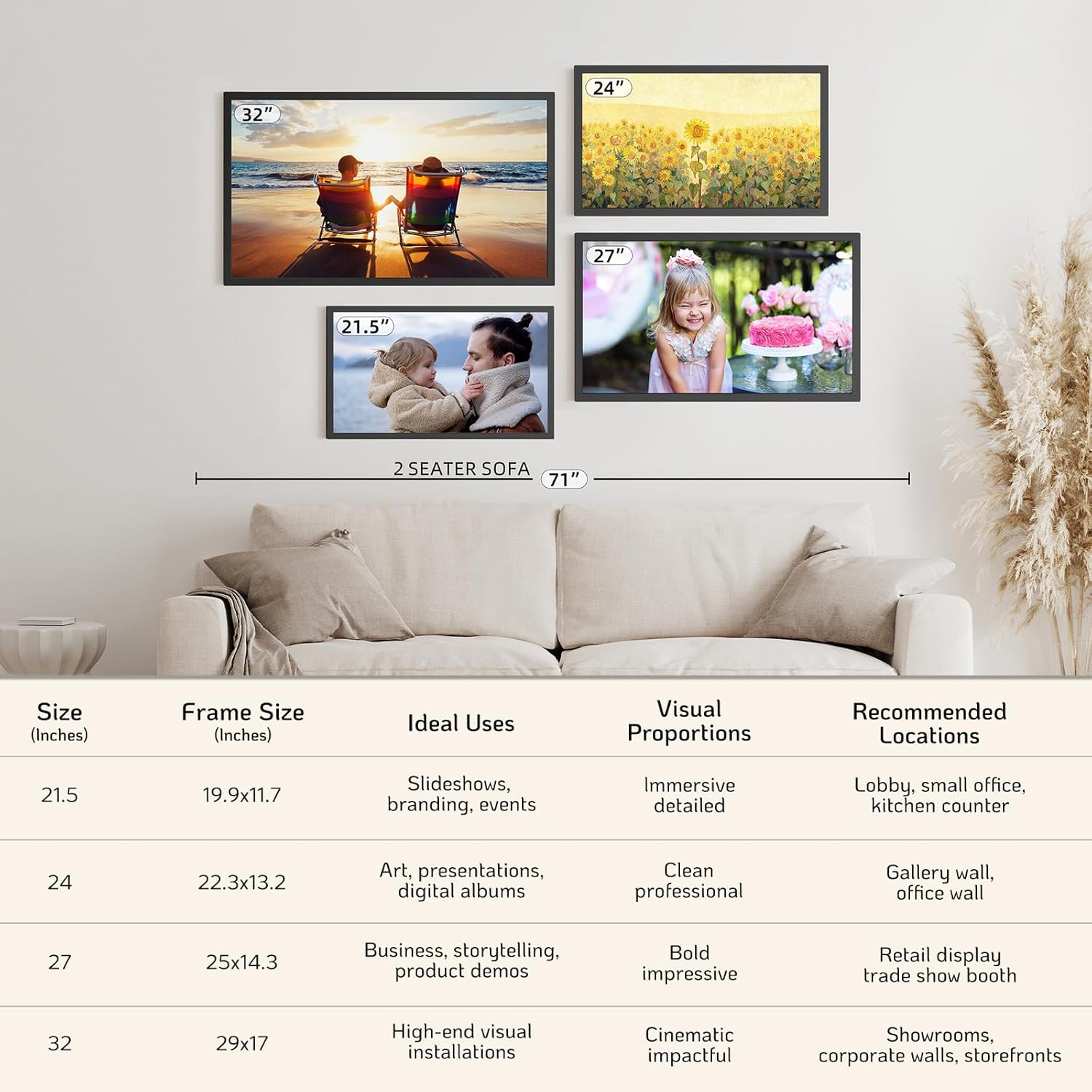
Figure 9: NexFoto Frame Sizes and Placement Examples
9. Garantie und Support
9.1 Einjährige Garantie
NexFoto is committed to delivering top-quality digital photo frames. This product comes with a one-year warranty from the date of purchase, covering manufacturing defects and malfunctions under normal use. Please retain your proof of purchase for warranty claims.
9.2 Kundendienst
If you have any questions, require technical assistance, or need to make a warranty claim, please contact NexFoto customer support. Our team is available to provide satisfactory responses within 12 hours.
For the most up-to-date contact information, please refer to the official NexFoto website or the contact details provided in your Quick Start Guide.


