Einführung
Welcome to the user manual for your AYANEO Pocket S Android Handheld Gaming Device. This manual provides essential information for setting up, operating, maintaining, and troubleshooting your device to ensure optimal performance and longevity. Please read this manual thoroughly before using your device.
Sicherheitshinweise
Um Schäden an Ihrem Gerät oder Verletzungen von Ihnen selbst oder anderen zu vermeiden, beachten Sie bitte die folgenden Vorsichtsmaßnahmen:
- Setzen Sie das Gerät keinen extremen Temperaturen, direkter Sonneneinstrahlung oder hoher Luftfeuchtigkeit aus.
- Vermeiden Sie es, das Gerät fallen zu lassen oder starken Stößen auszusetzen.
- Verwenden Sie ausschließlich zugelassene Ladegeräte und Zubehör.
- Versuchen Sie nicht, das Gerät selbst zu zerlegen oder zu reparieren. Wenden Sie sich an qualifiziertes Servicepersonal.
- Halten Sie das Gerät von Wasser und anderen Flüssigkeiten fern.
Gerätekomponenten
Familiarize yourself with the various parts of your AYANEO Pocket S.
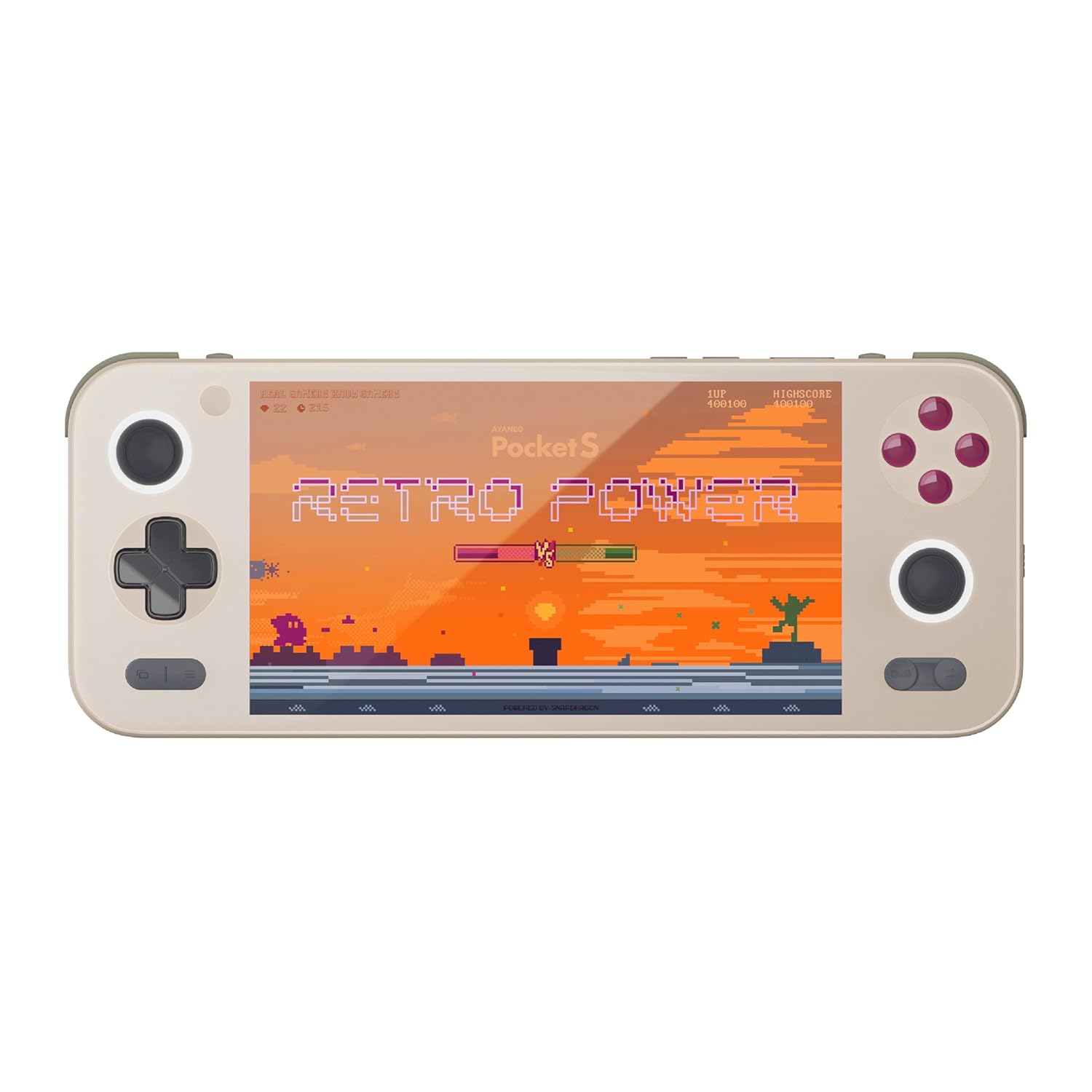
Abbildung 1: Vorderseite view of the AYANEO Pocket S, showing the screen, joysticks, D-pad, and action buttons.

Figure 2: Close-up of the Master Controller, highlighting the RGB Hall joysticks, Hall triggers, and crystal-textured keys.

Figure 3: Illustration of the internal VC thermal plate and active cooling system, along with the "Fishbone" biomimetic heat dissipation design on the side.

Figure 4: The AYANEO Pocket S displaying the AYASpace and AYAHOME Launcher interface, showing various game icons.
Hauptmerkmale:
- Anzeige: 6-inch 2K Borderless IPS Screen (490 PPI, 120% sRGB, 85% DCI-P3)
- Prozessor: Snapdragon G3x Gen 2 Gaming Platform
- Speicher: Up to 16GB RAM, up to 1TB Storage (This model: 12GB RAM, 128GB Storage)
- Kühlung: Large VC Heat Sink, Active Cooling System, "Fishbone" Cooling Vents
- Steuerung: Master Controller with RGB Hall Joysticks, Linear Hall Triggers, X-axis Vibration
- Betriebssystem: Android 13
Installationshandbuch
1. Erstes Aufladen
Before first use, fully charge your AYANEO Pocket S. Connect the provided USB-C cable to the device's charging port and the other end to a compatible power adapter. The charging indicator will illuminate.
2. Ein-/Ausschalten
- So schalten Sie das Gerät ein: Press and hold the Power button located on the top edge of the device until the AYANEO logo appears on the screen.
- So schalten Sie das Gerät aus: Halten Sie die Ein-/Aus-Taste gedrückt, bis das Menü mit den Energieoptionen erscheint. Wählen Sie „Ausschalten“ und bestätigen Sie.
- Neustarten: Wählen Sie im Menü „Energieoptionen“ die Option „Neustart“.
3. Erstkonfiguration des Systems
Upon first power-on, you will be guided through the initial Android setup process. This includes:
- Wählen Sie Ihre Sprache.
- Verbindung mit einem Wi-Fi-Netzwerk herstellen.
- Anmeldung mit Ihrem Google-Konto (optional, aber für App-Downloads empfohlen).
- Einrichten der Bildschirmsperre und anderer Sicherheitsfunktionen.
4. Software-Updates
It is recommended to check for and install any available system updates after initial setup to ensure you have the latest features and security patches. Navigate to Einstellungen > System > Systemupdate.
Betrieb Ihres Geräts
Navigation und Steuerung
The AYANEO Pocket S features both touchscreen input and physical controller input for navigation and gameplay.
- Touch-Screen: Use familiar Android gestures such as tap, swipe, pinch-to-zoom.
- Joysticks: Analog input for movement and camera control in games.
- Steuerkreuz: Digital input for menu navigation and directional controls.
- Aktionsschaltflächen (A/B/X/Y): Primary input for in-game actions.
- Shoulder/Trigger Buttons (L1/L2/R1/R2): Additional input for various game functions.
- Funktionstasten: Dedicated buttons for system functions, such as Home, Back, and Menu.
Leistungsmodi
The device offers multiple performance modes to optimize for either maximum performance or extended battery life.
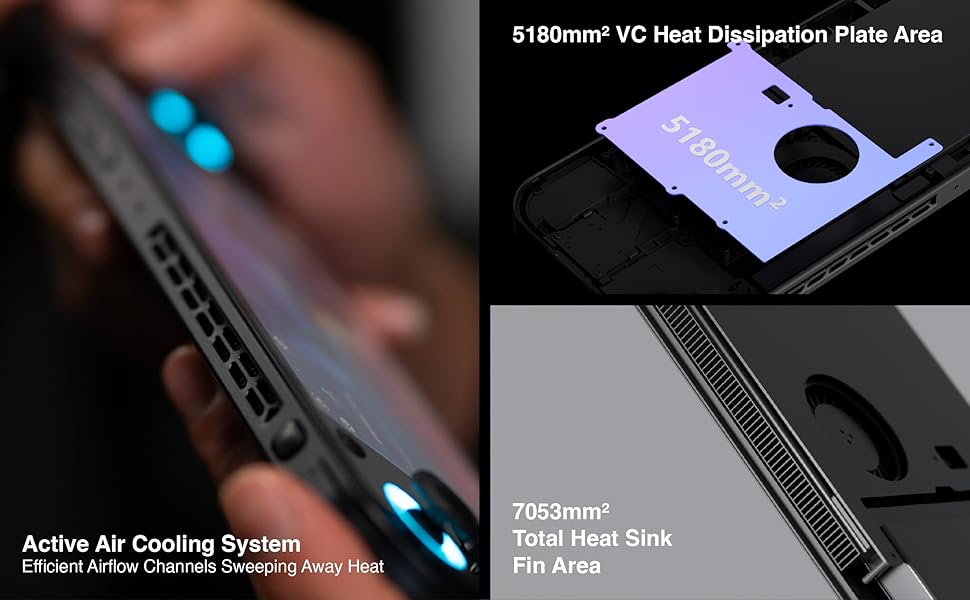
Figure 5: Diagram illustrating the three performance modes: Performance Turbo Mode, Balanced Mode, and Power-Saving Long Battery Life Mode.
- Performance Turbo Mode: Maximizes CPU, GPU, and fan speed for demanding games.
- Ausgewogener Modus: Provides a good balance between performance and battery life for most games.
- Power-Saving Long Battery Life Mode: Optimizes for extended usage, suitable for less demanding applications or when battery conservation is critical.
You can switch between these modes via the AYASpace application or quick settings menu.
AYASpace and AYAHOME Launcher
The AYASpace application and AYAHOME Launcher provide a customized Android experience for gaming handhelds.
- Game Management: Organize and launch your games.
- Tastenbelegung: Customize button assignments for mobile games that do not natively support physical controllers.
- Systemeinstellungen: Access performance mode settings, controller calibration, and other device-specific configurations.
Wartung
Reinigen des Geräts
- Verwenden Sie ein weiches, fusselfreies Tuch, um Bildschirm und Gehäuse des Geräts abzuwischen.
- Bei hartnäckigen Flecken leicht dampBefeuchten Sie das Tuch mit Wasser oder einem Bildschirmreiniger.
- Verwenden Sie keine scharfen Chemikalien, Scheuermittel oder Aerosolsprays.
- Ensure all ports are free of dust and debris. Use a soft brush or compressed air if necessary, holding the can upright.
Batteriepflege
- Vermeiden Sie häufiges vollständiges Entladen des Akkus.
- Lassen Sie das Gerät nicht über längere Zeiträume ungeladen.
- Store the device in a cool, dry place if not used for a long time, with the battery charged to around 50%.
Software-Wartung
- Regularly check for and install system updates.
- Keep your applications updated through the Google Play Store or AYASpace.
- Cache und unnötige Dateien regelmäßig leeren fileum die Systemleistung aufrechtzuerhalten.
Fehlerbehebung
| Problem | Mögliche Ursache | Lösung |
|---|---|---|
| Gerät lässt sich nicht einschalten. | Niedriger Akkustand; Systemabsturz. | Laden Sie das Gerät mindestens 30 Minuten lang auf. Führen Sie einen Neustart durch, indem Sie die Ein-/Aus-Taste 10–15 Sekunden lang gedrückt halten. |
| Der Bildschirm reagiert nicht. | Softwarefehler; Bildschirmschaden. | Starten Sie das Gerät neu. Sollte das Problem weiterhin bestehen, wenden Sie sich bitte an den Kundendienst. |
| Games are lagging or performing poorly. | Incorrect performance mode; Background apps; Overheating. | Switch to Performance Turbo Mode. Close unnecessary background applications. Ensure cooling vents are not blocked. |
| Probleme mit der WLAN-Verbindung. | Incorrect password; Router issue; Device Wi-Fi module error. | Verify Wi-Fi password. Restart your router. Toggle Wi-Fi off and on on the device. |
If you encounter issues not listed here or if the suggested solutions do not resolve the problem, please contact AYANEO customer support.
Technische Daten
| Besonderheit | Detail |
|---|---|
| Modell | Tasche S |
| Prozessor | Snapdragon G3x Gen 2 Gaming Platform |
| Anzeige | 6-inch 2K Borderless IPS Display (2560*1440 resolution, 490 PPI, 120% sRGB, 85% DCI-P3) |
| RAM | 12GB (as per current model) |
| Lagerung | 128GB (as per current model) |
| Betriebssystem | Android 13 |
| Kühlsystem | Large VC Heat Sink, Active Cooling System, "Fishbone" Vents |
| Batterie | 1 Lithium-Ionen-Akku (im Lieferumfang enthalten) |
| Maße | Ungefähr 8.42 x 3.35 x 0.55 Zoll |
| Gewicht | Ungefähr 1.59 Pfund (0.72 kg) |
Garantieinformationen
AYANEO products typically come with a limited manufacturer's warranty. Please refer to the warranty card included in your product packaging or visit the official AYANEO webDie detaillierten Garantiebedingungen finden Sie auf der Website. Bewahren Sie Ihren Kaufbeleg für Garantieansprüche auf.
Note: Protection plans may be available for purchase separately. These plans are offered by third parties and are not part of the standard manufacturer's warranty.
Kundenservice
For technical assistance, troubleshooting, or warranty inquiries, please contact AYANEO customer support through their official channels:
- Offiziell WebWebsite: www.ayaneo.com (Bitte prüfen Sie den Supportbereich oder die Kontaktseite)
- E-Mail-Support: Wenden Sie sich an den Beamten webDie aktuellste Support-E-Mail-Adresse finden Sie auf der entsprechenden Webseite.
- Online Community/Forums: AYANEO may host online communities where users can find answers and share experiences.
When contacting support, please have your device model (Pocket S) and serial number ready.


