1. Einleitung
The Havit Gamenote F2005 is a 120mm RGB CPU Cooler designed to provide efficient cooling for your computer's processor. It features copper pipe technology for enhanced heat dissipation and integrated RGB lighting for visual customization. This cooler is compatible with various Intel and AMD sockets, ensuring stable performance even during demanding tasks.
This manual provides essential information for the proper installation, operation, maintenance, and troubleshooting of your Havit Gamenote F2005 CPU Cooler. Please read it carefully before proceeding with installation.

Bild 1.1: Schräg view of the Havit Gamenote F2005 CPU Cooler, showcasing the RGB fan and heatsink design.
2. Einrichtung und Installation
Before beginning installation, ensure your computer is powered off and disconnected from the main power supply. Refer to your motherboard's manual for specific CPU cooler mounting instructions if needed.
2.1 Packungsinhalt
Überprüfen Sie, ob alle Komponenten im Paket vorhanden sind:
- Havit Gamenote F2005 CPU Cooler (Heatsink and Fan assembly)
- Mounting brackets for Intel sockets (LGA 1700, 1200, 115x)
- Mounting brackets for AMD sockets (AM4, AM5)
- Wärmeleitpaste
- Screws and backplate (if applicable for your socket type)
2.2 Installationsschritte
- Bereiten Sie die CPU vor: Clean the surface of your CPU and the cooler's base plate thoroughly with isopropyl alcohol to remove any old thermal paste or residue.
- Wärmeleitpaste auftragen: Apply a small, pea-sized amount of thermal paste to the center of your CPU's integrated heat spreader (IHS). Do not spread it manually; the pressure from the cooler will distribute it evenly.
- Montagehalterungen anbringen: Secure the appropriate mounting brackets for your CPU socket (Intel LGA or AMD AM) to the cooler's base. Ensure they are firmly attached.
- Positionieren Sie den Kühler: Carefully align the cooler with the mounting holes on your motherboard. For Intel sockets, you may need to install a backplate behind the motherboard first.
- Sichern Sie die Kühlbox: Gently press the cooler down onto the CPU and secure it using the provided screws. Tighten screws in a diagonal pattern (e.g., top-left, bottom-right, top-right, bottom-left) to ensure even pressure. Do not overtighten.
- Lüfterstrom anschließen: Locate the CPU_FAN header on your motherboard and connect the cooler's 4-pin fan connector. Ensure it is securely plugged in.
- Connect RGB (Optional): If your motherboard supports RGB control, connect the cooler's RGB cable to the appropriate RGB header on your motherboard. Refer to your motherboard manual for header location.
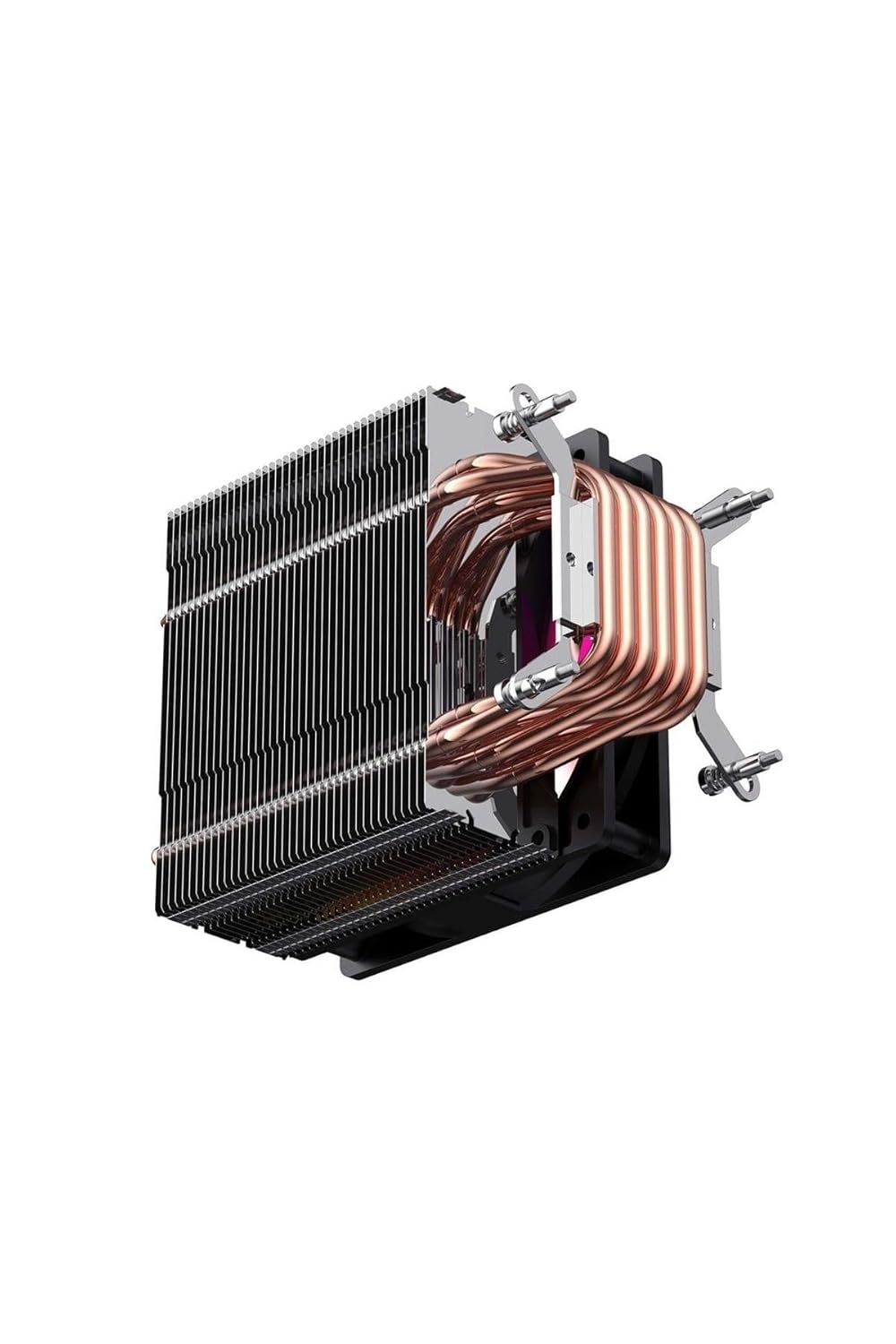
Abbildung 2.1: Seite view of the Havit Gamenote F2005 CPU Cooler, highlighting the copper heat pipes and aluminum fins for efficient heat transfer.

Abbildung 2.2: Unterseite view of the Havit Gamenote F2005 CPU Cooler, showing the direct contact copper heat pipes and the mounting bracket attachment points.
3. Bedienungsanleitung
Once installed, the Havit Gamenote F2005 CPU Cooler operates automatically to maintain optimal CPU temperatures.
3.1 Lüfterbetrieb
The 120mm fan's speed is controlled by your motherboard's BIOS/UEFI settings, typically adjusting automatically based on the CPU temperature. This ensures efficient cooling when needed and quiet operation during lighter loads. The Havit Gamenote F2005 is designed for quiet performance.
3.2 RGB-Beleuchtung
The integrated RGB lighting will illuminate upon system power-on. If connected to a compatible motherboard RGB header, you can control the lighting effects and colors using your motherboard's dedicated RGB software (e.g., ASUS Aura Sync, MSI Mystic Light, Gigabyte RGB Fusion, ASRock Polychrome Sync).

Bild 3.1: Draufsicht view of the Havit Gamenote F2005 CPU Cooler, showcasing the vibrant RGB lighting of the fan.
4. Wartung
Regelmäßige Wartung trägt dazu bei, die Langlebigkeit und optimale Leistung Ihres CPU-Kühlers zu gewährleisten.
- Staubentfernung: Schalten Sie Ihren Computer regelmäßig (z. B. alle 3–6 Monate) aus und blasen Sie den Staub vorsichtig mit Druckluft von den Kühlrippen und Lüfterflügeln. Halten Sie die Lüfterflügel während der Reinigung fest, damit sie sich nicht zu schnell drehen, da dies die Lager beschädigen kann.
- Verbindungen prüfen: Ensure all power and RGB cables remain securely connected to the motherboard.
- Thermal Paste (Advanced): After several years, or if you notice a significant increase in CPU temperatures, consider reapplying thermal paste. This involves carefully removing the cooler, cleaning both surfaces, and applying new thermal paste. This is an advanced procedure and should only be performed if you are comfortable with it.
5. Fehlerbehebung
If you encounter issues with your Havit Gamenote F2005 CPU Cooler, refer to the following common problems and solutions:
- Hohe CPU-Temperaturen:
- Stellen Sie sicher, dass der Kühler fest montiert ist und ordnungsgemäßen Kontakt zur CPU hat.
- Prüfen Sie, ob die Wärmeleitpaste korrekt aufgetragen wurde und nicht ausgetrocknet ist.
- Check if the fan is spinning.
- Entfernen Sie jeglichen Staub von den Kühlrippen des Kühlkörpers.
- Sorgen Sie für ausreichende Luftzirkulation im PC-Gehäuse.
- Lüfter dreht sich nicht:
- Prüfen Sie, ob der 4-polige Lüfteranschluss fest mit dem CPU_FAN-Anschluss auf dem Motherboard verbunden ist.
- Verify BIOS/UEFI settings to ensure the CPU fan control is enabled and not set to a very low RPM profile.
- RGB-Beleuchtung funktioniert nicht:
- Ensure the RGB cable (if present) is correctly connected to a compatible RGB header on your motherboard.
- Check your motherboard's RGB software for lighting control settings.
- Verify that the RGB header on your motherboard is enabled in BIOS/UEFI.
- Unusual Noise from Fan:
- Prüfen Sie, ob Kabel oder andere Hindernisse die Lüfterflügel berühren.
- Stellen Sie sicher, dass der Lüfter fest montiert ist und nicht vibriert.
- Dust buildup can sometimes cause imbalance; clean the fan.
6. Spezifikationen
| Besonderheit | Detail |
|---|---|
| Modellnummer | F2005 |
| Marke | Havit |
| Technische Daten | 12 x 12 x 2.5 cm |
| Gewicht | 360 Gramm |
| Lüftergröße | 120 mm |
| CPU-Sockel-Kompatibilität | Intel: LGA 1700, LGA 1200, LGA 115x (1150, 1151, 1155, 1156) AMD: AM4, AM5 |
| Nennvolumentage | 12 Volt (DC) |
| Leistung in Watt | 200 Watt |
| Stromanschluss | 4-polig |
| Kühltechnik | Kupfer-Wärmerohre, Aluminium-Lamellen |
| Beleuchtung | RGB |
7. Garantie und Support
For detailed warranty information regarding your Havit Gamenote F2005 CPU Cooler, please refer to the official Havit webBesuchen Sie unsere Website oder wenden Sie sich an Ihre Verkaufsstelle. Die Garantiebedingungen können je nach Region und Händler variieren.
For technical support or further assistance, please visit the official Havit support page or contact their customer service department.