1. Einleitung
This user manual provides essential information for the safe and efficient operation of your iFFALCON 65U85 4K Mini LED Google TV. Please read this manual thoroughly before using the product and retain it for future reference.
2. Sicherheitshinweise
Beachten Sie beim Gebrauch dieses Fernsehers stets die grundlegenden Sicherheitsvorkehrungen, um das Risiko von Bränden, Stromschlägen und Verletzungen zu verringern.
- Setzen Sie den Fernseher weder Regen noch Feuchtigkeit aus.
- Öffnen Sie nicht den Fernseher.asing; alle Wartungsarbeiten sind qualifiziertem Personal zu überlassen.
- Sorgen Sie für ausreichende Belüftung und blockieren Sie keine Lüftungsöffnungen.
- Verwenden Sie ausschließlich das vom Hersteller angegebene Netzkabel und Zubehör.
- Halten Sie den Fernseher von Wärmequellen und direkter Sonneneinstrahlung fern.
3. Packungsinhalt
Überprüfen Sie, ob alle Artikel im Paket vorhanden sind:
- iFFALCON 65U85 4K Mini LED Google TV
- Fernbedienung
- Stromkabel
- Benutzerhandbuch (dieses Dokument)
- Garantiekarte
- Wall Bracket (if included)
4. Einrichtung
4.1 Auspacken und Aufstellen
Carefully remove the TV from its packaging. Place the TV on a stable, flat surface or mount it on a wall using a VESA-compatible bracket. Ensure adequate space around the TV for ventilation.
4.2 Anschließen von Strom und Geräten
- Schließen Sie das Netzkabel an den Fernseher und anschließend an eine Steckdose an.
- Connect external devices (e.g., gaming consoles, Blu-ray players) to the HDMI 2.1 ports.
- For internet access, connect an Ethernet cable to the LAN port or prepare for Wi-Fi setup.
4.3 Ersteinrichtung und Fernkopplung
Upon first power-on, the TV will guide you through the initial setup process. This includes language selection, network connection, and Google account login.
So koppeln Sie die Bluetooth-Fernbedienung:
- Richten Sie die Fernbedienung auf den Fernseher.
- Halten Sie die Einstellungen und die Heim Taste gleichzeitig für 4 Sekunden.
- The TV will display a pairing confirmation message once successful.
4.4 Netzwerkverbindung
Connect your TV to the internet via Wi-Fi or Ethernet to access Google TV features and streaming services.
- W-lan: Wählen Sie Ihr Netzwerk aus der Liste aus und geben Sie das Passwort ein.
- Ethernet: Verbinden Sie Ihren Router mit einem Ethernet-Kabel mit dem LAN-Anschluss des Fernsehers.
5. Bedienung Ihres Fernsehgeräts
5.1 Google TV-Oberfläche
Your iFFALCON 65U85 features Google TV, providing a personalized experience with access to a vast library of content and apps.

5.2 Sprachsteuerung mit Google Assistant
Use the built-in Google Assistant for hands-free control. Press the Google Assistant button on your remote and speak your commands.
- Suchen nach Filme und Serien.
- Smart-Home-Geräte steuern.
- Erhalten Sie Antworten auf Fragen.

5.3 Casting Content (AirPlay2 & Chromecast)
Easily share content from your smartphone or tablet to the TV screen.
- AirPlay2: For Apple devices, use AirPlay2 to stream videos, photos, and music.
- Chromecast: For Android devices and Chrome browser, use Chromecast built-in to cast content.

6. Hauptmerkmale
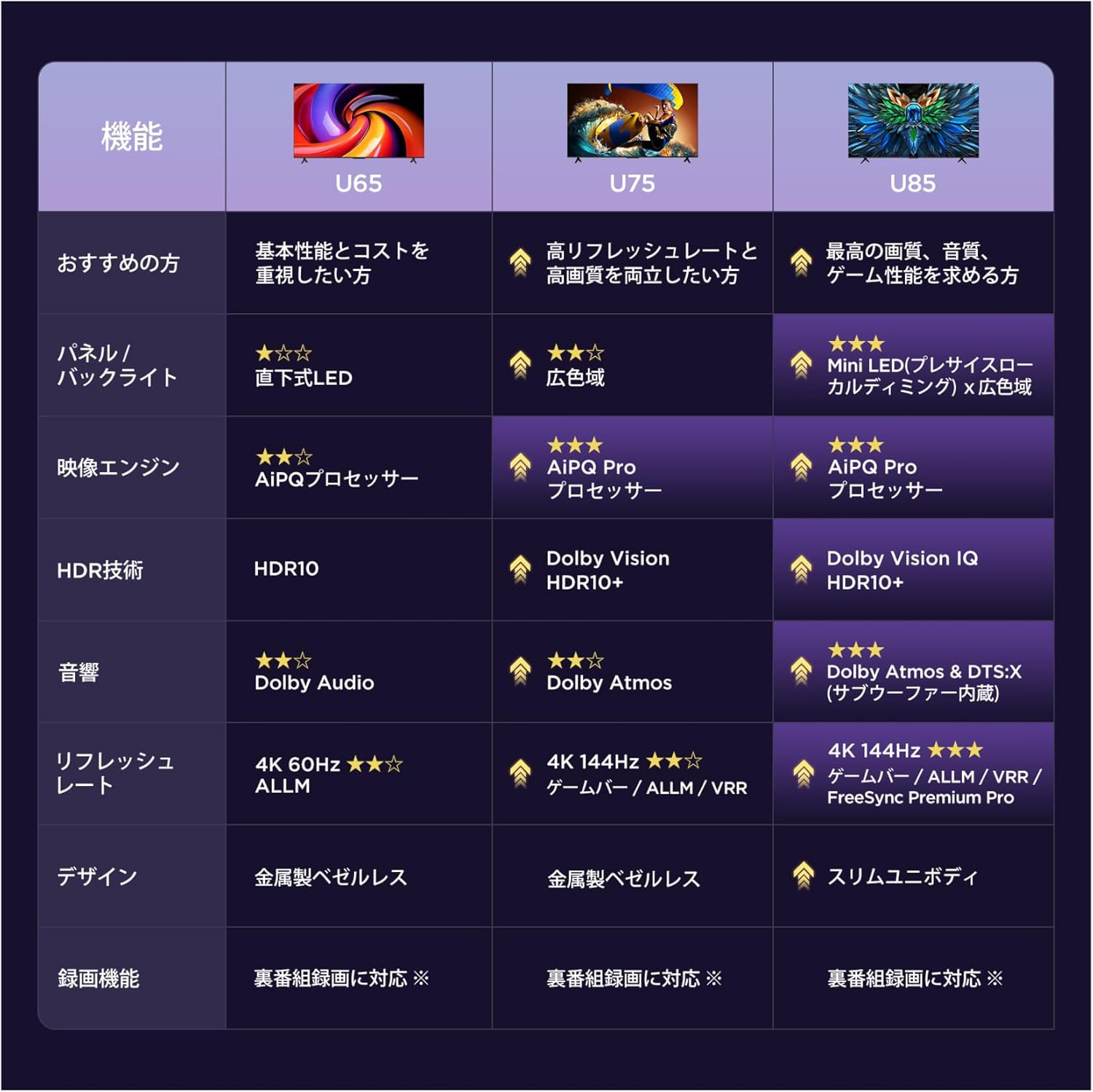
6.1 Display Technology: Mini LED & 4K HDR
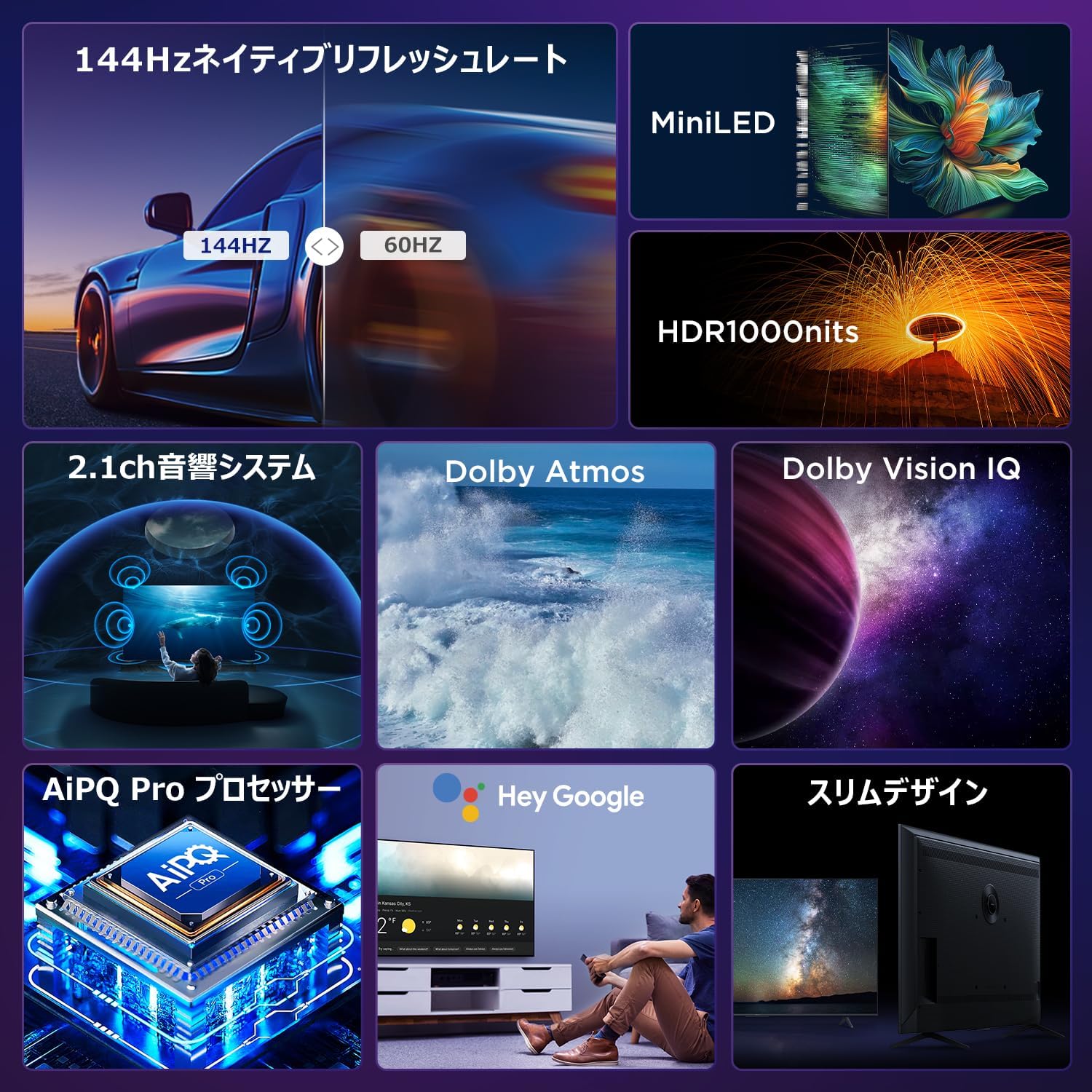
Experience stunning visuals with Mini LED backlight technology, delivering 1000 nits peak brightness and enhanced contrast. Combined with 4K resolution, Dolby Vision IQ, and HDR10+, you get precise brightness, vibrant colors, and deep blacks.


6.2 Immersive Audio: Dolby Atmos & DTS Virtual:X
Enjoy a captivating audio experience with Dolby Atmos and DTS Virtual:X, delivering multi-dimensional sound that fills your room. The 2.1ch speaker system provides powerful bass and clear audio.


6.3 Gaming Features: 144Hz VRR & Game Master
Designed for gamers, the 65U85 offers a native 144Hz refresh rate, Variable Refresh Rate (VRR), Auto Low Latency Mode (ALLM), and FreeSync Premium Pro for smooth, tear-free gameplay.


6.4 AiPQ Pro Prozessor
The AiPQ Pro processor intelligently optimizes color, contrast, and motion for every scene, delivering a visually stunning and immersive viewErfahrung.

6.5 Slim Metal Bezel-less Design
The TV features a sleek, metal bezel-less design that blends seamlessly into any living space, offering a premium aesthetic.

7. Spezifikationen
| Besonderheit | Beschreibung |
|---|---|
| Bildschirmgröße | 65 Zoll |
| Anzeigetyp | VA Panel, Mini LED |
| Auflösung | 4K (3840 x 2160) |
| Bildwiederholrate | 144 Hz (Native) |
| HDR-Unterstützung | Dolby Vision IQ, HDR10+ |
| Audio | 2.1ch Speaker System, Dolby Atmos, DTS Virtual:X |
| Smart-TV-Plattform | Google TV |
| Sprachassistent | Google Assistant |
| Konnektivität | 3x HDMI 2.1, 2x USB, Wi-Fi, Bluetooth |
| Abmessungen (B x T x H) | 144.8 x 32.4 x 89.5 cm (mit Ständer) |
| Gewicht | 19 kg |
| VESA-Kompatibilität | Ja |

8. Fehlerbehebung
Sollten Sie Probleme mit Ihrem Fernseher haben, beachten Sie bitte die folgenden gängigen Lösungsansätze:
- Kein Strom: Vergewissern Sie sich, dass das Netzkabel fest angeschlossen und die Steckdose funktionsfähig ist.
- Kein Bild/Ton: Check all cable connections (HDMI, audio). Verify the correct input source is selected.
- Fernbedienung funktioniert nicht: Tauschen Sie die Batterien aus. Koppeln Sie die Fernbedienung erneut, wie in Abschnitt 4.3 beschrieben.
- Keine Internetverbindung: Überprüfen Sie Ihren Router und Ihr Modem. Stellen Sie die WLAN-Verbindung wieder her oder vergewissern Sie sich, dass das Ethernet-Kabel ordnungsgemäß angeschlossen ist.
- Probleme mit der Bildqualität: Adjust picture settings (brightness, contrast, color). Ensure content source is high quality.
Bei anhaltenden Problemen wenden Sie sich bitte an den Kundendienst.
9. Wartung
Proper maintenance ensures the longevity of your iFFALCON TV:
- Reinigen des Bildschirms: Gently wipe the screen with a soft, dry, lint-free cloth. Do not use harsh chemicals or abrasive cleaners.
- Reinigung des Casing: Verwenden Sie ein weiches,amp cloth to wipe the TV casing.
- Belüftung: Halten Sie die Lüftungsöffnungen frei von Staub und Verunreinigungen.
- Ausschalten: Ziehen Sie bei Gewittern oder wenn der Fernseher längere Zeit unbeaufsichtigt bleibt, den Netzstecker.
10. Garantie und Support
Your iFFALCON 65U85 TV comes with a manufacturer's warranty. Please refer to the included warranty card for details on coverage, terms, and conditions.
For technical support, service inquiries, or further assistance, please visit the official iFFALCON website or contact their customer service hotline. Contact information can be found on the warranty card or the official product page.
11. Produktvideos
11.1 Mini LED Quantum Dot 144Hz 65-inch TV
This video showcases the Mini LED and Quantum Dot display technology of the 65-inch iFFALCON TV, highlighting its 144Hz refresh rate for smooth visuals.


