1. Einleitung
This manual provides essential instructions for the setup, operation, and maintenance of your Bemi Cognita Tab 5 E-Reader. The Cognita Tab 5 is a lightweight e-reader designed for comfortable reading, featuring a 5.76-inch e-paper display, Android 8.1 operating system, and Wi-Fi connectivity. Please read this manual thoroughly to ensure proper use and to maximize your device's potential.
2. Packungsinhalt
Upon unpacking your Bemi Cognita Tab 5, please verify that all the following items are included:
- Bemi Cognita Tab 5 E-Reader
- USB-Ladekabel
- Kurzanleitung
- Benutzerhandbuch (dieses Dokument)
- Garantiekarte

Image: Contents of the Bemi Cognita Tab 5 E-Reader package, including the device, charging cable, and documentation.
3. Gerät überview
Familiarize yourself with the physical components of your Bemi Cognita Tab 5.
3.1-Vorderseite View
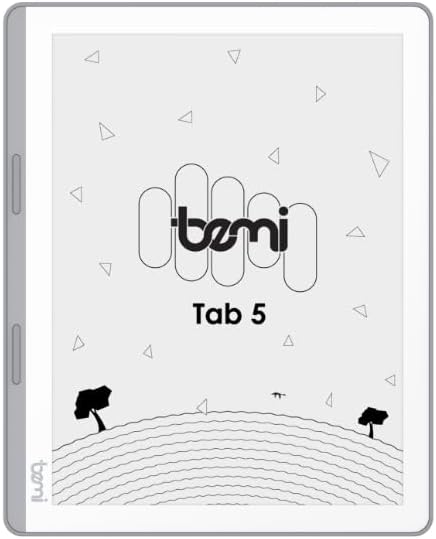
Bild: Vorderseite view of the Bemi Cognita Tab 5 E-Reader, showing the e-paper display and side buttons.
- E-Paper Display: 5.76-inch screen with 920x680 resolution (198 ppi) and anti-glare coating.
- Page-Turn Buttons: Located on the side for convenient navigation through content.
3.2 Zurück View

Abbildung: Rückseite view of the Bemi Cognita Tab 5 E-Reader, highlighting its textured surface and branding.
- Rubberized Casing: Provides a secure grip and durability.
3.3 Anschlüsse und Tasten
- Netzschalter: Used to turn the device on/off and put it to sleep.
- USB-Anschluss: Zum Aufladen und zur Datenübertragung.
- MicroSD-Kartensteckplatz: Zur Speichererweiterung auf bis zu 64 GB.
- Kopfhöreranschluss: Für Audioausgabe.
4. Einrichtung
4.1 Erstaufladung
Before first use, fully charge your Bemi Cognita Tab 5. Connect the provided USB cable to the device's USB port and plug the other end into a compatible USB power adapter (not included) or a computer's USB port. The charging indicator will show the charging status.
4.2 Ein-/Ausschalten
- So schalten Sie das Gerät ein: Press and hold the Power button until the screen activates.
- So schalten Sie das Gerät aus: Halten Sie die Ein-/Aus-Taste gedrückt und wählen Sie dann in den angezeigten Optionen die Option „Ausschalten“.
- Zum Schlafen/Aufwachen: Drücken Sie kurz den Ein-/Ausschalter, um das Gerät in den Ruhemodus zu versetzen oder es aufzuwecken.
4.3 Grundlegende Navigation
The Cognita Tab 5 features a responsive touchscreen for navigation. Tap to select items, swipe to scroll, and use pinch-to-zoom where applicable. The dedicated page-turn buttons on the side can also be used for navigating through e-books.
4.4 Wi-Fi-Verbindung
To access online content, transfer files wirelessly, or update software, connect your device to a Wi-Fi network:
- Gehe zu Einstellungen aus dem Hauptmenü.
- Wählen W-lan.
- WLAN ein-/ausschalten On.
- Wählen Sie das gewünschte Netzwerk aus der Liste aus und geben Sie gegebenenfalls das Passwort ein.
5. Bedienungsanleitung
5.1 Lesen von E-Books
The Bemi Cognita Tab 5 supports various e-book formats including PDF, EPUB, and MOBI. To start reading:
- Navigieren Sie zum Bücher section on your device.
- Tap on the cover of the e-book you wish to read.
- Use the touchscreen or the physical page-turn buttons to navigate through pages.

Image: A person holding the Bemi Cognita Tab 5 E-Reader, demonstrating the reading experience on its e-paper display.
5.2 Hintergrundbeleuchtung einstellen
The adjustable screen backlight allows for comfortable reading in various lighting conditions. Access backlight settings through the quick settings panel or the main Settings menu to adjust brightness levels.
5.3 File Überweisen
Sie können übertragen files to your Cognita Tab 5 via USB or Wi-Fi.
- USB-Übertragung: Connect the device to your computer using the USB cable. The device will appear as a removable storage drive, allowing you to drag and drop files.
- Wi-Fi-Übertragung: Ensure both your device and the transmission device are on the same local area network (LAN). On your Cognita Tab 5, navigate to the Wi-Fi Transfer option (often found in the 'Storage' or 'Settings' menu). An IP address will be displayed (e.g., http://172.20.10.8:12580). Enter this address into a web browser on your computer or phone to access the device's storage and transfer files. Do not close this page during transmission.

Image: Screenshots showing the Wi-Fi transfer interface with an IP address and a file management screen on the Bemi Cognita Tab 5 E-Reader.
5.4 Installing Additional Applications
Running on Android 8.1, the Cognita Tab 5 allows for the installation of additional reading applications. You can typically install apps by transferring their APK files to the device and installing them through a file manager, or by using a pre-installed app store if available.
5.5 Audiofunktionen
Das Gerät unterstützt Audio files and features text-to-speech functionality. Connect headphones to the headphone jack to listen to audiobooks or have your e-books read aloud.
5.6 Special Reading Features
The Cognita Tab 5 includes features to enhance your reading experience:
- PDF Reflow: Optimizes PDF documents for better readability on the smaller screen.
- Wörterbuch: Look up definitions of words directly from your e-book.
- Übersetzer: Translate words or phrases within your reading material.
6. Wartung
6.1 Reinigung
Verwenden Sie zum Reinigen des Bildschirms ein weiches, fusselfreies Tuch. Hartnäckige Flecken lassen sich leicht mit einem dünnen Tuch entfernen.ampen the cloth with water or a screen cleaner specifically designed for electronics. Avoid harsh chemicals or abrasive materials. For the device body, use a dry, soft cloth.
6.2 Batteriepflege
To prolong battery life, avoid exposing the device to extreme temperatures. Charge the device regularly, but avoid leaving it fully discharged for extended periods. If storing the device for a long time, ensure it has a partial charge (around 50%).
6.3 Speicherung
Store your Bemi Cognita Tab 5 in a cool, dry place away from direct sunlight and moisture. Protect the screen from scratches by using a protective cover or case when not in use.
7. Fehlerbehebung
If you encounter issues with your Bemi Cognita Tab 5, refer to the following common solutions:
- Gerät lässt sich nicht einschalten: Ensure the battery is charged. Connect the device to a power source and try again. If unresponsive, perform a hard reset by holding the power button for 10-15 seconds.
- Bildschirm reagiert nicht: Starten Sie das Gerät neu. Sollte das Problem weiterhin bestehen, vergewissern Sie sich, dass der Bildschirm sauber und frei von Staub und Schmutz ist.
- Probleme mit der Wi-Fi-Verbindung: Verify your Wi-Fi password. Restart your router and the Cognita Tab 5. Ensure the device is within range of the Wi-Fi signal.
- Langsame Leistung: Close unused applications. Clear cache if available in settings. Consider performing a factory reset (this will erase all data).
- Batterie entlädt sich schnell: Reduce screen brightness. Turn off Wi-Fi when not in use. Close background applications.
Bei anhaltenden Problemen, die hier nicht behandelt werden, wenden Sie sich bitte an den Kundendienst.
8. Spezifikationen
| Besonderheit | Spezifikation |
|---|---|
| Modellname | Cognita Tab 5 (BRCT5) |
| Anzeige | 5.76-inch E-Paper, 920x680 resolution (198 ppi), Anti-glare |
| Prozessor | Cortex-A7 Quad-Core |
| RAM | 1 GB |
| Interner Speicher | 16 GB |
| Erweiterbarer Speicher | MicroSD-Karte bis zu 64 GB |
| Betriebssystem | Android 8.1 |
| Konnektivität | WLAN, USB |
| Besondere Merkmale | Text-to-speech, Smart Reading, Headphone Jack, Scratch Resistant, Card Support |
| Unterstützte E-Book-Formate | PDF, EPUB, MOBI, and others |
| Akkulaufzeit | Bis zu 2 Wochen (bei typischer Anwendung) |
| Gewicht | 135g |
| Dicke | 8 mm |
9. Garantie und Support
9.1 Garantieinformationen
Your Bemi Cognita Tab 5 E-Reader comes with a warranty. Please refer to the included Warranty Card for specific terms, conditions, and duration of the warranty. Keep your proof of purchase for warranty claims.
9.2 Kundendienst
For technical assistance, troubleshooting beyond this manual, or warranty inquiries, please contact the seller or manufacturer directly. Contact information may be available on the product packaging or the official Bemi webWebsite.


