1. Produktüberschreitungview
This manual provides instructions for the CAMECHO Android 15 Car Radio, a multimedia system designed for Opel Vivaro B (2014-2018) and Renault Traffic 3 (2014-2021) vehicles. It features a 9-inch IPS touchscreen, Android 15 operating system, 4-Core processor, 4GB RAM, and 64GB ROM. Key functionalities include wireless Carplay and Android Auto, Mirrorlink, Bluetooth 5.0, GPS navigation, Wi-Fi connectivity, 32-band equalizer, FM/RDS radio, and support for steering wheel controls and a backup camera.
2. Einrichtung und Installation
2.1 Packungsinhalt
Vor der Installation prüfen Sie bitte, ob alle Komponenten im Paket vorhanden sind:
- 1 x Android Car Radio (with frame)
- 1 x CANBUS-Decoder
- 1 x externes Mikrofon
- 1 x Rückfahrkamera
- 1 x CAM-IN-Kabel
- 2 x Stromkabel
- 1 x Antennenadapter
- 2 x USB Kabel
- 1 x GPS-Antenne
- 1 x RCA Kabel
- 1 x Benutzerhandbuch
- Installationstools
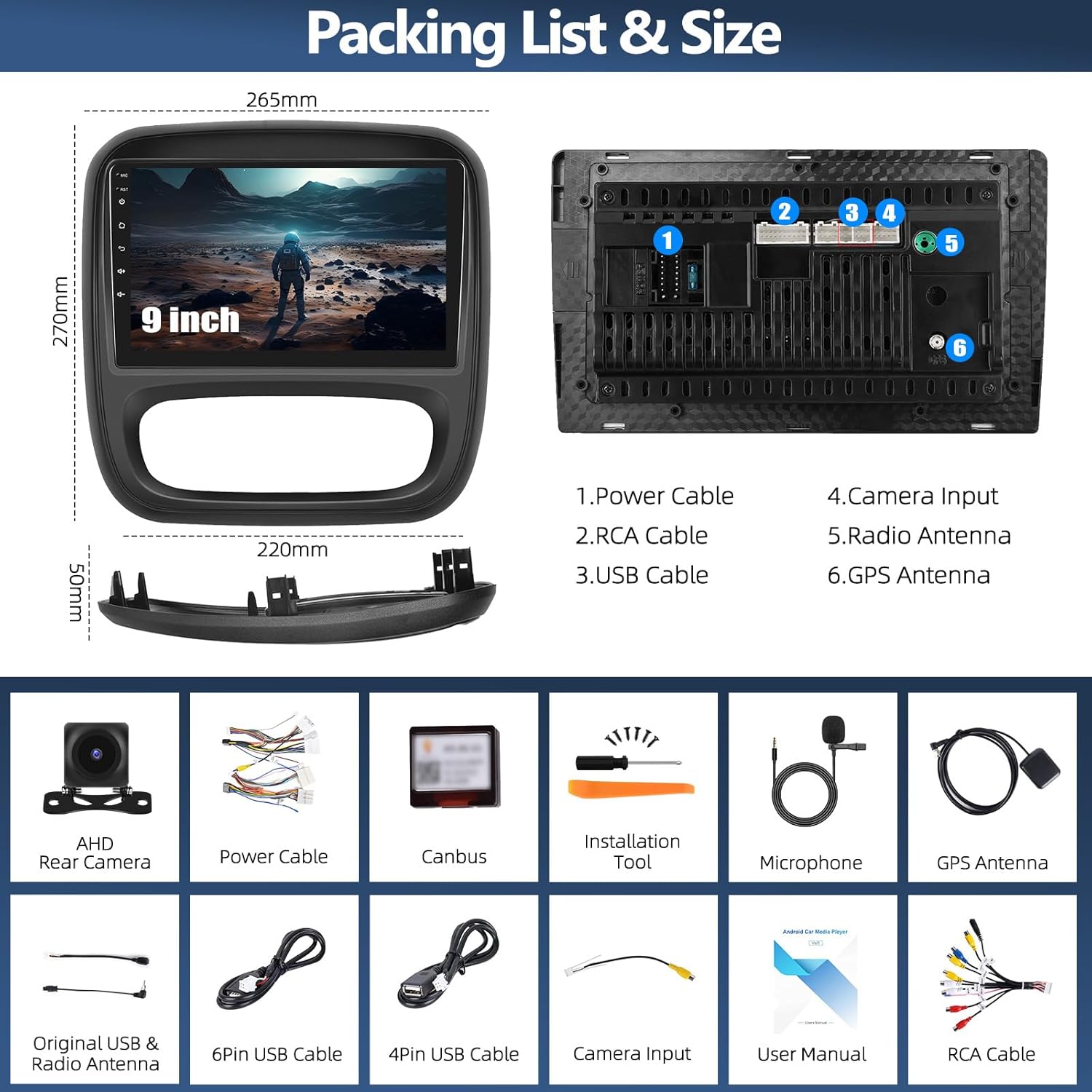
Abbildung 1: Enthaltene Komponenten und Abmessungen der Einheit.
2.2 Fahrzeugkompatibilität
This car radio is designed for specific vehicle models and dashboard configurations. Please confirm your vehicle's original car center console matches Model A as shown in Figure 2. This product does not support Model B configurations.

Figure 2: Compatible (Model A) and incompatible (Model B) car console types. Ensure your vehicle matches Model A.
2.3 Installationshinweise
The installation process involves connecting the power cables, RCA cables, USB cables, GPS antenna, and the included backup camera. The CANBUS decoder facilitates integration with your vehicle's steering wheel controls. For some Renault Traffic 3 models, minor modifications to the dashboard's internal fixations may be required for proper fitment. It is recommended to consult a professional for installation if you are unsure.
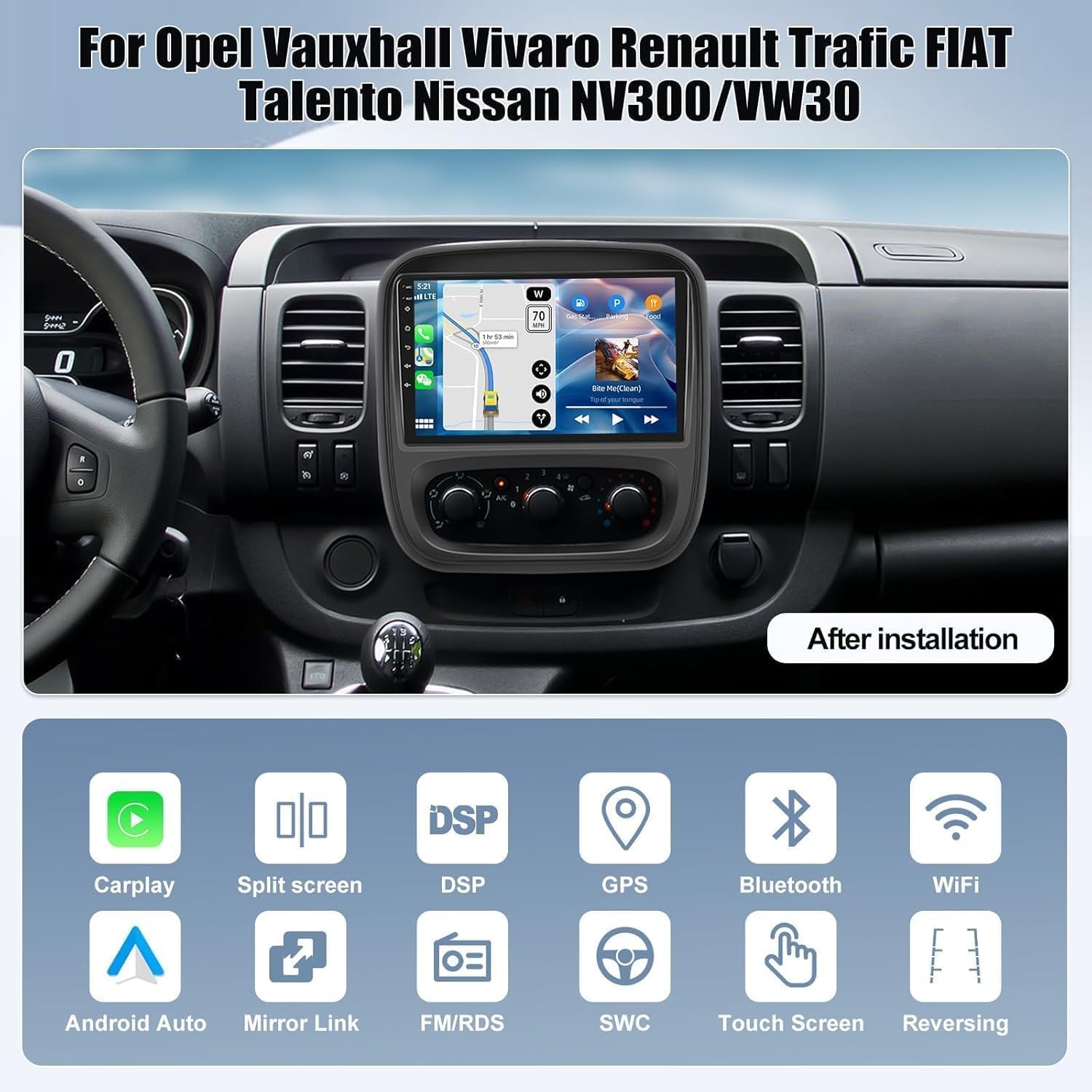
Abbildung 3: Bspample of the car radio after successful installation.
3. Bedienungsanleitung
3.1 Kabelloses CarPlay & Android Auto
The unit supports wireless Apple Carplay and Android Auto via USB and Wi-Fi. This allows access to phone functions such as contacts, navigation, and music playback directly on the car radio screen.
- Für drahtloses CarPlay: Activate Bluetooth on your iPhone and pair it with the car radio. Then, open the Zlink app on the unit. Ensure Bluetooth and hotspot connections are maintained.
- Für drahtloses Android Auto: Install the Android Auto app on your phone. Activate Bluetooth on your phone and pair it with the car radio. Switch to the Zlink app on the unit.
Note: Some Samsung and Huawei phones may not be compatible with this feature.

Abbildung 4: Drahtlose Carplay- und Android Auto-Funktionalität.
3.2 Spiegel-Link
Mirror Link allows you to display your phone's screen content on the car radio. This feature enhances driving safety by reducing phone interaction.
- Für iOS-Geräte: Connect via Wi-Fi. Turn on your iPhone's hotspot, connect the car radio to it, then use the Airplay function on your iPhone or scan the QR code in the app to establish the connection.
- Für Android-Geräte: Connect via Wi-Fi or USB cable. Click on 'phonelink' and scan the QR code to download the app, or connect via USB, enable 'USB debugging' in developer options, and set USB configuration to data transmission.

Figure 5: Mirror Link functionality for screen mirroring.
3.3 GPS-Navigation & WLAN
The car radio includes advanced GPS/Galileo/Glonass for precise online and offline navigation. Integrated Wi-Fi allows internet browsing, video streaming, and downloading various applications like YouTube, TikTok, and Spotify.

Abbildung 6: GPS-Navigation im Einsatz.
3.4Bluetooth 5.0
Equipped with Bluetooth 5.0, the unit provides a fast and stable wireless connection for hands-free calling and audio streaming. You can manage calls and play music directly from your paired smartphone.

Figure 7: Bluetooth 5.0 connectivity for communication and audio.
3.5 FM/RDS-Radio
Enjoy your favorite radio stations with the integrated FM/RDS tuner. The RDS function provides additional information such as station name and song titles where available.

Abbildung 8: FM/RDS-Radioschnittstelle.
3.6 32-Band Equalizer (EQ)
Customize your audio experience with the 32-band equalizer. Adjust sound parameters to your preference and save settings for different music genres or listening environments.

Figure 9: 32-band equalizer settings.
3.7 Lenkradsteuerung (SWC)
The included CANBUS decoder enables learning functions for your vehicle's steering wheel buttons. This allows you to control essential functions of the car radio directly from your steering wheel, enhancing convenience and safety.

Abbildung 10: Konfiguration der Lenkradbedienelemente.
3.8 Rückfahrkamera
The car radio integrates with the included backup camera, providing a clear view of the area behind your vehicle when reversing. This assists with precise parking and helps prevent collisions.

Abbildung 11: Anzeige der Rückfahrkamera.
3.9 Split-Screen-Funktionalität
The split-screen feature allows you to run two applications simultaneously on the 9-inch display, such as navigation and music playback, enhancing multitasking capabilities.

Figure 12: Split screen mode in operation.
4. Wartung
To ensure optimal performance and longevity of your CAMECHO car radio, follow these general maintenance guidelines:
- Keep the screen clean using a soft, dry, lint-free cloth. Avoid abrasive cleaners or solvents.
- Schützen Sie das Gerät vor extremen Temperaturen, direkter Sonneneinstrahlung über längere Zeiträume und übermäßiger Feuchtigkeit.
- Um zeitweilige Aussetzer zu vermeiden, stellen Sie sicher, dass alle Kabel fest angeschlossen sind.
- Prüfen Sie regelmäßig, ob Software-Updates verfügbar sind, um die Leistung zu verbessern und neue Funktionen hinzuzufügen.
5. Fehlerbehebung
Sollten Sie Probleme mit Ihrem Autoradio haben, beachten Sie bitte die folgenden gängigen Schritte zur Fehlerbehebung:
- Kein Strom: Prüfen Sie alle Stromanschlüsse. Stellen Sie sicher, dass die Zündung des Fahrzeugs eingeschaltet ist. Prüfen Sie die Sicherungen.
- Kein Ton: Überprüfen Sie die Lautsprecheranschlüsse. Stellen Sie sicher, dass die Lautstärke nicht stummgeschaltet oder zu niedrig eingestellt ist. Überprüfen Sie die Audioausgabeeinstellungen.
- Touchscreen reagiert nicht: Restart the unit. If the issue persists, a factory reset might be necessary (refer to settings menu).
- GPS-Signalverlust: Stellen Sie sicher, dass die GPS-Antenne ordnungsgemäß installiert ist und eine freie Sicht hat. view des Himmels.
- Verbindungsprobleme mit CarPlay/Android Auto: Verify Bluetooth and Wi-Fi connections on both the phone and the car radio. Ensure the Zlink app is running. Check phone compatibility (e.g., some Samsung/Huawei models may have limitations).
- Lenkradbedienelemente funktionieren nicht: Ensure the CANBUS decoder is correctly connected. Re-perform the steering wheel button learning process in the unit's settings.
- Rückfahrkamera zeigt kein Bild an: Check the CAM-IN cable connection. Ensure the camera is receiving power and is properly installed.
- Installation Fitment Issues (Renault Traffic 3): As noted in user feedback, some Traffic 3 models may require modification of the original dashboard's internal fixations for the unit to fit correctly. If you encounter significant resistance during installation, re-evaluate the fitment and consider professional assistance.
Sollten die Probleme durch diese Schritte nicht behoben werden können, wenden Sie sich bitte an den Kundendienst.
6. Spezifikationen
| Besonderheit | Spezifikation |
|---|---|
| Marke | KAMECHO |
| Modell | 4-Kern, 4+64G, CarPlay |
| Betriebssystem | Android 15 |
| Prozessor | 4-Kern |
| RAM | 4 GB |
| ROM | 64 GB |
| Bildschirmgröße | 9 Zoll |
| Bildschirmauflösung | 1280 * 720 IPS |
| Bluetooth-Version | 5.0 |
| Konnektivität | RCA, USB, Bluetooth, Wi-Fi |
| Besondere Merkmale | Wireless Carplay & Android Auto, Mirrorlink, GPS Navigation, FM/RDS, 32-Band EQ, Steering Wheel Control, Backup Camera Support |
| Kompatible Geräte | Smartphone, Tablet, PC, Game Console, TV, Speaker, Amplifier, Subwoofer, DVR |
7. Garantie und Support
7.1 Garantieinformationen
This product comes with a 2-year manufacturer's warranty. For warranty claims or issues, please contact customer support.
7.2 Kundendienst
For technical assistance, installation queries, or any other support needs, please contact CAMECHO customer service. Responses are typically provided within 24 hours. Returns are accepted within 30 days of purchase.
E-Mail: CAMECHOVIP@126.com

Abbildung 13: Kontaktinformationen für den Kundensupport.


