Einführung
This manual provides detailed instructions for the setup, operation, and maintenance of your DAREU EK87PRO 80% TKL Wireless Mechanical Gaming Keyboard and DAREU A955 Wireless Gaming Mouse Combo. Please read this manual thoroughly before using the products to ensure optimal performance and longevity.
Packungsinhalt
- DAREU EK87PRO Wireless Mechanical Gaming Keyboard
- DAREU A955 Wireless Gaming Mouse
- USB-C-Kabel (zum Laden und für die kabelgebundene Verbindung)
- 2.4 GHz USB-Empfänger
- Bedienungsanleitung
Aufstellen
Tastaturverbindung
The EK87PRO keyboard supports three connection modes: Bluetooth (BT 5.1), 2.4GHz wireless, and USB-C wired.

Image: Diagram illustrating the three connection modes (USB wired, 2.4GHz wireless, Bluetooth 5.1) for the DAREU EK87PRO keyboard, showing connection to a laptop, smartphone, and a digital clock device.
- 2.4-GHz-Wireless-Modus:
- Suchen Sie den 2.4-GHz-USB-Empfänger.
- Stecken Sie den Empfänger in einen freien USB-Anschluss Ihres Computers.
- Ensure the keyboard's mode switch (usually on the back or side) is set to 2.4GHz mode. The keyboard should automatically connect.
- Bluetooth-Modus:
- Stellen Sie den Modusschalter der Tastatur auf Bluetooth-Modus.
- On your device (computer, smartphone), enable Bluetooth and search for new devices.
- Select "DAREU EK87PRO" from the list of available devices to pair. The keyboard can connect to up to five devices simultaneously. Use Fn + 1/2/3 zum Umschalten zwischen gekoppelten Bluetooth-Geräten.
- USB-C-Kabelmodus:
- Verbinden Sie das mitgelieferte USB-C-Kabel mit dem USB-C-Anschluss der Tastatur.
- Verbinden Sie das andere Ende des Kabels mit einem USB-Anschluss Ihres Computers.
- Die Tastatur schaltet automatisch in den kabelgebundenen Modus und beginnt mit dem Ladevorgang.
Mausanschluss
The A955 mouse also supports three connection modes: Bluetooth (BT 5.0), 2.4GHz wireless, and USB-C wired.

Image: Diagram showing the DAREU A955 mouse connecting via Bluetooth 5.0, 2.4GHz, and USB-C to various devices including Windows, Android, and Apple operating systems.
- 2.4-GHz-Wireless-Modus:
- Plug the 2.4GHz USB receiver (shared with keyboard or separate if provided) into your computer.
- Ensure the mouse's mode switch is set to 2.4GHz mode. The mouse should connect automatically.
- Bluetooth-Modus:
- Set the mouse's mode switch to Bluetooth mode.
- Aktivieren Sie Bluetooth auf Ihrem Gerät und suchen Sie nach neuen Geräten.
- Select "DAREU A955" from the list to pair.
- USB-C-Kabelmodus:
- Connect the USB-C cable to the mouse's USB-C port and to your computer.
- The mouse will operate in wired mode and charge simultaneously.
Laden
Sowohl Tastatur als auch Maus sind mit wiederaufladbaren Batterien ausgestattet.
- Keyboard (4000mAh): Connect the USB-C cable to the keyboard and a power source (computer USB port or USB wall adapter). A full charge provides approximately 45 days of playtime with lights off.
- Mouse (930mAh): Connect the USB-C cable to the mouse and a power source. The A955 mouse also supports charging via its magnetic charging dock (if included). A full charge provides approximately 120 hours of playtime.

Image: The DAREU A955 mouse on its RGB rainbow charging stand, connected via USB-C cable, highlighting magnetic fixation and 30 days playtime.
Betrieb
Keyboard Features (EK87PRO)
- Gasket Mount & PCB Single Key Slotting: The keyboard features a gasket structure with a 1.2mm thick FR4 PCB and single key slotted design for enhanced resilience and stability. Six layers of padding reduce internal noise, providing a focused and crisp sound profile.

Abbildung: Explosionszeichnung view diagram of the DAREU EK87PRO keyboard's gasket structure, detailing layers like PBT keycaps, customized switch, top cover, center frame, PC positioning plate, latex foam, IXPE under shaft pad, silicone sleeve, PCB circuit board, latex backing foam, and EVA bottom pad.
- Hot-Swap-fähige Schalter: The EK87PRO is equipped with a hot-swappable PCB, supporting most 3-pin or 5-pin mechanical switches. This allows for easy customization and replacement of switches without soldering. It comes with pre-lubed Cloud linear switches.

Bild: Nahaufnahme view of the DAREU EK87PRO keyboard's PCB hot-swappable sockets, showing compatibility with both 3-pin and 5-pin mechanical switches, and an image of a switch being removed with a puller.
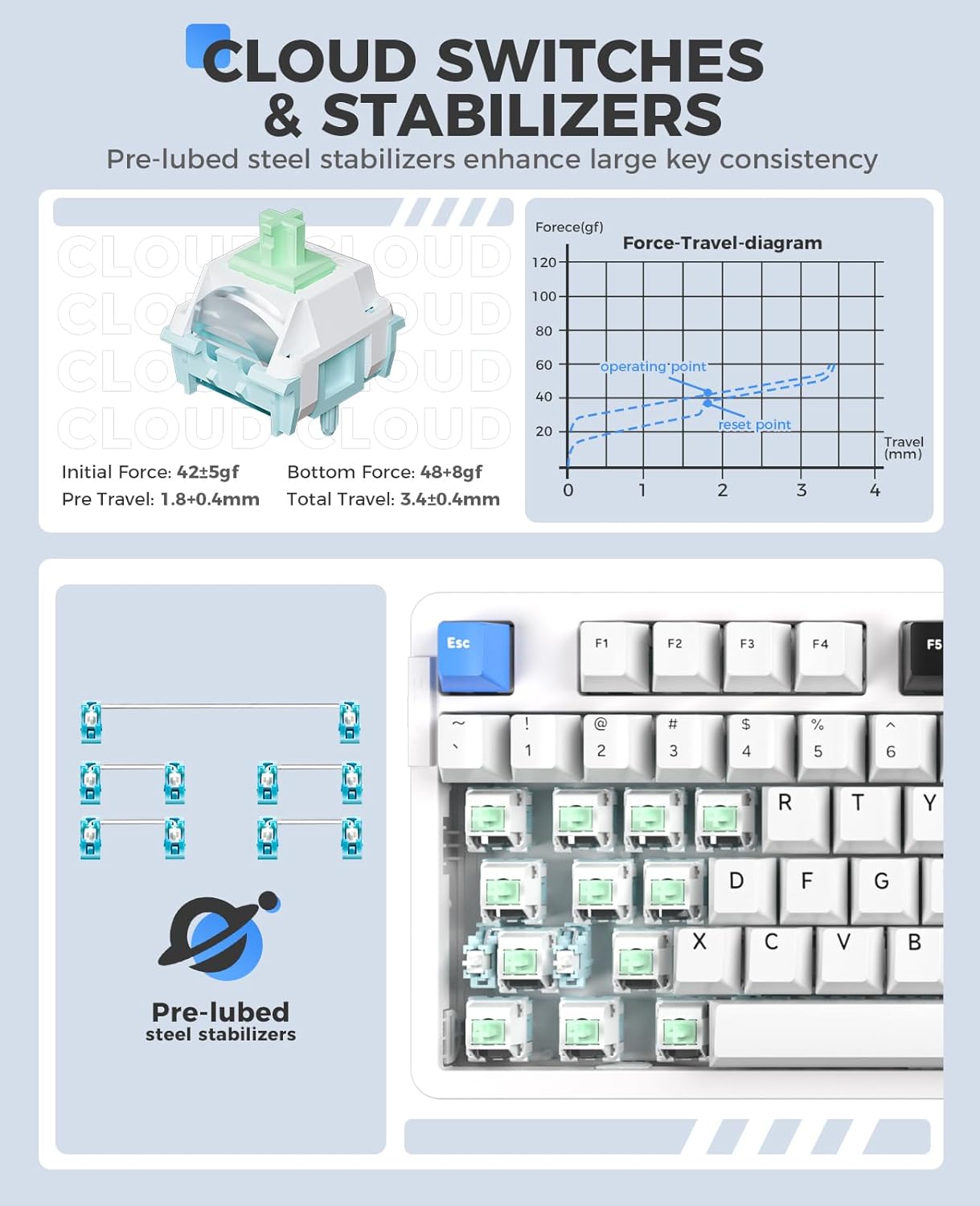
Bild: Detailliert view of DAREU Cloud switches and pre-lubed steel stabilizers on the EK87PRO keyboard, including a force-travel diagram for the Cloud switch.
- RGB-Beleuchtung mit Südausrichtung: The keyboard features up to 26 backlight modes and 16.8 million colors. Brightness and speed can be adjusted via the driver software.
- Helligkeit anpassen: Drücken Fn + Aufwärtspfeil (Brightness+) / Fn + Pfeil nach unten (Brightness-).
- Change Backlight Colors: Drücken Fn + { / Fn + }.
- More lighting effects and macros are customizable through the official DAREU driver software.

Image: The DAREU EK87PRO keyboard showcasing its 16.8 million RGB lighting with various color patterns, and key combinations for adjusting brightness and backlight colors.
- Tastenumschaltung: All 87 keys are conflict-free, supporting N-key rollover for accurate input during fast typing or gaming.
Mouse Features (A955)
- High Performance Sensor: Equipped with an AIM-WL sensor, offering up to 12000 DPI, 300 IPS tracking speed, and 50G acceleration for precise control.
- KBS II Button: Specific button for enhanced click response.
- Programmierbare Tasten: The mouse buttons are programmable via the DAREU driver software.
- Leichtbauweise: Weighs 88g for comfortable and agile movement.
- Langlebige Schalter: Rated for 80 million clicks.
- Custom RGB Light: Customize over 16.8 million colors and 6 lighting effects via software.

Image: The DAREU A955 mouse with a transparent bottom cover, showcasing its internal components and customizable RGB lighting effects.
Wartung
- Reinigung:
- Verwenden Sie ein weiches, trockenes Tuch, um die Oberflächen von Tastatur und Maus abzuwischen.
- Bei hartnäckigen Verschmutzungen leicht dampBefeuchten Sie das Tuch mit Wasser oder einer milden Reinigungslösung. Vermeiden Sie aggressive Chemikalien.
- Use compressed air to remove dust and debris from between keycaps and mouse crevices.
- Switch Replacement (Keyboard):
- Schalten Sie die Tastatur aus oder trennen Sie sie vom Computer.
- Verwenden Sie den mitgelieferten Tastenkappenabzieher, um die gewünschte Tastenkappe vorsichtig zu entfernen.
- Use the provided switch puller to gently extract the switch from its socket.
- Richten Sie die Pins des neuen Schalters an den Löchern auf der Platine aus und drücken Sie ihn fest, bis er einrastet. Achten Sie darauf, dass die Pins nicht verbogen sind.
- Bringen Sie die Tastenkappe wieder an.
- Batteriepflege:
- Vermeiden Sie häufiges vollständiges Entladen des Akkus.
- Bewahren Sie die Geräte an einem kühlen, trockenen Ort auf, wenn sie längere Zeit nicht benutzt werden.
Fehlerbehebung
| Ausgabe | Mögliche Lösung |
|---|---|
| Gerät verbindet sich nicht (drahtlos) |
|
| Keys/Mouse clicks not responding |
|
| RGB-Beleuchtung funktioniert nicht/ist fehlerhaft |
|
| Mouse cursor erratic/lagging |
|
Technische Daten
DAREU EK87PRO Keyboard
- Modell: EK87PRO
- Layout: 80% TKL (87 keys)
- Konnektivität: Bluetooth 5.1, 2.4-GHz-Funkverbindung, USB-C-Kabelverbindung
- Schalter: Pre-lubed Cloud Linear (Hot-swappable, supports 3/5 pin switches)
- Struktur: Gasket Mount with FR4 PCB
- Batterie: 4000 mAh
- Beleuchtung: South-facing RGB (26 modes, 16.8 million colors)
- Tastenumschaltung: N-Key Rollover (all 87 keys conflict-free)
- Kompatible Geräte: Laptop, PC, Smartphone
DAREU A955 Mouse
- Modell: A955
- Konnektivität: Bluetooth 5.0, 2.4-GHz-Funkverbindung, USB-C-Kabelverbindung
- Sensor: AIM-WL
- DPI: Bis zu 12000
- IPS: 300
- Beschleunigung: 50 G
- Schalter: Lebensdauer von 80 Millionen Klicks
- Batterie: 930mAh (120 hours playtime)
- Gewicht: 88g
- Beleuchtung: Customizable RGB (16.8 million colors, 6 effects)
- Kompatible Geräte: Laptop, PC, Smartphone
Garantie und Support
DAREU products are designed and manufactured to the highest quality standards. For information regarding warranty coverage, please refer to the warranty card included with your product or visit the official DAREU webWebsite.
If you encounter any issues or have questions not covered in this manual, please contact DAREU customer support through their official webBitte wenden Sie sich an den Support oder an den Händler, bei dem Sie das Produkt erworben haben. Halten Sie bitte Ihre Produktmodell- und Kaufinformationen bereit, wenn Sie den Support kontaktieren.
Official DAREU WebWebsite: www.dareu.com (Hinweis: Dies ist ein Platzhalter) URL(Die korrekten Support-Links finden Sie in der Produktdokumentation.)


