1. Einleitung
This manual provides detailed instructions for the installation, setup, and operation of your ASD 20-Inch Smart RGBW Flush Mount Ceiling Light. This LED lighting fixture combines a modern design with advanced smart features, offering a versatile lighting solution for various indoor spaces. It features RGBW color-changing capabilities, dimming, and control via a remote or a smartphone app, with compatibility for Alexa and Google Assistant.
2. Sicherheitshinweise
Bitte lesen Sie vor der Installation und Inbetriebnahme alle Anweisungen sorgfältig durch. Bewahren Sie diese Anleitung zum späteren Nachschlagen auf.
- Elektrische Sicherheit: Always turn off power at the circuit breaker before installing, servicing, or cleaning the fixture. Consult a qualified electrician if you are unsure about electrical wiring.
- Installation: Ensure the mounting surface can support the weight of the fixture. Follow all local electrical codes and ordinances.
- Handhabung: Do not handle the fixture with wet hands. Avoid direct eye exposure to the light source when illuminated.
- Umfeld: Diese Leuchte ist für d ausgelegtamp locations but is intended for indoor use only. Do not expose to direct water spray or submersion.
- Reinigung: Use a soft, dry cloth for cleaning. Do not use harsh chemicals or abrasive cleaners.
3. Packungsinhalt
Vergewissern Sie sich vor Beginn der Installation, dass alle Komponenten vorhanden sind:
- ASD 20-Inch Smart RGBW Flush Mount Ceiling Light Fixture (2 units)
- Fernbedienung (1 Einheit)
- Befestigungsmaterial (Schrauben, Drahtklemmen)
- Bedienungsanleitung
4. Produktspezifikationen
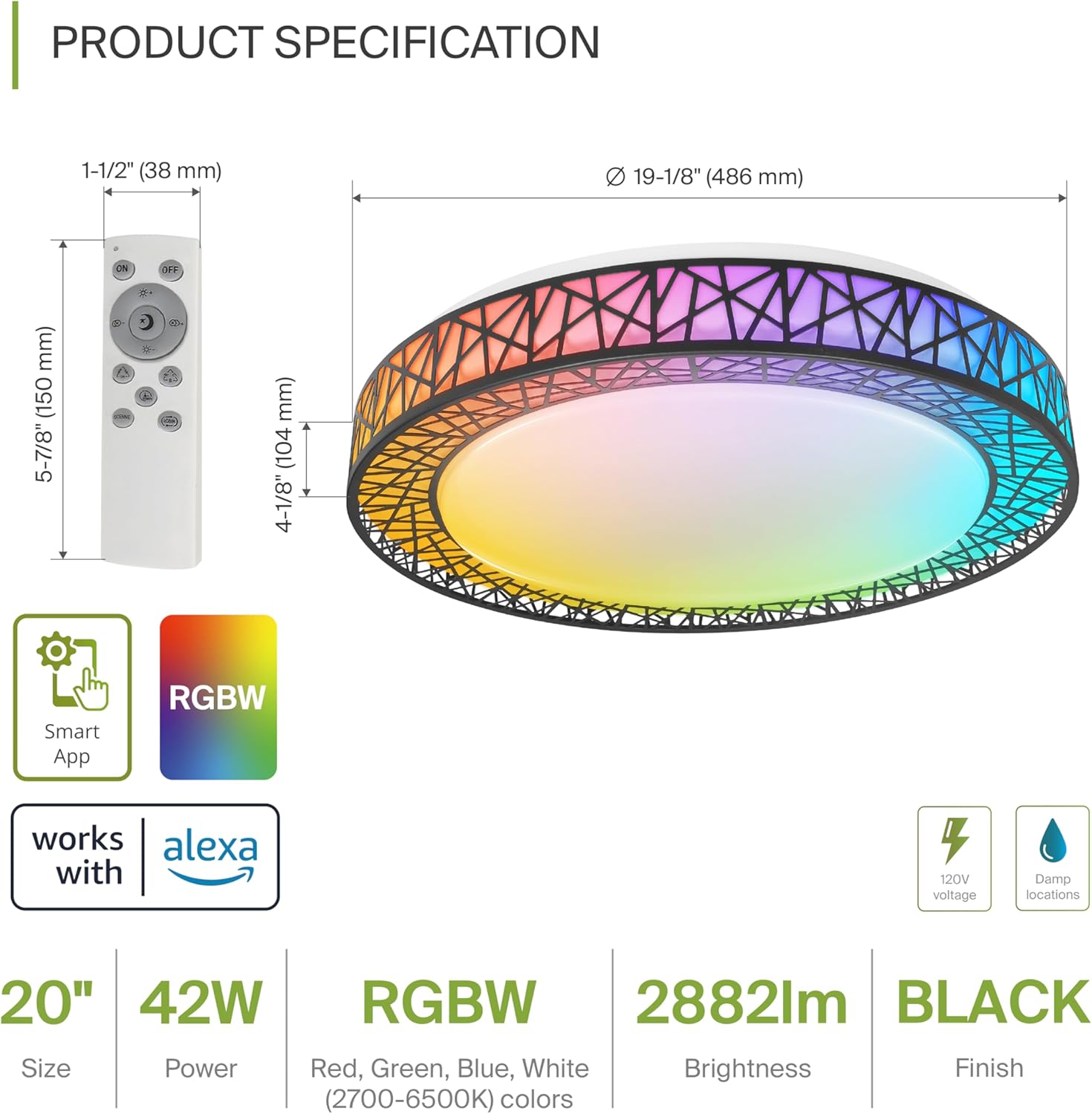
Product Specification Diagram: Dimensions, remote control, and key features.
| Besonderheit | Detail |
|---|---|
| Marke | ASD |
| Modellname | DACHBODEN |
| Modellnummer | A-LFM20D42SRGBW-B-2p |
| Farbe | 20" | Black | RGBW |
| Material | Acrylic, Alloy Steel |
| Technische Daten | 19.1 Zoll L x 19.1 Zoll B x 4.1 Zoll H |
| Stromquelle | Festverdrahtet |
| Wastage | 42 Watt |
| Bandtage | 120 Volt |
| Helligkeit | 2579 Lumen (max.) |
| Farbtemperatur | 2700-6500K (CCT einstellbar) |
| Besondere Merkmale | RGBW, Remote Control, Smart App, Dimmable |
| Kontrollmethode | Remote, Voice (Alexa, Google Assistant) |
| Verwendung im Innen- und Außenbereich | Innenbereich |
| Wasserbeständigkeit | Wasserbeständig (Damp Locations Rated) |
| Durchschnittliches Leben | 50,000 Stunden |
| Zertifizierung | ETL-gelistet |
5. Installationsanweisungen
Before starting, ensure the power is turned off at the circuit breaker.

Installation Diagram: Visual guide for mounting the light fixture.
- Bereiten Sie das Gerät vor: Remove the lens from the light fixture by rotating it clockwise.
- Montieren Sie die Halterung: Attach the two screws to the outlet box on your ceiling.
- Drahtverbindungen: Connect the wires: Black to Black, White to White, and Ground to Ground. Secure these connections with wire nuts.
- Sichern Sie die Vorrichtung: Carefully tuck all wires back into the outlet box. Attach the light fixture to the mounting bracket.
- Reattach the Lens: Rotate the lens counter-clockwise to secure it to the fixture.
Once installed, restore power at the circuit breaker.
6. Smart Feature Setup
6.1. ASD SMART App Control
The ASD Smart RGBW Flush Mount Ceiling Light can be controlled via the ASD SMART App on your smartphone (Wi-Fi internet connection required).
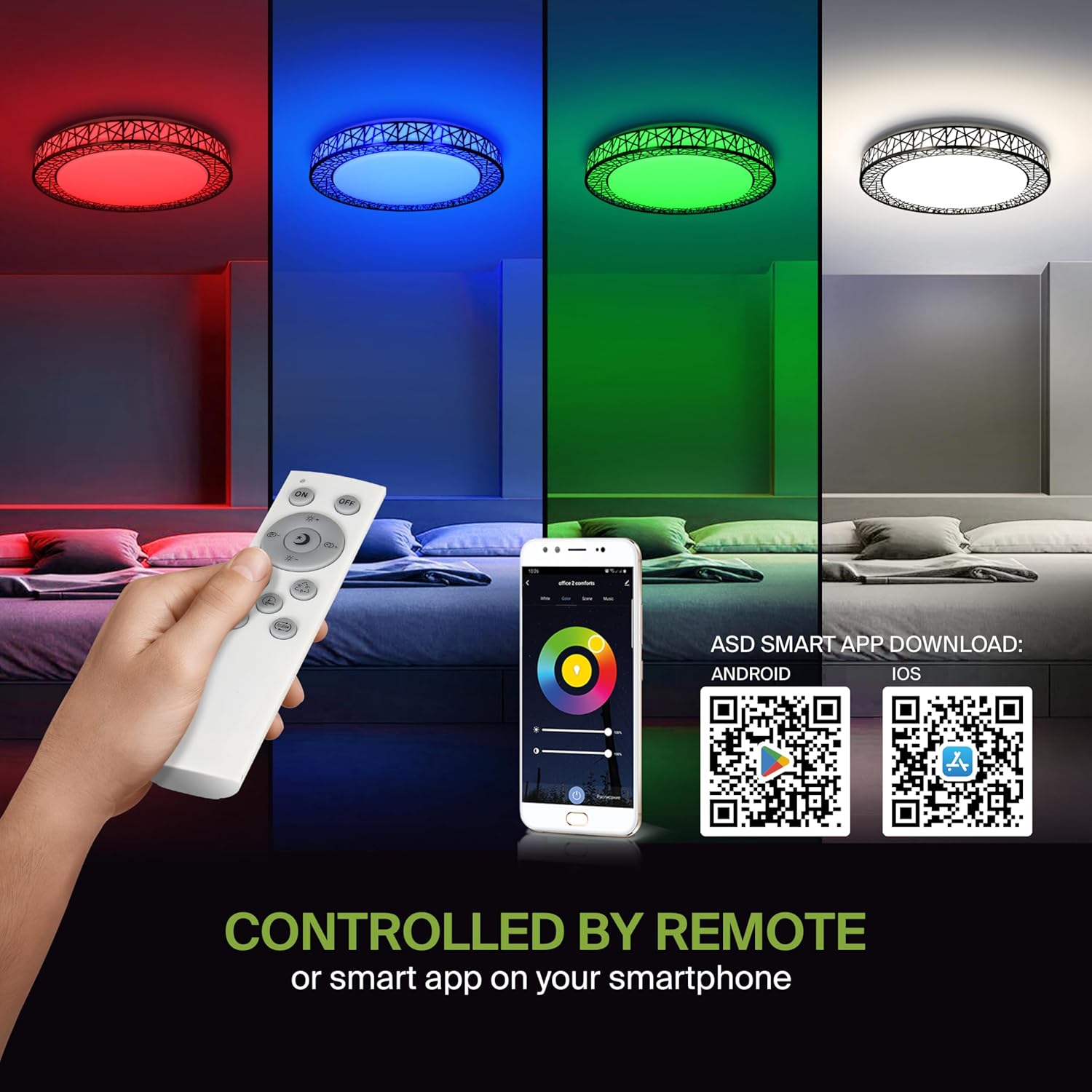
Remote control and ASD SMART App interface with QR codes for download.
- Laden Sie die App herunter: Scan the QR code provided in the product images or search for "ASD SMART" in the Apple App Store (für iOS) oder Google Play Store (für Android).
- Registrieren/Anmelden: Folgen Sie den Anweisungen in der App, um ein Konto zu erstellen oder sich anzumelden.
- Gerät hinzufügen: In the app, select the option to add a new device. Follow the pairing instructions to connect your ceiling light to the app via Wi-Fi.
6.2. Sprachsteuerung (Alexa & Google Assistant)
The fixture is compatible with Amazon Alexa and Google Assistant for convenient voice control.

Voice control compatibility with Alexa and Google Assistant.
- Konto verknüpfen: Open your Alexa or Google Home app. Navigate to the 'Skills' or 'Works with Google' section.
- Suchen nach ASD SMART: Suchen nach the "ASD SMART" skill/service and enable it.
- Verbinden: Link your ASD SMART account with your Alexa or Google Home account.
- Geräte entdecken: Ask Alexa or Google Assistant to discover new devices, or manually initiate device discovery in their respective apps.
7. Bedienungsanleitung
7.1. Fernbedienungsbetrieb
Use the included remote control to manage your light fixture's functions.
Remote control for easy access to light functions.
- Ein-/Ausschalten: Drücken Sie den Netzschalter, um das Licht ein- oder auszuschalten.
- Helligkeitsanpassung: Use the brightness buttons to increase or decrease the light intensity (smoothly dimmable).
- Color Selection (RGBW): Press the dedicated color buttons (Red, Green, Blue, White) or use the color wheel/mode buttons to cycle through 16.7 million colors.
- Farbtemperatur (CCT): Adjust the white light color temperature between 2700K (warm white) and 6500K (cool white).
- Szenenmodi: Select pre-programmed lighting patterns or scenes.
7.2. App-Steuerungsfunktion
The ASD SMART App offers comprehensive control over your light fixture.
- Full Color Spectrum: Access the full 16.7 million RGBW color palette.
- Präzises Dimmen: Adjust brightness levels with fine control.
- Terminplanung: Set schedules for the light to turn on/off or change modes at specific times.
- Gruppierung: Group multiple ASD smart lights to control them simultaneously.
- Benutzerdefinierte Szenen: Erstellen und speichern Sie Ihre eigenen individuellen Lichtszenen.
7.3. Voice Command Examples
After linking your device to Alexa or Google Assistant, use commands such as:
- "Alexa, schalte die [Lichtname] ein."
- „Hey Google, stelle [Lichtname] auf Blau.“
- „Alexa, dimme die [Lichtname] auf 50 %.“
- "Hey Google, make the [Light Name] warmer."
8. Wartung
To ensure the longevity and optimal performance of your ASD Smart RGBW Flush Mount Ceiling Light, follow these maintenance guidelines:
- Reinigung: Vor der Reinigung sicherstellen, dass die Stromzufuhr zur Leuchte unterbrochen ist. Verwenden Sie ein weiches, trockenes oder leicht angefeuchtetes Tuch.amp Verwenden Sie ein Tuch, um die Oberfläche abzuwischen. Vermeiden Sie die Verwendung von Scheuermitteln, Lösungsmitteln oder aggressiven Chemikalien, da diese die Oberfläche oder elektrische Bauteile beschädigen können.
- Inspektion: Periodically check the fixture for any signs of damage, loose connections, or wear. If any issues are found, turn off the power and consult a qualified electrician.
- Lampenwechsel: This fixture uses integrated LED technology and does not require bulb replacement. The LEDs are designed for a long lifespan.
9. Fehlerbehebung
If you encounter issues with your ASD Smart RGBW Flush Mount Ceiling Light, refer to the following common solutions:
| Problem | Mögliche Ursache | Lösung |
|---|---|---|
| Licht geht nicht an | Kein Strom, lose Verkabelung, defekter Schalter | Prüfen Sie den Sicherungsautomaten. Stellen Sie sicher, dass alle Drahtverbindungen fest sitzen. Testen Sie den Wandschalter. |
| Fernbedienung funktioniert nicht | Dead batteries, remote out of range, pairing issue | Replace remote batteries. Ensure remote is within operating range. Re-pair the remote with the light (refer to app instructions for pairing). |
| App-Steuerung funktioniert nicht | No Wi-Fi connection, incorrect app pairing, outdated app | Verify Wi-Fi connectivity. Ensure the light is correctly paired in the ASD SMART App. Update the app to the latest version. |
| Sprachsteuerung reagiert nicht | Account not linked, device not discovered, incorrect commands | Ensure ASD SMART account is linked to Alexa/Google Assistant. Redo device discovery. Use correct voice commands. |
| Das Licht flackert oder wird unerwartet schwächer | Unstable power supply, loose wiring, incompatible dimmer (if applicable) | Check power supply stability. Verify wiring. This light is dimmable via remote/app; external dimmers may cause issues. |
10. Garantieinformationen
ASD bietet eine 5 Jahr eingeschränkte Garantie for this product. This warranty covers defects in materials and workmanship under normal use. Please retain your proof of purchase for warranty claims. For detailed warranty terms and conditions, please refer to the official ASD webWebsite oder wenden Sie sich an den Kundendienst.
11. Kundendienst
If you have any questions, require technical assistance, or need to make a warranty claim, please contact ASD customer support through the following channels:
- WebWebsite: Visit the official ASD Lighting webWebsite mit häufig gestellten Fragen und Support-Ressourcen.
- E-Mail: Refer to your product packaging or the ASD webWebsite für Kundenservice-E-Mail-Adressen.
- Telefon: Refer to your product packaging or the ASD webWebseite mit Kundendienst-Telefonnummern.
Please have your model number (A-LFM20D42SRGBW-B-2p) and purchase date ready when contacting support.


