1. Einleitung
The Raddy VP7 Wireless Weather Station provides comprehensive weather monitoring for your home and surroundings. This manual details the setup, operation, and maintenance of your device, ensuring accurate and reliable weather data.
2. Lieferumfang
Packen Sie alle Komponenten sorgfältig aus und vergewissern Sie sich, dass die folgenden Teile vorhanden sind:
- Bedienungsanleitung
- Außensensor
- Windfahne
- Solarpanel
- Anzeigekonsole für den Innenbereich
3. Produktmerkmale
- 7.4-Zoll-Farbdisplay: Provides detailed weather information including indoor/outdoor temperature and humidity, precipitation, 12-hour weather forecasts, atomic clock, RCC calendar, wind direction and speed, dew point, felt temperature, atmospheric pressure, and daily maximum/minimum temperatures.
- High-Precision Outdoor Sensors: Includes a rain funnel, wind vane, speed sensor, thermo-hygrometer with anti-radiation shield, and a solar panel. Designed for accurate data with a communication range of up to 100 meters and resistance to harsh weather.
- Anpassbare Warnungen: Configure alerts for maximum/minimum temperature and humidity, wind speed, and precipitation. Features two alarms for weekdays and weekends.
- Scalable Monitoring: Connect up to three additional Raddy R5 remote sensors to monitor up to five different areas (e.g., baby's room, garden, living room, kitchen).
4. Einrichtung
4.1 Installation des Außensensors
Proper placement of the outdoor sensor is crucial for accurate readings. Choose an open location, free from obstructions, that allows for accurate wind, rain, and temperature measurements.
- Assemble the wind cups and wind vane onto the sensor unit.
- Mount the sensor using the provided hardware. Ensure it is level using a spirit level for accurate rain and wind measurements.
- Legen Sie 3 AA-Batterien (nicht im Lieferumfang enthalten) in das Batteriefach des Außensensors ein.

Image: The Raddy VP7 outdoor sensor showing its main components: Wind Cups, Rain Funnel, Thermo-Hygrometer Radiation Shield, Solar Panel, and Wind Vane.

Image: Various mounting options for the outdoor sensor, including top, side, and pole mounting, along with a detailed view des Batteriefachs und des Reset-Knopfes des Sensors.
4.2 Indoor Display Console Setup
- Place the indoor display console in a central location within range of the outdoor sensor (up to 100 meters).
- Connect the power adapter to the console and a power outlet. Alternatively, insert 3 AA batteries (not included) for backup power. Note that continuous backlight requires AC power.
- The console will automatically search for the outdoor sensor and synchronize data. This may take a few minutes.

Image: Illustration showing the wireless data transmission between the indoor display console and the outdoor sensor, highlighting the 330ft (100m) range.
5. Bedienungsanleitung
5.1 Anzeige überview
The 7.4-inch color display presents various weather parameters. Familiarize yourself with the layout:
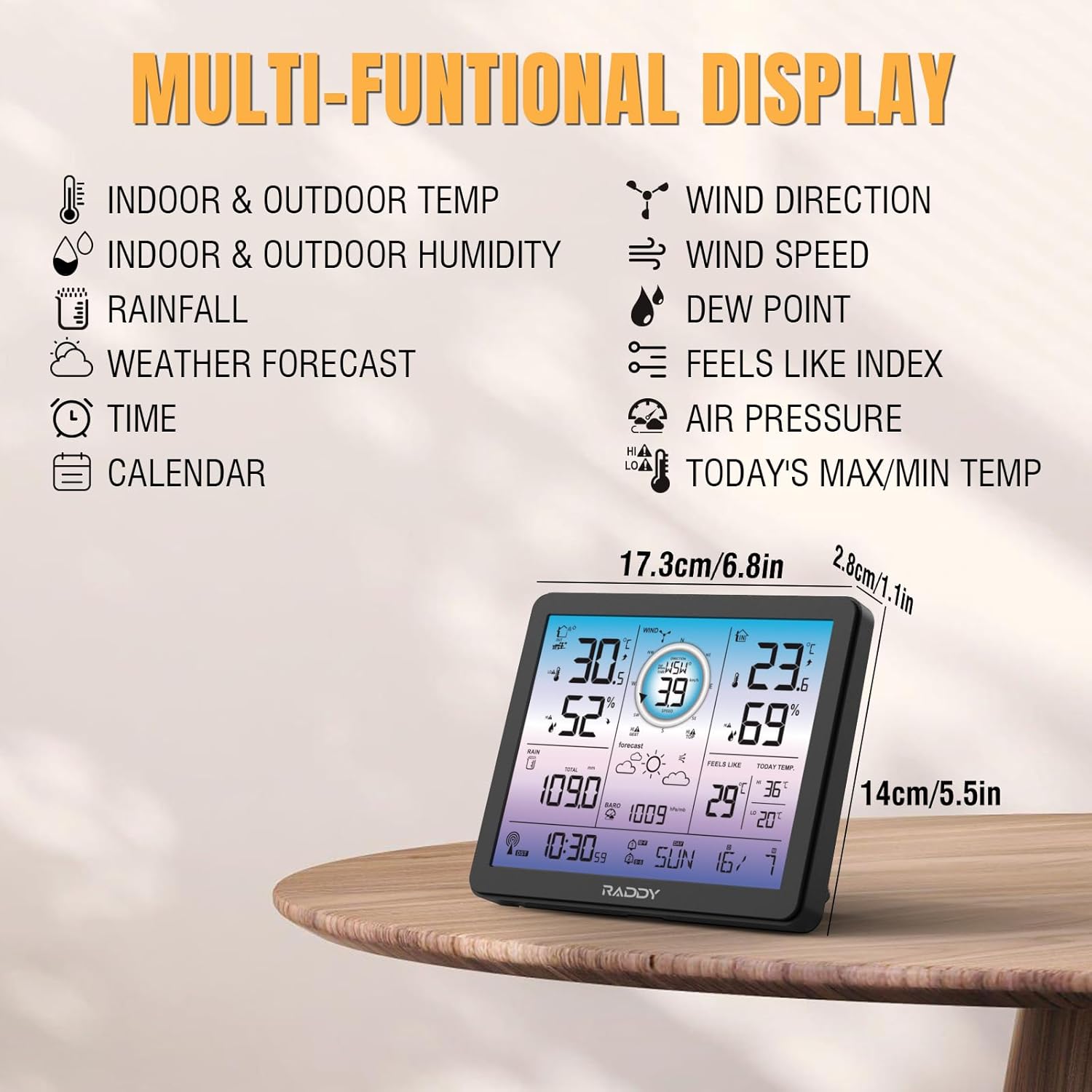
Image: The Raddy VP7 indoor display console showing its multi-functional display with various weather data points and dimensions.
- Oben links: Indoor & Outdoor Temperature, Indoor & Outdoor Humidity
- Oben rechts: Wind Direction, Wind Speed, Dew Point, Feels Like Index
- Mitte: Rainfall, Weather Forecast, Air Pressure
- Unten: Time, Calendar, Today's Max/Min Temperature
5.2 Uhrzeit und Datum einstellen
The Raddy VP7 features an atomic clock with DCF functionality for automatic time synchronization. If manual adjustment is needed:
- Drücken Sie die Taste „SET“, um in den Zeiteinstellungsmodus zu gelangen.
- Use the '+' and '-' buttons to adjust values.
- Press 'SET' again to confirm and move to the next setting (e.g., year, month, day).

Image: The Raddy VP7 display console highlighting the atomic clock with DCF feature for precise timekeeping.
5.3 Understanding Weather Data
The display provides real-time and forecasted weather information:
- Temperatur/Luftfeuchtigkeit: Zeigt die aktuellen Messwerte für Innen- und Außenbereiche an.
- Winddaten: Zeigt die aktuelle Windgeschwindigkeit und -richtung an.
- Niederschlagsmenge: Tracks daily, weekly, and monthly precipitation.
- Wettervorhersage: Bietet eine 12-Stunden-Vorhersage auf Basis von Luftdruckänderungen.
- Luftdruck: Displays current atmospheric pressure.
5.4-Grad-Warnungen
Set custom alerts for various weather conditions:
- Press the 'ALERT' button to cycle through alert settings (temperature, humidity, wind, rain).
- Use '+' and '-' to set desired high/low thresholds.
- Press 'ALERT' again to activate or deactivate the alert.
5.5 Einstellung der Hintergrundbeleuchtung
The display features 4 adjustable backlight levels (LV0 to LV3) for optimal visibility in different lighting conditions.

Bild: Vier Examples of the Raddy VP7 display showing different backlight levels from LV0 (off) to LV3 (brightest).
6. Wartung
- Reinigung: Wischen Sie die Anzeigekonsole und den Außensensor mit einem weichen, fusselfreien Tuch ab.amp Tuch. Keine Scheuer- oder Lösungsmittel verwenden.
- Batteriewechsel: Replace batteries in both the outdoor sensor and indoor console when the low battery indicator appears on the display.
- Überprüfung der Außensensoren: Periodically check the outdoor sensor for debris (leaves, dirt) that might obstruct the rain funnel or wind sensors.
7. Fehlerbehebung
| Problem | Mögliche Ursache | Lösung |
|---|---|---|
| Es werden keine Außendaten angezeigt. | Outdoor sensor out of range or low battery. | Relocate sensor closer to console. Replace sensor batteries. |
| Ungenaue Temperatur/Luftfeuchtigkeit | Sensor, der direktem Sonnenlicht oder Wärmequellen ausgesetzt ist. | Ensure sensor is in a shaded, well-ventilated area. |
| Falsche Uhrzeit/Datum | DCF signal interference or manual setting error. | Ensure console is away from electronic interference. Manually set time/date if automatic sync fails. |
| Niederschlag wird nicht registriert | Rain funnel blocked by debris. | Clear any obstructions from the rain funnel. |
8. Spezifikationen
| Besonderheit | Detail |
|---|---|
| Modell | VP7 |
| Hersteller | Raddy |
| Anzeigestil | Digitales Farbdisplay |
| Bildschirmgröße | 7.4 Zoll |
| Stromversorgung (Konsole) | AC Adapter (included), 3x AA Batteries (not included) |
| Stromquelle (Sensor) | 3x AA Batteries (not included), Solar Panel |
| Konnektivitätstechnologie | Kabellos |
| Drahtlose Reichweite | Bis zu 100 Meter (330 Fuß) |
| Temperaturgenauigkeit | ±1 °C |
| Im Lieferumfang enthaltene Komponenten | Instruction Manual, Outdoor Sensor, Wind Vane, Solar Panel, Indoor Display Console |
| Abmessungen (Paket) | 38.1 x 29.7 x 14.8 cm |
| Gewicht (Paket) | 1.7 Kilogramm |
9. Garantie und Support
Raddy provides lifetime technical support for the VP7 Wireless Weather Station. For any questions, issues, or assistance with installation and setup, please contact Raddy customer service. Refer to the product packaging or Raddy's official webWebsite für Kontaktdaten.


