1. Einleitung
This manual provides essential information for setting up, operating, and maintaining your MOREFINE Mini PC M9. Please read these instructions carefully before using the device to ensure optimal performance and safety.
The MOREFINE Mini PC M9 is a compact desktop computer designed for various applications, including office work, business tasks, and home entertainment. It features a 13th Generation Twin Lake N150 processor, 8GB DDR4 RAM, and a 256GB PCIe M.2 SSD, offering efficient performance in a small form factor.
2. Sicherheitshinweise
- Stellen Sie sicher, dass das Netzteil mit Ihrem örtlichen Stromnetz kompatibel ist.
- Das Gerät darf weder Wasser, Feuchtigkeit noch extremen Temperaturen ausgesetzt werden.
- Vermeiden Sie es, das Gerät direktem Sonnenlicht oder in der Nähe von Wärmequellen auszusetzen.
- Öffnen Sie nicht das casing or attempt to repair the device yourself. Refer to qualified service personnel.
- Halten Sie die Lüftungsöffnungen frei, um eine Überhitzung zu vermeiden.
- Verwenden Sie nur zugelassenes Zubehör und Peripheriegeräte.
3. Packungsinhalt
Überprüfen Sie, ob alle Artikel im Paket vorhanden sind:
- MOREFINE Mini PC M9 Unit
- Netzteil
- HDMI-Kabel
- Bedienungsanleitung
- VESA-Halterung (optional, kann je nach Verpackung variieren)
4. Produktüberschreitungview
The MOREFINE Mini PC M9 is designed for efficiency and connectivity. Below are the key features and port layouts.
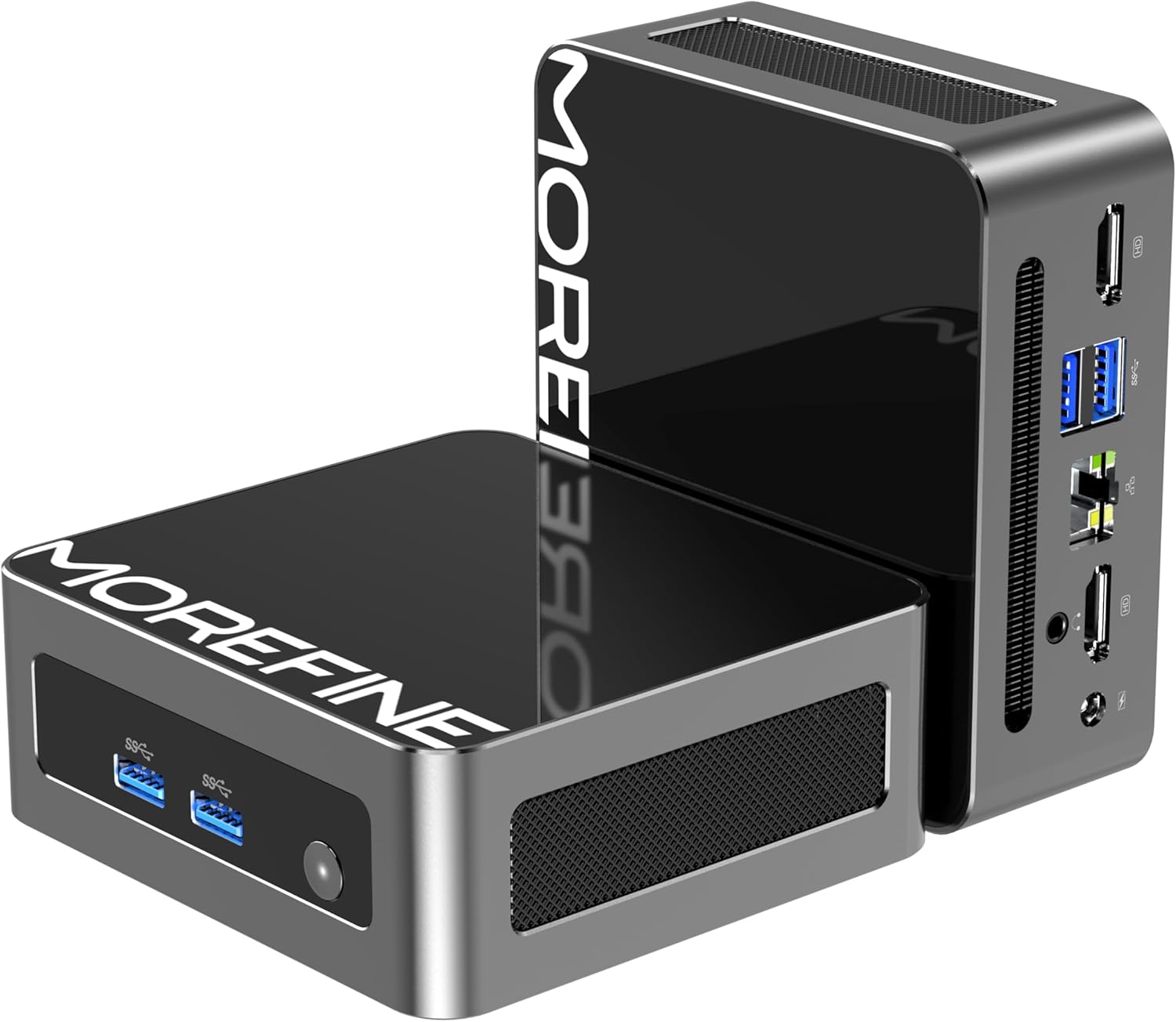
Abbildung: Vorder- und Seitenansicht view of the MOREFINE Mini PC M9, showcasing dank seines kompakten Designs und der leicht zugänglichen Anschlüsse.

Bild: Überview of the Mini PC's features including Twin Lake N150 processor, dual 4K output, space-saving design, quiet fan, DDR4 RAM, WiFi+Bluetooth, and 2.5G LAN.
Port-Layout
- Vordere Anschlüsse: Power Button, USB 3.2 x 2
- Anschlüsse auf der Rückseite: USB 3.2 x 2, 2.5GbE RJ45 x 1, HDMI 2.0 x 2, 3.5mm Audio Jack x 1, DC Power Input x 1

Image: Close-up of the side ports on the MOREFINE Mini PC M9, showing USB 3.2 ports and the power button.

Bild: Rückseite view of the MOREFINE Mini PC M9, detailing the HDMI, USB, RJ45, and power input ports.
5. Einrichtung
Follow these steps to set up your MOREFINE Mini PC M9:
- Peripheriegeräte anschließen: Connect your monitor(s) to the HDMI ports using HDMI cables. Connect your keyboard and mouse to the USB ports.
- Netzwerkverbindung: For a wired connection, connect an Ethernet cable to the 2.5GbE RJ45 port. For wireless, the device supports WiFi 6 and Bluetooth 5.2, which can be configured after initial boot.
- Stromanschluss: Schließen Sie den Netzadapter an den DC-Stromeingang des Mini-PCs an und stecken Sie den Adapter anschließend in eine Steckdose.
- Einschalten: Drücken Sie den Ein-/Ausschalter an der Vorderseite des Geräts. Das System startet.
- Ersteinrichtung: Follow the on-screen instructions to complete the operating system setup (e.g., Windows 11). This typically involves selecting language, region, and creating a user account.

Image: Demonstrates the compact size and multiple placement options for the Mini PC, including laying flat or mounting on the back of a monitor.
6. Betrieb
Dual-Display-Setup
The Mini PC supports dual 4K display output via its two HDMI 2.0 ports. To set up dual monitors:
- Schließen Sie beide Monitore an die HDMI-Anschlüsse des Mini-PCs an.
- Schalten Sie den Mini-PC und beide Monitore ein.
- Once the operating system loads, right-click on the desktop and select 'Display settings' (Windows) or similar.
- Configure the display mode (e.g., Extend, Duplicate) and resolution for each monitor as desired.

Image: Illustration of the Mini PC connected to two monitors, demonstrating its dual 4K display capability for enhanced multitasking.
Netzwerk- und Bluetooth-Konnektivität
- WLAN 6: Access network settings in your operating system to connect to available wireless networks.
- Bluetooth 5.2: Enable Bluetooth in your operating system settings to pair with compatible devices like keyboards, mice, or headphones.
Auto Power On and Wake On LAN
The Mini PC supports Auto Power On and Wake On LAN features. These settings can typically be configured within the BIOS/UEFI setup. To access BIOS/UEFI, press the 'Del' key repeatedly during startup. You may need to adjust the boot delay in Windows advanced startup options if the default 1-second delay is too short.
7. Wartung
Reinigung
- Reinigen Sie die Außenseite des Geräts mit einem weichen, trockenen Tuch.
- Bei hartnäckigen Verschmutzungen leicht dampBefeuchten Sie das Tuch mit Wasser. Vermeiden Sie aggressive Chemikalien.
- Periodically clean the ventilation openings with a soft brush or compressed air to prevent dust buildup.
Storage and RAM Expansion
The MOREFINE Mini PC M9 supports storage and RAM upgrades:
- RAM: The device has one DDR4 SODIMM slot, supporting up to 32GB DDR4 3200MHz RAM.
- Lagerung: It features one M.2 2280 NVMe PCIe 3.0 slot and one M.2 2242 SATA3 slot, supporting up to 4TB of storage expansion.
To perform upgrades, it is recommended to consult a qualified technician or refer to detailed online guides specific to the M9 model to avoid damaging internal components.

Bild: Intern view of the Mini PC, highlighting the DDR4 SODIMM slot, M.2 2280 NVMe PCIe, and M.2 2242 SATA slots for memory and storage expansion.
8. Fehlerbehebung
Sollten Sie Probleme mit Ihrem Mini-PC haben, beachten Sie bitte die folgenden häufig auftretenden Probleme und Lösungen:
- Kein Strom:
- Stellen Sie sicher, dass das Netzteil sowohl mit dem Mini-PC als auch mit einer funktionierenden Steckdose fest verbunden ist.
- Testen Sie die Steckdose mit einem anderen Gerät.
- If the power button LED does not illuminate, there might be an issue with the power button or internal power delivery. Contact support if basic checks fail.
- Kein Bildschirm:
- Vergewissern Sie sich, dass das/die HDMI-Kabel fest mit dem Mini-PC und dem/den Monitor(en) verbunden ist/sind.
- Stellen Sie sicher, dass der Monitor eingeschaltet und auf die richtige Eingangsquelle (HDMI 1, HDMI 2 usw.) eingestellt ist.
- Versuchen Sie, einen anderen Monitor anzuschließen oder ein anderes HDMI-Kabel zu verwenden.
- No Network Connection (WiFi/Ethernet):
- Bei Ethernet-Verbindungen prüfen Sie bitte die Kabelverbindung und den Routerstatus.
- For WiFi, ensure WiFi is enabled in the operating system and you are connecting to the correct network with the correct password.
- Starten Sie Ihren Router/Ihr Modem und den Mini-PC neu.
- Operating System Issues (e.g., updates failing):
- Ensure you have a stable internet connection for updates.
- Check for available disk space.
- Run the operating system's built-in troubleshooters.
- Consider performing a clean installation of the operating system if issues persist and are not resolved by standard troubleshooting.
9. Spezifikationen
Detailed technical specifications for the MOREFINE Mini PC M9:
| Besonderheit | Spezifikation |
|---|---|
| Modell | M9 |
| Prozessor | Intel Twin Lake N150 der 13. Generation (4 Kerne, 4 Threads, bis zu 3.6 GHz) |
| Grafik | Intel UHD-Grafik (integriert) |
| RAM | 8 GB DDR4 3200 MHz (erweiterbar auf bis zu 32 GB) |
| Lagerung | 256GB PCIe M.2 SSD (Expandable up to 4TB via M.2 2280 NVMe PCIe 3.0 and M.2 2242 SATA3 slots) |
| Betriebssystem | OS (Pre-installed, typically Windows) |
| Videoausgang | 2 x HDMI 2.0 (Supports Dual 4K@60Hz) |
| USB-Anschlüsse | 4 x USB 3.2 |
| Netzwerk | 1 x 2.5GbE RJ45, WiFi 6 (802.11ax Dual-band), Bluetooth 5.2 |
| Audio | 1 x 3.5 mm Audiobuchse |
| Leistungsaufnahme | Gleichstrom 12 V/3 A |
| Maße | Ungefähr 4.49 x 4.17 x 1.73 Zoll |
| Gewicht | Ungefähr 1.43 Pfund |
10. Garantie und Support
Garantieinformationen
Your MOREFINE Mini PC M9 comes with a standard manufacturer's warranty. Please refer to the warranty card included in your package or the product listing for specific terms and duration. Keep your proof of purchase for warranty claims.
Technische Unterstützung
For technical assistance, troubleshooting beyond this manual, or warranty inquiries, please contact MOREFINE customer support through the retailer where you purchased the product or visit the official MOREFINE webWebsite für Kontaktinformationen.


