1. Wichtige Sicherheitshinweise
Bitte lesen Sie vor der Benutzung dieses Laufbands alle Anweisungen sorgfältig durch. Bewahren Sie diese Bedienungsanleitung zum späteren Nachschlagen auf.
- Stellen Sie das Laufband immer auf eine ebene, stabile Fläche.
- Sorgen Sie für ausreichend Freiraum rund um das Laufband (mindestens 2 Meter nach hinten und 0.6 Meter auf jeder Seite).
- Halten Sie Kinder und Haustiere während des Betriebs vom Laufband fern.
- Tragen Sie geeignete Sportschuhe und -kleidung.
- Betreiben Sie das Laufband nicht, wenn das Kabel oder der Stecker beschädigt ist oder wenn es nicht ordnungsgemäß funktioniert.
- Maximale Benutzergewichtskapazität: 130 kg.
- Always use the safety key. Attach it to your clothing before starting your workout.
2. Produktüberschreitungview
The TOPUTURE 2-in-1 Treadmill is designed for both walking and light running, offering a versatile fitness solution for home or office use. It features a powerful yet quiet motor, manual incline adjustment, and smart app connectivity.

Image: Two individuals demonstrating the TOPUTURE 2-in-1 Treadmill in use, highlighting its dual functionality for walking while working and running.
3. Aufbau und Montage
This TOPUTURE 2-in-1 Treadmill features a space-saving design that requires minimal assembly. It is ready for use almost immediately out of the box.
3.1 Auspacken
- Nehmen Sie das Laufband vorsichtig aus der Verpackung.
- Check all components against the packing list to ensure everything is present.
3.2 Platzierung
- Place the treadmill on a firm, level surface.
- Stellen Sie sicher, dass das Netzkabel leicht zugänglich und nicht blockiert ist.
3.3 Manuelle Neigungsverstellung
The treadmill offers manual incline settings to increase workout intensity. The original incline is 2°, and can be adjusted to 4.7° (9% incline rate).
- Locate the incline adjustment bolts at the rear of the treadmill.
- Pull out the bolt and turn the slope block to the desired position.
- Setzen Sie den Bolzen in das obere Loch ein, um die Schräge zu sichern.

Image: A visual guide illustrating the two-step process for manually adjusting the treadmill's incline.
4. Bedienungsanleitung
Your treadmill can be controlled via its LED display, remote control, or a smart application.
4.1 Ein-/Ausschalten
- Schließen Sie das Netzkabel an eine geeignete Steckdose an.
- Flip the main power switch located on the treadmill base to the 'ON' position.
- To turn off, flip the main power switch to 'OFF' and unplug the unit.
4.2 Using the LED Display and Remote Control
The multi-functional LED display shows real-time data including speed, distance, time, and calories burned. The remote control allows for easy adjustment of speed and modes.

Image: The treadmill's clear LED display provides real-time workout metrics, complemented by a convenient remote control for adjustments.
- Start/Stopp: Press the 'Start' button on the display or remote to begin. Press 'Stop' to pause or end your workout.
- Geschwindigkeitsanpassung: Use the '+' and '-' buttons on the remote or display to increase or decrease speed (1-10 km/h).
- Programme: Wählen Sie aus 12 voreingestellten Programmen für abwechslungsreiche Trainingsroutinen.
- Temporary Pause: Use the 'Pause' button to temporarily stop your workout without losing data.
4.3 Intelligente App-Konnektivität
Connect your treadmill to fitness apps like 'FITSHOW' via Bluetooth (Bluetooth name: TP3) for enhanced training courses and data tracking.
- Stellen Sie sicher, dass Bluetooth auf Ihrem Mobilgerät aktiviert ist.
- Open the 'FITSHOW' app (or compatible app) and search for 'TP3'.
- Pair your device with the treadmill.
- Follow the app's instructions to access various training courses and monitor your progress.

Image: The treadmill connects to fitness apps, allowing users to engage with virtual training courses and track their performance.
5. Wartung
Regelmäßige Wartung gewährleistet die Langlebigkeit und optimale Leistung Ihres Laufbands.
5.1 Reinigung
- Vor der Reinigung den Netzstecker des Laufbands ziehen.
- Wipe down the display and exterior surfaces with a damp Tuch. Scheuermittel vermeiden.
- Regularly vacuum under the treadmill to prevent dust buildup.
5.2 Riemenschmierung
The running belt requires periodic lubrication to reduce friction and extend its lifespan. Use silicone-based treadmill lubricant.
- Heben Sie die Kante des Laufbandes an.
- Apply a small amount of lubricant to the center of the deck, underneath the belt.
- Lassen Sie das Laufband einige Minuten lang mit niedriger Geschwindigkeit laufen, um das Schmiermittel gleichmäßig zu verteilen.
- Refer to the lubricant manufacturer's instructions for frequency, typically every 3-6 months depending on usage.
5.3 Riemeneinstellung
Wenn das Laufband zur Seite verrutscht oder durchrutscht, muss es möglicherweise nachjustiert werden.
- Consult the detailed instructions in the full product manual for specific belt tension and alignment procedures.
6. Fehlerbehebung
Sollten Sie Probleme mit Ihrem Laufband haben, beachten Sie bitte die folgenden häufig auftretenden Probleme und Lösungen.
| Problem | Mögliche Ursache | Lösung |
|---|---|---|
| Das Laufband lässt sich nicht einschalten. | Power cord not plugged in, main switch off, safety key not in place. | Check power connection, ensure main switch is ON, insert safety key. |
| Laufband rutscht. | Riemen zu locker, unzureichende Schmierung. | Adjust belt tension (refer to full manual), lubricate the belt. |
| Ungewöhnliche Geräusche während des Betriebs. | Lose Teile, Riemenreibung, Motorproblem. | Check for loose bolts, lubricate belt, contact customer support if motor noise persists. |
| App-Verbindungsfehler. | Bluetooth deaktiviert, App nicht aktualisiert, falsche Kopplung. | Ensure Bluetooth is on, update app, re-pair with 'TP3'. |
Sollte das Problem nach dem Ausprobieren dieser Lösungsansätze weiterhin bestehen, wenden Sie sich bitte an den TOPUTURE-Kundendienst.
7. Spezifikationen
| Besonderheit | Spezifikation |
|---|---|
| Marke | TOPUTUR |
| Motorleistung | 2.5 PS (Spitzenleistung 3.0 PS) |
| Geschwindigkeitsbereich | 1 - 10 km/h |
| Neigung | Manual (0%, 5%, 10% equivalent to 2° and 4.7°/9%) |
| Lauffläche | 1000 x 400 mm (ca. 39.4 x 15.7 Zoll) |
| Max. Benutzergewicht | 130 kg (ca. 286 Pfund) |
| Geräuschpegel | < 45 dB |
| Technische Daten | 120.8 x 52.6 x 12.5 cm (ca. 47.6 x 20.7 x 4.9 Zoll) |
| Produktgewicht | 21.69 kg (ca. 47.8 Pfund) |
| Konnektivität | Bluetooth (TP3) for APP control |
| Studiengänge | 12 voreingestellte Programme |
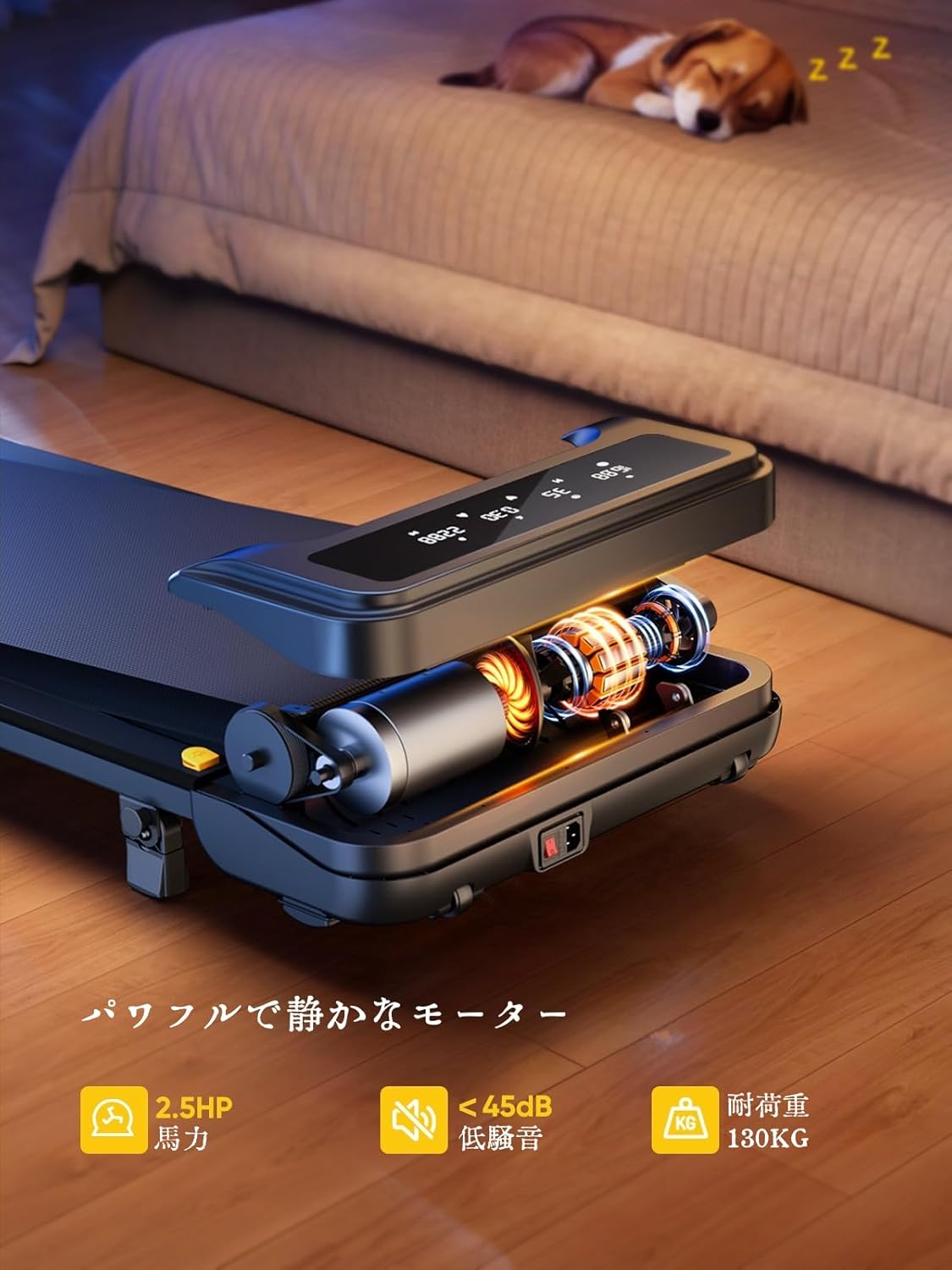
Image: The treadmill features a powerful 2.5 HP motor, operates quietly below 45dB, and supports users up to 130 kg.

Image: The compact design of the treadmill, highlighting its running surface dimensions for space efficiency.
8. Lagerung und Transport
The TOPUTURE 2-in-1 Treadmill is designed for easy storage and portability, making it ideal for small spaces.
- The treadmill is lightweight (18.5 kg / 40.7 lbs) and features built-in wheels for effortless movement.
- It can be stored upright or flat under a bed or sofa when not in use, saving valuable space.
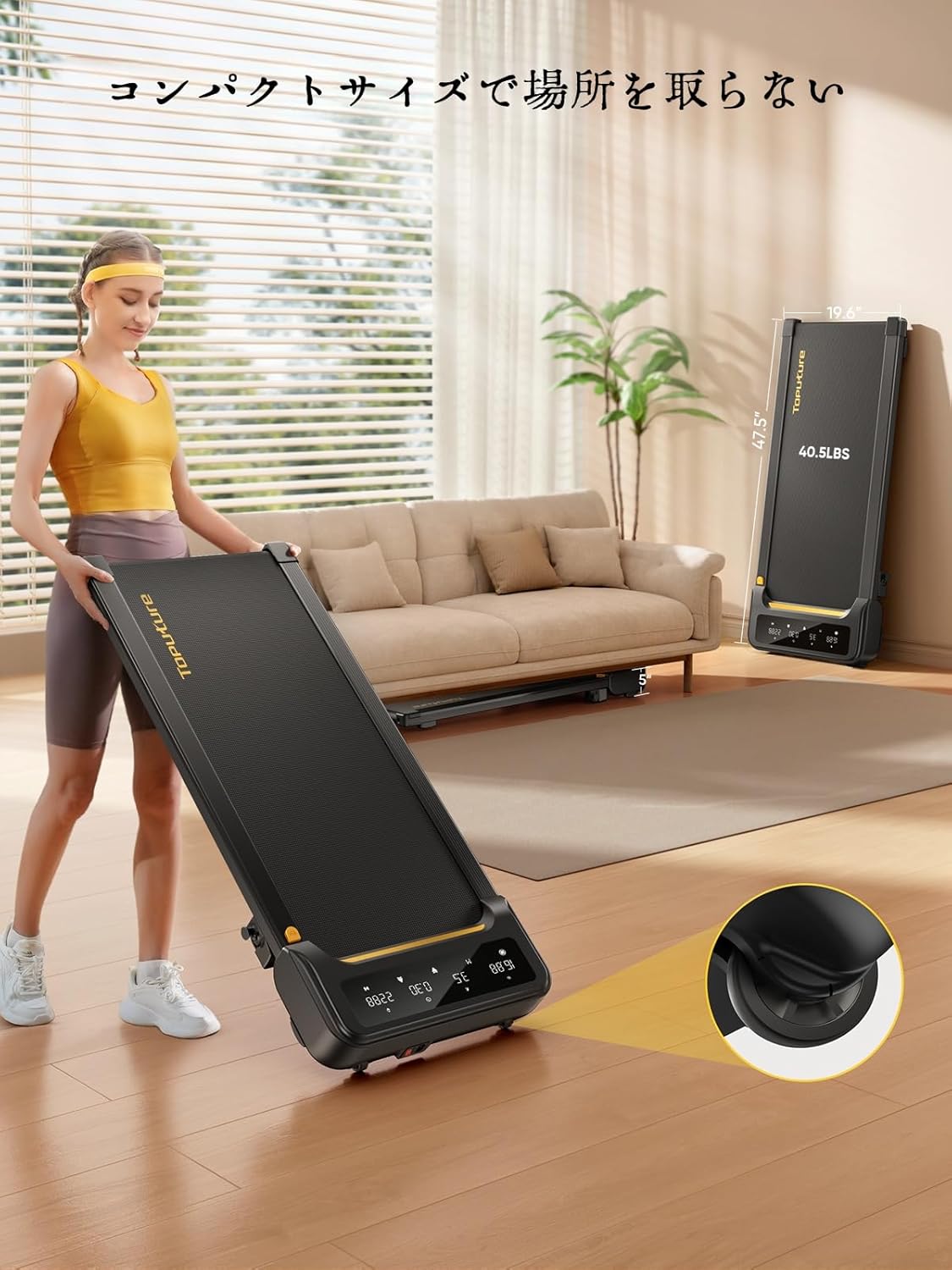
Image: A woman demonstrates the ease of moving the treadmill, highlighting its portability with integrated wheels.
9. Garantie und Support
TOPUTURE provides a warranty for this product. Please refer to your purchase documentation for specific warranty terms and conditions.
9.1 Kundendienst
Bei Fragen, technischem Support oder Garantieansprüchen wenden Sie sich bitte an den TOPUTURE-Kundendienst über den Händler, bei dem Sie das Produkt erworben haben, oder besuchen Sie die offizielle TOPUTURE-Website. webWebsite.
- Online-Hilfe: Visit the TOPUTURE brand store on Amazon or the official webWebsite mit häufig gestellten Fragen und Kontaktinformationen.
- E-Mail-Support: Die E-Mail-Adresse des Kundendienstes finden Sie auf Ihrer Produktverpackung oder Ihrer Garantiekarte.


