Benutzerhandbuch für die kabellose mechanische Tastatur ATTACK SHARK X98
Model: X98 | Brand: ATTACK SHARK
Einführung
The ATTACK SHARK X98 is a versatile wireless mechanical keyboard designed for a superior typing and gaming experience. Featuring tri-mode connectivity, hot-swappable switches, PBT keycaps, and vibrant RGB backlighting, this manual provides essential information for setup, operation, and maintenance to ensure optimal performance.
1. Einrichtung
1.1 Packungsinhalt
Vor Beginn der Arbeiten vergewissern Sie sich, dass alle Artikel im Paket vorhanden sind:
- ATTACK SHARK X98 Wireless Mechanical Keyboard
- USB-C-Kabel
- 2.4 GHz USB-Empfänger
- Tastenkappenabzieher
- Abzieher wechseln
- Extra Switches (2)
- Benutzerhandbuch (dieses Dokument)

Figure 1: Package Contents of the ATTACK SHARK X98 Keyboard.
1.2 Konnektivitätsoptionen
The X98 keyboard supports three connection modes:
- USB-C-Kabelanschluss: For a stable, direct connection and charging.
- 2.4 GHz Wireless: Utilizes a dedicated USB receiver for low-latency wireless performance.
- Bluetooth 5.0: Verbindet sich gleichzeitig mit bis zu drei Geräten.

Figure 2: Triple Mode Connection Overview.
1.3 Anschließen Ihrer Tastatur
- Locate the mode switch on the back edge of the keyboard.
- Select your desired connection mode:
- Verdrahtet: Connect the USB-C cable to the keyboard and your device.
- 2.4 GHz: Remove the 2.4GHz USB receiver from its storage slot on the keyboard and plug it into your device. Switch the keyboard to 2.4G mode.
- Bluetooth: Switch the keyboard to BT mode. On your device, search for 'ATTACK SHARK X98' in Bluetooth settings and pair. The keyboard can store up to three Bluetooth profiles (BT1, BT2, BT3).
- Ensure the operating system switch (Win/Mac) is set correctly for your device.

Figure 3: Connectivity Switches.
1.4 Erstgebühr
For optimal performance, fully charge the keyboard before first use. Connect the USB-C cable to the keyboard and a power source. The battery indicator will show charging status.
Video 1: ATTACK SHARK X98 Wireless Mechanical Keyboard Overview. This video demonstrates the keyboard's features and connectivity options.
2. Bedienungsanleitung
2.1 RGB-Hintergrundbeleuchtung
The X98 keyboard features 16.8 million RGB colors and 21 lighting effects. Use the following key combinations to control the lighting:
- Fn + \|: Switch between different lighting effects.
- Fn + Eingabetaste: Switch between different lighting colors.
- Brightness and speed can also be adjusted via the dedicated software.

Figure 4: RGB Lighting Customization Software.
2.2 programmierbare Makrotasten
Customize your workflow or gaming experience with programmable macro keys. Use the dedicated software to assign complex sequences or functions to individual keys.

Figure 5: Programmable Macro Keys Interface.
2.3 Batteriestandsprüfung
To check the battery level in wireless mode, press Fn + Rücktaste. The indicator lights will display the current charge:
- Red light: 20% or less
- Yellow light: 50%
- Green light: 60%
- Full green light: 100%

Figure 6: Battery Level Indicators.
2.4 Gasket Mount Design
The X98 features a gasket mount design with 5 layers of foam (PORON Foam, IXPE Switch Pad, PET Noise Cancellation Pad, EPDM Dampening Pad, Silicone Pad). This construction provides a softer, quieter, and more satisfying 'thocky' typing sound, ideal for both office and gaming environments.
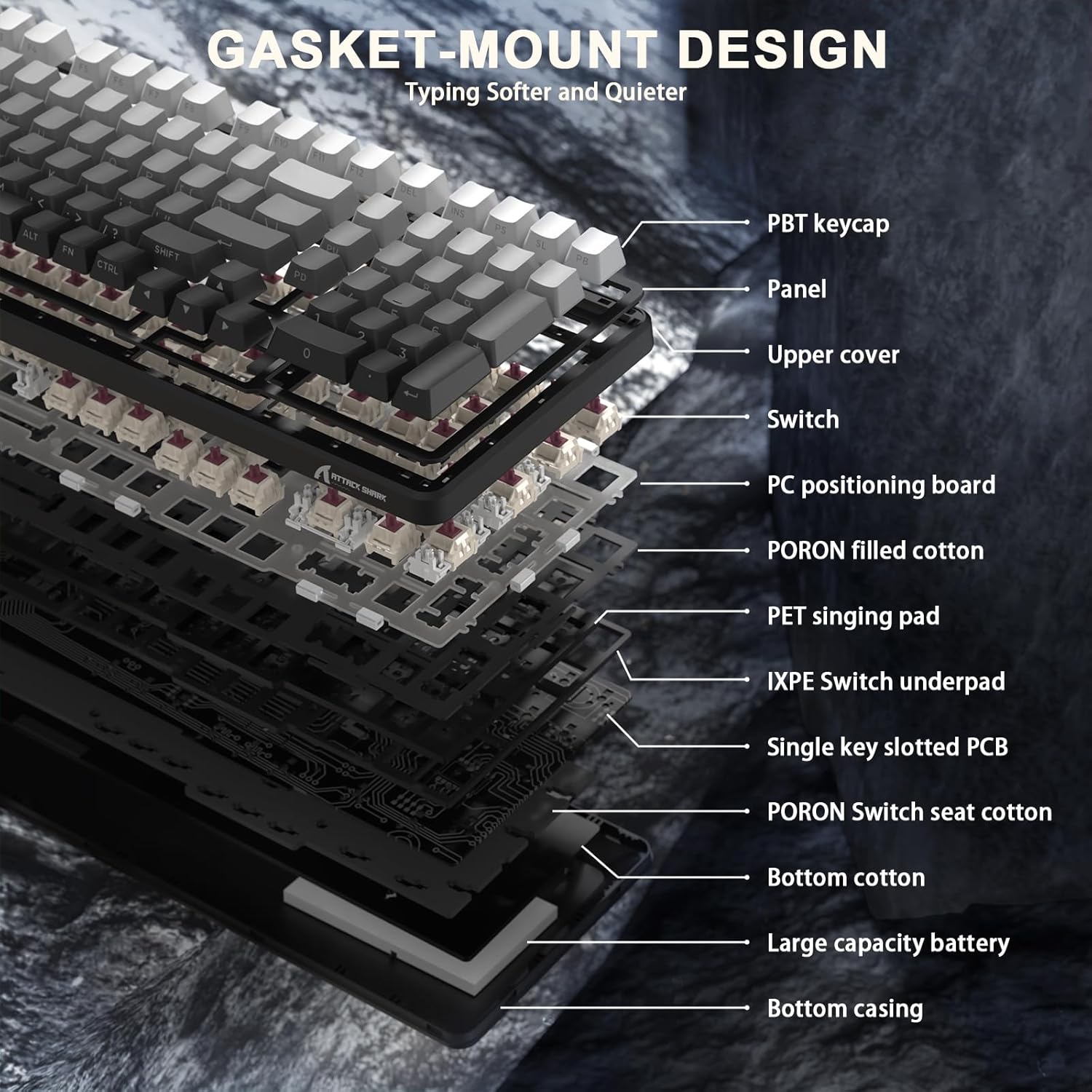
Figure 7: Gasket Mount Design Layers.
2.5 Hot-Swap-fähige Schalter
The keyboard is equipped with hot-swappable sockets, allowing you to easily change switches without soldering. This enables customization of your typing feel and sound. The pre-lubed Blueberry linear switches offer a creamy, tactile, yet quiet experience.

Abbildung 8: Hot-Swap-fähige Schalter.
Video 2: X98PRO 98 Keys Mechanical Keyboard with TFT Display. This video highlights various features of the X98PRO keyboard, including its display and lighting effects.
Video 3: ATTACK SHARK X98PRO Wireless Keyboard. A short demonstration of the X98PRO's wireless capabilities and design.
3. Wartung
3.1 Reinigung
- Verwenden Sie ein weiches, trockenes Tuch, um die Tastaturoberfläche abzuwischen.
- Für eine gründlichere Reinigung verwenden Sie den mitgelieferten Tastenkappenabzieher, um die Tastenkappen zu entfernen und die Unterseite mit Druckluft oder einer kleinen Bürste zu reinigen.
- Vermeiden Sie die Verwendung aggressiver Chemikalien oder Scheuermittel.
3.2 Austausch von Tastenkappen und Schaltern
The X98 features durable PBT keycaps that resist shine and fading. If replacement is needed, use the provided keycap puller to gently remove keycaps. For switches, use the switch puller to carefully extract and insert new compatible 3/5-pin mechanical switches.
4. Fehlerbehebung
- Tastatur reagiert nicht: Ensure the keyboard is charged and the correct connection mode (Wired, 2.4GHz, or Bluetooth) is selected. For 2.4GHz, verify the USB receiver is properly inserted. For Bluetooth, ensure it's paired correctly.
- RGB-Beleuchtung funktioniert nicht: Check if the keyboard is powered on. Use Fn + \| and Fn + Enter to cycle through lighting effects and colors. Adjust brightness via software or keyboard shortcuts.
- Verzögerungen oder Verbindungsabbrüche im drahtlosen Modus: Ensure the keyboard is within range of the receiver/device. Minimize interference from other wireless devices.
- Schlüssel werden nicht registriert: Wenn einzelne Tasten nicht funktionieren, versuchen Sie, den Schalter mithilfe des mitgelieferten Schalterabziehers und der Ersatzschalter auszutauschen.
5. Spezifikationen
| Besonderheit | Detail |
|---|---|
| Modellnummer | X98 |
| Technische Daten | 16 x 5.6 x 1.5 Zoll |
| Artikelgewicht | 2.7 Pfund |
| Konnektivitätstechnologie | 2.4G Wireless, Bluetooth 5.0, USB-C |
| Tastaturbeschreibung | Gaming/Office/Programming |
| Kompatible Geräte | Spielkonsole, Laptop, PC, Smartphone, Tablet |
| Besondere Merkmale | Backlit, Customized Linear Blueberry Switch, Ergonomic, Hot-Swappable, Web Cloud Driver |
| Tastatur Hintergrundbeleuchtung | RGB (16.8 million colors, 21 effects) |
| Tastenkappen | Durable PBT Keycaps |
| Batteriekapazität | 4000 mAh |
6. Garantie und Support
For warranty information and technical support, please refer to the product packaging or contact ATTACK SHARK customer service directly. Keep your purchase receipt for warranty claims.


