1. Einleitung
This manual provides detailed instructions for the installation, operation, and maintenance of your EDISION CAM-100 Broadband TV Antenna Amplifier. The CAM-100 is designed to enhance Digital Terrestrial Television (DVB-T/T2) signals, featuring adjustable gain and integrated 5G LTE protection to ensure optimal reception quality.
2. Sicherheitshinweise
Please read these safety instructions carefully before installing or operating the device. Failure to follow these instructions may result in electric shock, fire, or damage to the product.
- Stellen Sie sicher, dass die Stromversorgungslautstärketage den auf dem Gerät angegebenen Anforderungen entspricht.
- Setzen Sie das Gerät weder Regen, Feuchtigkeit noch extremen Temperaturen aus.
- Vermeiden Sie, das Gerät in der Nähe von Wärmequellen oder in direktem Sonnenlicht aufzustellen.
- Öffnen Sie das Gerät nicht.asing. Alle Wartungsarbeiten sind qualifiziertem Personal zu überlassen.
- Vor dem Anschließen oder Trennen von Verbindungen muss die Stromversorgung unterbrochen werden.
3. Packungsinhalt
Überprüfen Sie, ob alle Artikel im Paket vorhanden sind:
- EDISION CAM-100 TV-Antenne Ampschwerer
- Kurzanleitung
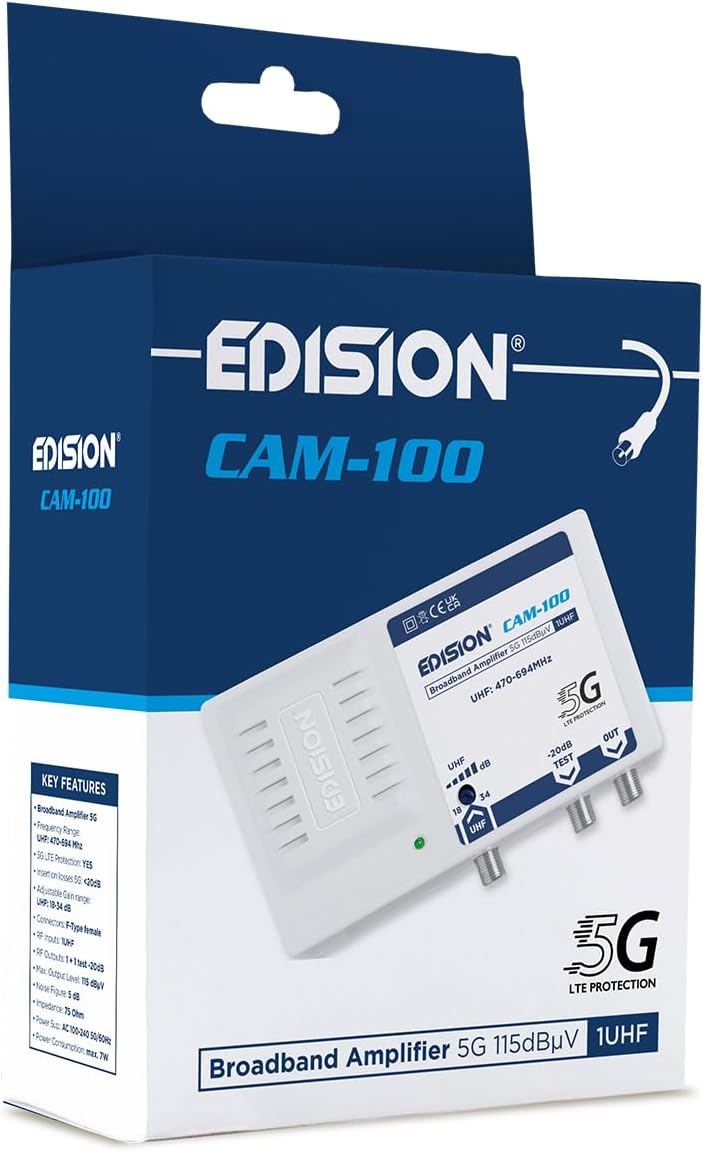
The EDISION CAM-100 amplifier presented in its retail box, showcasing the product branding and key features listed on the packaging.
4. Produktüberschreitungview
The EDISION CAM-100 is a compact broadband amplifier designed for UHF signals. It features adjustable gain and a built-in 5G LTE filter.

The EDISION CAM-100 broadband amplifier, shown with its power plug, features a single UHF input, adjustable gain from 18-34dB, and two output ports (one main, one -20dB test port). It includes 5G LTE protection and operates within the UHF 470-694MHz frequency range.

Nahaufnahme von vorn view of the EDISION CAM-100, clearly displaying the UHF input, the adjustable gain knob, the -20dB test output, and the main output port. The 5G LTE PROTECTION label is also visible.

The rear side of the EDISION CAM-100 amplifier, featuring keyhole slots for wall mounting, indicating easy installation.
5. Einrichtung und Installation
Follow these steps to properly install your EDISION CAM-100 ampReiniger:
- Montage: Choose a suitable indoor location for the amplifier, away from direct heat or moisture. Use the keyhole slots on the back of the unit to securely mount it to a wall or flat surface.
- Antennenanschluss: Connect your outdoor UHF antenna cable to the UHF IN Port auf dem ampVerstärker. Stellen Sie sicher, dass die Verbindung sicher ist.
- TV Connections: Connect your television(s) to the AUS port(s) of the amplifier using coaxial cables. The main output provides the amplified signal. There is also a -20dB-TEST port for signal measurement or connecting a single device with reduced signal.
- Stromanschluss: Stecken Sie den amplifier's power cord into a standard AC 100-240V, 50/60Hz electrical outlet. The power indicator LED on the front of the unit should illuminate.
- Verstärkung anpassen: Turn the adjustable gain knob (labeled UHF dB) to set the desired amplification level. Start with a lower setting and gradually increase it until optimal signal quality is achieved on your television.

An illustrative diagram demonstrating a typical installation scenario for the EDISION CAM-100. It shows an outdoor UHF antenna connected to the amplifier, which then distributes the signal to multiple televisions indoors, including connections for a test point.
6. Bedienungsanleitung
Once installed, the EDISION CAM-100 operates continuously when powered. The primary operational adjustment is the gain control.
- Betriebsanzeige: A green LED on the front panel indicates that the ampDer Verstärker wird mit Strom versorgt und ist betriebsbereit.
- Verstärkungseinstellung: Use the rotary knob to adjust the UHF signal gain between 18dB and 34dB. Adjust this setting while monitoring your TV's signal quality meter (if available) or picture quality. The goal is to achieve a strong, stable signal without over-amplification, which can cause distortion.
- Testausgabe: The -20dB TEST output provides a reduced signal level, useful for connecting a single TV or for signal strength measurements without affecting the main output.
7. Wartung
The EDISION CAM-100 requires minimal maintenance to ensure long-term performance.
- Reinigung: Wischen Sie die Außenseite des Geräts regelmäßig mit einem weichen, trockenen Tuch ab. Verwenden Sie keine flüssigen Reinigungsmittel oder Scheuermittel.
- Belüftung: Um eine Überhitzung zu vermeiden, stellen Sie sicher, dass die Lüftungsschlitze des Geräts nicht blockiert sind.
- Verbindungen: Überprüfen Sie gelegentlich alle Kabelverbindungen, um sicherzustellen, dass sie fest sitzen und frei von Korrosion sind.
8. Fehlerbehebung
If you experience issues with your EDISION CAM-100, refer to the following common problems and solutions:
| Problem | Mögliche Ursache | Lösung |
|---|---|---|
| Keine Betriebskontrollleuchte | Kein Strom am Gerät | Check power cord connection and wall outlet. Ensure the outlet is live. |
| No signal or weak signal on TV |
|
|
| Distorted picture or sound | Signal over-amplification or interference | Reduce the gain setting. Ensure the 5G LTE filter is effective; if interference persists, check for external sources. |
9. Technische Daten
| Besonderheit | Spezifikation |
|---|---|
| Modell | CAM-100 (26-01-0403) |
| Frequenzbereich | UHF 470-694MHz |
| Eingang | 1UHF |
| Ausgaben | 1 Main Output, 1 Test Output (-20dB) |
| Einstellbare Verstärkung | 18-34 dB (UHF) |
| Max. Ausgabelautstärke | 115 dBµV |
| Filter | 5G LTE-Schutz |
| Stromversorgung | Wechselstrom 100 – 240 V, 50/60 Hz |
| Maße | 11 x 14 x 5 cm |
| Gewicht | 270 g |
| Kompatible Geräte | TV antenna, Televisions |
10. Garantieinformationen
EDISION products are covered by a standard manufacturer's warranty against defects in materials and workmanship. Please refer to the warranty card included with your product or visit the official Edision webDie detaillierten Garantiebedingungen finden Sie auf der Website. Bewahren Sie Ihren Kaufbeleg für Garantieansprüche auf.
11. Unterstützung
Für weitere Unterstützung, technischen Support oder um view additional products, please visit the official Edision store or contact customer service:
- Edision Store: Visit the Edision Store on Amazon
- Kundendienst: Refer to the contact information provided in your Quick Start Guide or on the official Edision webWebsite.


