1. Einleitung
This manual provides essential information for the safe and efficient operation of your OMTech AF 60W CO2 Laser Engraver. This versatile machine is designed for precision cutting and engraving across a wide range of materials, including wood, glass, acrylic, leather, and cardboard. Key features include a 28"x20" working area, autofocus, air assist, and 4-way pass-through capabilities for larger projects. The laser operates at Class 2 with 0.874 mW output power.
Abbildung 1: Überview of the OMTech AF 60W CO2 Laser Engraver's main features.
2. Sicherheitshinweise
Your OMTech AF 60W CO2 Laser Engraver is a Class 2 laser product. Adherence to safety guidelines is paramount to prevent injury and ensure proper machine function.
- Augenschutz: Always wear appropriate laser safety glasses when operating the machine, even with the flame-resistant observation window.
- Belüftung: Ensure the efficient exhaust system is properly connected and functioning to direct hazardous debris and fumes away from the engraving surface and into your ventilation system. Operating without adequate ventilation can be harmful.
- Brandschutz: Keep a fire extinguisher nearby. Never leave the machine unattended during operation, especially when cutting flammable materials.
- Not-Halt: Machen Sie sich mit dem Standort und der Bedienung des Not-Aus-Knopfes vertraut.
- Materialverträglichkeit: Only engrave or cut materials approved for CO2 lasers. Avoid materials that produce toxic fumes or are highly reflective. Refer to the material compatibility table in the Operating section.

Figure 2: The flame-resistant window allows for safe observation during the engraving process.
3. Einrichtung
Proper setup is crucial for optimal performance and safety. Follow these steps to prepare your laser engraver for use:
- Auspacken und Aufstellen: Carefully unpack the machine. Place it on a stable, level surface in a well-ventilated area, away from flammable materials.
- Connect Exhaust System: Attach the provided exhaust hose to the machine's exhaust port and route it to an external vent or a dedicated fume extractor.
- Luftunterstützung anschließen: Connect the air assist pump to the designated port on the machine. Air assist helps to clear debris and reduce scorching during operation.
- Wasserkühler anschließen: Connect the water chiller (or pump) to the laser tube's inlet and outlet ports. Ensure the chiller is filled with distilled water and operating correctly to maintain the laser tube's temperature.
- Stromanschluss: Schließen Sie die Maschine an eine geerdete Steckdose an.
- Softwareinstallation: Install the necessary software (RDWorks, LightBurn, CorelDRAW, AutoCAD) on your computer and connect it to the laser engraver via USB or Ethernet.
- Initial Alignment & Focus: While machines are often pre-aligned, it is recommended to verify mirror alignment and focal length according to the detailed instructions in the full user manual. The autofocus function will assist with setting the correct focal distance.

Figure 3: The OMTech AF 60W Laser Engraver ready for setup.
4. Bedienungsanleitung
Operating your OMTech laser engraver involves a few key steps to ensure precise and successful results.
4.1 Powering On and Control Panel
- Turn on the main power switch, then the laser power switch.
- Use the digital control panel to navigate menus, load files und passen Sie die Einstellungen an.

Figure 4: The digital control panel for easy operation and software compatibility.
4.2 Loading Materials and Autofocus
- Place your material on the appropriate workbed (honeycomb for cutting, blade for engraving). The machine features dual engraving beds.
- Utilize the autofocus function by pressing the dedicated button. This automatically sets the correct focal distance for your material, ensuring sharp and clean results.

Figure 5: The rapid autofocus feature eliminates manual adjustments.
4.3 Setting Parameters and 4-Way Pass-Through
- Adjust laser power and engraving/cutting speed in your software (RDWorks, LightBurn, etc.) based on the material and desired outcome. The maximum engraving speed is 600 mm/s.
- For oversized projects, utilize the 4-way pass-through doors. This allows you to feed longer or wider materials through the machine, expanding your working area beyond the 28"x20" bed.
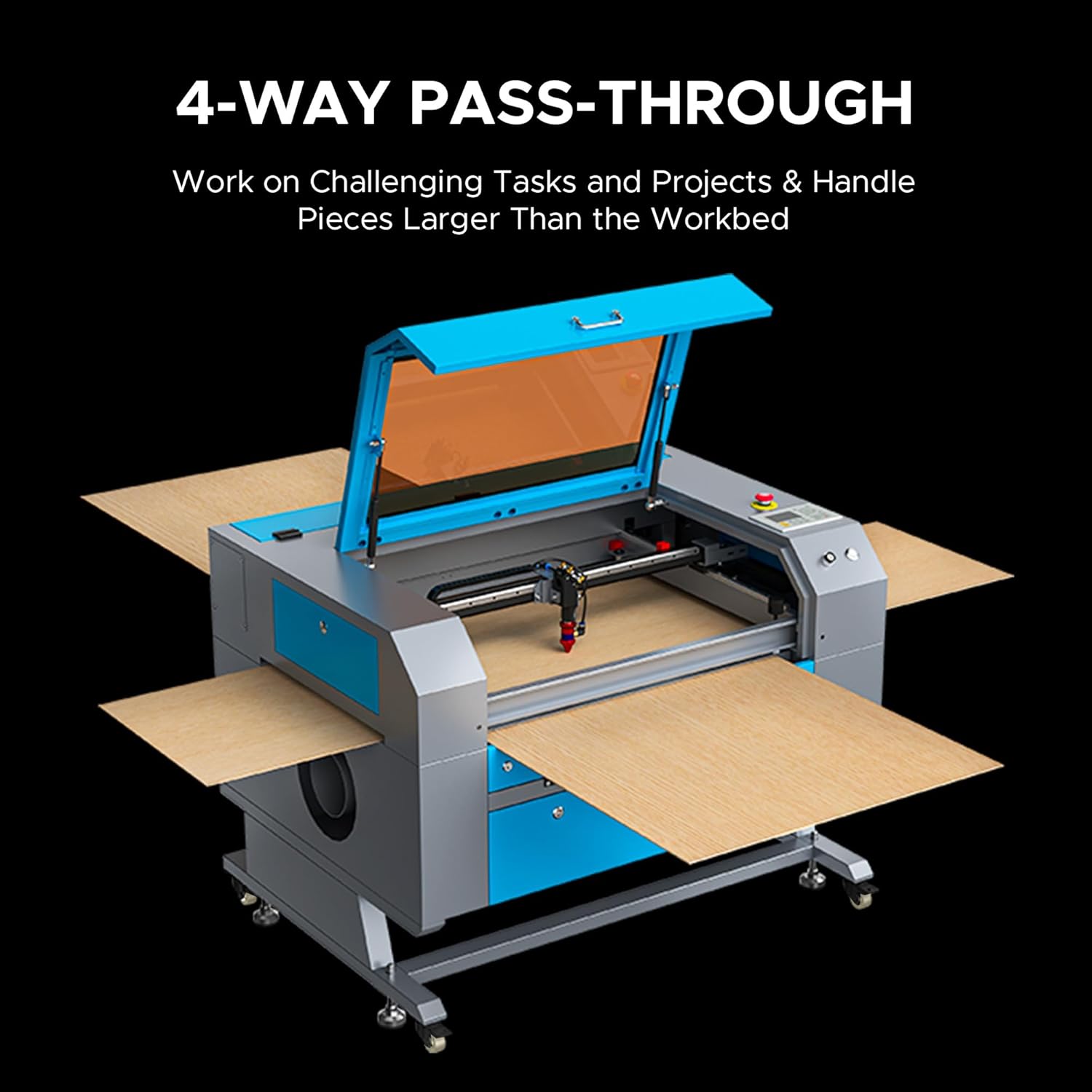
Figure 6: The 4-way pass-through feature for handling large materials.
4.4 Materialverträglichkeit
The OMTech AF 60W CO2 Laser Engraver is compatible with a variety of materials for both engraving and cutting. Refer to the table below for common materials:

Figure 7: Material compatibility chart for engraving and cutting.
Video 1: Ein überview of the OMTech Laser Engraver, demonstrating its use for various projects and materials. This video is provided by OMTech Direct.
5. Wartung
Regular maintenance ensures the longevity and consistent performance of your laser engraver.
- Reinigung des Arbeitsbereichs: Regularly clean the honeycomb and blade workbeds to remove debris and residue from cutting and engraving. This prevents buildup that can affect material placement and laser performance.
- Optikreinigung: Periodically clean the laser lens and mirrors with appropriate optical cleaning solutions and wipes to maintain laser beam quality and power.
- Laser Tube Maintenance: Monitor the laser tube's performance. The high-performance 60W DC tube runs strong for up to 1,000 hours, and up to 12,000 hours when used efficiently at lower settings. Replacement is straightforward if needed.
- Wartung des Wasserkühlers: Ensure the water chiller is clean and filled with distilled water. Regularly check for proper water flow and temperature.
- Abgasanlagenprüfung: Inspect the exhaust fan and ducting for blockages or leaks to ensure efficient fume extraction.
6. Fehlerbehebung
If you encounter issues with your OMTech laser engraver, consider the following common troubleshooting steps:
- Mangelhafte Schnitt-/Gravurqualität: Check laser power and speed settings for the specific material. Verify lens and mirror cleanliness and alignment. Ensure the material is flat and properly focused.
- Laser feuert nicht: Confirm all safety interlocks (lid closed, water flow sensor) are engaged. Check the laser power supply and tube connections.
- Maschine reagiert nicht: Verify power connections and software communication. Restart the machine and computer.
- Übermäßiger Rauch/Dämpfe: Inspect the exhaust system for blockages or fan malfunction. Ensure proper ventilation is established.
For more detailed troubleshooting or persistent issues, refer to the comprehensive user manual or contact OMTech customer support.
Video 2: Ein Wiedersehenview from 'Laser Guys from OMTech' discussing their experience with OMTech lasers, including setup and operation tips. This video is provided by OMTech Direct.
7. Spezifikationen
| Besonderheit | Detail |
|---|---|
| Modellnummer | SH-G570 |
| Hersteller | OMTech |
| Laserklasse | Klasse 2 (0.874 mW Ausgangsleistung) |
| Nennleistung | 60 W |
| Max. Gravurgeschwindigkeit | 600 mm/s |
| Arbeitsbereich | 28" x 20" |
| Max. Schnitttiefe (Holz) | Bis zu 0.4 Zoll |
| Max. Cutting Depth (Acrylic) | Bis zu 0.8 Zoll |
| Lebensdauer der Laserröhre | Up to 1,000 hours (up to 12,000 hours with efficient use) |
| Maschinengewicht | 249.1 Pfund. |
| Side/Side Pass Size | 19.7" x 0.8" |
| Front/Back Pass Size | 31.5" x 3.9" |
| Maschinenabmessungen | 47.2" x 34.3" x 36.6" |
| Softwarekompatibilität | RDWorks, LightBurn, CorelDRAW, AutoCAD |

Figure 8: Detailed specifications of the OMTech AF 60W Laser Engraver.
8. Garantie und Support
OMTech is committed to providing excellent customer service and support for your laser engraver.
- Garantie: Die genauen Garantiebedingungen entnehmen Sie bitte Ihrer Kaufdokumentation.
- Technische Unterstützung: Benefit from U.S.-based technical support to resolve any issues you encounter.
- Kundendienst: Access 24/7 online customer service for assistance.
- Supportdauer: The product includes two-year support.
Weitere Unterstützung finden Sie unter OMTech Store or contact their support team directly.


