1. Einleitung
This manual provides essential instructions for the safe and effective use of your Hello Kitty Kuromi Wireless Bluetooth Earbuds. Please read this manual thoroughly before using the product and retain it for future reference.
2. Packungsinhalt
Überprüfen Sie, ob alle Artikel im Paket vorhanden sind:
- Hello Kitty Kuromi Wireless Bluetooth Earbuds (2)
- Rotating Charging Case
- USB-Kabel
- Benutzerhandbuch (dieses Dokument)
3. Produktüberschreitungview
3.1 Komponenten
The Hello Kitty Kuromi Wireless Bluetooth Earbuds system consists of two earbuds and a rotating charging case. The charging case features a unique flip-face design, allowing you to change Kuromi's expression.
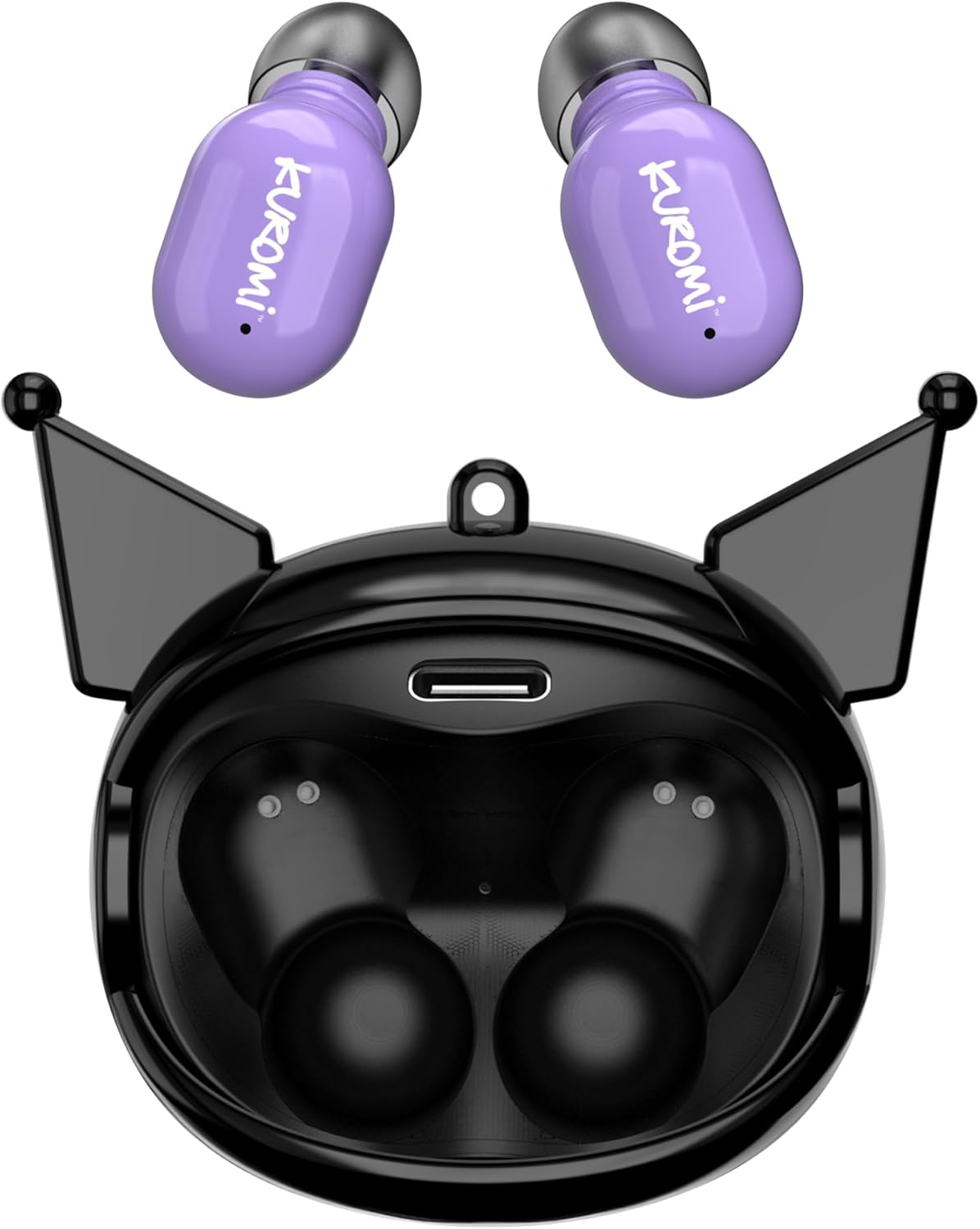
This image displays the two purple Kuromi wireless earbuds positioned above their open black charging case. The charging case features the Kuromi character design with pointed ears and an open compartment for the earbuds, revealing the charging contacts and a USB-C port.

The closed black charging case is shown, featuring Kuromi's default facial expression with a pink skull on her forehead and a neutral mouth.

The closed black charging case displays Kuromi's winking facial expression, with one eye closed and a small pink heart near her mouth.

The closed black charging case features Kuromi's heart-eyes facial expression, with two pink hearts replacing her eyes and an open-mouthed smile.
3.2 Bedienelemente
The earbuds feature touch controls for various functions. Specific touch gestures may vary; refer to the 'Operating Instructions' section for details.
4. Einrichtung
4.1 Erstaufladung
Vor dem ersten Gebrauch die Ohrhörer und das Ladecase vollständig aufladen.
- Connect the provided USB cable to the charging port on the case and to a compatible USB power source.
- Legen Sie beide Ohrhörer in das Ladecase. Achten Sie darauf, dass sie richtig sitzen.
- The charging indicator lights (if present) will illuminate to show charging status. A full charge typically takes approximately 1 hour.
4.2 Bluetooth-Kopplung
So verbinden Sie Ihre Ohrhörer mit einem Gerät:
- Stellen Sie sicher, dass die Ohrhörer aufgeladen und aus dem Ladecase genommen sind. Sie sollten automatisch in den Kopplungsmodus wechseln.
- Aktivieren Sie Bluetooth auf Ihrem Gerät (Smartphone, Tablet usw.).
- Suchen nach verfügbare Bluetooth-Geräte.
- Select "HKTWSRKU" or a similar name from the list of devices.
- Sobald die Verbindung hergestellt ist, signalisieren die Ohrhörer den erfolgreichen Verbindungsaufbau (z. B. durch eine Sprachansage oder einen LED-Farbwechsel).
- Die Ohrhörer verbinden sich beim Herausnehmen aus dem Ladecase automatisch wieder mit dem zuletzt gekoppelten Gerät, sofern Bluetooth auf dem Gerät aktiviert ist.
5. Bedienungsanleitung
5.1 Ein-/Ausschalten
- Einschalten: Nehmen Sie die Ohrhörer aus dem Ladecase. Sie schalten sich automatisch ein.
- Ausschalten: Place the earbuds back into the charging case. They will power off and begin charging automatically.
5.2 Musikwiedergabe
Use the touch controls on the earbuds:
- Abspielen/Pause: Tippen Sie einmal auf einen der Ohrhörer.
- Nächster Titel: Doppeltippen Sie auf den rechten Ohrhörer.
- Vorheriges Lied: Doppeltippen Sie auf den linken Ohrhörer.
- Lautstärkeregelung: Die Lautstärke wird üblicherweise über Ihr angeschlossenes Gerät gesteuert.
5.3 Anrufmanagement
Das eingebaute Mikrofon ermöglicht freihändiges Telefonieren:
- Anruf annehmen: Tippen Sie einmal auf einen der Ohrhörer, wenn ein Anruf eingeht.
- Anruf beenden: Tippen Sie während eines Anrufs einmal auf einen der Ohrhörer.
- Anruf ablehnen: Drücken und halten Sie einen der Ohrhörer etwa 2 Sekunden lang.
5.4 Flip-Face Feature
The charging case features a rotating mechanism to change Kuromi's facial expression. Gently rotate the front panel of the case to cycle through the available expressions.
6. Aufladen
6.1 Aufladen der Ohrhörer
Place the earbuds into the charging case. They will automatically begin to charge from the case's internal battery.
6.2 Laden des Gehäuses
When the charging case battery is low, connect it to a power source using the provided USB cable. The case's indicator lights will show charging status. A full charge for the case typically takes about 1 hour.
7. Wartung und Pflege
- Reinigung: Reinigen Sie die Ohrhörer und das Ladecase mit einem weichen, trockenen Tuch. Verwenden Sie keine scharfen Chemikalien oder Scheuermittel.
- Lagerung: Bewahren Sie die Ohrhörer bei Nichtgebrauch im Ladecase auf, um sie zu schützen und geladen zu halten. Vermeiden Sie extreme Temperaturen.
- Wassereinwirkung: Diese Ohrhörer sind nicht wasserdicht. Vermeiden Sie den Kontakt mit Wasser oder übermäßiger Feuchtigkeit.
- Auswirkungen: Behandeln Sie die Ohrhörer und das Ladecase mit Sorgfalt, um Beschädigungen durch Stürze oder Stöße zu vermeiden.
8. Fehlerbehebung
Sollten Probleme auftreten, konsultieren Sie bitte die folgende Tabelle:
| Problem | Mögliche Lösung |
|---|---|
| Ohrhörer lassen sich nicht koppeln | Stellen Sie sicher, dass Ihre Ohrhörer geladen sind. Schalten Sie Bluetooth auf Ihrem Gerät aus und wieder ein. Entfernen Sie das Gerät aus den Bluetooth-Einstellungen und koppeln Sie es erneut. |
| Kein Ton aus den Ohrstöpseln | Überprüfen Sie die Lautstärke des Geräts. Stellen Sie sicher, dass die Ohrhörer angeschlossen sind. Versuchen Sie, eine andere Audioquelle abzuspielen. |
| Ohrhörer werden nicht aufgeladen | Ensure earbuds are correctly seated in the case. Check if the charging cable is securely connected to the case and power source. |
| Mikrofon funktioniert nicht | Ensure earbuds are properly connected. Check microphone permissions on your device. |
9. Spezifikationen
Key technical details for the Hello Kitty Kuromi Wireless Bluetooth Earbuds:
| Besonderheit | Detail |
|---|---|
| Modellname | Wireless Earbuds (HKTWSRKU) |
| Konnektivitätstechnologie | Bluetooth 5.3 |
| Akkulaufzeit (Spielzeit) | Bis zu 4 Stunden pro Ladung |
| Ladezeit | Ungefähr 1 Stunde |
| Kontrollmethode | Berühren |
| Platzierung des Ohrs | Im Ohr |
| Besonderheit | Rotating Charging Case with Flip-Face Feature |
| Im Lieferumfang enthaltene Komponenten | Rotating Charging Case, USB Cable, User Manual |
| Hersteller | Südliche Telekommunikation |
| Artikelgewicht | 3.52 Unzen |
10. Garantieinformationen
For warranty details, please refer to the documentation included with your purchase or contact the retailer where the product was acquired. Warranty terms and conditions may vary by region and retailer.
11. Unterstützung
If you require further assistance or have questions not covered in this manual, please contact the manufacturer or your retailer's customer support. Keep your purchase receipt and product model number (HKTWSRKU) available when seeking support.


