Einführung
This manual provides essential instructions for the safe and effective use of your Panasonic HC-X1200 Camcorder. Please read this manual thoroughly before using the product and retain it for future reference. The Panasonic HC-X1200 is a high-performance camcorder designed for capturing stunning 4K video footage with advanced features for professional and enthusiast users.
Zu den Hauptmerkmalen gehören:
- High-quality 4K Recording: Captures stunning 4K video at 60 frames per second, delivering sharp and detailed footage.
- 20-fach optisches Zoomobjektiv: Offers powerful zoom capability without losing image quality.
- Eingebaute Bildstabilisierung: Helps reduce camera shake for smoother, more stable video.
- Zwei SD-Kartensteckplätze: Supports continuous recording with automatic card switching.
- 3.5-Zoll-LCD-Touchscreen: Easy-to-use touchscreen for navigating settings and previewschießt.
Lieferumfang
Bitte prüfen Sie, ob alle unten aufgeführten Artikel in Ihrem Paket enthalten sind. Sollten Artikel fehlen oder beschädigt sein, wenden Sie sich bitte an Ihren Händler.
- Panasonic HC-X1200 Camcorder
- Netzteil/Ladegerät
- Wiederaufladbarer Akku
- 32GB-Speicherkarte
- Hochgeschwindigkeits-Speicherkartenleser
- UV-Filter
- 2-in-1 Cleaning Pen
- Staubgebläse
- Deluxe Starter Kit
- ZeeTech MicroFiber Cleaning Cloth
- Cleaning Kit (general)

Bild: Vorderseite view of the Panasonic HC-X1200 Camcorder, showing the lens and viewFinder.

Image: ZeeTech UV Filter, designed to protect the camcorder lens and reduce haze.

Image: A 2-in-1 cleaning pen, featuring a brush and a carbon cleaning tip for lenses.

Image: A dust blower, used for safely removing dust and debris from camera surfaces and lenses.
Aufstellen
- Laden Sie den Akku auf: Connect the camcorder to the power adapter and plug it into an electrical outlet. The charging indicator will illuminate. Ensure the battery is fully charged before first use.
- Installieren Sie die Batterie: Open the battery compartment cover on the camcorder. Insert the charged battery, ensuring it clicks into place. Close the cover securely.
- Speicherkarte(n) einlegen: The HC-X1200 features dual SD card slots. Open the SD card slot cover. Insert the 32GB memory card (and an optional second card) into the slots until they click. Ensure the cards are inserted in the correct orientation. Close the cover.

Abbildung: Seite view of the camcorder, highlighting the dual SD card slots.
- Attach UV Filter: Carefully screw the UV filter onto the front of the camcorder lens. This protects the lens and can reduce UV light.
- Einschalten: Slide the power switch to the "ON" position. The camcorder will start up, and the LCD screen will display the live view.
- Anfangseinstellungen: Follow the on-screen prompts to set the date, time, language, and other initial configurations.
Bedienungsanleitung
Grundlegende Aufzeichnung
- Open LCD Screen: Flip open the 3.5-inch LCD touchscreen. This will often power on the camcorder automatically.
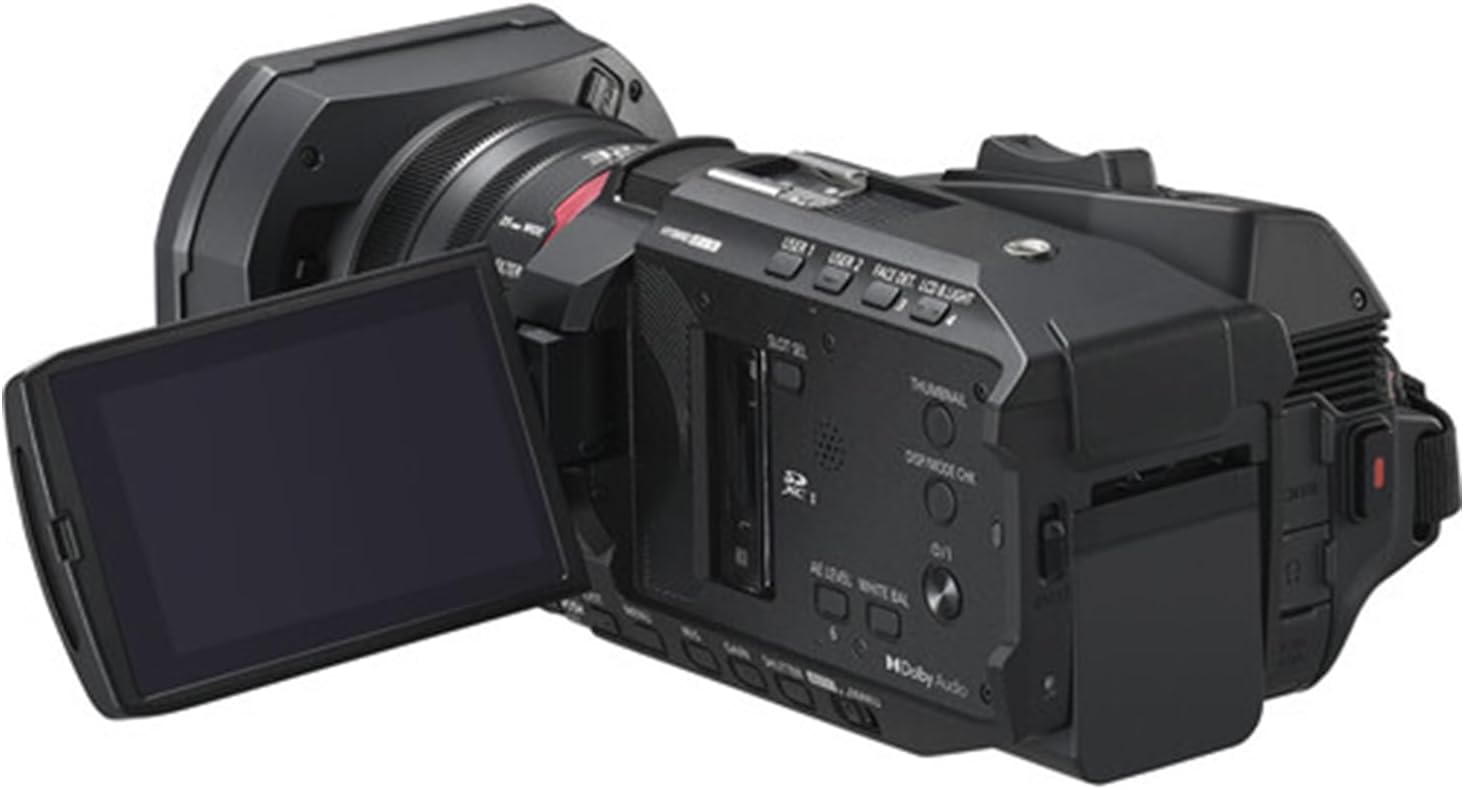
Image: The camcorder with its 3.5-inch LCD touchscreen rotated open for viewing.
- Aufnahmemodus auswählen: Use the menu on the LCD touchscreen to select your desired recording mode (e.g., 4K 60p).
- Zoom anpassen: Use the zoom lever to zoom in or out. The 20x optical zoom allows for clear magnification without loss of quality.
- Fokus: The camcorder features autofocus. For manual focus, use the focus ring on the lens barrel.
- Aufnahme starten/stoppen: Drücken Sie die REC START/STOP Drücken Sie diese Taste, um die Aufnahme zu starten. Drücken Sie sie erneut, um sie zu stoppen.
- Bildstabilisierung: The built-in image stabilization system automatically reduces camera shake. Ensure it is enabled in the settings for smoother footage, especially during handheld shooting.
Wiedergabe
- Wiedergabemodus aktivieren: Drücken Sie die WIEDERGABE button or select playback from the menu on the LCD screen.
- Video auswählen: Use the touchscreen or navigation buttons to select the video you wish to play.
- Abspielen/Pause: Drücken Sie die WIEDERGABE/PAUSE button on the screen to start or pause playback.
Wartung
- Reinigung der Linse: Use the provided 2-in-1 cleaning pen or microfiber cloth to gently clean the lens. For stubborn dust, use the dust blower first. Avoid touching the lens surface with your fingers.
- Reinigung des Körpers: Wipe the camcorder body with a soft, dry cloth. For tougher grime, slightly dampDas Tuch mit Wasser befeuchten. Keine Lösungsmittel oder Scheuermittel verwenden.
- Batteriepflege: Store batteries in a cool, dry place. If not using the camcorder for an extended period, remove the battery. Avoid fully discharging the battery frequently to prolong its lifespan.
- Lagerung: Store the camcorder in a dry, dust-free environment, away from extreme temperatures and direct sunlight. Use a protective case when transporting.
Fehlerbehebung
| Problem | Mögliche Ursache | Lösung |
|---|---|---|
| Der Camcorder lässt sich nicht einschalten. | Die Batterie ist nicht geladen oder falsch eingesetzt. | Ensure the battery is fully charged and correctly inserted. Check power adapter connection if using AC power. |
| Videoaufnahme nicht möglich. | Die Speicherkarte ist voll, gesperrt oder nicht richtig eingesetzt. | Check memory card status. Ensure it has free space, is unlocked, and properly inserted. Format the card if necessary (this will erase all data). |
| Video footagDas Bild ist verschwommen oder verwackelt. | Focus issue, image stabilization off, or excessive camera movement. | Check focus settings (autofocus or manual). Ensure image stabilization is enabled. Use a tripod or stable surface for recording. |
| Der LCD-Bildschirm ist leer. | Camcorder is off, battery is dead, or screen brightness is too low. | Power on the camcorder. Charge or replace the battery. Adjust screen brightness in settings. |
Technische Daten
- Marke: Panasonic (Camcorder), ZeeTech (Bundle Provider)
- Modellname: HC-X1200
- Artikelmodellnummer: X1200
- Fotosensor-Technologie: MOS
- Auflösung der Videoaufnahme: 4K
- Maximale Brennweite: 98.9 Millimeter
- Flash-Speichertyp: SDHC
- Videoaufnahmeformat: MP4
- Bildschirmgröße: 3.5 Inches (LCD Touchscreen)
- Farbe: Schwarz
- Batterien: 1 nicht standardmäßige Batterie erforderlich (im Lieferumfang enthalten)
- Enthaltene Komponenten: Cleaning Kit, 32GB Memory Card, High Speed Memory Card Reader, UV Filter, 2-in-1 Cleaning Pen, Dust Blower, Deluxe Starter Kit, MicroFiber Cleaning Cloth.
- Datum der Erstveröffentlichung: 24. April 2025
Garantie und Support
The Panasonic HC-X1200 Camcorder is covered by the manufacturer's standard warranty. Please refer to the warranty card included in your original packaging for specific terms and conditions, including warranty period and coverage details.
For technical support, service, or warranty claims, please contact Panasonic customer service or your authorized retailer. Keep your proof of purchase for warranty validation.


