1. Einleitung
The EDIFIER MP330 is a portable Bluetooth speaker designed to deliver a high-quality audio experience with its retro aesthetic and advanced features. It supports Hi-Res audio and offers versatile connectivity options.

Image: The EDIFIER MP330 portable Bluetooth speaker, showcasing its brown finish and integrated leather handle.
2. Packungsinhalt
Bitte kreuzen Sie das Kästchen für die folgenden Elemente an:
- EDIFIER MP330 Speaker x 1
- USB-C-zu-USB-C-Kabel x 1
- Kurzanleitung x 1
- Important Safety Information x 1

Image: A visual representation of the EDIFIER MP330 speaker and its included accessories: USB-C cable, quick start guide, and safety information.
3. Produktüberschreitungview
3.1 Bedienelemente und Anschlüsse
The EDIFIER MP330 features intuitive controls and essential ports for various audio sources.
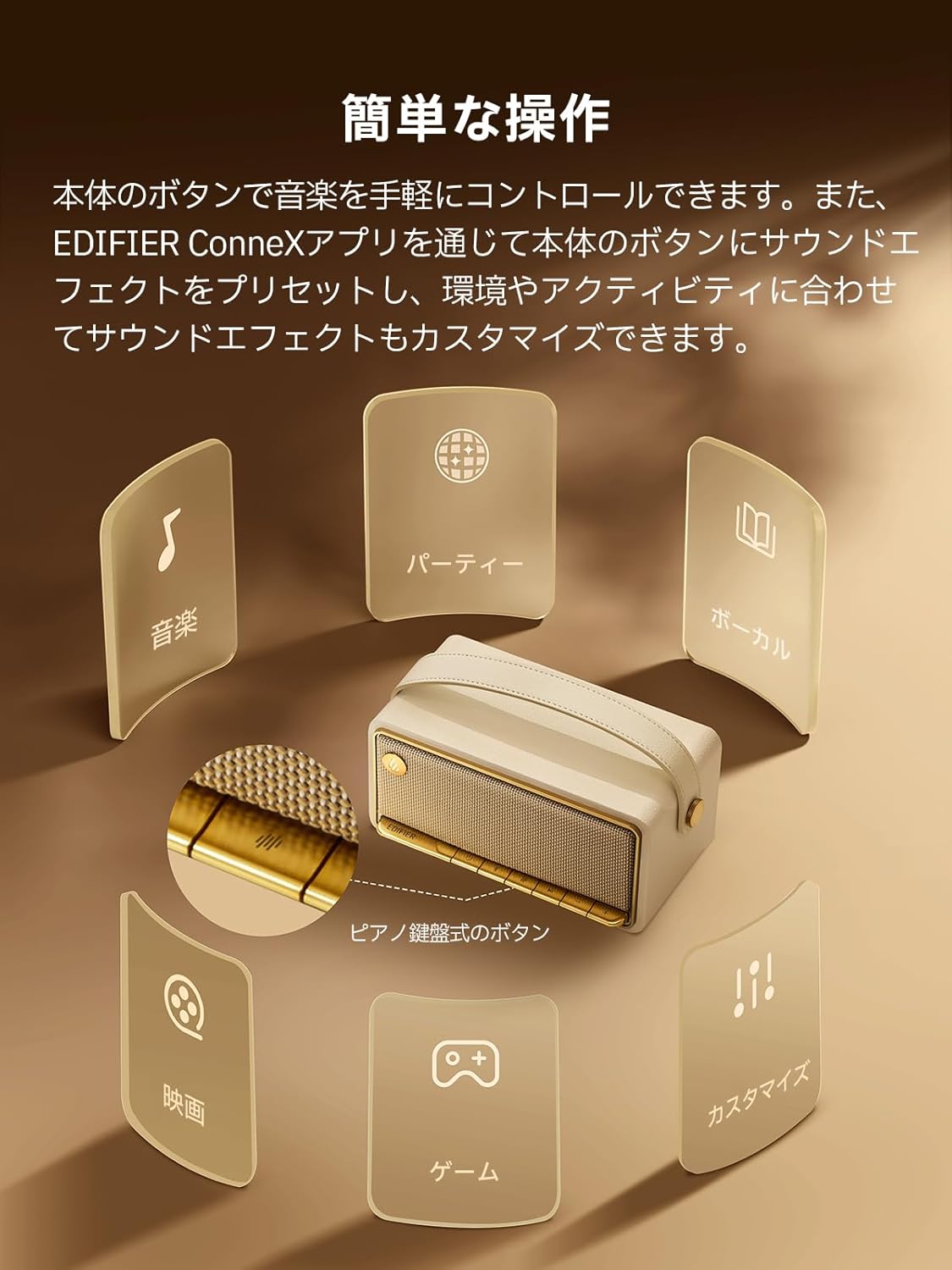
Image: A diagram illustrating the control buttons and indicator lights on the EDIFIER MP330 speaker, showing their functions for power, mode selection, playback, and volume.
- Netzschalter: Zum Ein-/Ausschalten gedrückt halten.
- Modus-Taste: Short press to cycle through Bluetooth, USB-C, and microSD card input modes.
- Wiedergabe-/Pause-Taste: Kurzes Drücken zum Abspielen oder Pausieren der Audiowiedergabe.
- Lautstärke erhöhen/Nächster Titel-Taste: Kurz drücken für Lautstärke erhöhen, lang drücken für nächsten Titel.
- Lautstärke verringern/Vorheriger Titel-Taste: Kurzes Drücken verringert die Lautstärke, langes Drücken springt zum vorherigen Titel.
- USB-C-Anschluss: For charging and audio input.
- microSD-Kartensteckplatz: Zum Abspielen von Audio files directly from a microSD card.
4. Einrichtung
4.1 Aufladen des Lautsprechers
Before first use, fully charge the speaker using the provided USB-C cable and a compatible power adapter (not included). The indicator light will show charging status.
4.2 Ein-/Ausschalten
- Zum Einschalten: Halten Sie den Netzschalter gedrückt, bis die Kontrollleuchte aufleuchtet.
- Zum Ausschalten: Halten Sie den Netzschalter gedrückt, bis die Kontrollleuchte erlischt.
4.3 Bluetooth-Kopplung
So verbinden Sie Ihr Gerät über Bluetooth:
- Power on the MP330 speaker. The Bluetooth indicator will flash, indicating it is in pairing mode.
- Aktivieren Sie auf Ihrem Gerät (Smartphone, Tablet usw.) Bluetooth und suchen Sie nach verfügbaren Geräten.
- Select "EDIFIER MP330" from the list of devices.
- Sobald die Verbindung hergestellt ist, leuchtet die Bluetooth-Anzeige durchgehend.
4.4 Mehrpunktverbindung
The MP330 supports connecting to two Bluetooth devices simultaneously. After connecting the first device, put the speaker back into pairing mode and connect the second device. You can then switch between audio sources by pausing playback on one device and starting it on the other.

Image: Two mobile phones displaying music playback interfaces, indicating a multipoint Bluetooth connection to the EDIFIER MP330 speaker.
4.5 Stereo Pairing (TWS)
For an enhanced stereo sound experience, you can pair two MP330 speakers together:
- Ensure both MP330 speakers are powered on and not connected to any Bluetooth device.
- On one speaker, press and hold the Bluetooth button until it enters TWS pairing mode (indicator light will flash a specific pattern).
- The two speakers will automatically connect to each other. One speaker will become the left channel and the other the right.
- Sobald die Kopplung abgeschlossen ist, verbinden Sie Ihr Gerät über Bluetooth mit dem Hauptlautsprecher, wie in Abschnitt 4.3 beschrieben.

Image: Two EDIFIER MP330 speakers, one black and one ivory, positioned to illustrate stereo pairing, with a Bluetooth logo and arrows indicating connection.
5. Bedienungsanleitung
5.1 Umschalten der Eingangsmodi
Short press the Mode button to switch between Bluetooth, USB-C, and microSD card input modes. The indicator light will change color to reflect the active mode.
5.2 USB-C Audiowiedergabe
Connect the MP330 to your computer using the provided USB-C cable. The speaker will automatically switch to USB-C audio mode. Select "EDIFIER MP330" as the audio output device on your computer.

Image: A diagram showing the EDIFIER MP330 speaker connected to a computer via a USB-C cable, indicating USB-C audio playback.
5.3 microSD Card Playback
Legen Sie eine microSD-Karte mit Audio ein files into the microSD card slot. The MP330 will automatically switch to microSD card mode and begin playback.

Image: A diagram illustrating how to insert a microSD card into the dedicated slot on the EDIFIER MP330 speaker.
5.4 Using the EDIFIER Connex App
Download the EDIFIER Connex app to unlock extended features and customize your listening experience. The app allows you to:
- Eingangsquellen wechseln.
- Steuern Sie die Wiedergabe.
- Customize sound effects (equalizer presets or custom settings).
- Access the electronic user manual and other settings.

Image: Multiple smartphone screens displaying the EDIFIER Connex app interface, highlighting various control and customization options for the speaker.
6. Wartung
To ensure the longevity and optimal performance of your EDIFIER MP330 speaker, follow these maintenance guidelines:
- Reinigung: Use a soft, dry cloth to clean the speaker's surface. Avoid using abrasive cleaners, solvents, or strong chemicals, as they may damage the finish.
- Lagerung: Bewahren Sie den Lautsprecher an einem kühlen, trockenen Ort fern von direkter Sonneneinstrahlung, extremen Temperaturen und hoher Luftfeuchtigkeit auf.
- Wassereinwirkung: The speaker is not waterproof. Avoid exposing it to water, rain, or excessive moisture.
- Handhabung: Behandeln Sie den Lautsprecher mit Sorgfalt. Vermeiden Sie es, ihn fallen zu lassen oder starken Stößen auszusetzen.
- Batteriepflege: Um eine optimale Akkulaufzeit zu gewährleisten, sollte der Akku nicht häufig vollständig entladen werden. Bei längerer Lagerung sollte der Akku alle paar Monate auf etwa 50 % aufgeladen werden.
7. Fehlerbehebung
If you encounter issues with your EDIFIER MP330 speaker, refer to the following common troubleshooting steps:
- Kein Strom:
- Stellen Sie sicher, dass der Lautsprecher vollständig aufgeladen ist.
- Check if the power button is pressed and held correctly to turn on the device.
- Kein Ton:
- Verify the volume level on both the speaker and your connected device.
- Ensure the correct input mode (Bluetooth, USB-C, microSD) is selected.
- Wenn Sie Bluetooth verwenden, stellen Sie sicher, dass der Lautsprecher ordnungsgemäß mit Ihrem Gerät gekoppelt und verbunden ist.
- If using a microSD card, ensure the card is inserted correctly and contains playable audio files.
- Probleme mit der Bluetooth-Kopplung:
- Stellen Sie sicher, dass sich der Lautsprecher im Bluetooth-Kopplungsmodus befindet (blinkende Kontrollleuchte).
- Deaktivieren und aktivieren Sie Bluetooth auf Ihrem Gerät erneut.
- Platzieren Sie den Lautsprecher näher an Ihrem Gerät und entfernt von potenziellen Störquellen.
- Versuchen Sie, den Lautsprecher über die Bluetooth-Einstellungen Ihres Geräts zu entkoppeln und anschließend erneut zu koppeln.
- Stereo Pairing Not Working:
- Stellen Sie sicher, dass beide Lautsprecher vor dem Starten der TWS-Kopplung mit keinem anderen Bluetooth-Gerät verbunden sind.
- Befolgen Sie die TWS-Kopplungsschritte sorgfältig (Abschnitt 4.5).
- Probleme mit der App-Konnektivität:
- Ensure Bluetooth is enabled and the speaker is connected to your device.
- Update the EDIFIER Connex app to the latest version.
- Starten Sie sowohl den Lautsprecher als auch Ihr Gerät neu.
If the problem persists after trying these steps, please contact Edifier customer support for further assistance.
8. Spezifikationen
Detailed technical specifications for the EDIFIER MP330 speaker:

Image: A comparison chart highlighting key specifications of the EDIFIER MP330 and MP230 models, including output power, Bluetooth version, battery capacity, playback time, and Hi-Res audio support.
| Besonderheit | Spezifikation |
|---|---|
| Modellname | MP330 |
| Lautsprechertyp | Tragbarer Lautsprecher |
| Material | Holz (MDF) |
| Farbe | Braun |
| Ausgangsleistung | 40 W RMS |
| Bluetooth-Version | 6.0 |
| Batteriekapazität | 4800 mAh |
| Wiedergabezeit | Bis zu 19 Stunden (bei 50 % Lautstärke) |
| Frequenzgang | 53 Hz – 40 kHz |
| Hochauflösendes Audio | Supported (up to 24bit/96kHz) |
| Konnektivität | Bluetooth, USB-C, microSD card |
| Abmessungen (B x T x H) | 20.7 x 11.6 x 10.1 cm |
| Gewicht | 1.13 kg |
| Kontrollmethode | App, Druckknopf |
| Signal-Rausch-Verhältnis (S/N) | 85 dB |

Image: A technical drawing showing the dimensions (width, depth, height) and weight of the EDIFIER MP330 speaker.
9. Garantie und Support
For warranty information, please refer to the warranty card included in your product packaging or visit the official Edifier website. If you require technical support or have questions about your EDIFIER MP330 speaker, please contact Edifier customer service through their official channels.
Edifier Official WebWebsite: www.edifier.com